Notepad3 does not recognize encoding correctly.
Notepad3 does not recognize encoding correctly. The Chinese Character is garbled when opening an txt with English words and Chinese Character.
 liwenbus
All 16 comments
Could you please send us a sample file of your problem packed in a zip file. :thinking:
 hpwamr
on 27 Nov 2019
hpwamr
on 27 Nov 2019
Hello @liwenbus ,
Question: which version of Notepad3 do you use ? ("Help" --> "About...")
Feel free to test the BETA version "Notepad3Portable_5.19.1127.2688_BETA" or higher.
See "Notepad3 BETA-channel access #1129" or here Notepad3Portable_5.19.1127.2688_BETA.
hpwamr
on 27 Nov 2019
I sometimes get garbled text. This problem has also occurred in Japanese text since Notepad2.
Notepad 3 remembers the character code, so it was only when it was first opened.
 maboroshin
on 27 Nov 2019
maboroshin
on 27 Nov 2019
@maboroshin : The "_remember encoding in file history (recent files)_" feature changed from "_force this encoding_" to "_suggestion on unreliable encoding detection_". The reason for this: It has been in-transparent to the user, why this encoding has been chosen and also gets lost, if file is dropped from history.
 RaiKoHoff
on 27 Nov 2019
RaiKoHoff
on 27 Nov 2019
I feel less garbled than before. If I get garbled, I will inform you of the file.
I read about 50 files, but they are not reproduced garble.
maboroshin
on 27 Nov 2019
Could you please send us a sample file of your problem packed in a zip file. 🤔
Hello. The version is v5.19.815.2595. Here are the files.
Test.zip
liwenbus
on 28 Nov 2019
@hpwamr : please analyze ...
RaiKoHoff
on 28 Nov 2019
The version is v5.19.815.2595
Hello @liwenbus ,
- Indeed you are using the latest Notepad3 Release version.
- In my "Out-of-the-Box" Notepad3 v5.19.815.2595, your file is correctly encoded !
- Maybe your "Notepad3.ini" is not correctly updated. 🤔
For v5.19.815.2595, it should be:SettingsVersion=4and encoded as:Unicode (UTF-8) Signature - But since then we have completely rewritten the encoding detection.
- The latest BETA version detects the code-page "GB18030" of your file correctly. 👍
test_chinese_chars - UCD=GB18030 (issue #1815).zip

We will soon release a new Notepad3 version that will integrate all latest changes.
Changes.txt
My advice is that you:
- try to recode your file to GB18030 with your current Notepad3
- or use the latest BETA version as Notepad3Portable Apps (to optimize your beta experience, please read the note at #1129).
- or update your currently installed version with the latest beta files (see #1105)
Feel free to test the BETA version "Notepad3Portable_5.19.1127.2689_BETA" or higher.
See "Notepad3 BETA-channel access #1129" or here Notepad3Portable_5.19.1127.2689_BETA.
hpwamr
on 28 Nov 2019
In "Encoding" of setting, All checked without "Use as fallback...". Version is 5.19.1120.2681.
Failed with this file: dl.zip
maboroshin
on 28 Nov 2019
In "Encoding" of setting, All checked without "Use as fallback...". Version is 5.19.1120.2681.
Failed with this file: dl.zip
Hello @maboroshin , @RaiKoHoff
This is a very good example to check/improve our encoding detection.
First findings:
- Your file is "UTF-8" (No Signature). 👍
- Notepad++ detects it correctly !
- Notepad3 NO ! 😬
I have to analyze more deeply tonight. 🤔
hpwamr
on 28 Nov 2019
The version is v5.19.815.2595
Hello @liwenbus ,
- Indeed you are using the latest Notepad3 Release version.
- In my "Out-of-the-Box" Notepad3 v5.19.815.2595, your file is correctly encoded !
- Maybe your "Notepad3.ini" is not correctly updated. 🤔
For v5.19.815.2595, it should be:SettingsVersion=4and encoded as:Unicode (UTF-8) Signature- But since then we have completely rewritten the encoding detection.
- The latest BETA version detects the code-page "GB18030" of your file correctly. 👍
test_chinese_chars - UCD=GB18030 (issue #1815).zip
We will soon release a new Notepad3 version that will integrate all latest changes.
Changes.txtMy advice is that you:
- try to recode your file to GB18030 with your current Notepad3
- or use the latest BETA version as Notepad3Portable Apps (to optimize your beta experience, please read the note at #1129).
- or update your currently installed version with the latest beta files (see #1105)
Feel free to test the BETA version "Notepad3Portable_5.19.1127.2689_BETA" or higher.
See "Notepad3 BETA-channel access #1129" or here Notepad3Portable_5.19.1127.2689_BETA.
OK. Thank you very much!!
liwenbus
on 28 Nov 2019
Feel free to test development beta version _5.19.1128.2690_BETA.
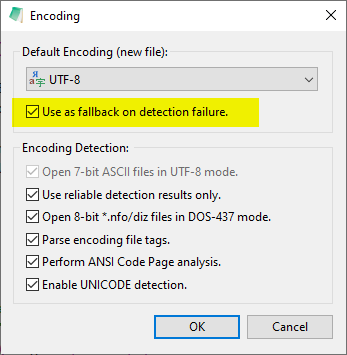
Changed: Encoding Detection Fallback (if encoding analysis result is not reliable):
=> If fallback is not explicitly defined (File->Encoding-Set Default... : "Use as fallback..."),
then use UTF-8 (if valid for document) else use current system's ANSI code-page.
RaiKoHoff
on 28 Nov 2019
Changed:
Encoding Detection Fallback(if encoding analysis result is not reliable):
=> If fallback is not explicitly defined (File->Encoding-Set Default...: "Use as fallback..."),
then useUTF-8(if valid for document) else use current system'sANSIcode-page.
I confirm with "Use as fallback on detection failure" checked, this UTF-8 text is correctly detected. 👍
hpwamr
on 28 Nov 2019
From ver _5.19.1128.2690 on, Notepad3 is pushed to be more UTF-8 friendly (less current system's ANSI code-page bound).
(Fallback prefer UTF-8 (valid) over system's ANSI CP if not forced by the switch shown above )
RaiKoHoff
on 28 Nov 2019
OK. Thank you very much!!
Hello @liwenbus ,
Is your problem solved ? 🤔
If No, could you give a little more detail? ?
If Yes, as far as I'm concerned, I think you (as requester) can close this issue...
hpwamr
on 28 Nov 2019
Hello @hpwamr
Yes, my problem is solved! Thank you so much.
liwenbus
on 29 Nov 2019
Related issues
 valhristov
·
3Comments
valhristov
·
3Comments
 craigo-
·
4Comments
craigo-
·
4Comments
 rizonesoft
·
4Comments
rizonesoft
·
4Comments
 blackcrack
·
3Comments
blackcrack
·
3Comments
 tzleon
·
3Comments
tzleon
·
3Comments
Most helpful comment
From ver _5.19.1128.2690 on, Notepad3 is pushed to be more UTF-8 friendly (less current system's ANSI code-page bound).
(Fallback prefer UTF-8 (valid) over system's ANSI CP if not forced by the switch shown above )