Notepad3: "Insert Tabs as Spaces" setting not persistent
Tested Version: Notepad3 (64-bit) v5.19.330.1670 develop
Platform: Windows 10 Enterprise 1803 x64
Toggling the Insert Tabs as Spaces setting does not persist between Notepad3 sessions (i.e. closing and reopening the application).
Inspecting Notepad3.ini, it looks like the code that saves this setting has been recently broken. When I turn the setting on in a pristine copy of Notepad3 portable and close the application, I see the following (line 8):
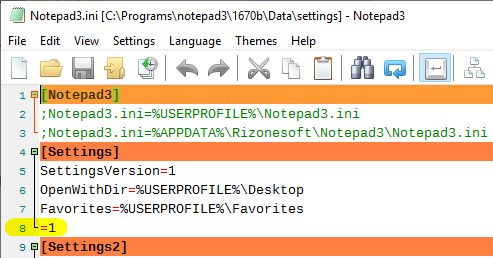
I understand the setting line should probably read TabsAsSpaces=1.
NB: after some testing I have found that this issue appears to have been introduced in build 5.19.312.1656.
 craigo-
All 7 comments
Please test development beta version _5.19.402.1671_develop.
(For beta channel, see issue #160) or download from my Google Drive.
 RaiKoHoff
on 2 Apr 2019
RaiKoHoff
on 2 Apr 2019
Thanks, @RaiKoHoff. Build 1671 fixes the issue.
craigo-
on 3 Apr 2019
I know this issue is closed. But the setting is still not persisting for me.
Is the fix merged to the master branch already?
Steps to reproduce:
1) Activate the option: Settings > Insert Tabs as Spaces.
2) Close and reopen Notepad3. The option is still active.
3) Close and reopen Notepad3 again. Now the option is off.
Build:
Notepad3 (64-bit) v5.19.418.1672 develop
Scintilla v415 (RegEx: Onigmo v6.2.0)
Compiler: MS Visual C++ 2017 v15.9.(7-10) (VC v1916)
[en-US] English(amer.) text by Flo Balmer et al.
 omega32
on 19 Apr 2019
omega32
on 19 Apr 2019
I can confirm @omega32's findings. It also occurs in Notepad3 (64-bit) v5.19.402.1671 develop.
craigo-
on 19 Apr 2019
Please test beta version _5.19.425.1673_develop (see beta-channel access #1129).
RaiKoHoff
on 25 Apr 2019
I can confirm that this bug is now fixed in the latest master build (1673).
Notepad3 (64-bit) v5.19.425.1673 develop
Scintilla v415 (RegEx: Onigmo v6.2.0)
Compiler: MS Visual C++ 2017 v15.9.(7-10) (VC v1916)
[en-US] English(amer.) text by Flo Balmer et al.
omega32
on 25 Apr 2019
Agree... Closing this issue.
craigo-
on 26 Apr 2019
Related issues
 wmsrww
·
3Comments
wmsrww
·
3Comments
 zb-z
·
3Comments
zb-z
·
3Comments
 ggordon-vispero
·
3Comments
craigo-
·
3Comments
ggordon-vispero
·
3Comments
craigo-
·
3Comments
 hpwamr
·
4Comments
hpwamr
·
4Comments