Notepad3: Minor issue, tooltip present until click
Hi,
When we zoom in Notepad, the sofware retains the % zoom selected at close. If the zoom is not 100%, at startup Notepad shows the percentage in a tooltip. The tooltip remains until we click inside Notepad. It can be useful to have that tooltip to hide itself after few seconds or to have the possibility to make the tooltip to hide itself.
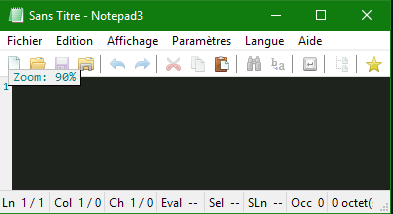
Best regards.
 MadDogVachon
All 12 comments
Please test development beta version _5.19.304.1630_XpErImEnTaL.
(For beta channel, see issue #160) or download from my Google Drive.
 RaiKoHoff
on 4 Mar 2019
RaiKoHoff
on 4 Mar 2019
I didn't find beta version _5.19.304.1630_XpErImEnTaL.
But I tried beta version _5.19.304.1631_XpErImEnTaL to _5.19.304.1634_XpErImEnTaL.
The tooltip hide itself but a bit too fast at my opinion. Something like 3 to 4 seconds would be good.
MadDogVachon
on 4 Mar 2019
Me too, I think 2 seconds is too short ... I propose 4 or 5 seconds. 🤔
 hpwamr
on 4 Mar 2019
hpwamr
on 4 Mar 2019
Hello @RaiKoHoff ,
OK, v5.19.305.1636 XpErImEnTaL settings changed to 4 sec. 😃
But, when open an new Notepad3, the displayed time is 2 sec ! 😬
And in that opened Notepad3, go to -->File -->New (Ctrl+N), the displayed time is 4 sec. 😃
hpwamr
on 5 Mar 2019
I only get the 2 sec display times, when started via Notepad3Portable.exe related to the splash screen of the portable starter.
(SplashScreen can be disabled by: copy Notepad3Portable.ini from .\Other\Source\ to the Notepad3Portable.exe directory (side-by-side) and set the option: DisableSplashScreen=true )
RaiKoHoff
on 5 Mar 2019
Hello @RaiKoHoff ,
I tried to disable the SplashScreen, like you wrote but with v5.19.305.1637 XpErImEnTaL, and I still have the SplahScreen and the behavior is the same as written by hpwamr.
MadDogVachon
on 5 Mar 2019
Sorry, my bad... It's 6h00 AM...
v5.19.305.1636 XpErImEnTaL settings changed to 5 sec. 😃
New Notepad3 opening, the displayed time is ~6 sec. A bit too long.
And in that opened Notepad3, go to -->File -->New (Ctrl+N), the displayed time is 4 sec. 😃
MadDogVachon
on 5 Mar 2019
OK, i will reduce the timing a little bit - currently it is set to 4000 ms, the but this is not an exact value, it depends a little bit on the utilization of the machine.
Be aware of the fact, that the ToolTips can be closed immediately by pressing ESC. :smile:
RaiKoHoff
on 5 Mar 2019
I suggest to add an user settings in Notepad3.ini - [Setting2] ? 🤔
hpwamr
on 5 Mar 2019
Oh no, not for something like that :-1:
RaiKoHoff
on 5 Mar 2019
I think this ok like this. Thanks!
MadDogVachon
on 5 Mar 2019
REQUEST: Allow us to disable this tooltip.
 networkproblemsolver
on 3 Jun 2020
networkproblemsolver
on 3 Jun 2020
Related issues
 valhristov
·
3Comments
valhristov
·
3Comments
 craigo-
·
3Comments
craigo-
·
3Comments
 RaffaeleBianc0
·
3Comments
RaffaeleBianc0
·
3Comments
 bravo-hero
·
3Comments
bravo-hero
·
3Comments
 tzleon
·
3Comments
tzleon
·
3Comments
Most helpful comment
I think this ok like this. Thanks!