Notepad3: default windows position
On Sep 1, 2018, changed default windows position function. If, the taskbar is the top. In ver992, position
was appropriate. The current Ver1104 protrudes to the bottom. The function is not adapted to the top taskbar.
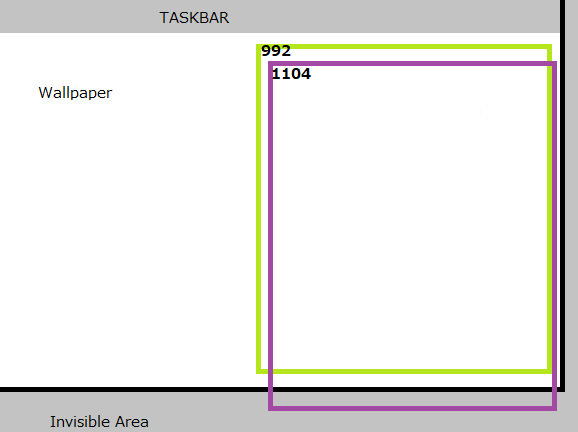
Even at the top task bar, rc.top +0 there is a gap at the top. rc.top=40. (My environment)
Similarly to the left task bar. rc.left=62. In the case of the bottom, right, it is 0 respectively. So the solution is simple.
  pWinInfo->y = _BORDEROFFSET; //-rc.top is fix top taskbar
  pWinInfo->cy = rc.bottom - rc.top - (_BORDEROFFSET * 2);
  pWinInfo->cx = (rc.right - rc.left) / 2; //min(rc.right - rc.left - 32, g_WinInfo.cy);
  pWinInfo->x = (g_flagDefaultPos == 3) ? rc.left + _BORDEROFFSET :
   rc.right - rc.left - g_WinInfo.cx - _BORDEROFFSET; //-rc.left is fix left task bar
 maboroshin
All 17 comments
I can pull requests as well.
maboroshin
on 15 Sep 2018
The solution is simple but fits only in your special case, we need a solution for all possible cases.
The logic is: Default Window Pos = fit Notepad3 window into the right half of the "WorkArea" having as small _BORDEROFFSET (which is different depending on OS version - Win10 adds a small invisible border-offset). There are different methods taking relative ("WorkArea") coordinates or absolute ScreenArea coordinates - maybe there has been something mixed up - I have to check this ...
 RaiKoHoff
on 15 Sep 2018
RaiKoHoff
on 15 Sep 2018
My system is Windows 10.
Taskbar is not on top: rc.top = 0
Top taskbar: rc.top = 40 (my system)
Adjust this
rc.top-rc.top: rc.top = 0
Even if the taskbar is top, pWinInfo->y = 0 is the starting point. But if the taskbar is top, GetMonitorWorkArea() add 40.
In summary, you do not need to add rc.top.
maboroshin
on 15 Sep 2018
Not my special case. it means.
Recent function:
rc.bottom=1000, rc.top=0
Current function, other system: e.g. ...
rc.bottom=1060, rc.top=60
Both height is:
rc.bottom - rc.top = 1000
rc.left is similar.
maboroshin
on 15 Sep 2018
Please test development beta version _TinyExpr_4.18.916.1105.
The bug has been a missing "FitIntoWorkArea() call for default positioning)
Additionally, I removed the border offset of the (initial) default position (Ctrl+Shift+P) window.
(Keep in mind Win10 reserves a small border (right and bottom) of the work-area for own purposes - don't know the reason so far? Aero-Snap functionality ?)
RaiKoHoff
on 16 Sep 2018
Hi @RaiKoHoff ,
I've tested: beta version _TinyExpr_4.18.916.1105.
Personally, I don't like your new settings with an offset of "0"
1920x1080 PosX=960
1920x1080 PosY=0
1920x1080 SizeX=960
1920x1080 SizeY=1040
I prefer an offset of "8" (1st choice)
1920x1080 PosX=954
1920x1080 PosY=8
1920x1080 SizeX=966
1920x1080 SizeY=1032
Or an offset of "12" (2nd choice)
1920x1080 PosX=954
1920x1080 PosY=12
1920x1080 SizeX=962
1920x1080 SizeY=1024
Or an offset of "16" (3rd choice)
1920x1080 PosX=954
1920x1080 PosY=16
1920x1080 SizeX=958
1920x1080 SizeY=1018
Notes:
- With the above settings (offset 8, 12 or 16), 2 x Notepad3 windows can be exactly positioned side by side with an external offset.
- If an offset of 8, 12 or 16 is written in Notepad3.ini,
Snap to Initial Positionseems to respect the new settings in NP3.ini. - But
Snap to Default Positionnot respects it and returns to a "hard coded" position ! - Idem
Toggle Full Area Positionnot respects it and returns to a "hard coded" position !
 hpwamr
on 16 Sep 2018
hpwamr
on 16 Sep 2018
I confirmed 1105. It fixed. 1105 fit on the top task bar. Also passed the left taskbar. And, certainly Windows 10 has a border.
My point of view about hpwamr's claim.
Often browsers and explorers protrude to the invisible area. If there is the offset, it is easy to understand that there is something below. 16px is good for intuitive viewing of this.
And, When there is no offset, "Snap to InitialDefault Position" becomes the same as the function of the OS. Snap your windows.
PS: Fixed. by the following.
maboroshin
on 17 Sep 2018
The "Default Position" (right half of the work-area" is and has ever been a hard-coded position.
In former times, there has been a (hard-coded) border offset of 16pix.
The "_Initial_ Position" is the position stored in the .ini-File. This is the current position, if "save settings" is pressed resp. (if save settings on exit is enabled) the position of the window on exit. It will become the (_Initial_) startup position.
With Win10 the "work-area" gets an additional small border, so we should adjust the "Default Window" border settings anyway.
Proposal: we can make the "Default Window" border settings configurable ([Settigs2]) and distinguish between Win10 and prior OS versions. Suggestion for initial settings: Old values (16pix) ?
RaiKoHoff
on 17 Sep 2018
@hpwamr Toggle Full Area Position was not return to "hard code".
@RaiKoHoff In 12px, mouse pointer for resizing is hard to use. I recommend traditional 16px.
Did you make it to 0, it is for a small monitor like a laptop? I think everyone wants the window size on such a monitor. Set to 0 less than 800px of Heght. There is also this method.
maboroshin
on 17 Sep 2018
Hi @RaiKoHoff ,
I know v.992 has an offset of 16px, but your last beta's (prior than 1105) has an offset of 8px, which I found good ! :thinking:
Any way, the above settings (8, 12, 16px) adjust exactly 2 np3 Windows with a equal external offset and a little space in middle. :wink:
hpwamr
on 17 Sep 2018
Please test development beta _TinyExpr_4.18.917.1106.
I am fine with the new offset-less (except Win10) borders for the "default position".
For convenience, there is a new [Settings2] DefaultWindowPosition= entry and corresponding menu entry (View -> Save as Default Position) to fill this entry, to get back to e.g. a border offset as default.
Now you are able to switch between _Default_, _Initial_ and _Full-Work_Area_ window placements (in addition to OS placements , e.g. WinKey+Left,Right,Up(Max),Down.
If you want to get back to factory-defaults, just press WinKey-Right and "Menu View->Save as Default Position"
Ed.: forgot to mention: in addition there is a "Sticky window position" too, which is an "_Initial_" window position, but save settings changes this initial position.
(@hpwamr : all the stuff plus command line switches (#425, #491) may be worth a section in the documentation)
RaiKoHoff
on 18 Sep 2018
@RaiKoHoff I've confirmed. There is no problem, If I change the position of the taskbar. And the new function worked. 👌 The window did not protrude. So, I will withdraw the discussion of offset.
maboroshin
on 18 Sep 2018
For convenience, there is a new
[Settings2] DefaultWindowPosition=
Hello @RaiKoHoff ,
How does the new parameter work, can you give me an example to get an offset of 16px ?
hpwamr
on 18 Sep 2018
@hpwamr : Yes, e.g. position the window as you like, select Menu->View->Save as Default Position,
open the .ini-File (Ctrl+F7) and adjust the parameter as you like.
Coordinates of the current Window: Copy to Clipboard (Menu->View-Copy Position Args) and paste into Notepad3. To get the exact border offset of your current screen, you have to calculate a little bit...
RaiKoHoff
on 18 Sep 2018
Hi @RaiKoHoff, I knew the explanation above and I understood it.
My problem is that I do not quite understand the usefulness of the new parameter: [Settings2] DefaultWindowPosition=
When to use this parameter and what are the values to put after the "="?
_Edit:_ As I understand it, if I complete this parameter with for example: "DefaultWindowPosition=961,62,926,892,0", these coordinates become the new "Default Position" instead of the former "hard-coded coordinates "/pos 960,0,960,1040,0"?
Is it correct ?
hpwamr
on 18 Sep 2018
@hpwamr : exactly. The value for this parametr is filled automatically if you choose Menu: View->Save as Default Position, filling it with coordinates of the current window position, which is then the new default position, which can be snapped to by Ctrl+Shift+P at any time.
RaiKoHoff
on 19 Sep 2018
As far as I am concerned, this issue may be closed....
hpwamr
on 3 Dec 2018
Related issues
 wsrf16
·
49Comments
wsrf16
·
49Comments
 Mitezuss
·
42Comments
Mitezuss
·
42Comments
 Dothion
·
35Comments
Dothion
·
35Comments
 rizonesoft
·
58Comments
rizonesoft
·
58Comments
 craigo-
·
79Comments
craigo-
·
79Comments