In Notepad3.ini, [Settings2] IMEinline=1 . Will you make it?
It is useful in Japanese IME, but it will be the same in Chinese IME. In Korean it is possible to turn on by default.
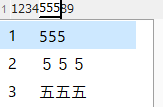
In many editors including Notepad 2 and default notepad, the IME behaves like this. Characters hide while inputting. Hover it.
1234[555]56789
However, the modern browser's text area, Microsoft word, some text editor's behavior is different. This is showing everything. WISYWIG.
1234[000]56789
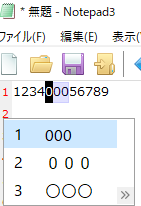
I wanted to use this WISYWIG mode, So I found out.
- SCI_SETIMEINTERACTION, Scintilla Documentation
ScintillaWin.cxx :
if (KoreanIME() || imeInteraction == imeInline)
or
bool ScintillaWin::KoreanIME() {
    const int codePage = InputCodePage();
    return codePage == 949 || codePage == 1361;
}
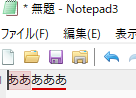
I changed Korea's 949 to Japanese 932 and succeeded after compiling. The second picture is this successful one.
 maboroshin
All 22 comments
@maboroshin : please test development beta version _TinyExpr_4.18.827.1074.
Parameter [Settings2] IMEInteraction=1
As you stated: for Korean system locale code-pages (949, 1361) the IME is always used.
If you want to use the "windowed" Interaction mode for Japanese code-page too, we should add the Japanese codepage (932) to the list of IME-InputCodePages() - which makes it always active "windowed" or "inline". Is that what the Japanese people expect?
 RaiKoHoff
on 27 Aug 2018
RaiKoHoff
on 27 Aug 2018
Thank you.😃 4.18.827.1074 worked.
I think that it is good to select switching. In the past most of the software was only "windowed". A few text editors advertise the "inline" option (like a MS Word. Perhaps in Japan the MS Word Japan ver first implemented). Thus personal preference occurs.
However, Current Windows 10's situation:
- Always "inline" : modern browser (Edge, IE, Chrome, Firefox), VSCode.
maboroshin
on 28 Aug 2018
@maboroshin : do you think the IME interaction parameter should be "inline" by default ?
RaiKoHoff
on 28 Aug 2018
Considering bug fixes, I recommend "windowed" by default. By default "inline", there may be people who can not inpiut in IME.
I am using the default MS IME on the Win10. I tried using Google IME and ATOK IME (Japanese company) on Win10. All right. There was no problem with Notepad 3.
I do not know compatibility. A few text editors made in Japan (have "inline" option) are adjusting. e.g. Google IME on Win7. It may be necessary to fix bugs in combination.
maboroshin
on 28 Aug 2018
zufuliu implemented a menu entry to switch between "inline" and "windowed" IME.
IMO this will just clutter the menu structure - it is a not often used setting switch.
(@rizonesoft : Something for the "Admin-Tool" ...).
RaiKoHoff
on 28 Aug 2018
It can be collapsed into a "Misc" sub settings menu (alone with other less common used settings).
I personal don't like to edit the ini file.
From current Scintilla code, this settings has no effect on Korean IME, it's always inlined.
I had made a (possible invalid) bug report at https://sourceforge.net/p/scintilla/bugs/2038/.
 zufuliu
on 28 Aug 2018
zufuliu
on 28 Aug 2018
For this settings, as it depends on current used IME, I think it better to has a easy way to change it without restart application.
Because different application window can has different IME, set the option global without an easy way to switch might not appreciate.
zufuliu
on 28 Aug 2018
Both IME implementations are glad for me.
I fail to create a source forge account. I write the difference. I think it is a bug in Scintilla.
It does not behave the same.
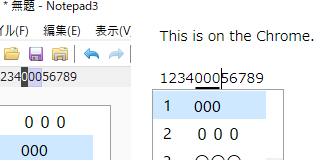
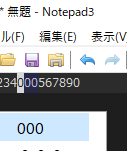
- In the state of the picture below, when we press any key other than Enter (It means character input), the input characters disappear. means: canceled or ESC key. (In the case of the browser or "windowed", it remains. means: decision or Enter key)
I think this is a problem. Characters disappear in the previous way. But we can avoid it if we remember.

Different styles.
- It becomes a block caret before input convention. (Above picture) (Same when not inputting. There is line caret. No different both.)
- There is no right caret during input conversion. (Following picture)
- As a problem, it is difficult to distinguish purple from the dark background. It is easier to use if this is resolved. The purple part feels easy to use. I want color change.
- As a Consistently, the line caret is better for the block caret of the first picture.
maboroshin
on 28 Aug 2018
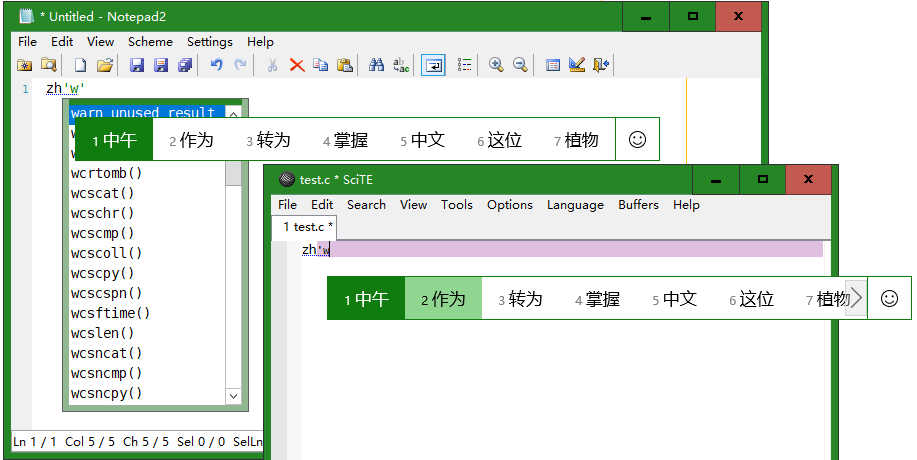
For Chinese Pinyin IME, inline mode will trigger SCN_CHARADDED, which will popup auto-completion for some editor.
zufuliu
on 28 Aug 2018
Find a document on Chinese, Japanese, Korean IME at
https://docs.microsoft.com/en-us/windows/desktop/DxTechArts/installing-and-using-input-method-editors
Seems Korean IME always use a block caret, but not Chinese and Japanese.
zufuliu
on 29 Aug 2018
@zufuliu OK. I understood. These carets are Korean style. There is no hindrance to use.
If the purple part changes color, "inline" mode is easy to use even on Monokai Notepad2 Color Scheme (dark background). Or always put the caret at the right end (Slightly hard to see).
maboroshin
on 29 Aug 2018
@maboroshin Can you build and test https://github.com/zufuliu/notepad2?
https://github.com/zufuliu/notepad2/wiki/Build-Notepad2 contains document on how to build with MSVC, Clang or GCC.
zufuliu
on 29 Aug 2018
Hello: @zufuliu,
cc: @rizonesoft , @RaiKoHoff
Sir, please, do not act like a "poacher", your help is very much appreciated, however your direct advertising for "zufuliu/notepad2" is much less appreciated, and therefore does not belong here! :thinking:
 hpwamr
on 29 Aug 2018
hpwamr
on 29 Aug 2018
Inline IME is now available. It is a Japanese style caret. This is done.
zufuliu tried to extend Scintilla. To the behavior of CJK not K.
And it seems that the 2 build test here was out of place. I avoid mentioning.
maboroshin
on 7 Sep 2018
@maboroshin : zufuliu extends and changes Scintilla-Base a lot. Please tell me, if the current behavior of Notepad3 is sufficient for you, or shall we adapt the changes, zufuliu made to the IME handling.
RaiKoHoff
on 7 Sep 2018
@RaiKoHoff Caret consistency is sufficient on 4.18.903.1081.
maboroshin
on 7 Sep 2018
The topic has been fixed.
Derived problems (this) can be solved.
Block caret or Line caret.
unsolved
Like ESC behavior(The importance is low)Color during conversion(After this, it solved.)
About the latter. I searched the 4.1.1 Notepad 3 folder, but it is still only defined. (Although I am a beginner, there is a possibility of misunderstanding) But, Near future, there is a possibility to solve.
scintillahaiku411's README write this:
IME support:
You can set your own colors for clauses and selection, customize indicators
INDIC_IME and INDIC_IME+1, respectively.
So close here. Later on, I will talk about setting the IME color.
PS. Delete resolved after.
maboroshin
on 17 Sep 2018
Okay, I success changed color. Continue development for a while.
This problem only happens with Inline IME and dark background. In default Window IME, it always becomes a white background. There is no problem of visibility.
maboroshin
on 21 Sep 2018
Change the color of inline IME. When there is the following, read the setting of the RRGGBB. This became a dialog later.
It be like this:

Supplementary information:
Window IME can not be set. This code does not apply in Window IME.
maboroshin
on 21 Sep 2018
As far as I am concerned, this issue may be closed....
hpwamr
on 10 Dec 2018
SciCall_IsIMEModeCJK() can be removed by using characterSource filed in SCNotification.
zufuliu
on 15 Jul 2019
@maboroshin : a build which includes your patch can be downloaded from workupload.com.
RaiKoHoff
on 20 Feb 2020
Related issues
hpwamr
·
3Comments
 vvyoko
·
3Comments
vvyoko
·
3Comments
 bravo-hero
·
3Comments
bravo-hero
·
3Comments
 craigo-
·
3Comments
craigo-
·
3Comments
 wmsrww
·
3Comments
wmsrww
·
3Comments