Notepad3: 2X) 1.create a config if not default exist(better update option) / 2. add an replaceswitch in notepad3.exe
Hi,
1.)i had update the last notepad3 version and my config has change again.. (and ever and ever..)
what i have configuring in the last update (AGAIN..)
sooo, please create a entry with a default configuration , if not exist ini/reg
so, by an user who use Notepad and he update, reinstall or what ever, it is very nerve,
if must configurate by any update the notepad fresh because the ini it is overwrite again
the default ini, because it is exist as "notepad3.ini"
maybe it is more better, if the default notepad3.ini compress in the notepad3.exe
or maybe as extra textpart and if it not exist to be write as default "notepad3.ini"
(so, not overwrite) if not exist an notepad3.ini can it be not overwrite
if exist a configurate by user notepad3.ini it is never overwrite ..
therewith it is possible for an update also over internet and the
notepad3.ini it is not overwrite, because it exist an notepad3.ini already
by each start of notepad3 (if exist "./notepad3.ini" {load ./notepad3.ini} else {goto createn3ini} )
something in this direction. In with this is not need to wear it any more and the notepad3.ini is only create if need.
2.) Add an replace option/switch in Notepad3
notepad3 /replace
notepad3 /notreplace //remove the replace string
notepad3 /replacesys (copy in system and replace as normal "notepad"
notepad3 /notreplace //remove the replace string and delete in system (search in sys32/sys64(wow) and destroy ;) )
best regards
Blacky
 blackcrack
All 13 comments
The vanilla default values are already "compressed" into the Notepad3.exe. So it is possible to start a Notepad3.exe w/o any Notepad2.ini and by saving the settings (F7) a Notepad3.ini with defaults is written. The problem here: setting which a never written (read-only) are not finding their way into this vanilla .ini (e.g. most of the values in section [Settings2], so the user may never know that he is able to fine-tune Notepad3).
You are right, an installation should not destroy the existing configuration (@rizonesoft ?) - never tried this 😬 . The golden standard installation of Notepad3 into a directory, where only administrators have write permissions should install a Notepad3.ini side-by-side which has a sole purpose: link to the Notepad.ini in a user distinct and writable place - example for this Notepad3.ini would be:
; !!! Do not change this file, until you know what you are doing
[Notepad3]
Notepad3.ini=%USERPROFILE%\Notepad3\Notepad3.ini
;<EOF>
This file would create a plain vanilla Notepad3/Notepad3.ini in users profile directory on first save settings (F7) - each user would have his own settings then. The installer would never touch the files in the user's directory. The installer could make the installation optional (central or user specific).
 RaiKoHoff
on 10 May 2018
RaiKoHoff
on 10 May 2018
so, remove the notepad3.ini by side of the exefile, add it in the code of np3
and let check if an notepad3.ini exist or not ..
otherwise want the users ever overwrite the exist inifile with them of the zipfile and so on..
if exist =".\notepad.ini" ( load notepad.ini & save as notepad3.ini & goto next
) else ( if exist =".\notepad2.ini" ( load notepad2.ini & save as notepad3.ini & goto next
) else ( if exist =".\notepad3.ini" ( load notepad3.ini & goto next
) else ( if exist ="%USERPROFILE%\Notepad3\notepad2.ini" ( load notepad2.ini & save as notepad3.ini & goto next
) else ( if exist ="%USERPROFILE%\Notepad3\notepad3.ini" ( load notepad3.ini & goto next
) else ( create %USERPROFILE%\Notepad3\notepad3.ini & goto next
)
)
)
)
)
)
and the userprofile should be optional by install
- install switch notepad3.exe /portable for create an inifile in the programmfolder .\notepad3.ini
and therewith check if in programmfolder if exist an notepad3.ini
or in the Userfolder like %USERPROFILE%\Notepad3Notepad3.ini
;)
best regards
Blacky
blackcrack
on 10 May 2018
That seems to me a little bit over engineered.
The Portable distributions (.paf /.7z (betas)) are fine, copying over an former portable installation will not destroy already saved user settings (except the structure has been disassembled and destroyed - than it is sole in the hands of the user).
The Installer version should be checked by Derick (@rizonesoft) to not destroy user settings, I am sure he knows what to do on installation times.
Notepad2.ini files are not fully compatible with Notepad3 settings.
RaiKoHoff
on 10 May 2018
paf (https://portableapps.com) they are not really open and let the users not a choice by C:Program Files and so in, more better is http://www.winpenpack.com/en/index.php with the repo on sourceforge
https://sourceforge.net/projects/winpenpack/files/?source=navbar
the X-Libreoffice it's really pretty well ! :) and it works also over UNC-Path ! The Crap from they portableapps.com works particularly not ..
because notepad2.ini *bg* well, let it transform *bg*
if not, so, not then :+1:
how ever, the notepad3.ini should first create by program
start if it's not exist, so be one less files where be to moved and not exist by 7z or zip as beta or so .. how ever .. ;) you know how i it meant :)
best regards
Blacky
blackcrack
on 10 May 2018
The Installer version should be checked by Derick (@rizonesoft) to not destroy user settings, I am sure he knows what to do on installation times.
Hello @RaiKoHoff , @rizonesoft , @blackcrack ,
The "Notepad3 Setup Installer" CORRECTLY supports the %USERPROFILE%\Notepad3\Notepad3.ini !
And also it supports correctly the replacement of "MS Notepad" with a NON intrusive method ! 😃
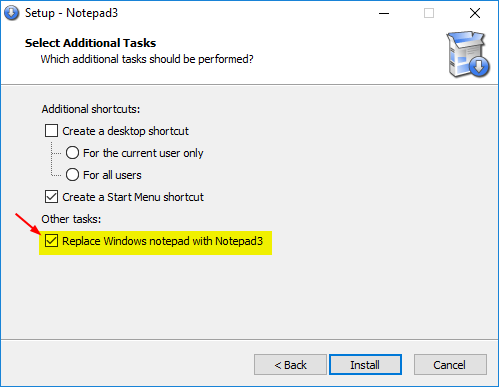
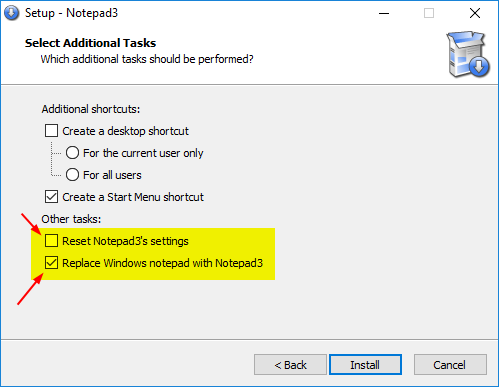
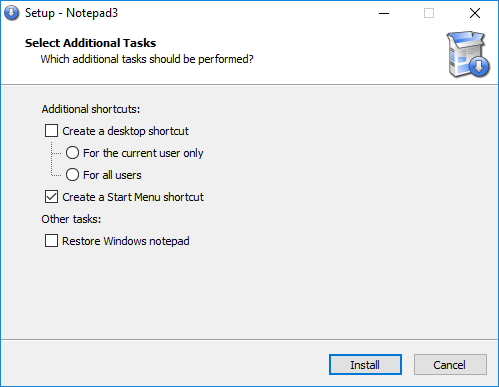
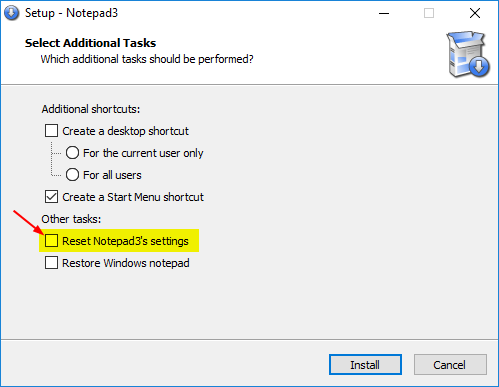
Here the "Setup Options" of 4 installations schemes : 🤔
- New installation of Notepad3 (MS Notepad is the default)
- New installation of Notepad3 but with traces of an old Notepad3 installation (MS Notepad is the default) (case of a previous uninstall of Notepad3 but with keeping the settings of Notepad3 !)
- Installation OVER a existing of Notepad3 BUT WITHOUT
%USERPROFILE%\Notepad3\Notepad3.ini) present !
- Installation OVER a existing of Notepad3 BUT WITH
%USERPROFILE%\Notepad3\Notepad3.ini) present !
 hpwamr
on 10 May 2018
hpwamr
on 10 May 2018
if you, use a Beta Zip, extract it in the notepad3 folder and the notepad3.ini is over wrote,
have this nothing to do with the installer ..
if you use a notepad3.exe and put it in your portable folder with an notepad3.ini and it happens to be also an notepad3.ini by it, this will also be overridden by accident .
there it is no word over the installer.. it was ever speak about the notepad3.exe and the notepad3.ini who be should only create by start if there not ini-file, do, if be give out an beta in zip with the whole files and you test this f.. c.. damn.. and you let overwrite your files include the f.. ini-file have you ever the problem with removed configuration and the default one..
thank you for your comment @hpwamr
you can remove your huge pictures !
best regards
Blackcrack
blackcrack
on 10 May 2018
Hi @blackcrack,
If I understand correctly the use: the "Beta's", .paf" and/or "portable" versions are reserved in the first place for "advanced users or testers" who know how to take care of their own "notepad.ini" 🤔
It's their responsibility ❗️ 😏
hpwamr
on 10 May 2018
@hpwamr : Thank you, good to know that the Installers are working fine.
@blackcrack : The portable 7z's are also correct, the Notepad3.ini side-by-side at thes packages are referencing to the Notepad3.ini (Data\settingsNotepad3.ini) which is not in the package and can't be overwritten so and this is correct that way ❗️. If you copy only sub-folders (this what I mean by disassembling the structure) you must be an advanced user (as @hpwamr mentioned) and so you know that you destroy your Notepad3.ini and this is not by accident - you exactly know what you are doing 😲 .
So everything is fine as it is 😄
RaiKoHoff
on 10 May 2018
To close my intervention in this issue, hereunder is what I posted on 6th Fev: https://github.com/rizonesoft/Notepad3/issues/125#issuecomment-363485494
People who want to work with Beta versions, have to manually update them at their own risk !
hpwamr
on 10 May 2018
Please try development beta "_develop_4.18.511.1032".
RaiKoHoff
on 11 May 2018
@RaiKoHoff
mark, F5 copy/overwritten.. {"shit, i have overwritten my config"}
alter, wenn meine Griffel einfach schneller sind als mein Verstand, bin hald schon alt
und die Muskeln in den Griffeln haben hald schon gelernt den ersten impuls zu verarbeiten..
.. ausprobieren, in's zip rein und rübercopieren.. überschreiben..
Früher hab ich auch für Dich die programme getraded.. Ohne 0X wäre die ganze soft nich
verteilt worden über bbs'es .. und Du hättest nicht da rein wachsen können..
also,... und du willst mir sagen, daß ich weis was ich tu ? Manchmal weist Selbst Du es nicht..
sag, daß das nicht stimmt, komm sag ! *lol* .... aaaalter... *dichangrinz...*
and again, Pairi, this have nothing to do with the installer.. you can remove your pictures ..
best regards
blacky
blackcrack
on 14 May 2018
@blackcrack : :wink: - ich bin dir ja schon entgegen gekommen, wenn du die letzten 7z anschaust :grin:
RaiKoHoff
on 14 May 2018
As far as I am concerned, this issue may be closed....
hpwamr
on 3 Dec 2018
Related issues
 valhristov
·
3Comments
valhristov
·
3Comments
 zb-z
·
3Comments
zb-z
·
3Comments
 rizonesoft
·
4Comments
rizonesoft
·
4Comments
 bravo-hero
·
3Comments
hpwamr
·
4Comments
bravo-hero
·
3Comments
hpwamr
·
4Comments
Most helpful comment
@hpwamr : Thank you, good to know that the Installers are working fine.
@blackcrack : The portable 7z's are also correct, the Notepad3.ini side-by-side at thes packages are referencing to the Notepad3.ini (Data\settingsNotepad3.ini) which is not in the package and can't be overwritten so and this is correct that way ❗️. If you copy only sub-folders (this what I mean by disassembling the structure) you must be an advanced user (as @hpwamr mentioned) and so you know that you destroy your Notepad3.ini and this is not by accident - you exactly know what you are doing 😲 .
So everything is fine as it is 😄