Notepad3: Incorrect display of NFO files.
From a comment on Rizonesoft.
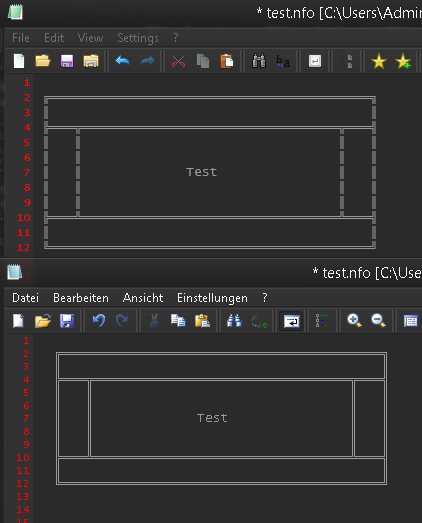
Would it be able to change the view of nfo files (ascii art) back to the way it worked in notepad2-mod? All the lines have these little horizontal spaces between while in notepad2-mod, nfo files were rendering correctly (like in any other good nfo viewer). Also the anti-alaising setting is a bit too high for my taste. The best option would be a button to change between rendered and not rendered ascii art.
Here’s a screenshot of what I mean:
Ps.: Yes, I translated notepad2-mod into german language for my own purpose cause after I wanted to share it with others, the np2-mod developer called me a stupid a**hole and prohibited any modification of “his” work – even if it’s just the ui language.
 rizonesoft
All 16 comments
@rizonesoft : Please provide/attach the test.nfo file 😄
 RaiKoHoff
on 2 May 2018
RaiKoHoff
on 2 May 2018
I couldn't find the reason for the difference, so I add the styling option to set the "Extra Line Spacing" (overriding (2nd) Default Text :: Extra Line Spacing) (defaulted to -4, to come close to the shown visual appearance.
Please test development beta "_develop_3.18.502.1009".
test.nfo.zip
RaiKoHoff
on 2 May 2018
Hi @RaiKoHoff It looks like changing the font to Consolas produces a better result.
rizonesoft
on 2 May 2018
Hell @RaiKoHoff,
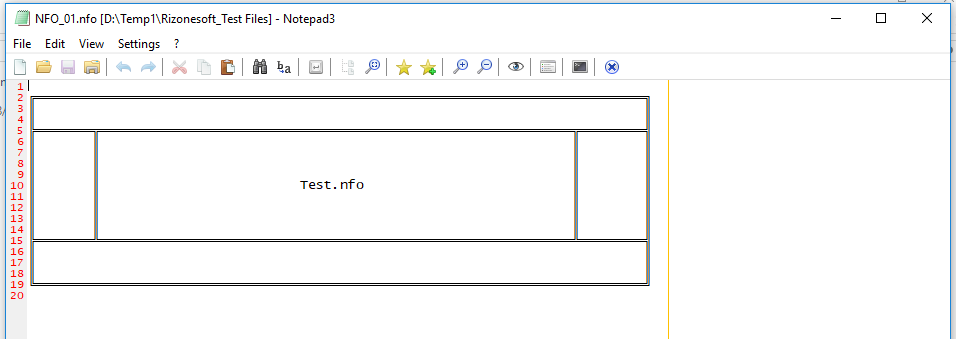
Tested with: "_develop_3.18.502.1009"
For me at 1920x1080 and 1366x768, it looks very good.
 hpwamr
on 2 May 2018
hpwamr
on 2 May 2018
@hpwamr It out of proportion. If @RaiKoHoff agrees, the best option would be to change the Font to Consolas. Consolas is used for NFO and DIZ files.
rizonesoft
on 2 May 2018
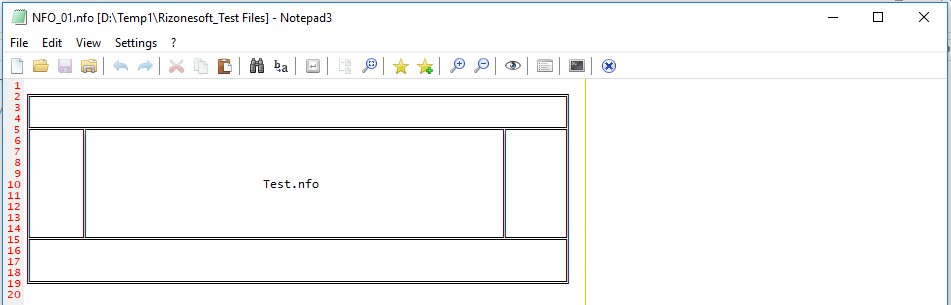
With: Consolas, Regular, 10p
hpwamr
on 2 May 2018
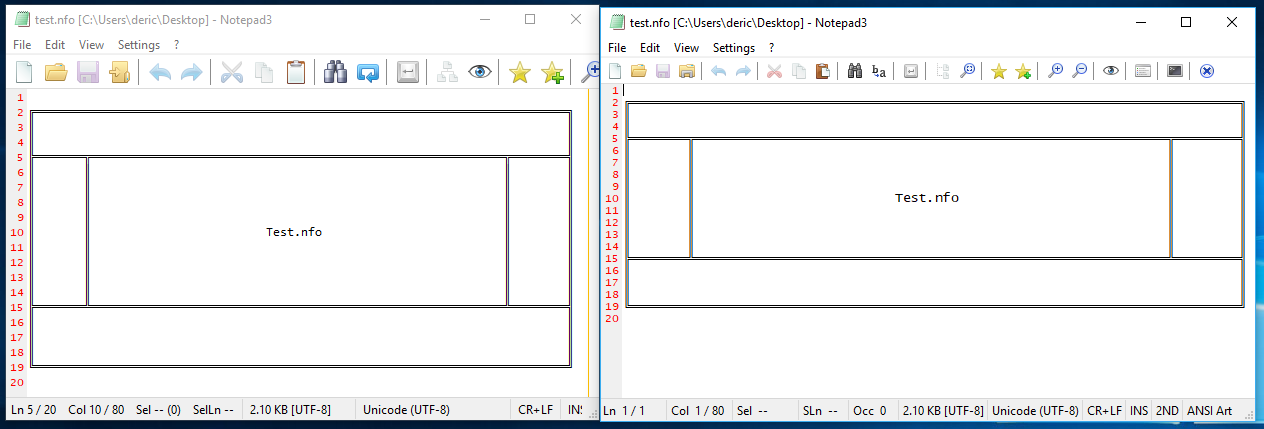
First screen is with the Consolas Font on second Default Scheme. Latest release.
The second is the Beta version display.
rizonesoft
on 2 May 2018
I don't like the idea to fix this by using another font (ANSI-Art: Lucida Console).
test.nfo.zip
Double-checking the font, size, line-space settings to get Notepad2-mod result, I got this:
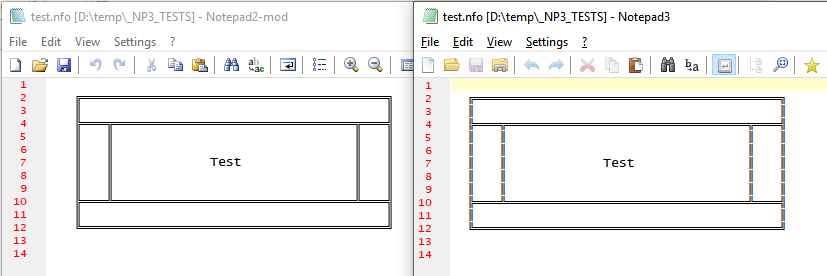
This means: there is "something" left, which is different here.
As you can see, font, font-size (= line-height) and line-spacing are the same - resulting in same proportions.
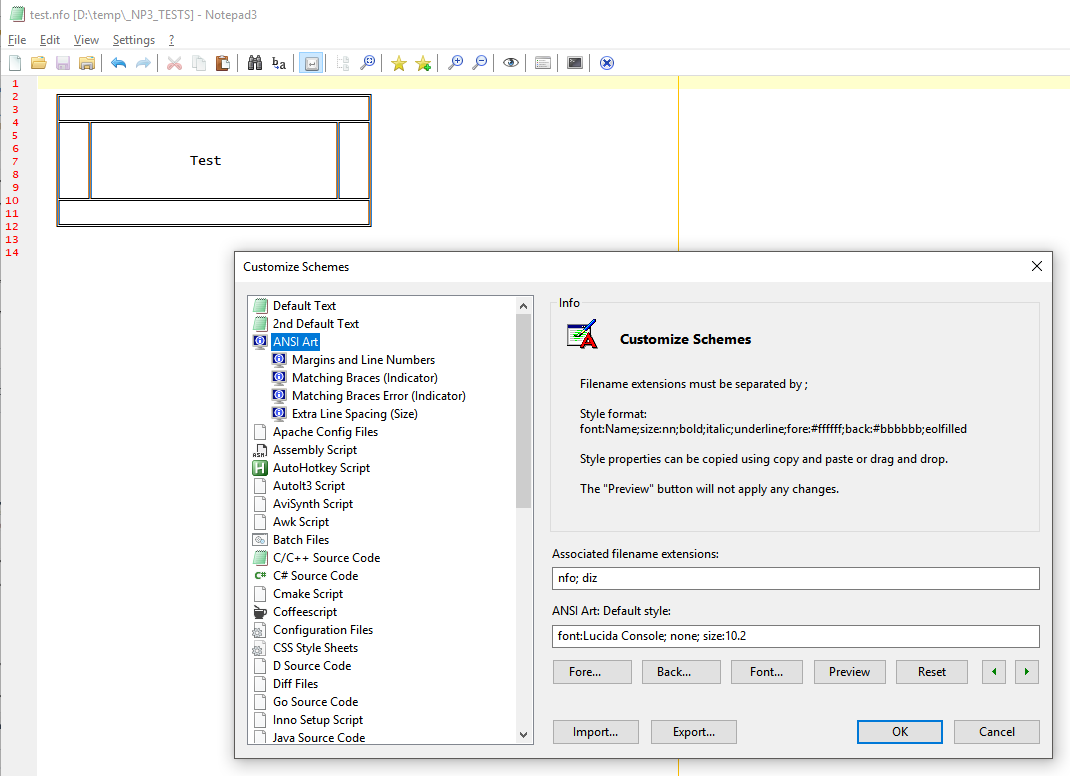
... wait, oh, changing the font-size to size:10.2 fixes the problem 😲 ... I will check the source code ...
RaiKoHoff
on 2 May 2018
Some time ago, I switched the integer font sizing to fractional settings (need to switch Scintilla API method too). This has been done to give the experts the possibility to find the "sweet spot" of font rendering on their screens.
The scaling calculations was correct, so my assumption is: Scintilla internally, there is a difference in scaling. Now I provided a "bias" of 2% (10.0 -> 10.2) internally for fractional font size calculation.
Hope the only impact is for ANSI-Art ... 😲 ...
test.nfo.zip
Please test development beta "_develop_3.18.502.1010".
RaiKoHoff
on 2 May 2018
Hello @RaiKoHoff ,
Tested with: "Notepad3 (64-bit) develop v3.18.502.1010"
I don't known is this is related with this issue but the Default font for the "Configuration files" has changed !
Now it seems that the font is 11 points instead of before 10 points ?
E.g: Open NP3 settings files: "notepad3.ini" !
hpwamr
on 2 May 2018
Please test development beta "_develop_3.18.503.1011".
(Bias reverted to correct fractional font size translation, ANSI-Art get default font size:10.5 for correct display).
RaiKoHoff
on 3 May 2018
I don't known is this is related with this issue but the Default font for the "Configuration Files" has changed !
Now it seems that the font is 11 points instead of before 10 points ?
Hello @RaiKoHoff,
Tested with: "Notepad3 (64-bit) develop v3.18.503.1012"
The Default FONT for "Configuration Files" has changed. 😏
- Before: Consolas, Regular, 10p; 😄
- NOW: Consolas, Regular, 11p ! 😬
For example See: Notepadp3 Configuration Files: "notepad3.ini"
This "FONT" change has appeared with : "Notepad3 (64-bit) develop v3.18.502.1010".
hpwamr
on 3 May 2018
@hpwamr : oh, you are right :thinking:
RaiKoHoff
on 3 May 2018
Please test development beta "_develop_3.18.503.1013".
Font sizing has been revised 😬
Unfortunately, The ANSI-Art above needs for "Lucida Console" a font size of 10.5 (instead of 10).
I checked the correct size applying and line spacing (0), but with 10 I still have gaps on lines - but can't find the error - if there is any. No time to debug Notepad2-mod, they can't apply fractional font sizes ...
test.nfo.zip
RaiKoHoff
on 3 May 2018
The Default FONT for "Configuration Files" has changed. 😏
Check with Notepad3 (64-bit) develop v3.18.503.1013
Issue resolved, Thanks 👍 😃
hpwamr
on 3 May 2018
As far as I am concerned, this issue may be closed....
hpwamr
on 3 Dec 2018
Related issues
 ggordon-vispero
·
3Comments
ggordon-vispero
·
3Comments
 vvyoko
·
3Comments
vvyoko
·
3Comments
 wmsrww
·
3Comments
hpwamr
·
3Comments
wmsrww
·
3Comments
hpwamr
·
3Comments
 dlong500
·
3Comments
dlong500
·
3Comments