Notepad3: Ctrl-Backspace Should Delete Word to the Left
Open the Search Dialog (Ctrl-F), type "text text", press Ctrl-BackSpace.
Expected: the second word "text" is deleted from the Search String.
Actual: an extra character "" (code 0x7F) is added to the Search String.
Notepad3 (64-bit) Xperimental v3.18.409.968
 alex-ilin
All 18 comments
Notepad3 (64-bit) Xperimental v3.18.411.971
I confirm: Open the Search Dialog (Ctrl-F), type "text text", press Ctrl-BackSpace.
- Ctrl+Backspace, add also each time (code 0x7F) :
text - Ctrl+Del, delete all characters after the cursor instead of the first word after the cursor.
text text
 hpwamr
on 12 Apr 2018
hpwamr
on 12 Apr 2018
The input-box is a pure Windows input control, I don't know how to customize this.
Please check against Notepad, Notepad2, Notepad2-mod, Notepad++. 😲
 RaiKoHoff
on 12 Apr 2018
RaiKoHoff
on 12 Apr 2018
Does this link help in any way?
alex-ilin
on 12 Apr 2018
The input-box is a pure Windows input control, I don't know how to customize this.
Please check against Notepad, Notepad2, Notepad2-mod, Notepad++. 😲
Yes you're right, Notepad and WordPad have the same behavior as Notepad 3.
On the other hand, Word Office 2013 works as expected?
hpwamr
on 12 Apr 2018
Please test experimental beta version "_Xperimental_3.18.413.973".
(maybe there are more edit controls in other dialogs, which should have this enhancement?)
RaiKoHoff
on 13 Apr 2018
Here my observations for F/R.
Crtl+Backspace: functions as expected butUndois not more working !Ctrl+Del: If cursor at begin of the field, remove all the line at once instead of "one by one word", but hereUndois working !Crtl+Right or Left: are working as expected.
hpwamr
on 13 Apr 2018
Enabling the requested feature Ctrl+Backspace is done by a "hack":
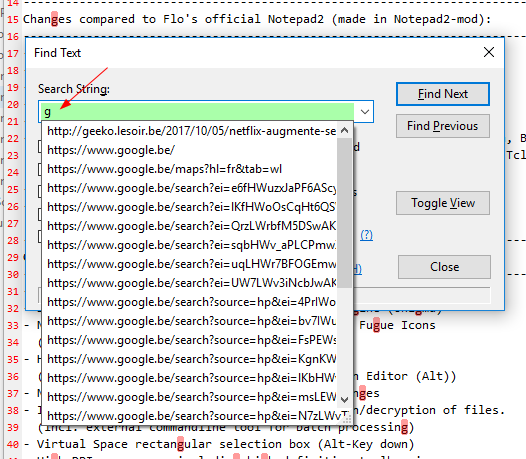
Injecting a property to the search field's underlying combobox's embedded edit-control.
The intended purpose of the property is to file-system/URL-History auto-completion (type a drive letter into the empty combo box and see whats happen ... 😲 - I am goging to switch that auto-completion off).
The programmer of this property adds the Ctrl+Backspace by his own - not on request and undocumented and this undocumented feature is what we want here, there is no further tuning to this.
We only have these 2 possibilities:
- using this "hack" as it is
(introducing theCtrl+Backspacewith lack of Undo support, auto-completion off) - switching back to former behavior of the edit-control
I, personally, can live with "missing undo in case of Ctrl+Backspace" - other undos work well, doesn't it?
RaiKoHoff
on 13 Apr 2018
It's a request from @AlexIljin, I suggest waiting for his answer.
hpwamr
on 13 Apr 2018
The intended purpose of the property is to file-system/URL-History auto-completion (type a drive letter into the empty combo box and see whats happen ... 😲 - I am goging to switch that auto-completion off).
WelI I see ! 😖 👎
hpwamr
on 15 Apr 2018
Please test experimental beta version "_Xperimental_3.18.416.974"
RaiKoHoff
on 16 Apr 2018
Yes, with "_Xperimental_3.18.416.974", the above issue seems to be resolved. 😆
Crtl+Backspace: functions as expected but Undo is not more working !Crtl+Right or Left: are working as expected.Ctrl+Del: If cursor at begin of the field, it remove all the line at once instead of "one by one word", but here Undo is working !
Point 3. I think that also Ctrl+Del: is not working as expected. 😲
hpwamr
on 16 Apr 2018
Yes, Ctrl+Del is nor working as it does in the editor itself, but the behavior is as before.
I have no solution found for that, we have to stay with this behavior.
RaiKoHoff
on 16 Apr 2018
Yes, Ctrl+Del is nor working as it does in the editor itself, but the behavior is as before.
I didn't found a abnormal behavior of Ctrl+Del in the editor itself?
What did you found as abnormal?
hpwamr
on 16 Apr 2018
Sorry, it should read: "... Ctrl+Del is not working (_in the search edit box_) as it does in the editor itself (_deleting next word_)".
RaiKoHoff
on 17 Apr 2018
Unfortunately, I can't find the link to the folder with the latest beta releases. Where should I look for it?
alex-ilin
on 18 Apr 2018
Hello @AlexIljin,
Please, take a look here: (https://github.com/rizonesoft/Notepad3/issues/432#issuecomment-379084180)
hpwamr
on 18 Apr 2018
@AlexIljin : I think we can stay with this solution, so please close this issue after testing RC (#454).
RaiKoHoff
on 24 Apr 2018
Perfect!
alex-ilin
on 29 Apr 2018
Related issues
 blackcrack
·
3Comments
blackcrack
·
3Comments
 ggordon-vispero
·
3Comments
hpwamr
·
3Comments
ggordon-vispero
·
3Comments
hpwamr
·
3Comments
 valhristov
·
3Comments
valhristov
·
3Comments
 bravo-hero
·
3Comments
bravo-hero
·
3Comments