Notepad3: Menu Navigation via Keyboard Shortcuts: tidyup
Notepad3 beta build 3.18.202.867.
I've noticed that with the addition of several functions and the movement of a few menu items, that the keyboard shortcuts used to navigate each menu system have a few conflicts.
Note that I am talking solely about the keyboard shortcuts to navigate the menus, not the keyboard shortcuts ("accelerator keys") for the functions themselves.
Windows handles these conflicts reasonably gracefully, but nevertheless I think that, where possible, we should minimise the conflicts.
I'll start with the View menu, as that is where I first noticed the conflicts.
Menu Shortcuts - View:
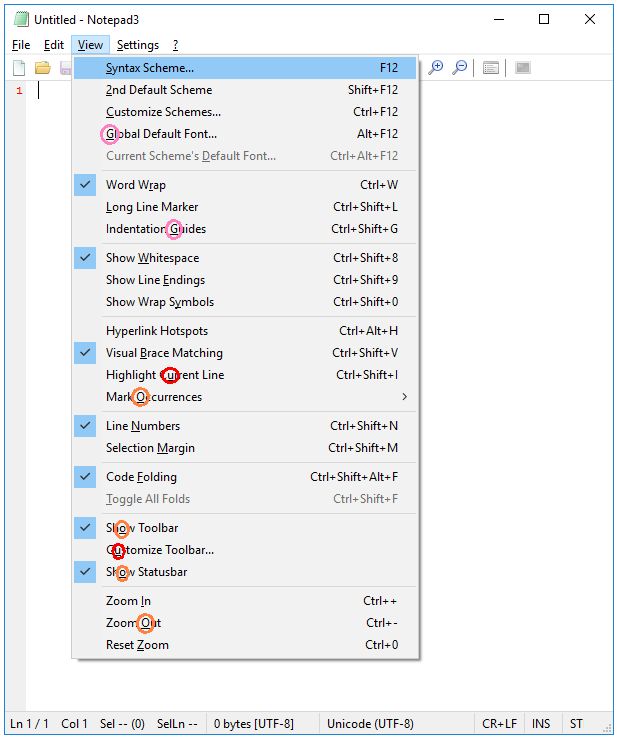
(That o key is really overloaded!)
Suggestions:
| Menu Entry: | Current Key: | Suggested Key:|
| ----- | ----- | ----- |
| Syntax Scheme... | s | x [changed] |
| 2nd Default Scheme | 2 | 2 |
| Customize Schemes... | c | c |
| Global Default Font... | g | d [changed] |
| Current Scheme's Default Font... | d | h [changed] |
| Word Wrap | r | r |
| Long Line Marker | l | l |
| Indentation Guides | g | a [changed] |
| Show Whitespace | w | w |
| Show Line Endings | e | e |
| Show Wrap Symbols | y | p [changed] |
| Hyperlink Hotspots | (none) | y [changed] |
| Visual Brace Matching | b | v [changed] |
| Highlight Current Line | u | g [changed] |
| Mark Occurrences | o | k [changed] |
| Line Numbers | n | n |
| Selection Margin | m | m |
| Code Folding | f | f |
| Toggle All Folds | t | t |
| Show Toolbar | o | b [changed] |
| Customize Toolbar... | u | u |
| Show Statusbar | o | s [changed] |
| Zoom In | i | i |
| Zoom Out | o | o |
| Reset Zoom | z | z |
As I have the time, I'll examine the other menus and provide further suggestions. (It's a fairly time-consuming task!)
 craigo-
All 15 comments
Menu Shortcuts - Settings:
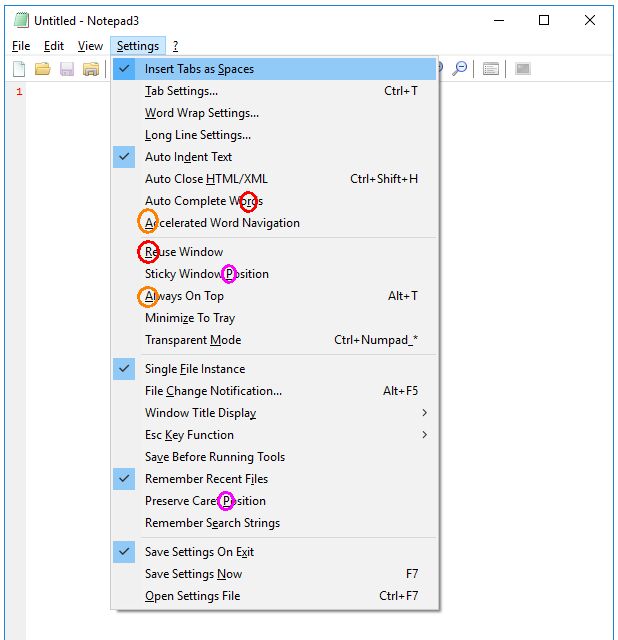
Suggestions:
| Menu Entry: | Current Key: | Suggested Key: |
| ----- | ----- | ----- |
| Insert Tabs as Spaces | s | s |
| Tab Settings... | t | t |
| Word Wrap Settings... | w | w |
| Long Line Settings... | l | l |
| Auto Indent Text | d | d |
| Auto Close HTML/XML | h | h |
| Auto Complete Words | r | u [changed] |
| Accelerated Word Navigation | a | g [changed] |
| Reuse Window | r | r |
| Sticky Window Position | p | p |
| Always On Top | a | a |
| Minimize To Tray | z | z |
| Transparent Mode | m | m |
| Single File Instance | f | f |
| File Change Notification... | c | c |
| Window Title Display | y | y |
| Esc Key Function | k | k |
| Save Before Running Tools | v | b [changed] |
| Remember Recent Files | i | i |
| Preserve Caret Position | p | v [changed] |
| Remember Search Strings | e | e |
| Save Settings On Exit | x | x |
| Save Settings Now | n | n |
| Open Settings File | o | o |
craigo-
on 3 Feb 2018
Menu Shortcuts - Edit:
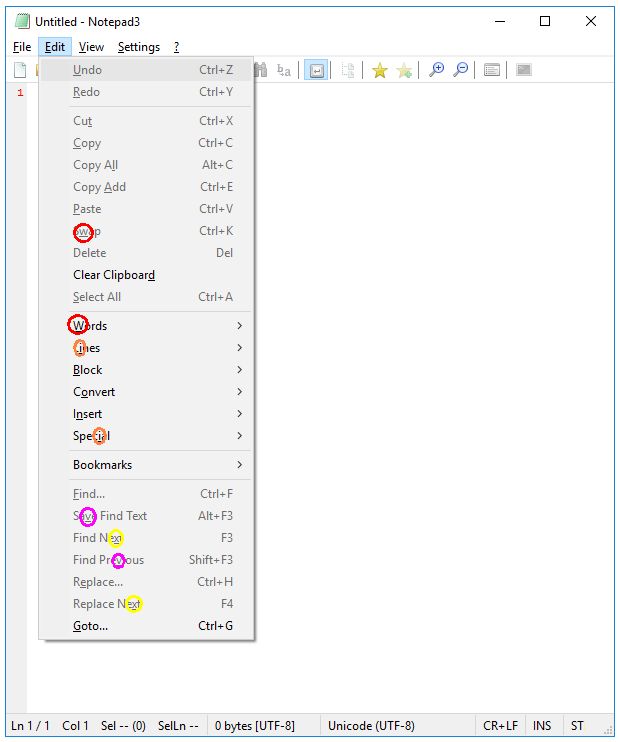
Suggestions (work in progress):
| Menu Entry: | Current Key: | Suggested Key: |
| ----- | ----- | ----- |
| Undo | u | u |
| Redo | r | r |
| Cut | t | t |
| Copy | c | c |
| Copy All | l | o [changed] |
| Copy Add | a | y [changed] |
| Paste | p | p |
| Swap | w | s [changed] |
| Delete | (none) | d [changed] |
| Clear Clipboard | d | e [changed] |
| Select All | s | a [changed] |
| Words | w | w |
| Lines | i | l [changed] |
| Block | b | b |
| Convert | o | v [changed] |
| Insert | n | i [changed] |
| Special Miscellaneous | i | m [changed] |
| Bookmarks | (none) | k [changed] |
| Find... | f | f |
| Save Find Text | v | t [changed] |
| Find Next | x | n [changed] |
| Find Previous | v | (none) [changed] |
| Replace... | e | (none) [changed] |
| Replace Next | x | x |
| Goto... | g | g |
craigo-
on 3 Feb 2018
Menu Shortcuts - File:
There are no conflicts here, just two entries that currently do not have keyboard shortcuts.
Suggestions:
| Menu Entry: | Current Key: | Suggested Key: |
| ----- | ----- | ----- |
| Set Encryption Passphrase | (none) | y [changed] |
| Browse | (none) | b [changed] |
craigo-
on 3 Feb 2018
Menu Shortcuts - ? (Help)
There are no conflicts here, just one entry that currently does not have a keyboard shortcut.
Suggestions:
| Menu Entry: | Current Key: | Suggested Key: |
| ----- | ----- | ----- |
| Check for Updates | (none) | u [changed] |
craigo-
on 3 Feb 2018
@craigo-:
It's a fairly time-consuming task!
But it's also very welcome! I've stumbled upon these conflicts as well several times in the past, so a big thanks to you :clap: for taking on this tedious task and coming up with both a systematic analysis as well as suggestions for improvements!
 engelhro
on 3 Feb 2018
engelhro
on 3 Feb 2018
@craigo- : @engelhro is absolutely right about the very welcome effort you invested here 🥇
 RaiKoHoff
on 3 Feb 2018
RaiKoHoff
on 3 Feb 2018
@craigo- : Please try beta build 3.18.205.868++. I tried to change menu "Edit" (work in progress) as well.
Hopefully changed all collisions, but didn't find a solution for "Find Previous" ... :thinking:
RaiKoHoff
on 5 Feb 2018
Thanks, @RaiKoHoff. You've done well with that tricksy Edit menu. I'll have another try, and see if I can do any better. (Probably not!)
craigo-
on 7 Feb 2018
Have updated the table above for the Edit menu with your alterations. I didn't catch that you had renamed one of the entries until I did so!
I did note that there is now a new conflict for the d key (Delete, Clear Clipboard). I'll definitely prioritise having another look at this.
craigo-
on 7 Feb 2018
Upps, not seen this one. And the o (Copy All, Convert) 🤔
Ok, beta build 3.18.208.878 is out.
Still open: "Find Previous" and "Replace..." (unfortunately, the dot(.) can not be used!)
RaiKoHoff
on 8 Feb 2018
The Edit menu:
Without drastic changes, we're not going to assign unique letters to all entries... There are 25 entries, and together they use a total of 22 out of the 26 available letters. None of these function names include the letters H, J, Q or Z. (it's the same when using either Special or Miscellaneous)...
Here are some options:
- Choose which entries have no assigned letter
- Overload the letter assignments
- Move the entries to another menu
- Rename some functions to names that include the 4 unused letters
- Just forget about it :smile:
I've had a final crack at it, using the first two above options. Précis:
- The sole unassigned menu option is
Save Find Text(I consider this of lower priority) - Overloading:
v:Convert&Find Previousx:Find Next&Replace Next
The full table:
| Menu Entry: | Current Key: | Suggested Key: |
| ----- | ----- | ----- |
| Undo | u | u |
| Redo | r | r |
| Cut | t | t |
| Copy | c | c |
| Copy All | l | y [changed] |
| Copy Add | a | a |
| Paste | p | p |
| Swap | w | w |
| Delete | (none) | d [changed] |
| Clear Clipboard | d | l [changed] |
| Select All | s | s |
| Words | w | o [changed] |
| Lines | i | i |
| Block | b | b |
| Convert | o | v [changed] |
| Insert | n | n |
| Special Miscellaneous | i | m [changed] |
| Bookmarks | (none) | k [changed] |
| Find... | f | f |
| Save Find Text | v | (none) [changed] |
| Find Next | x | x |
| Find Previous | v | v |
| Replace... | e | e |
| Replace Next | x | x |
| Goto... | g | g |
craigo-
on 12 Feb 2018
Thank you for the work.
I suggest some slight changes:
- I prefer to have (if possible) the first letter to be the Alt-Menu-Key.
- I remove the second duplicates, cause they are not reachable (intercepted by the first one).
| Menu Entry: | Current Key: | Suggested Key: |
| ----- | ----- | ----- |
| Undo | u | u |
| Redo | r | r |
| Cut | t | t |
| Copy | c | c |
| Copy All | l | a [changed] |
| Copy Add | a | y [changed] |
| Paste | p | p |
| Swap | w | w |
| Delete | (none) | d [changed] |
| Clear Clipboard | d | e [changed] |
| Select All | s | s |
| Words | w | o [changed] |
| Lines | i | l [changed] |
| Block | b | b |
| Convert | o | n [changed] |
| Insert | n | i [changed] |
| Special Miscellaneous | i | m [changed] |
| Bookmarks | (none) | k [changed] |
| Find... | f | f |
| Save Find Text | v | (none) [changed] |
| Find Next | x | x |
| Find Previous | v | v |
| Replace... | e | r [changed] |
| Replace Next | x | x |
| Goto... | g | g |
RaiKoHoff
on 12 Feb 2018
It's not easy, is it? 😣 I imagine Flo sweated over this, too. He ended up not even assigning a key to the Clear entry!
The gnarly one in that list is the troublesome Replace entry. I think it's too important to miss out on a menu key assignment.
I largely agree with your rules, although I would prioritise them like this:
- Where possible, assign each menu entry a letter
- Where possible, avoid duplication/overloading
- Where possible, assign the first letter of the first word
Windows fairly gracefully handles the duplication/overloading scenario (I've tested Windows 7 and 10). For example, Notepad3 beta build 882 overloads the t key for Cut and Save Find Text. Pressing Alt+E to open the Edit menu, then pressing t toggles between these options. It's not ideal, but it does work. And I think I'd rather have this than having a fairly important entry unassigned, e.g. Replace.
craigo-
on 12 Feb 2018
OK, I changed my table above:
Duplicating the "R" key for Redo and Replace... - Find... and Replace... and Undo/Redo are mainly called via Accelerator-Keys (Ctrl+F, Ctrl+H - Ctrl+Z, Ctrl+Y)).
Duplicating "X", as it has been before.
Assigning "V" for Find Previous (as before) - needs to change Convert to "N".
Maybe there are a lot of other possibilities and a higher amount of opinions, what maybe better.
If there is not a strong argument against this suggestion, I send a PR with these changes.
RaiKoHoff
on 13 Feb 2018
I'm happy with that, @RaiKoHoff.
Issue resolved, ready to close.
craigo-
on 13 Feb 2018
Related issues
 tzleon
·
3Comments
tzleon
·
3Comments
 bravo-hero
·
3Comments
bravo-hero
·
3Comments
 RaffaeleBianc0
·
3Comments
RaffaeleBianc0
·
3Comments
 valhristov
·
3Comments
valhristov
·
3Comments
 blackcrack
·
3Comments
blackcrack
·
3Comments
Most helpful comment
I'm happy with that, @RaiKoHoff.
Issue resolved, ready to close.