Nodejs.dev: Accessibility: Navigation using tab key issue in Safari (Mac OS)
Description
While using the tab key to navigate on the website, it is not working similar to the chrome browser. Most of the time, tab key is kind of stuck in browser's address bar.
Steps to reproduce
- Open the safari browser in Mac OS
- Navigate to https://nodejs.dev website
- Use tab key from keyboard couple of times to see the issue.
Expected result
When using the tab key, the focus should go to the link element along with the links in sidebar so that I can use keyboard for navigation.
Actual result
Tabbing is not working. It is kind of stuck in the address bar instead of navigating through the links/contents on website.
Environment
- OS Version: Mac OS 10.13.6
- Browser Version: Safari 12.1
 elanandkumar
All 7 comments
@elanandkumar This looks like a good first issue. Do you want to take a stab at a fix? ✨
 sagirk
on 7 Apr 2019
sagirk
on 7 Apr 2019
Yes, I can pick this up @sagirk.
elanandkumar
on 7 Apr 2019
Awesome! 👏
It's all yours, @elanandkumar. 🎉
sagirk
on 7 Apr 2019
How can I assign this one to me. Seems, you need to do so @sagirk.
elanandkumar
on 7 Apr 2019
Seems, you need to do so @sagirk.
Done. 👍
sagirk
on 7 Apr 2019
After some investigation, I found that it is working similar to chrome and the issue is not in the app but Safari thinks that it should not enable keyboard navigation by default for all of the website. So, the setting is disabled by default hence it does not work.
Here are the steps on how to enable the same. This will help others if they face the same issue.
- Open the safari preferences panel
- Navigate to
AdvancedTab - Look for the option
Accessibility - Turn on the checkbox for
Tab. Below is the screen grab for more clarification.
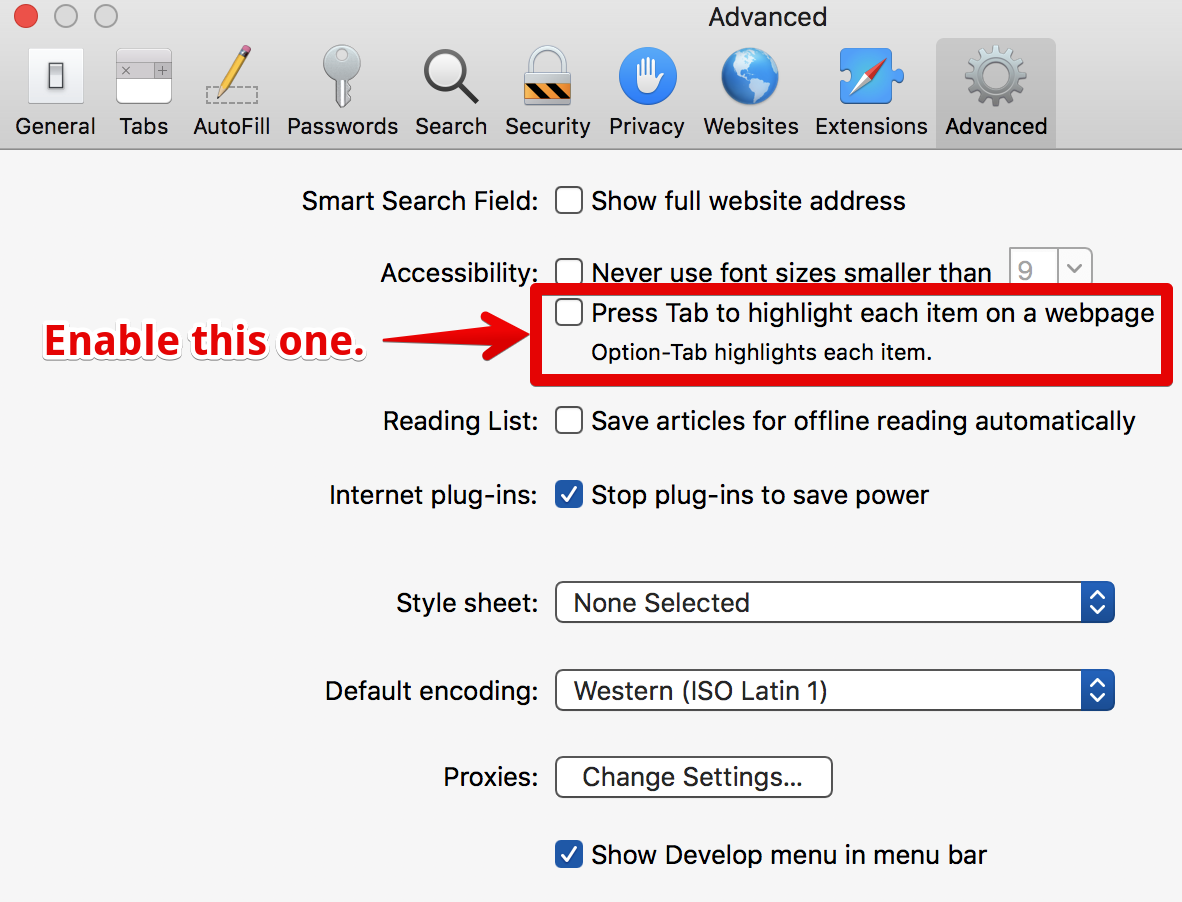
We can close the ticket now.
Thanks.
elanandkumar
on 13 Apr 2019
Thanks for documenting it, @elanandkumar! Good work. ❤️
sagirk
on 15 Apr 2019
Related issues
 mhdawson
·
4Comments
mhdawson
·
4Comments
 marcustisater
·
4Comments
marcustisater
·
4Comments
 SMotaal
·
4Comments
marcustisater
·
3Comments
SMotaal
·
4Comments
marcustisater
·
3Comments
 benhalverson
·
4Comments
benhalverson
·
4Comments
Most helpful comment
Yes, I can pick this up @sagirk.