Nodejs.dev: Navigation title color bug on iOS Safari (Phone Only, no Emulator)
I wanted to re-open issue #86 since I noticed the color issue was still happening on my iPhone XR in Safari. I tested both nodejs.dev and the final build from #195 and it seems that while the fix worked for an iPhone screen in Firefox developer tools, it did not work on my actual iPhone in the Safari app.
How to reproduce:
- Scroll at a normal scroll speed down the navigation menu. The
Getting Startedtitle should remain black'
I noticed that if I scroll really fast, or if I try to scroll further when reaching the bottom of the page, the Getting Started title will change back to white
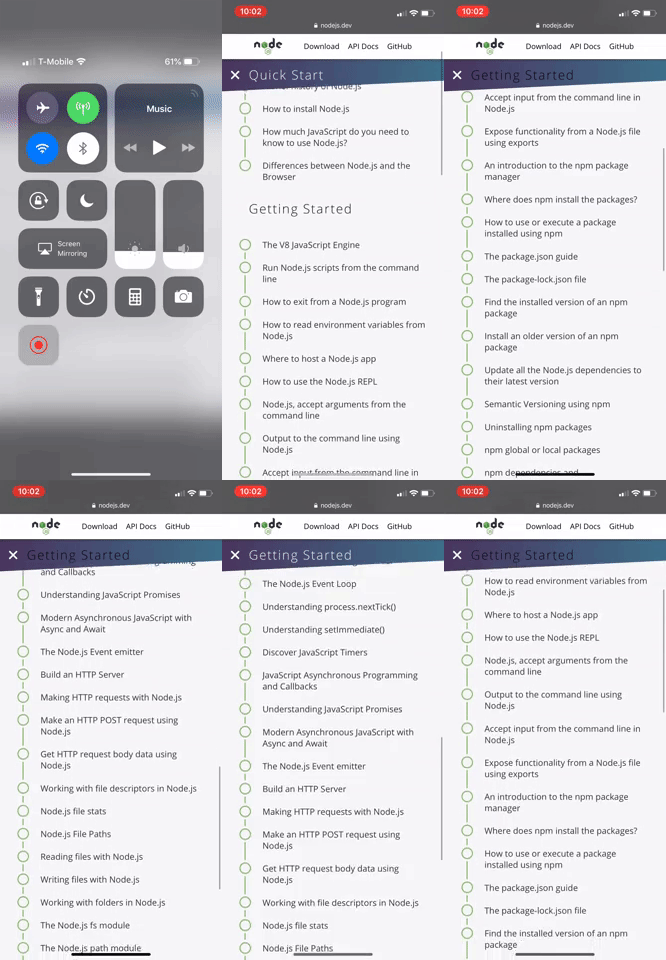
I am wondering if anyone else with iPhones can try to replicate this as well, to better understand the scope of this issue.
 kevjin
All 7 comments
Ah yes, IntersectionObserver is currently not supported on Safari (both desktop and mobile). It is in Technology Preview, though, so support should hopefully land soon.
This bug stems from the fallback CSS we have for legacy browsers, so that's where you want to look.
 sagirk
on 28 Mar 2019
sagirk
on 28 Mar 2019
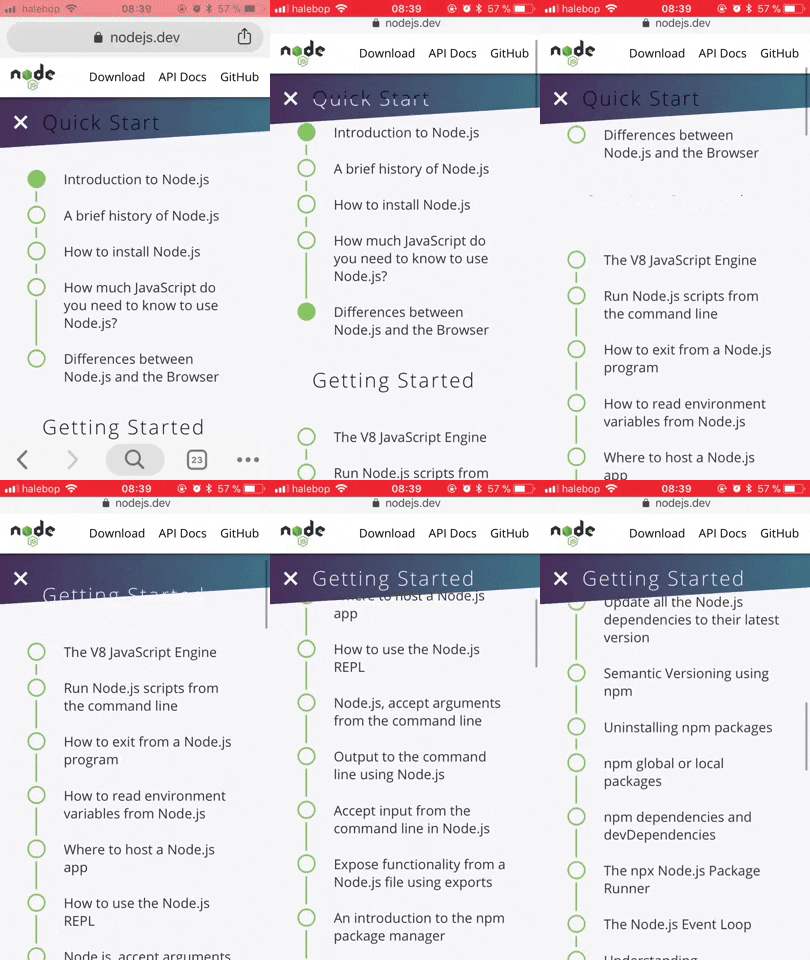
I'm able to reproduce this on my Iphone SE in both Safari and Chrome. Looks like this:
 ollelauribostrom
on 28 Mar 2019
ollelauribostrom
on 28 Mar 2019
Yup, that's accurate.
Chrome, and pretty much any other browser on iOS, has major technical restrictions imposed by the App Store, such as the requirement to use the built-in UIWebView for rendering.
So, AFAIK, basically what doesn't work on iOS Safari won't work on iOS anything else.
sagirk
on 28 Mar 2019
Since iOS 12.2 was recently released, I actually just went ahead and upgraded my phone to it.
From testing on Safari and Chrome, it looks to be working fine without the issue. The color transition is pretty smooth.
Would you guys think it's worth adding a fix for this issue for older iOS and Mac versions, or to just wait for users to update?
kevjin
on 28 Mar 2019
IMO, it's worth fixing anyway, 'coz the fallback CSS will continue to be used by other legacy browsers that don't ship with IntersectionObserver.
Or we could just ship a polyfill instead 🙃.
sagirk
on 28 Mar 2019
Sounds great, I will work on a PR for a fix then!
kevjin
on 29 Mar 2019
Tried out a polyfill for IntersectionObserver in #222. Looking forward to feedback. Cheers.
 BeniCheni
on 4 Apr 2019
BeniCheni
on 4 Apr 2019
Related issues
 saulonunesdev
·
4Comments
saulonunesdev
·
4Comments
 marcustisater
·
4Comments
marcustisater
·
4Comments
 mhdawson
·
4Comments
mhdawson
·
4Comments
 SMotaal
·
4Comments
SMotaal
·
4Comments
 benhalverson
·
4Comments
benhalverson
·
4Comments
Most helpful comment
Sounds great, I will work on a PR for a fix then!