Nodebb: User settings not applied after login on 1.11.0
- NodeBB version: 1.11.0
- NodeBB git hash: 543336070aa47ba3b155d9524d618acbd6eb5fc6
- Database type: mongo
- Database version: 3.6.8
- Exact steps to cause this issue:
- Login
- Set language to en-x-pirate (or anything that's not default)
- Skin skin to Darkly (or anything that's not default)
- Save settings
- Logout
- Hard refresh the forum home page
Login
What you expected:
Expected all the user settings to be applied: skin should be Darkly and language should be piratge
- What happened instead:
The forum default is still the displayed until a hard browser refresh is performed.
 djensen47
All 8 comments
Hah, good catch, I did not test that particular flow :smile:
 julianlam
on 3 Dec 2018
julianlam
on 3 Dec 2018
I used pirate as an example. It was actually @Panther2, from Germany, on our forums who found this. He has his language set to German and skin to darkly. I just thought it might be easier to test with pirate. 😉
djensen47
on 3 Dec 2018
What exactly isn't changed language-wise? It seems the menu and page content reflect the correct language...
app.alertError('[[error:invalid-data]]') also outputs generic error in correct language
julianlam
on 4 Dec 2018
I'll have to run through it again. You do see that the skin doesn't change, right?
djensen47
on 4 Dec 2018
Yes indeed 🙂
julianlam
on 4 Dec 2018
@julianlam
Indeed my system is a German system, that is why my browser (Chrome, latest stable) shows some forum details in German when not being logged in. As it is an English language forum I have set my user settings to "English".
But:
This is how it looks immediately after my login:

Note the German word "Kategorien".
This how it should look after my login, but only does after a hard refresh:
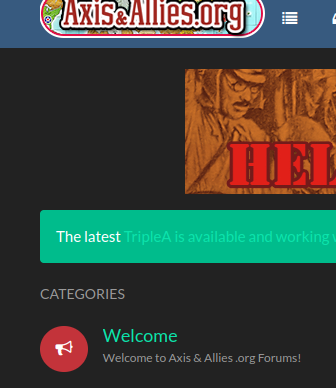
It is only by the hard refresh that my skin is applied as well as the preferred lanugage (English).
Now we have "Categories" as expected.
CC: @djensen47
 panther2
on 4 Dec 2018
panther2
on 4 Dec 2018
Hi @panther2 @djensen47 -- at this point the skin issue is resolved, although I cannot reproduce the language issue. @pitaj can, but I cannot, though I have not tried changing my system default language yet.
julianlam
on 4 Dec 2018
7059 contains potential fix
julianlam
on 4 Dec 2018
Related issues
 jidanni
·
5Comments
jidanni
·
5Comments
 aStonedPenguin
·
4Comments
aStonedPenguin
·
4Comments
 BenLubar
·
3Comments
BenLubar
·
3Comments
 cryptoethic
·
4Comments
djensen47
·
5Comments
cryptoethic
·
4Comments
djensen47
·
5Comments
Most helpful comment
7059 contains potential fix