Nodebb: Put the  's outside the <a> tag
I got an email that caused the cursor to tab to an empty area before a link instead of tabbing to the beginning of the link text, when using emacs' gnus.
I traced it down to NodeBB.
<a href="https://community.windy.com/post/22324" style="background: #222222; border: 15px solid #222222; font-family: sans-serif; font-size: 13px; line-height: 1.1; text-align: center; text-decoration: none; display: block; border-radius: 3px; font-weight: bold;" class="button-a">
<span style="color:#ffffff;" class="button-link"> Click here to go to forum </span>
</a>
So please put the 's outside the <a> tag,
No I don't own the site. I just got a mail from them seemingly generated by NodeBB so found this GitHub.
 jidanni
All 5 comments
Before anyone changes this -- bear in mind is used specifically to add padding. It is very likely that changes to the button to use padding will fail on email clients for one reason or another.
 julianlam
on 14 May 2019
julianlam
on 14 May 2019
One also notes the user is surprised that clicking
https://community.windy.com/post/22324 oddly takes him to
https://community.windy.com/topic/8388/android-app-lacks-menu/5
I would just put the real destination in the mail message.
Also although
"Click here to go to forum" is technically correct
"Click here to go to the article" would be more correct, and
"Click here to go to the comment" or
"Click here to go to the reply" would even be more correct.
Indeed, one would expect
"Click here to go to forum" to only go to
https://community.windy.com/
when in fact you are (thankfully instead) bringing us many leves deeper down.
jidanni
on 14 May 2019
@jidanni Why, yes, that is a perfectly legitimate complaint, :smile: I'll get _that_ one fixed.
julianlam
on 14 May 2019
This article suggests that a combination of table formatting and border-radius hacking can effectively work. I'll look into replacing our buttons (which are using the tabular format) to this.
julianlam
on 14 May 2019
OK good, because otherwise, using keyboard TAB, there is no way I can then "Click here" with ENTER,
because I can't get "there":
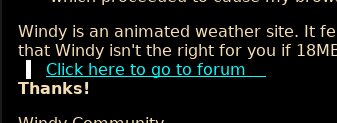
(i.e., I can only click before "here", as I am using TAB navigation, not the mouse.)
P.S., for a button perhaps just try HTML <button>.
jidanni
on 16 May 2019
Related issues
 AliCihan
·
4Comments
AliCihan
·
4Comments
 sandratatarevicova
·
3Comments
sandratatarevicova
·
3Comments
 BenLubar
·
3Comments
BenLubar
·
3Comments
 djensen47
·
5Comments
julianlam
·
4Comments
djensen47
·
5Comments
julianlam
·
4Comments