Node-red-contrib-homekit-bridged: [Feature Request] Have the abbility to add linkedservices
It would be nice to be able to add linked services... for example add a BatteryService to another serivce.
 sjorge
All 44 comments
Good idea!
 Shaquu
on 24 Feb 2019
Shaquu
on 24 Feb 2019
I think once the TV support lands in iOS 13 this will also be required to construct those more complex Services as the InputService and such are also added as linked services if I am not mistaken.
sjorge
on 24 Feb 2019
Update. I am currently working on it as it solves so many questions...
I am very grateful you opened this :)
Shaquu
on 27 Feb 2019
Another update.
I am very close to finish this feature.
Gonna need a day or two since I have to be at home to test my code.
Shaquu
on 3 Mar 2019
Linked services landed on dev branch.
Please test it.
Shaquu
on 6 Mar 2019
What would be the easiest way to install the dev branch?
sjorge
on 6 Mar 2019
I think I figured it out
npm install --unsafe https://github.com/oliverrahner/node-red-contrib-homekit-bridged.git#dev
I'll have a bit of time this weekend to look at this! I'm excited!
sjorge
on 6 Mar 2019
Another way:
1- stop node-red
2- navigate to wherever your node_modules live - for me on a pi this is ~/.node-red/node_modules/
3- delete the folder node-red-contrib-homekit-bridged
4- run:
git clone -b dev https://github.com/oliverrahner/node-red-contrib-homekit-bridged.git
5- restart node-red
Note I also found it necessary to run:
sudo apt-get install libavahi-compat-libdnssd-dev
 crxporter
on 6 Mar 2019
crxporter
on 6 Mar 2019
Some initial feedback:
- Master Service sounds a bit weird, maybe call it 'Parent service' ?
- Can we sort the entries under Master Service by flow and maybe use a different format? e.g. 'Service Name (Flow)'
- Maybe this can just be merged with the regular service? Were the 'Master/Parent Service' property can be left blank?
Here is working test flow I created, everything seems to be working perfectly!
[{"id":"f511876f.bafce8","type":"homekit-service","z":"84119c5a.51863","bridge":"2a07cbcc.69b214","name":"Test Switch","serviceName":"Switch","topic":"","filter":false,"manufacturer":"Default Manufacturer","model":"Default Model","serialNo":"Default Serial Number","characteristicProperties":"{\n \"On\": 0\n}","x":290,"y":200,"wires":[[]]},{"id":"3b7c0487.a2111c","type":"inject","z":"84119c5a.51863","name":"On","topic":"","payload":"{\"On\": true}","payloadType":"json","repeat":"","crontab":"","once":false,"onceDelay":0.1,"x":110,"y":180,"wires":[["f511876f.bafce8"]]},{"id":"5b40a3a7.c2f734","type":"inject","z":"84119c5a.51863","name":"Off","topic":"","payload":"{\"On\": false}","payloadType":"json","repeat":"","crontab":"","once":false,"onceDelay":0.1,"x":110,"y":220,"wires":[["f511876f.bafce8"]]},{"id":"a3aa5c9f.8150d","type":"homekit-linked-service","z":"84119c5a.51863","masterService":"f511876f.bafce8","name":"Test Switch Battery","serviceName":"BatteryService","topic":"","filter":false,"manufacturer":"Default Manufacturer","model":"Default Model","serialNo":"Default Serial Number","characteristicProperties":"{\n \"BatteryLevel\": 100,\n \"StatusLowBattery\": 0\n}","x":310,"y":400,"wires":[[]]},{"id":"778b314a.9dae28","type":"inject","z":"84119c5a.51863","name":"100%","topic":"","payload":"{\"BatteryLevel\": 100, \"StatusLowBattery\": 0}","payloadType":"json","repeat":"","crontab":"","once":false,"onceDelay":0.1,"x":110,"y":340,"wires":[["a3aa5c9f.8150d"]]},{"id":"ca689637.b987d8","type":"inject","z":"84119c5a.51863","name":"25%","topic":"","payload":"{\"BatteryLevel\": 25, \"StatusLowBattery\": 0}","payloadType":"json","repeat":"","crontab":"","once":false,"onceDelay":0.1,"x":110,"y":380,"wires":[["a3aa5c9f.8150d"]]},{"id":"f7a8cb56.f7b1c","type":"inject","z":"84119c5a.51863","name":"10%","topic":"","payload":"{\"BatteryLevel\": 10, \"StatusLowBattery\": 1}","payloadType":"json","repeat":"","crontab":"","once":false,"onceDelay":0.1,"x":110,"y":420,"wires":[["a3aa5c9f.8150d"]]},{"id":"111c479a.8f5558","type":"inject","z":"84119c5a.51863","name":"0%","topic":"","payload":"{\"BatteryLevel\": 0, \"StatusLowBattery\": 1}","payloadType":"json","repeat":"","crontab":"","once":false,"onceDelay":0.1,"x":110,"y":460,"wires":[["a3aa5c9f.8150d"]]},{"id":"2a07cbcc.69b214","type":"homekit-bridge","z":0,"bridgeName":"mybridge","pinCode":"123-71-242","port":"","allowInsecureRequest":false,"manufacturer":"Acheron Systems","model":"ZWHKB","serialNo":"NR1987"}]
This adds a little test switch, that can be turned on/off and have a battery level configured at 100%, 25%, 10% (battery low) and 0% (battery low).
I tested this on my iOS 12 iphone 7 and home.app on a recent macOS. Here is a little demo video!
I'm so excited to update all my flows this weekend as I am also switching away from openhab to zwave2mqtt!
sjorge
on 6 Mar 2019
@sjorge
- I studied Mechatronics and Telecommunications where we use Master-Slave term a lot of times and it was obvious for me to use it this time too. Actually if you look at rasspberryPi or Arduino docs and talks you gonna see it's used there aswell. And I know it's not politically correct and indeed I have planned to change it to Parent-Child - I have no problem with that.
Anyway thanks for reminding me as I forget to change this one. - Gonna add it too.
- It's an interesting idea. I was thinking about making it this way but was not sure if it's correct. Can somebody else comment on that? @crxporter @radokristof
Thanks for an example flow! Is it a bug that "Master Service" value is not exported? Hmm.
If you have time you could help documenting stuff with some examples (including this new feature). More at wiki and #50
PS. Great to see that batteries work!
Shaquu
on 6 Mar 2019
Oh, now I get the idea, what this linked services are.. It would be great that you can link any other service into a HomeKit Item. However I don't know how it will interfere with the current Characteristics (like lots of device type has pre-defined characteristics). Anyway, in my opinion if we can add this to support all kind of device type and just be an optional field when creating a new Parent Service, that would be great.
 radokristof
on 6 Mar 2019
radokristof
on 6 Mar 2019
The thing is that I didn't want to have a mess in a flow.
You know to not make it A be parent of B. B of C. And C of A.
What is funny is that Apple allow this...
2.3.2.5 Linked Service
Linked services allows accessories to specify logical relationship between services. A service can link to one or more services. A service must not link to itself. Service links have context and meaning only to the first level of services that it links to. For example if Service A links to Service B, and service B links to Service C, this does not imply any relation between Service A to Service C. If Service A also relates to Service C then Service A's linked services must include both Service B and Service C. Linked services allows applications to display logically grouped accessory controls in the UI.
What will happen if we have to same Services on Accessory? Example to Battery Services?
Shaquu
on 6 Mar 2019
Regarding question 3-
The linked services gets a little interesting. Take for example an irrigation system that takes a collection of valves. Sure works great. But we can also have a stand alone valve. The user will need to know what they’re doing to distinguish whether they have a linked service or another item.
It seems like having the default “linked service” item be something like “stand alone accessory” or “no parent” would work just fine.
The user may have to take care at this point to be sure both the parent and child are using the same homekit bridge which is currently auto selected in the slave node... that’s a point in favor of having 2 different nodes.
Most services only work as parent OR slave. Valve is the only i can think of with overlap - and I don’t think anyone plans to add a stand alone battery! I think either is fine, once it’s in the main branch I’ll get to adding examples on the wiki.
crxporter
on 6 Mar 2019
Thanks for an example flow! Is it a bug that "Master Service" value is not exported? Hmm.
I think this is a bug in node-red? It is set correctly when I look at the flow before exporting.
It might indeed be better to keep this as a separate service as @crxporter says, most service will only work as a normal one or as a linked one, a unlinked Battery Service doesn't seem to do anything inside home.app. Perhaps we should limit the types we can chose on each though, to not confuse the users.
There are a few more that can do both, you can link a fan to a thermostat for example to create an AC device. You can check HAP-nodejs examples for one of those. https://github.com/KhaosT/HAP-NodeJS/blob/9eaea6df40811ccc71664a1ab0c13736e759dac7/accessories/AirConditioner_accessory.js
But to be honest, I'm just going to use them for the batteries... and once TV support gets release to add inputserivces.
sjorge
on 6 Mar 2019
@sjorge I'm gonna try to merge it smartly ;) We gonna see if it's good.
Shaquu
on 6 Mar 2019
To everyone here. New version can brake last dev version. Linked service got merged to main node.
Please delete linked services before switching to new version.
What is done:
- Renamed Master to Parent
- Changed Parent Service list values look. Added some protection.
- Merged Linked Service node to Service node. Now you have to select if you would like to configure Parent or Linked Service.
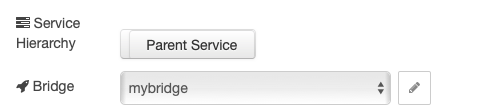
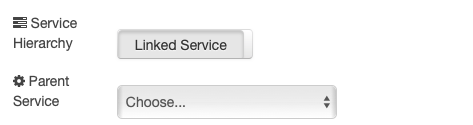
Of course I would be very grateful if you test it ASAP :)
Shaquu
on 7 Mar 2019
Still works, here is an update flow export:
[{"id":"1e87d10e.1b39ff","type":"homekit-service","z":"84119c5a.51863","isParent":true,"bridge":"2a07cbcc.69b214","parentService":"","name":"Test Switch","serviceName":"Switch","topic":"","filter":false,"manufacturer":"Default Manufacturer","model":"Default Model","serialNo":"Default Serial Number","characteristicProperties":"{\n \"On\": 0\n}","x":310,"y":260,"wires":[[]]},{"id":"a157f5aa.3bd868","type":"inject","z":"84119c5a.51863","name":"On","topic":"","payload":"{\"On\": true}","payloadType":"json","repeat":"","crontab":"","once":false,"onceDelay":0.1,"x":130,"y":240,"wires":[["1e87d10e.1b39ff"]]},{"id":"fcdd5a17.9582c8","type":"inject","z":"84119c5a.51863","name":"Off","topic":"","payload":"{\"On\": false}","payloadType":"json","repeat":"","crontab":"","once":false,"onceDelay":0.1,"x":130,"y":280,"wires":[["1e87d10e.1b39ff"]]},{"id":"4991f83e.6c9838","type":"inject","z":"84119c5a.51863","name":"100%","topic":"","payload":"{\"BatteryLevel\": 100, \"StatusLowBattery\": 0}","payloadType":"json","repeat":"","crontab":"","once":false,"onceDelay":0.1,"x":130,"y":400,"wires":[["e665a3d8.1e7d7"]]},{"id":"1bff107c.d65ae8","type":"inject","z":"84119c5a.51863","name":"25%","topic":"","payload":"{\"BatteryLevel\": 25, \"StatusLowBattery\": 0}","payloadType":"json","repeat":"","crontab":"","once":false,"onceDelay":0.1,"x":130,"y":440,"wires":[["e665a3d8.1e7d7"]]},{"id":"f450d1fb.214f","type":"inject","z":"84119c5a.51863","name":"10%","topic":"","payload":"{\"BatteryLevel\": 10, \"StatusLowBattery\": 1}","payloadType":"json","repeat":"","crontab":"","once":false,"onceDelay":0.1,"x":130,"y":480,"wires":[["e665a3d8.1e7d7"]]},{"id":"9942c66d.b8fa18","type":"inject","z":"84119c5a.51863","name":"0%","topic":"","payload":"{\"BatteryLevel\": 0, \"StatusLowBattery\": 1}","payloadType":"json","repeat":"","crontab":"","once":false,"onceDelay":0.1,"x":130,"y":520,"wires":[["e665a3d8.1e7d7"]]},{"id":"e665a3d8.1e7d7","type":"homekit-service","z":"84119c5a.51863","isParent":false,"bridge":"2a07cbcc.69b214","parentService":"1e87d10e.1b39ff","name":"Test Switch Battery","serviceName":"BatteryService","topic":"","filter":false,"manufacturer":"Default Manufacturer","model":"Default Model","serialNo":"Default Serial Number","characteristicProperties":"{\n \"BatteryLevel\": 0, \n \"StatusLowBattery\": 1\n}","x":330,"y":460,"wires":[[]]},{"id":"2a07cbcc.69b214","type":"homekit-bridge","z":0,"bridgeName":"amethyst","pinCode":"123-00-321","port":"","allowInsecureRequest":false,"manufacturer":"Acheron Systems","model":"ZWHKB","serialNo":"NR1987"}]
I did notice that I had to go to all my current service and toggle them from Parent -> Linked and back to Parent before they would show up in the list of available services for a linked service.
Also maybe change the Service Hierarchy to a dropdown?
sjorge
on 7 Mar 2019
@sjorge thanks for comment.
1.Will fix this issue.
- And I will make it a dropdown after work.
Shaquu
on 7 Mar 2019
@sjorge thanks for comment.
1.Will fix this issue.
- And I will make it a dropdown after work.
Awesome!
sjorge
on 7 Mar 2019
landed on dev branch
@sjorge please test changes (1 and 2).
Shaquu
on 7 Mar 2019
With linked services, can I assign the AirQualitySensor and FilterMaintenance (this one is not working though) to my AirPurifier device?
radokristof
on 7 Mar 2019
According to docs:
This service describes an air purifier. An air purifier accessory can have additional linked services such as:
- Filter Maintenance (page 234) service(s) to describe one or more air filters.
- Air Quality Sensor (page 220) services to describe air quality sensors.
- Fan v2 (page 233) service to describe a fan which can be independently controlled
- Slat (page 233) service to control vents
So you should be able to do that if Apple did not change it... I think they did not (I hope?).
Shaquu
on 7 Mar 2019
When you link Service to Parent Service then sometime it does not appear in Home.app.
But it can appear on Parent Service settings.
I thing it is this case ;)
I have "filter status: good" in my Air Purifier settings.
Shaquu
on 7 Mar 2019
Yes, some data only seen in the setting page (usually string like data is only seen on the device itself).
radokristof
on 7 Mar 2019
I will be trying to make time to add some information about linked services to the wiki this weekend. I should have time, are there any specific requests?
So far I’ll do:
-battery (already have an example above)
-irrigation system (I’ve tried this already)
-filter to air purifier (since purifier is done and @radokristof requested adding a filter)
These will be either new pages (battery, irrigation) or added as another example on the air purifier page.
crxporter
on 7 Mar 2019
Thank you! However FilterMaintenance is seems not supported (I think...) when I last tried. It worked, no problems occured, but Home.app said that this accessory is not supported in this version or something like this, so it wouldn't show it's state...
radokristof
on 8 Mar 2019
Anyway AirPurifier works great (almost)! I have a little bug in the openhab binding which updates the switch to ON/OFF a few times after triggering it, so that's why it is changing state in Home.app weirdly...
radokristof
on 8 Mar 2019
See #56 for more discussion on air purifier and filter maintenance.
crxporter
on 8 Mar 2019
@sjorge please test changes (1 and 2).
All working perfectly!
sjorge
on 8 Mar 2019
Linked services work great! I like the setup process - good comments on that @sjorge
It's interesting to link "incompatible" services. They just show up on their own instead of a child item.
I tried adding temperature service to a valve (like for a shower?) and homekit shows two items - the valve and the shower. Both fully functional.
crxporter
on 8 Mar 2019
Tried that too, i noticed something interesting though. If you have a temp and battery linked to something (motion in my case) the low battery seems to apply to both. Not sure that is an iOS home bug or not.
I need to replicate it again when I have a bit more time.
~ sjorge
On 8 Mar 2019, at 17:29, crxporter notifications@github.com wrote:
Linked services work great! I like the setup process - good comments on that @sjorge
It's interesting to link "incompatible" services. They just show up on their own instead of a child item.
I tried adding temperature service to a valve (like for a shower?) and homekit shows two items - the valve and the shower. Both fully functional.
—
You are receiving this because you were mentioned.
Reply to this email directly, view it on GitHub, or mute the thread.
sjorge
on 8 Mar 2019
I would guess it has to do with the ever-persistent "This accessory is not certified"
We can obviously do some screw configurations and set things up "wrong" - causing unexpected and unplanned results.
The low battery thing would be interesting - what if you have an esp8266 based motion sensor that is also a temperature, humidity, air particle, whatever sensor? And it runs on battery! You could make the motion be the parent and have all of the others be linked child services and presumably only need one battery node? But ALL of the items would show low battery together?
crxporter
on 8 Mar 2019
Yeah, I have an Aeotec MutliSensor 6 and I want to try that setup again, initial quick test showed the odd behavior. Just need to confirm it later this weekend (hopefully).
~ sjorge
On 8 Mar 2019, at 17:35, crxporter notifications@github.com wrote:
I would guess it has to do with the ever-persistent "This accessory is not certified"
We can obviously do some screw configurations and set things up "wrong" - causing unexpected and unplanned results.
The low battery thing would be interesting - what if you have an esp8266 based motion sensor that is also a temperature, humidity, air particle, whatever sensor? And it runs on battery! You could make the motion be the parent and have all of the others be linked child services and presumably only need one battery node? But ALL of the items would show low battery together?
—
You are receiving this because you were mentioned.
Reply to this email directly, view it on GitHub, or mute the thread.
sjorge
on 8 Mar 2019
Some fun things i noticed, I export my Aeotec MS6 as a Motion service with a linked temperature service that also has the light and humidy properties set... If I move the motion to a new room in homekit, the temperature sensor now follows. Which is nice!
I switched to zwave2mqtt so I do not have a battery service atm as that property is currently not coming in over mqtt :(
sjorge
on 10 Mar 2019
Yes, I think linked services should follow their Parent Accessory :) It's cool!
Does anyone have something more to add in this Issue? I would like to close it.
Shaquu
on 11 Mar 2019
It's working great as it is now on the dev branch, so I will close it! On to the next awesome update/feature!
sjorge
on 11 Mar 2019
Yes, I think linked services should follow their Parent Accessory
Just another interesting thing here - this is how native homekit accessories work.
For example ecobee room sensor will show temperature, motion, and occupancy. If you change room for one, the others follow.
It's really cool to see this plugin having so many features that are the same as the "real stuff"!
crxporter
on 12 Mar 2019
I occasionally get
"Error: Parent Node not assigned
When this happens the parent node shows as 'No Reponse' in homekit.
sjorge
on 14 Mar 2019
I occasionally get
"Error: Parent Node not assigned
When this happens the parent node shows as 'No Reponse' in homekit.
Edit: This seems to happen on a full deploy only
sjorge
on 14 Mar 2019
There are two options:
- Parent Service not assigned
- race between Parent and Linked nodes, and second one is starting as first...
Shaquu
on 14 Mar 2019
To reproduce:
- Add ServiceA (e.g. batteryservice), type = Parent
- Add ServiceB (e.g. MotionSensor), type = Parent
- Update ServiceA, type = linked, parent = ServiceB
- Full Deploy
I think node are deployed in the order they are added to the flow. So in this case ServiceA the linked service is started before ServiceB the parent service. And thus fails.
I was only experiencing this with one service as I made my temperature sensor a linked service of my motion one. As they are the same physical device so it is nice if the temperature follows the motion one around if I move it to the correct room.
Originally i created the temperature service before the motion service. I assume eventually people will run into this too.
e.g. create a batteryservice then move it to a new parents later.
sjorge
on 14 Mar 2019
@sjorge fixed on dev. Please test it ASAP!
Shaquu
on 14 Mar 2019
Fixed! 👍
sjorge
on 15 Mar 2019
Closing again. I hope didn't break by fixing...
Shaquu
on 15 Mar 2019
Related issues
 a2sky
·
7Comments
a2sky
·
7Comments
 djiwondee
·
11Comments
djiwondee
·
11Comments
 Kowy54
·
3Comments
Kowy54
·
3Comments
 Supergiovane
·
9Comments
Supergiovane
·
9Comments
 Delphius7
·
5Comments
Delphius7
·
5Comments
Most helpful comment
Update. I am currently working on it as it solves so many questions...
I am very grateful you opened this :)