Node-red-contrib-homekit-bridged: [FEATURE] Camera Service
Based on #15, try to think of a generic way to add camera functionality to this project.
Todos would be:
- add a new node type, because Cameras can't (or shouldn't) be hosted behind bridged accessories
- find out which abstract functionality has to be provided by the node
 oliverrahner
All 170 comments
If anyone wonder about it.
I am planning to add Camera support in release 0.6
There will be a new node but I am not sure yet if this should be attachable to existing Services/Accesoriess or we should really create a new Accessory for Camera only.
 Shaquu
on 3 Mar 2019
Shaquu
on 3 Mar 2019
@Shaquu, very nice to see some activity again on this repo 👍🏽
 RaymondMouthaan
on 3 Mar 2019
RaymondMouthaan
on 3 Mar 2019
This addition would be great! - Thanks for the update!
 TristanMW
on 4 Mar 2019
TristanMW
on 4 Mar 2019
Camera support will not come to 0.6.0
But 0.6.0 adds a lot required stuff for Camera implementation. I think that Camera will appear in 0.7.0.
Shaquu
on 11 Mar 2019
I'm also considering adding some cameras to my home setup.
What is missing right now to implement Camera Service? As I know, it only supports RTSP streams?
 radokristof
on 12 Mar 2019
radokristof
on 12 Mar 2019
Time :)
And I assume yes. Only RTSP is supported directly.
Shaquu
on 12 Mar 2019
@Shaquu, you probably have seen this https://github.com/KhaosT/homebridge-camera-ffmpeg project, but in case you haven't, it might be useful to you.
RaymondMouthaan
on 12 Mar 2019
The functional but not full featured one I’m using on a pi zero is https://github.com/moritzmhmk/homebridge-camera-rpi
 crxporter
on 12 Mar 2019
crxporter
on 12 Mar 2019
@crxporter, I am not (yet) a camera user and I am very curious about how it looks on the Home App and or Eve App. Could you share some screenshots? 😃
RaymondMouthaan
on 12 Mar 2019
This is how it looks right now - but the fun part is in the smart notifications. For example if I turn on homekit notifications for my motion detector when there is a camera and a door lock in the room then my "motion detected" alert is a view of the room with 2 buttons: one to turn on the room lights and one to unlock the door.
The 3rd screenshot is not from me but looks the same if I turn on the feature - however my buttons are "turn on lights" and "unlock door"


crxporter
on 12 Mar 2019
@crxporter, awesome! thanks for the screenshots and use-case :+1: , any recommendations for a good quality camera? I might consider buying one to play around :-)
RaymondMouthaan
on 12 Mar 2019
I’m running on a pi zero w with the official pi camera! Works great I just stuck it on the wall with two sided tape.
crxporter
on 12 Mar 2019
Is it possible to stream RTSP from computer?
If yes then please tell me how. If not the I will code blindly :)
Shaquu
on 12 Mar 2019
IIRC VLC should be able to stream a file, see https://support.spinetix.com/wiki/Tutorial:Streaming_using_VLC HTH
 matthub
on 12 Mar 2019
matthub
on 12 Mar 2019
I have managed to find a way to get snapshots of my camera and display them on the node-red Dashboard (Made for Android Users haha)
Here is the flow:


(Snapshot is saved into the tmp folder which gets overwritten every 2 minutes)
I use the saved snapshots to send them to telegram when motion is detected while homekit alarm is active
I was wondering if maybe you can integrate the camera service to display the snapshots instead of trying to stream the camera feed on the favourites page in the homekit app?

TristanMW
on 21 Mar 2019
The HomeKit protocol supports both snapshots and streamed video. There are homebridge programs out there that are capable of using this. The iPhone/iPad/etc will show the most recent snapshot in while connecting to the stream.
Yours is the first example I’ve seen using pictures files in node red.
Hopefully the devs find a winning setup! (though my wallet has other opinions, I don’t really have the spare cash to outfit my house with cameras!)
crxporter
on 21 Mar 2019
Prototype: https://i.imgur.com/rtDI1qF.mp4 (swipe to the bottom if video is outside of screen bounds).
@crxporter you said that you are using api currently? Can you share your configuration? (those for stream for example -re etc. my current is -rtsp_transport tcp -i rtsp://192.168.0.227:8554/unicast)
Shaquu
on 2 Apr 2019
I'm running this
crxporter
on 2 Apr 2019
@crxporter, no issues like this?
RaymondMouthaan
on 3 Apr 2019
@RaymondMouthaan :
Just tested with varying results:
Works on iPhone XS with newest release software (12.2)
Works on MacBook running newest release (10.14.4)
Does not work (I have the snapshot-only issue) on iPad running iOS beta 12.2
I'm updating the beta to the release version now, I don't use the iPad much... I'll update here in a few minutes.
Update complete - iPad still won't pull up live video.
crxporter
on 3 Apr 2019
@crxporter That's odd, I've the same issue with my iPhone X, still image works but live stream doesn't. While my good old iPad Air does the job well. I haven't test it on Mojave tho.
RaymondMouthaan
on 4 Apr 2019
@RaymondMouthaan it looks like it's an issue with ios beta - so nothing unusual.
Shaquu
on 5 Apr 2019
@Shaquu, I don't think it's a beta issue, because both of my devices run IOS 12.2 final...
RaymondMouthaan
on 5 Apr 2019
It seems this bug is only present in devices that have at one point run the beta?
Is that true with your devices? My only “broken” one is the only one that ever ran a beta.
crxporter
on 5 Apr 2019
@crxporter as far as I remember, I never installed an beta on my iPhone X, but I did on an iPhone 6s which I had before ..
RaymondMouthaan
on 5 Apr 2019
Interesting. I think best is to leave the issue for the other project to work out.
I’ll be more interested to get the node red camera abilities working... we’ve got the teaser from @shaquu, just need a test release!
crxporter
on 6 Apr 2019
Dear friends! Camera not working yet?
 freenetwork
on 8 Apr 2019
freenetwork
on 8 Apr 2019
@freenetwork Not as yet, Shaquu is working on the next update (0.7.0) which will hopefully have the camera integration. A lot of progress has been made though so keep an eye on this
TristanMW
on 8 Apr 2019
@RaymondMouthaan @crxporter and others.
RTSP Camera landed on feature/camera branch.
It is based on homebridge-camera-ffmpeg and you can find some help regarding configuration here.
Please consider that it is work in progress.
You should be able to install it using (remember to navigate to your node-red location first!)
cd ~/.node-red/
npm install --save https://github.com/NRCHKB/node-red-contrib-homekit-bridged/tarball/feature/camera
To run node-red in debug mode (Camera aswell) run:
DEBUG=NRCHKB,NRCHKB_Camera node-red
Remember to backup your current node-red nodes as this release is unstable or test in different environment then production (recommended).
All features and options are subject to change.
node-red node HERE
[
{
"id": "118f3869.0f78b8",
"type": "tab",
"label": "Flow 1",
"disabled": false,
"info": ""
},
{
"id": "b29455f1.a9353",
"type": "homekit-service",
"z": "118f3869.0f78b8",
"isParent": true,
"bridge": "1e9e915f.22faaf",
"parentService": "",
"name": "Pi Camera",
"serviceName": "CameraControl",
"topic": "",
"filter": false,
"manufacturer": "Raspberry",
"model": "Pi Zero",
"serialNo": "0",
"cameraConfigVideoProcessor": "ffmpeg",
"cameraConfigSource": "-re -i rtsp://192.168.0.227:8554/unicast",
"cameraConfigStillImageSource": "",
"cameraConfigMaxStreams": 2,
"cameraConfigMaxWidth": 1280,
"cameraConfigMaxHeight": 720,
"cameraConfigMaxFPS": 10,
"cameraConfigMaxBitrate": 300,
"cameraConfigVideoCodec": "libx264",
"cameraConfigAudioCodec": "libfdk_aac",
"cameraConfigAudio": false,
"cameraConfigPacketSize": 1316,
"cameraConfigVerticalFlip": false,
"cameraConfigHorizontalFlip": false,
"cameraConfigMapVideo": "0:0",
"cameraConfigMapAudio": "0:1",
"cameraConfigVideoFilter": "scale=1280:720",
"cameraConfigAdditionalCommandLine": "-tune zerolatency",
"cameraConfigDebug": false,
"characteristicProperties": "{}",
"x": 530,
"y": 300,
"wires": [
[]
]
},
{
"id": "1e9e915f.22faaf",
"type": "homekit-bridge",
"z": "",
"bridgeName": "Bridge",
"pinCode": "153-98-123",
"port": "",
"allowInsecureRequest": false,
"manufacturer": "Apple",
"model": "Mac OS",
"serialNo": "1"
}
]

Shaquu
on 20 Jun 2019
Thanks @Shaquu for your work again, happy to be back!
However I don't have any cameras to try yet... but this looks really cool for me!
radokristof
on 20 Jun 2019
Here is example RTSP stream you could use for tests:
rtsp://184.72.239.149/vod/mp4:BigBuckBunny_175k.mov
It's from https://www.wowza.com/demo/rtsp. It's 10 minutes animated clip.
EDIT: This video above fails for me in Home.app.
Anyway using FFmpeg I think you could stream image or video file... I think?
Shaquu
on 21 Jun 2019
Yes I think I made something similar a few years back with ffmpeg. However this stream looks good for testing. I will try out and test it in my case - hope I can add some real cameras soon.
radokristof
on 21 Jun 2019
Well now I know my weekend plans!
If anyone has any pointers on getting this running with a pi zero camera I’d be happy to hear.
Edit - I see that @shaquu likely made his example with a pi zero. I’m off to build mine.
crxporter
on 21 Jun 2019
I have camera on pi0 but node-red is on Mac. So I use SRTP stream.
But to use camera from the same device you can try this:
Here is how to install FFmpeg on raspberry.
https://github.com/KhaosT/homebridge-camera-ffmpeg/wiki/Raspberry-PI
And here is an example for configuration for camera.
https://github.com/KhaosT/homebridge-camera-ffmpeg/wiki/Tested-Configurations#raspberry-pi-zero-w--jessie--and-official-camera-module-v2
So instead of setting source to some RTSP stream you do this:
"source": "-re -f video4linux2 -i /dev/video0"
Shaquu
on 21 Jun 2019
Great news that this is being worked on, maybe some of the below info will help?
There's a good node red/rtsp guide on youtube I'm planning to watch in more detail:
https://youtu.be/ihZWrJmbGFY
I'm using the Neos Smartcam which are extremely cheap from Amazon and can very easily be made to support RTSP by using the Dafang firmware:
https://ryanfitton.co.uk/blog/install-dafang-custom-firmware-to-neos-smartcam/
It already seems to have Homebridge compatibility, but being honest I don't understand how it all works yet:
https://github.com/EliasKotlyar/Xiaomi-Dafang-Hacks/blob/master/README.md
I'm happy to test anything, in the meantime I will be reading more :)
My setup:
Ras Pi 3 running node red, mosquitto mqtt broker
Neos Smartcam running Dafang cfw (rtsp streaming)
 877dev
on 21 Jun 2019
877dev
on 21 Jun 2019
I followed the instructions that @Shaquu sent and only hit one problem. When you run the npm install --save... line, make sure you have your node-red folder open.
I had to first navigate to ~/.node-red/ on my pi. Didn't slow me down much, but others might not be so familiar. Too bad I finished the install over VPN and I can't add items to the home app over vpn :(
crxporter
on 21 Jun 2019
@877dev your profile picture just reminded me the camera I've been considering to try out - the esp32! Should be able to run an rtsp stream...
crxporter
on 21 Jun 2019
Yes this is really confusing in npm. I have used npm in other apps and I also saw that you can execute the commands everywhere but it will always use the current folder...
Sent from my iPhone
On 2019. Jun 21., at 14:15, crxporter notifications@github.com wrote:
I followed the instructions that @Shaquu sent and only hit one problem. When you run the npm install --save... line, make sure you have your node-red folder open.
I had to first navigate to ~/.node-red/ on my pi. Didn't slow me down much, but others might not be so familiar. Too bad I finished the install over VPN and I can't add items to the home app over vpn :(
—
You are receiving this because you commented.
Reply to this email directly, view it on GitHub, or mute the thread.
radokristof
on 21 Jun 2019
Anyone wanting to try this out with us but don't want to spend a lot of money?
Should work great with the $10 webcam!
...I'm off to order one to swap out my current esp8266 in the garage...
crxporter
on 21 Jun 2019
@crxporter I just got a couple of esp32's, I will have to get them cameras now :) I mostly used esp8266's.
Also, I also in the past made this mistake of installing to the wrong directory, I sometimes wonder where did those files end up and are they happy :) Seriously though maybe I should clean them up, I have a "package-lock.json" file and "node-modules" folder in my home/pi folder which I think should not be there!
877dev
on 21 Jun 2019
Sorry for bad instruction, sometimes I forget to focus on most important and I loose time on the least important :) I have fixed it in my original post.
I have spent too much time on gif render (download iMovie, remove some frames, convert video to gif, crop it and cut again...) Will try to make it better next time!
End of offtop.
I am really waiting for someone to implement this feature on real environment.
Any feedback is very valuable - from functional working to the visual or description of the field.
And one reminder as it is very important - make backup of your work and remember that anything here can be changed so don't get used to it.
When we finish entry phase of this feature I will need you guys to merge some KhaosT wiki pages to our wiki (with credits of course).
Shaquu
on 21 Jun 2019
The camera setup should look like this:

crxporter
on 21 Jun 2019
DAMN!
Edit: Website cache was the answer, thanks!
TristanMW
on 21 Jun 2019
This can be a problem with website cache.
After you install new version of _NRCHKB_ remember to refresh whole website
(instead of clicking Try again in _node-red_ UI).
Or if not working then try to clean browser cache.
Shaquu
on 21 Jun 2019
Alright I've just got my camera working on my pi zero w.
For reference: pi zero w running a NoIR "official" pi camera.
1- installed a fresh raspbian and node-red on the pi.
2- installed FFmpeg instructions here, took FOREVER to build on the pi zero
3- navigate to ~/.node-red/ and installed the new branch with npm
4- set up item as my screenshot a couple comments up
Some comments:
I think this is faster to connect than my previous camera (used hap camera rpi)
I'm not sure if the still images are working, I'll need to investigate.
And the obligatory screenshots so everyone knows I'm not lying (I'm not fancy with gifs like @Shaquu)


crxporter
on 21 Jun 2019
@crxporter cool dining room! I hope all lights are running on NRCHKB already :D
Anyway, thanks for trying this. It is really helpfull to see it.
I think it really depends on camera and connection and all setup including libraries (and even configure options used during ffmpeg compile).
And it is slower first time you connect to camera in node-red session (until restart) I think.
Please share your node form node-red (take pretty version and paste it with /details/summary/ tags like said here - I used it in README on feature/camera for reference) so other can benefit form your configuration better.
One thing to check. How many devices you can connect and try to view camera result (we have maxStreams value but what if we try to beat it?).
After hour or something will camera be still connected to NRCHKB? (hour idle connection)
About snapshots. I have a feeling it doesn't work the way we think or it works bad in my implementation (for now).
I am pretty sure that snapshot is last frame from video (in my case where stillImageSource is empty so Camera take snapshot from source itself). It would be cool if snapshot would be refreshed from time (new feature to add) to time or at least when we open Home.app it should be refreshed (maybe it does?).
Shaquu
on 21 Jun 2019
all lights are running on NRCHKB already
How else would anyone turn on/off the lights in their house? If you look REALLY close you can make out the little esp01 controlling the LED strip under the cabinet.
Multiple devices: I can only get one streaming. It's also a VERY low frame rate. Might need to bump up my bitrate or something...
After 30 minutes it's still connected without issue. I will check back throughout the day.
As for snapshots - it can just be a link to a jpg file, right? We can just link it to ANY jpg and test...
crxporter
on 21 Jun 2019
My node-red item:
[

    {

        "id": "457f5ce0.aa5a54",

        "type": "homekit-service",

        "z": "5c556f09.930f38",

        "isParent": true,

        "bridge": "d7cf985.0803ee8",

        "parentService": "",

        "name": "Camera",

        "serviceName": "CameraControl",

        "topic": "",

        "filter": false,

        "manufacturer": "Default Manufacturer",

        "model": "Default Model",

        "serialNo": "Default Serial Number",

        "cameraConfigVideoProcessor": "ffmpeg",

        "cameraConfigSource": "-re -f video4linux2 -i /dev/video0",

        "cameraConfigStillImageSource": "-re -f video4linux2 -ss 0.9 -i /dev/video0 -vframes 1",

        "cameraConfigMaxStreams": 2,

        "cameraConfigMaxWidth": "1920",

        "cameraConfigMaxHeight": "1080",

        "cameraConfigMaxFPS": "20",

        "cameraConfigMaxBitrate": "300",

        "cameraConfigVideoCodec": "h264_omx",

        "cameraConfigAudioCodec": "libfdk_aac",

        "cameraConfigAudio": false,

        "cameraConfigPacketSize": 1316,

        "cameraConfigVerticalFlip": false,

        "cameraConfigHorizontalFlip": false,

        "cameraConfigMapVideo": "0:0",

        "cameraConfigMapAudio": "0:1",

        "cameraConfigVideoFilter": "scale=1280:720",

        "cameraConfigAdditionalCommandLine": "-tune zerolatency",

        "cameraConfigDebug": false,

        "characteristicProperties": "{}",

        "x": 320,

        "y": 440,

        "wires": [

            []

        ]

    },

    {

        "id": "d7cf985.0803ee8",

        "type": "homekit-bridge",

        "z": "",

        "bridgeName": "Cams",

        "pinCode": "111-11-111",

        "port": "",

        "allowInsecureRequest": false,

        "manufacturer": "Default Manufacturer",

        "model": "Default Model",

        "serialNo": "Default Serial Number",

        "customMdnsConfig": false,

        "mdnsMulticast": true,

        "mdnsInterface": "",

        "mdnsPort": "",

        "mdnsIp": "",

        "mdnsTtl": "",

        "mdnsLoopback": true,

        "mdnsReuseAddr": true

    }

]
crxporter
on 21 Jun 2019
@Shaquu how do you do those little collapse arrows?
crxporter
on 21 Jun 2019
I am really looking for this esp01... :)
I have shortened your post by the way. It's longer to write and you have to remember how it goes but it's prettier:
<details>
  <summary>My node-red item:</summary>
  <pre><code>here would be the code</code></pre>
</details>
In my case I have noticed that framerate (bigger the worse) of the camera has performance impact on view fluency. You have many options here to tweak so that's a lot of fun
Regarding snapshots. I think yes. ffmpeg should accept images.
But I didn't make it to work with urls so maybe you need local file path?
Shaquu
on 21 Jun 2019
I've just changed the frame rate down to 15 - but now nobody is moving in the kitchen...
I copied the still image from the homebridge-camera-ffmpeg, I'm using -re -f video4linux2 -ss 0.9 -i /dev/video0 -vframes 1 but like I said - it's not working, I get "loading" where I used to get a still image. Of course I have NO IDEA what that points to, something on /dev/video0 but I don't know anything about that config.
For the esp01, here's a close up:
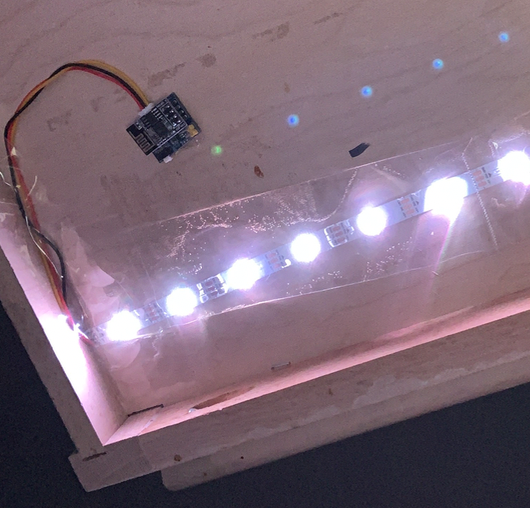
crxporter
on 21 Jun 2019
I wonder if the still image is for video doorbell? For when there is a doorbell linked so the rich notification can be sent to the home app.
I just tried it and it's not currently working. I can't get rich notifications to come through from this camera with a linked doorbell.
crxporter
on 21 Jun 2019
out of interest ... are the cameras listed in here the only cameras which would work currently?
I have a dahua which doesn't seem to be listed. So just wondering if I need to make a new plan
Non of the known rstp urls for Dahua are working
TristanMW
on 21 Jun 2019
I would say that it has to work, but maybe it implements the RTSP protocol little different - this is a common problem in lots of protocols...
radokristof
on 21 Jun 2019
@TristanMW these are tested configurations.
Read here to find out how to make it work for you.
@radokristof Exacly :) Protocol is made to not have situation like you just said.
If it's RTSP then it works the same everywhere.
@crxporter it looks like Video Doorbell will not work for now. Thanks for checking it!
You can't add CameraControl to (Video)Doorbell as Linked Service and Doorbell must be Parent according to docs.
For now we use CameraControl (always as a Parent and never can't be Linked) and it's managed via Camera class to generate Camera RTSP Stream Management Services itself. I will have to add the same option for Doorbell so it will behave the same as CameraControl.
You will be able to add these Services to CameraControl and VideoDoorbell(not ready yet):
- Microphone - to support audio (must be enabled in Camera config aswell)
- Speaker
- Camera RTSP Stream Management (is managed by Camera class so don't add it yourself please).
PS. Pretty setup :)
Shaquu
on 21 Jun 2019
@crxporter /dev/video0 is just video device and it's the path to device 0.
You can check all video devices like this:
ls -ltr /dev/video*
About stillImageSource it is used by _handleSnapshotRequest_ method so any preview should be sourced with this in my opinion. Maybe there is a problem with my code again?
It looks like handleSnapshotRequest should be fired here. So it's up to HomeKit what it asks for.
handleSnapshotRequest(request, callback(error, snapshot))
This method will be invoked when iOS device requests snapshot from the accessory. The request contains width and height of the requested snapshot. The callback is a function that expects error or snapshot image buffer.
Shaquu
on 21 Jun 2019
UPDATE. There will be a lot of changes to introduce Video Doorbell.
So hang on.
UPDATE2. All below in this message is wrong.
There will be a new Service type called Secondary.
Shaquu
on 21 Jun 2019
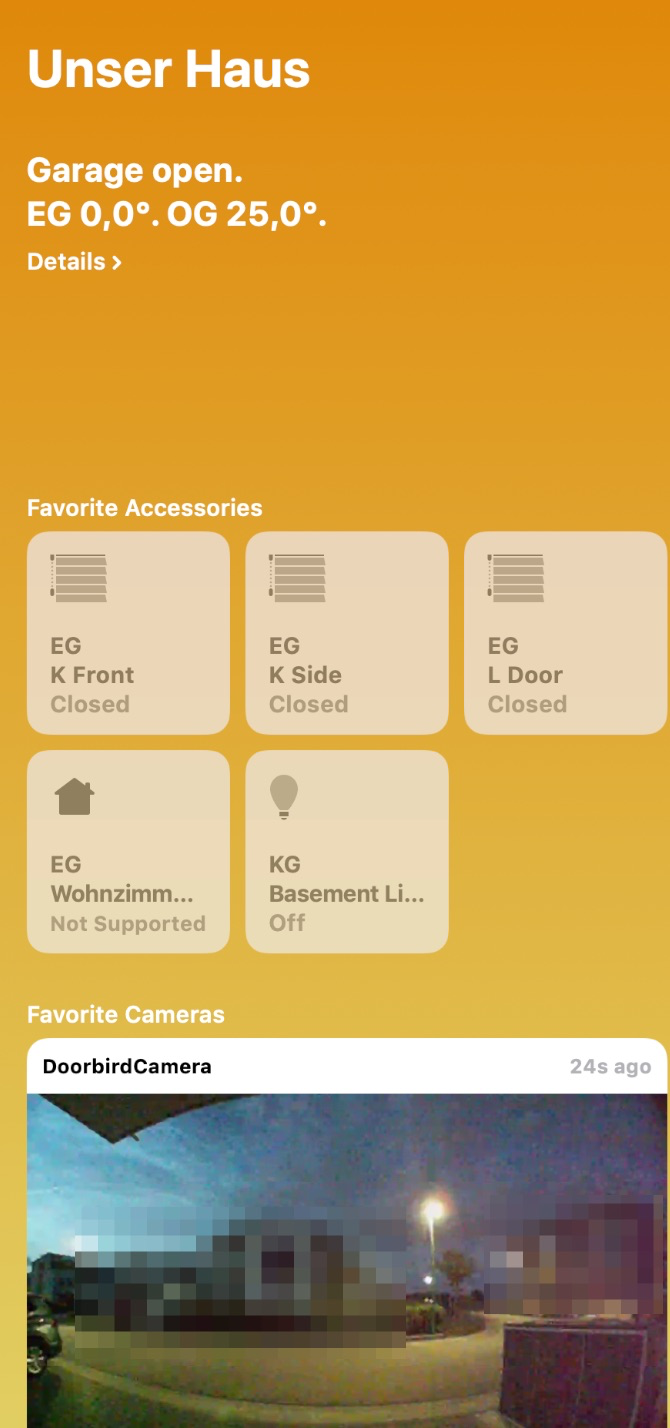
Great stuff, I've just added the relevant ffmpeg parameters from the homebridge-camera-ffmpeg wiki for my video doorbell camera and it worked out nicely to retrieve the image via the home app! Awaiting your next the video doorbell change! :-)
matthub
on 21 Jun 2019
Working like a charm with the Dahua Camera
TristanMW
on 22 Jun 2019
I ordered 4 esp32 cameras last night. In a month or so I’ll be testing:
-esp32 cam (x2)
-M5Stack
-TTGO T-camera
I’m excited for the ttgo, it’s got a screen, motion detector, and a gpio button. Should be fun to play with.
Also I have no self control on aliexpress.
crxporter
on 22 Jun 2019
Which is the cheapest and easiest to configure? I also saw lot of them (like Xiaomi and other Chinese ones which can be used with hacked fw). But which of them is the easiest to get going and have an rtsp stream and no freaking cloud? I don't want to spend a lot of money and time on this...
Sent from my iPhone
On 2019. Jun 22., at 16:31, crxporter notifications@github.com wrote:
I ordered 4 esp32 cameras last night. In a month or so I’ll be testing:
-esp32 cam (x2)
-M5Stack
-TTGO T-cameraI’m excited for the ttgo, it’s got a screen, motion detector, and a gpio button. Should be fun to play with.
Also I have no self control on aliexpress.
—
You are receiving this because you were mentioned.
Reply to this email directly, view it on GitHub, or mute the thread.
radokristof
on 22 Jun 2019
The esp32 cam with included camera came out to be about $8 (US) after shipping. I will be adding tutorials on the wiki for each eventually.
Links to what I bought:
Esp32 cam - this one is cheapest and documented on the existing ffmpeg-homebridge project
M5Stack - slightly more expensive but also well documented and comes with a case.
TTGO - this is the fancy one. Can be ordered with normal camera or fisheye camera and either motion detector or microphone. Also has a case available here
I’m confident each of these will work... I will be making some of my own arduino code for them to run with mqtt to be node-red friendly. I’ll be happy to share those sketches once they’re functional!
The ttgo will have a functional motion detector and button. The esp32 cam will have buttons and relays. The M5Stack will just be the camera.
crxporter
on 22 Jun 2019
no freaking cloud
Haha - I just saw this. Of course no cloud except Apple homekit!
crxporter
on 22 Jun 2019
I’ve got a Neos Smartcam which is basically a Xiaomi, £25 from Amazon as I couldn’t wait.
I ‘flashed’ Dafang firmware and it’s streaming RTSP nicely with motion detection and MQTT enabled.
I’m more than happy to test it out but I’m not 100% sure how to set it up with my RasPi3, Node Red and MQTT.
A little guidance would be helpful.
877dev
on 22 Jun 2019
@877dev check here for an example how a homebridge user has gotten an xiaomi defang camera to work. Using this json you should be able to fill in the fields in the node red camera item to get it working.
From there it’s hopefully just fiddling with the settings to optimize. As for motion detection, I have no idea how to connect it, what motion detector options does the defang firmware give you?
crxporter
on 22 Jun 2019
@crxporter thanks I will take some screenshots and post here, it’s basically has its own topic for motion on/off.
Update: I'm back on my PC, here is the view from Node Red and MQTT Explorer
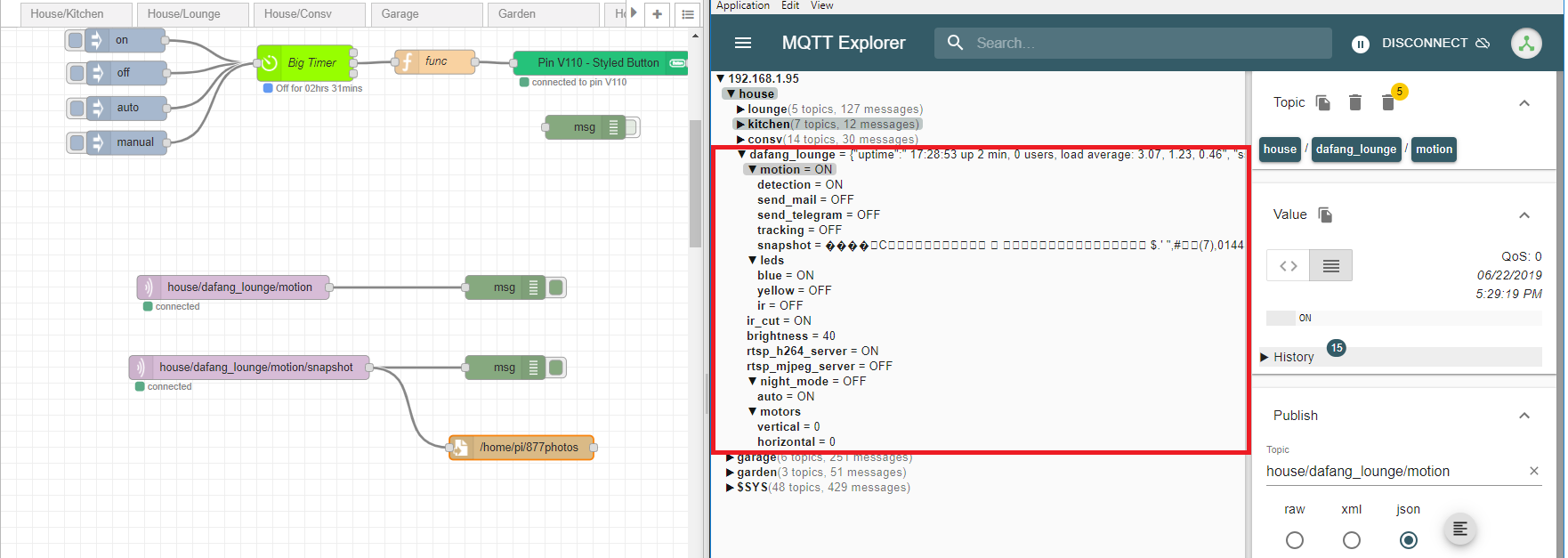
As you can see there are lots of topics, I think the motors are for a different model.
I'm not sure how to handle the snapshot topic, it just comes up with garbled output.
I will try next with the new node, I just need to know:
1) Do I need to back anything up before trying it?
2) Do I need to install ffmpeg or anything else?
Thanks :)
877dev
on 22 Jun 2019
First - always recommended back up your whole node red (export the json) before you update. You can just copy the flows_hostname_cred.json and flows_hostname.json from your ~/.node-red/ folder to a safe location (or different file name) before updating.
FFmpeg is to send a raspberry pi camera over to an rtsp stream - you already have an rtsp stream.
Your garbled snapshot is likely an image buffer. The snapshot is not working yet on this plugin - standby for @Shaquu to update.
Edit: motion detector
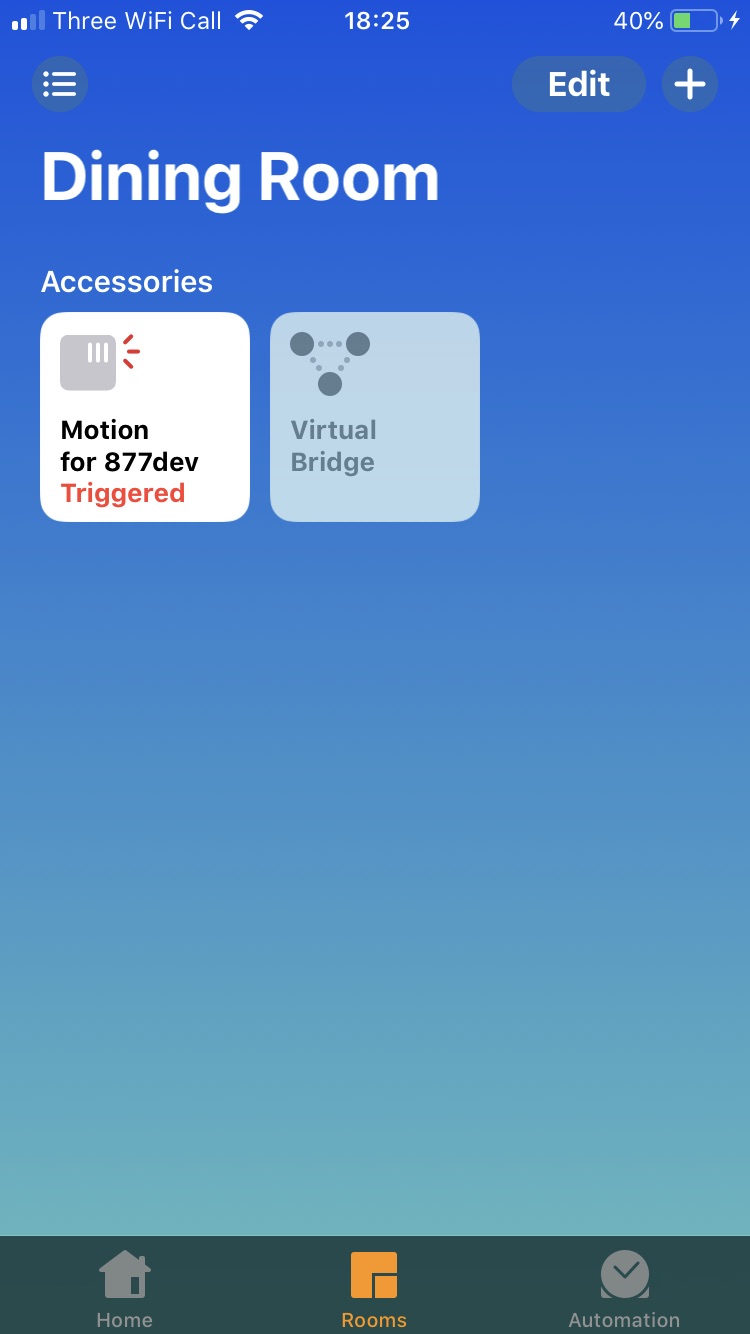
You can add another node red node with a motion detector service. This will give you a motion detector in homekit that is ready to go. Based on your screenshot, I assume your motion is sending ON and OFF payloads to the topic house/defang_lounge/motion. All you need to do is change that to {"MotionDetected":1} and {"MotionDetected":0}. From there you'll have a motion detector and, once the camera snapshots work, you can get rich notifications when the motion detector is triggered (have to put the motion and the camera in the same homekit room).
Motion looks like:

Flow:
[{"id":"329d2eea.47464a","type":"switch","z":"5c556f09.930f38","name":"","property":"payload","propertyType":"msg","rules":[{"t":"eq","v":"ON","vt":"str"},{"t":"eq","v":"OFF","vt":"str"}],"checkall":"true","repair":false,"outputs":2,"x":210,"y":720,"wires":[["e1371b2.758a168"],["997ddfaa.bcbfd"]]},{"id":"fad21c9c.e7dfa8","type":"mqtt in","z":"5c556f09.930f38","name":"Mqtt","topic":"house/defang_lounge/motion","qos":"1","datatype":"auto","broker":"2fe65ec7.ccdb0a","x":70,"y":720,"wires":[["329d2eea.47464a"]]},{"id":"e1371b2.758a168","type":"change","z":"5c556f09.930f38","name":"ON","rules":[{"t":"set","p":"payload","pt":"msg","to":"{\"MotionDetected\":1}","tot":"json"}],"action":"","property":"","from":"","to":"","reg":false,"x":350,"y":700,"wires":[["3480bb10.a987bc"]]},{"id":"997ddfaa.bcbfd","type":"change","z":"5c556f09.930f38","name":"OFF","rules":[{"t":"set","p":"payload","pt":"msg","to":"{\"MotionDetected\":0}","tot":"json"}],"action":"","property":"","from":"","to":"","reg":false,"x":350,"y":740,"wires":[["3480bb10.a987bc"]]},{"id":"3480bb10.a987bc","type":"homekit-service","z":"5c556f09.930f38","isParent":true,"bridge":"d7cf985.0803ee8","parentService":"","name":"Motion for 877dev","serviceName":"MotionSensor","topic":"","filter":false,"manufacturer":"Default Manufacturer","model":"Default Model","serialNo":"Default Serial Number","cameraConfigVideoProcessor":"ffmpeg","cameraConfigSource":"","cameraConfigStillImageSource":"","cameraConfigMaxStreams":2,"cameraConfigMaxWidth":1280,"cameraConfigMaxHeight":720,"cameraConfigMaxFPS":10,"cameraConfigMaxBitrate":300,"cameraConfigVideoCodec":"libx264","cameraConfigAudioCodec":"libfdk_aac","cameraConfigAudio":false,"cameraConfigPacketSize":1316,"cameraConfigVerticalFlip":false,"cameraConfigHorizontalFlip":false,"cameraConfigMapVideo":"0:0","cameraConfigMapAudio":"0:1","cameraConfigVideoFilter":"scale=1280:720","cameraConfigAdditionalCommandLine":"-tune zerolatency","cameraConfigDebug":false,"characteristicProperties":"{}","x":530,"y":720,"wires":[[]]},{"id":"2fe65ec7.ccdb0a","type":"mqtt-broker","z":"","name":"","broker":"localhost","port":"1883","clientid":"","usetls":false,"compatmode":true,"keepalive":"60","cleansession":true,"birthTopic":"","birthQos":"0","birthRetain":"false","birthPayload":"","closeTopic":"","closeQos":"0","closeRetain":"false","closePayload":"","willTopic":"","willQos":"0","willRetain":"false","willPayload":""},{"id":"d7cf985.0803ee8","type":"homekit-bridge","z":"","bridgeName":"Cams","pinCode":"111-11-111","port":"","allowInsecureRequest":false,"manufacturer":"Default Manufacturer","model":"Default Model","serialNo":"Default Serial Number","customMdnsConfig":false,"mdnsMulticast":true,"mdnsInterface":"","mdnsPort":"","mdnsIp":"","mdnsTtl":"","mdnsLoopback":true,"mdnsReuseAddr":true}]
Thank you, that makes sense. The motion detector is working great :
I'll try the camera now 👍
877dev
on 22 Jun 2019
I've got the camera showing in Homekit, but I think I have something set up incorrectly as it does not stream, just shows loading. The rtsp stream plays fine in VLC player.
I noticed it is set to h264, could that be an issue? Hopefully something dumb I have done... (maybe the config.json should not go in the characteristics section of the node?
Thanks
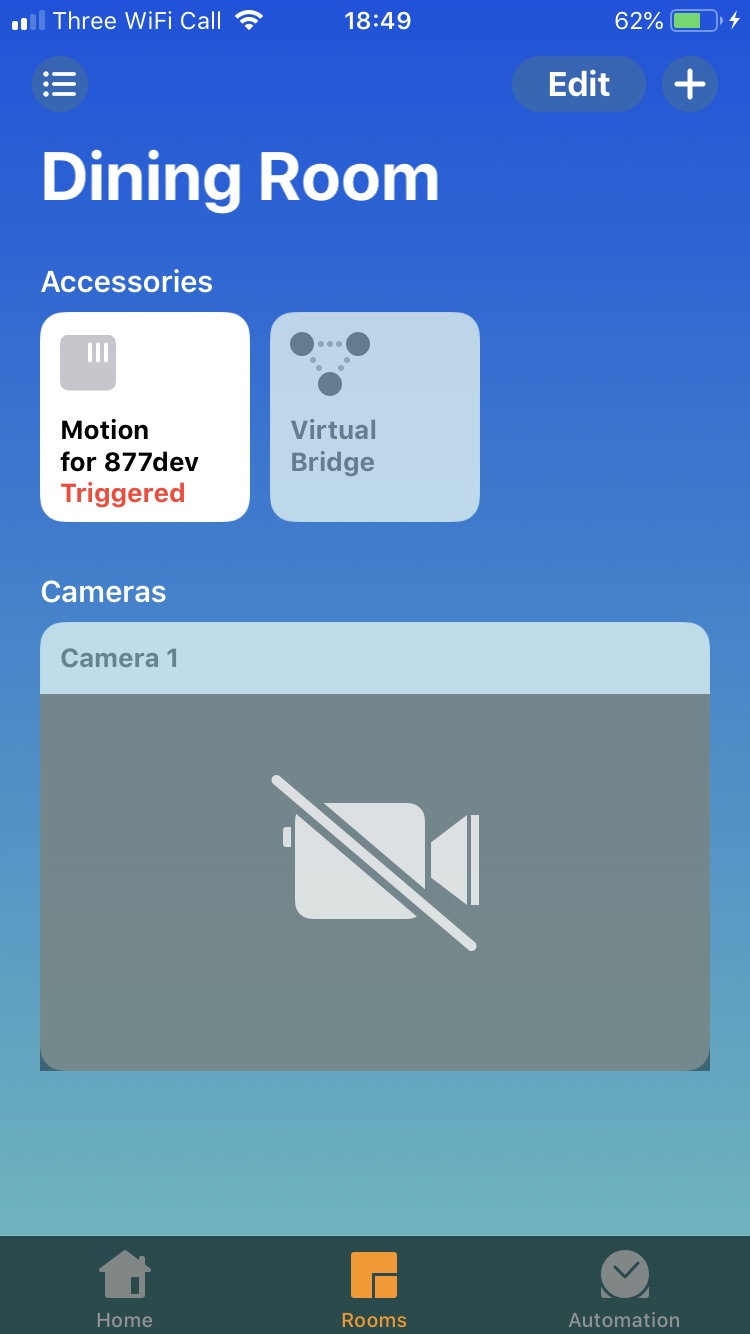
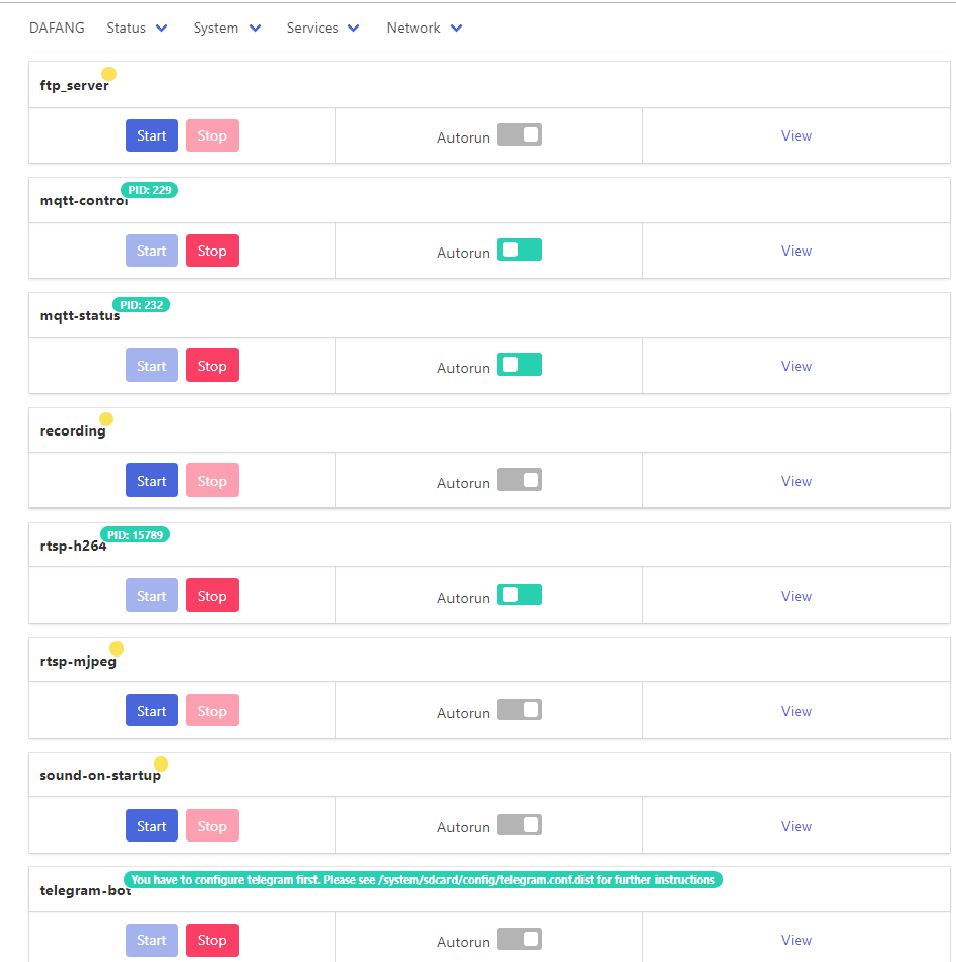
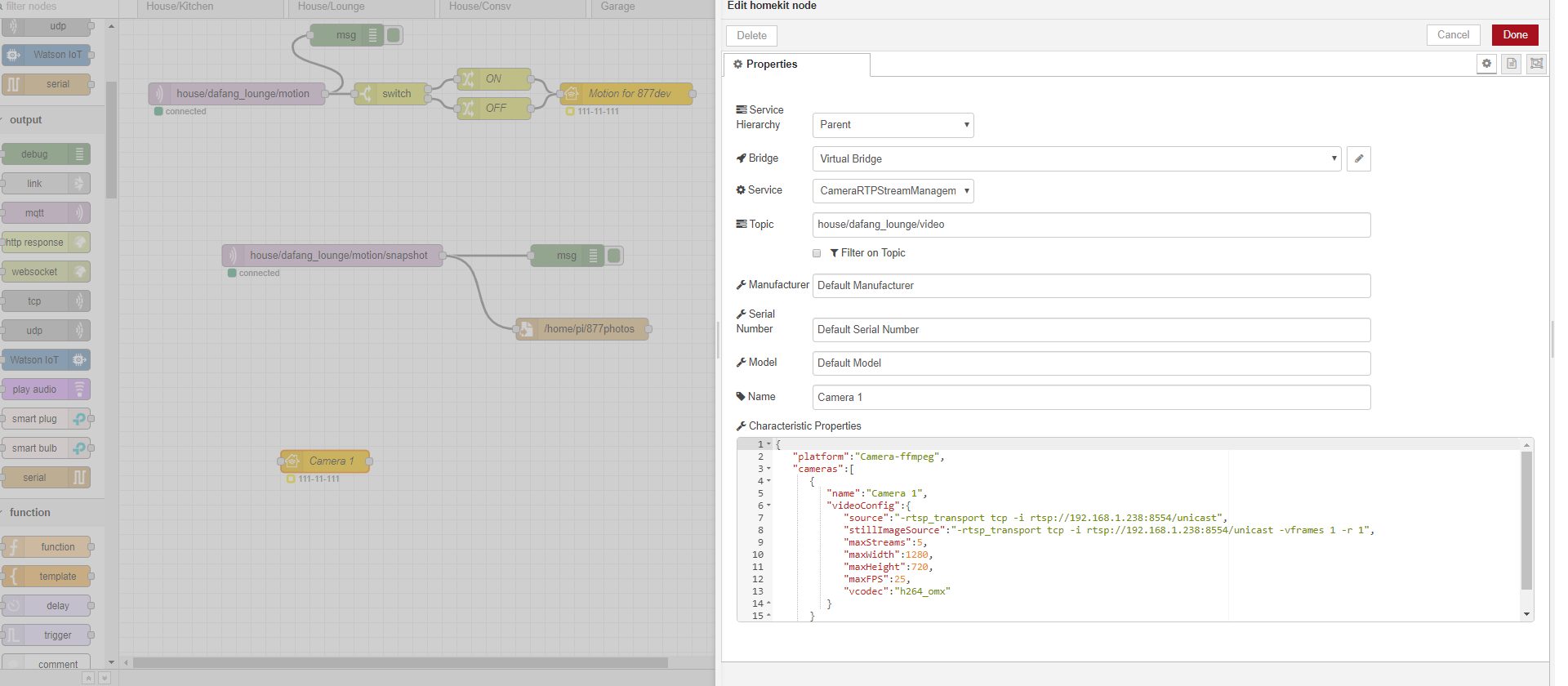
877dev
on 22 Jun 2019
Okay folks.
Updated landed on feature/camera.
- Snapshots are fixed. And I have set image url (-i https://i.imgur.com/rh8J3A1.jpg) in stillImageSource and it is working :)
- You can only have one Camera per Bridge (so only one Accessory in Bridge can have CameraControl).
- Video Doorbell is working now. Just add CameraControl as Linked Service.
- There is a new field in node-red UI for Parent Service called Accessory Category
Accessory Category is a hint to iOS clients about what "type" of Accessory this represents, for UI only. Default OTHER.
I hope I didn't forgot about anything new. Someone please check my commits if I missed something!
Shaquu
on 22 Jun 2019
@877dev You're having the same issue that @TristanMW had yesterday.
See: here
then: here
(just scroll up)
crxporter
on 22 Jun 2019
@shaquu - same install as last time? NPM using the dev branch link?
crxporter
on 22 Jun 2019
@crxporter Yes, it's should be compatible with last version of f/camera but who knows.. :)
Remember to refresh node-red browser page or clean cache if required.
Shaquu
on 22 Jun 2019
@877dev I just realized you set your service as "camera rtsp stream management" you need to set it as "camera control"
crxporter
on 22 Jun 2019
@crxporter yes I did try both, you were correct I needed to clear the Chrome cache 👍
I've transferred the info over but still the same "loading", I'm not sure if the "video processor" should be ffmpeg but I have tried both ways....
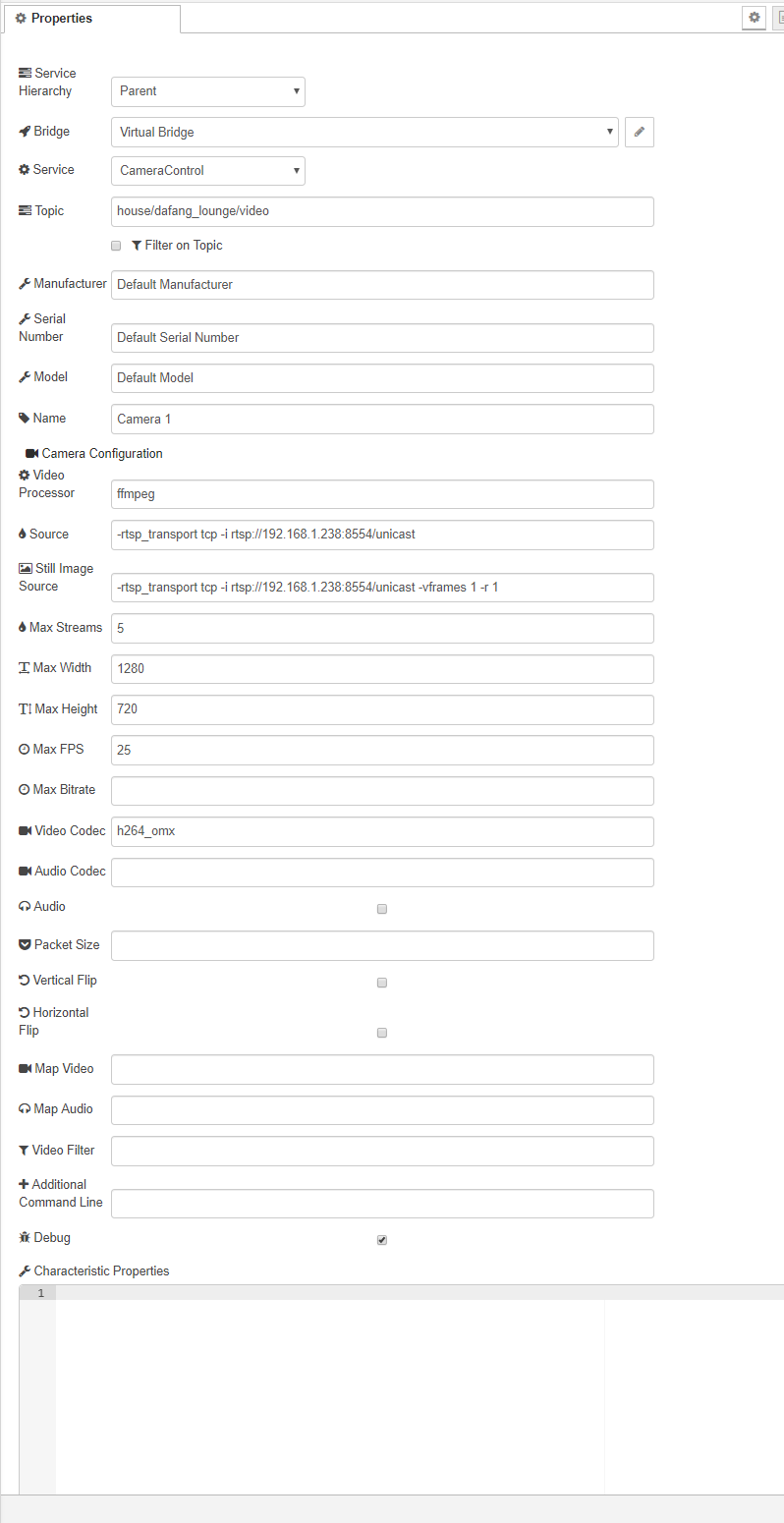
877dev
on 22 Jun 2019
Default video processor is ffmpeg.
Please run node-red in debug mode and look for errors:
DEBUG=NRCHKB,NRCHKB_Camera node-red
Shaquu
on 22 Jun 2019
@Shaquu I'm trying all of the little things, currently have video doorbell set like this is parent node:
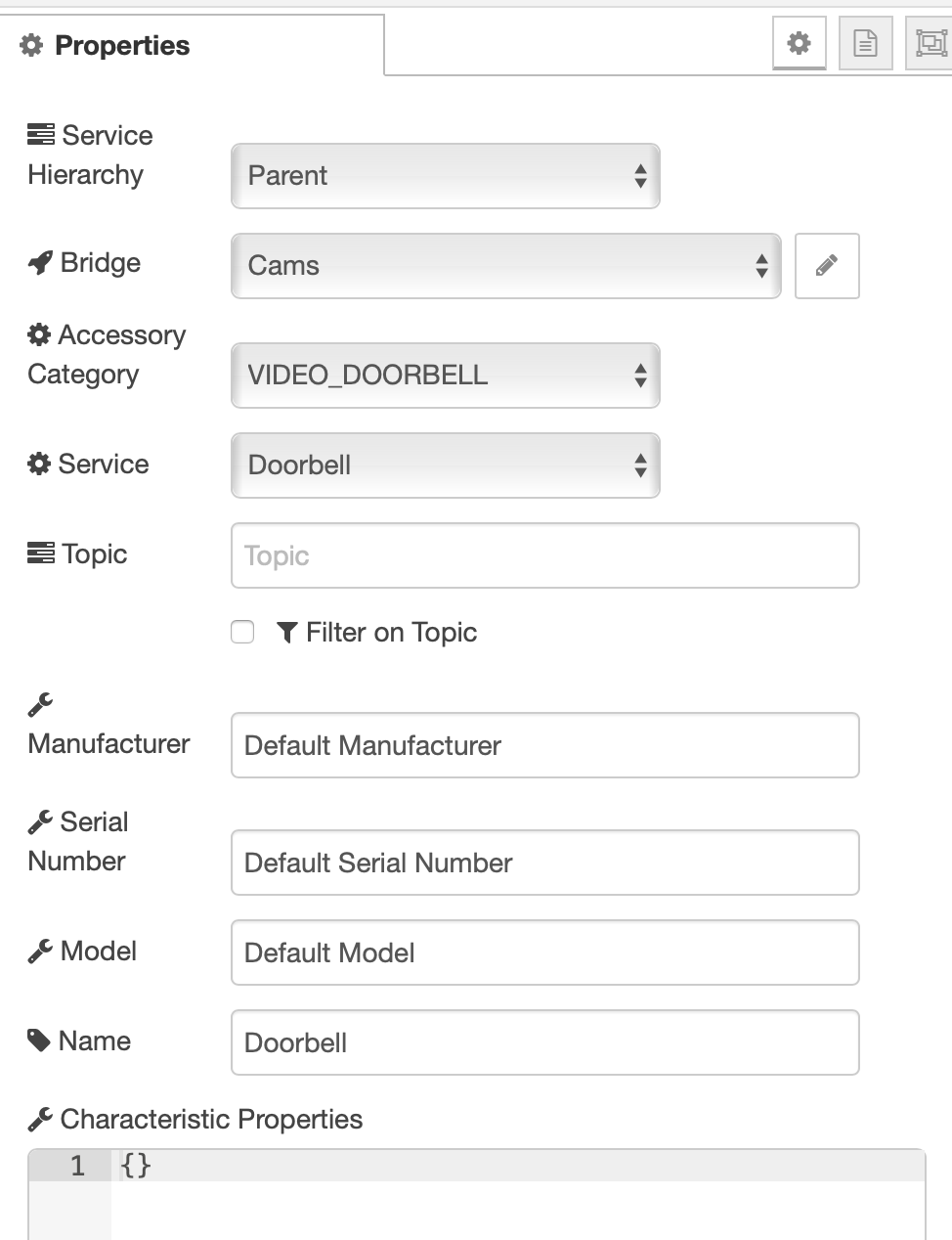
And camera control linked:
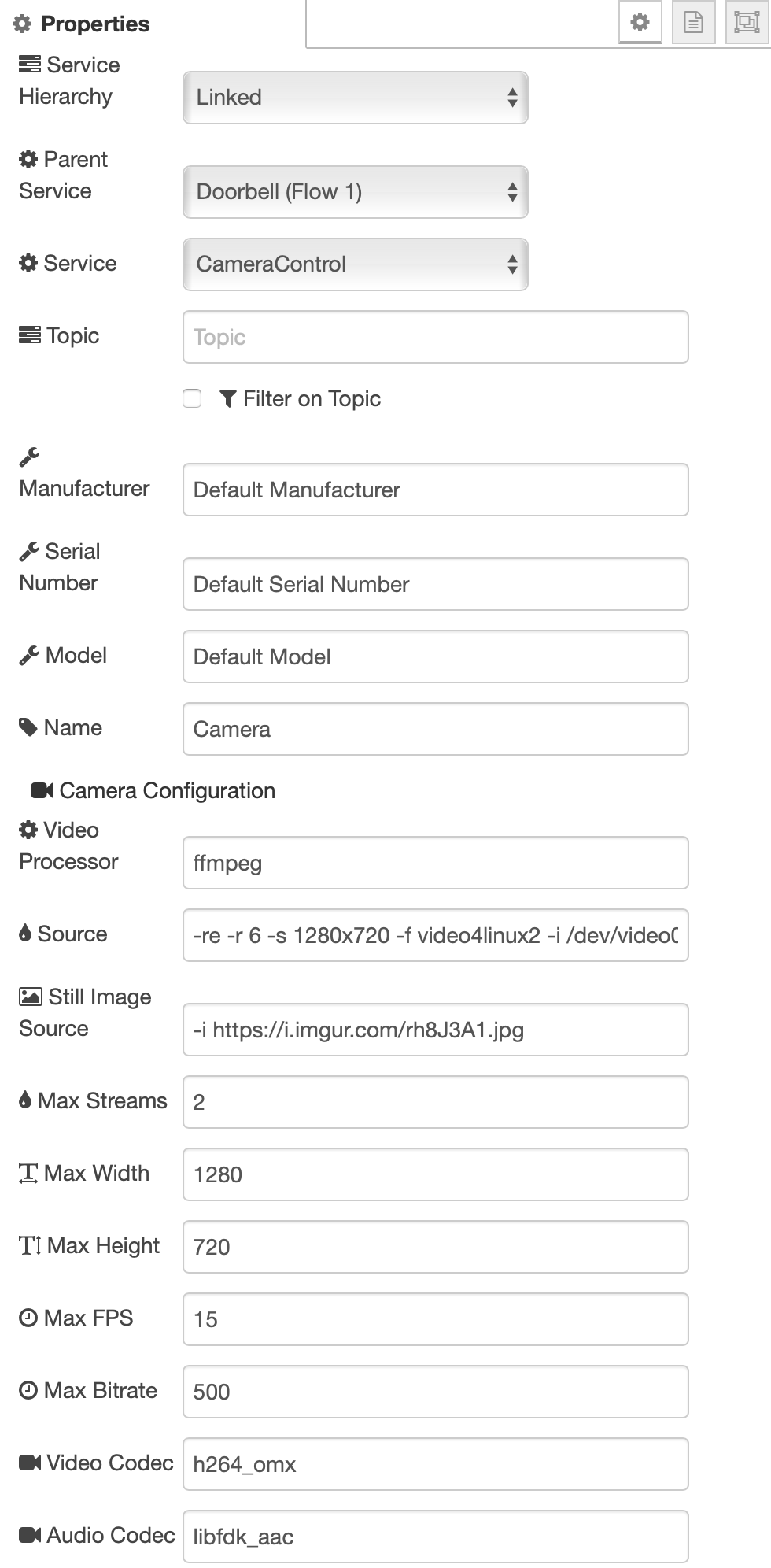
But I can't get Thor to ever show up... And I'm not getting rich doorbell notifications.
crxporter
on 22 Jun 2019
@877dev do you need {} in characteristic properties?
crxporter
on 22 Jun 2019
@Shaquu how do I start it in debug mode?
Idiots guide please - sorry 👍
877dev
on 22 Jun 2019
Update landed on feature/branch
Now snapshot is using source if stillImageSource is empty.
(previously if stillImageSource was empty then snapshots was not working correctly)
@877dev here I gave you exact command to run. How do you start node-red right now?
Shaquu
on 22 Jun 2019
@crxporter
My Video Doorbell:
[

    {

        "id": "6c7c5aba.b7c024",

        "type": "homekit-service",

        "z": "118f3869.0f78b8",

        "isParent": true,

        "bridge": "1e9e915f.22faaf",

        "accessoryCategory": "VIDEO_DOORBELL",

        "parentService": "",

        "name": "Doorbell",

        "serviceName": "Doorbell",

        "topic": "",

        "filter": false,

        "manufacturer": "D",

        "model": "D",

        "serialNo": "D",

        "cameraConfigVideoProcessor": "ffmpeg",

        "cameraConfigSource": "",

        "cameraConfigStillImageSource": "",

        "cameraConfigMaxStreams": 2,

        "cameraConfigMaxWidth": 1280,

        "cameraConfigMaxHeight": 720,

        "cameraConfigMaxFPS": 10,

        "cameraConfigMaxBitrate": 300,

        "cameraConfigVideoCodec": "libx264",

        "cameraConfigAudioCodec": "libfdk_aac",

        "cameraConfigAudio": false,

        "cameraConfigPacketSize": 1316,

        "cameraConfigVerticalFlip": false,

        "cameraConfigHorizontalFlip": false,

        "cameraConfigMapVideo": "0:0",

        "cameraConfigMapAudio": "0:1",

        "cameraConfigVideoFilter": "scale=1280:720",

        "cameraConfigAdditionalCommandLine": "-tune zerolatency",

        "cameraConfigDebug": false,

        "characteristicProperties": "{}",

        "x": 500,

        "y": 180,

        "wires": [

            [

                "925d20b4.f3d958"

            ]

        ]

    },

    {

        "id": "c24e057a.79a4c",

        "type": "inject",

        "z": "118f3869.0f78b8",

        "name": "1",

        "topic": "",

        "payload": "{\"ProgrammableSwitchEvent\":1}",

        "payloadType": "json",

        "repeat": "",

        "crontab": "",

        "once": false,

        "onceDelay": "7",

        "x": 190,

        "y": 160,

        "wires": [

            [

                "6c7c5aba.b7c024"

            ]

        ]

    },

    {

        "id": "b86e99a5.5115b8",

        "type": "inject",

        "z": "118f3869.0f78b8",

        "name": "0",

        "topic": "",

        "payload": "{\"ProgrammableSwitchEvent\":0}",

        "payloadType": "json",

        "repeat": "",

        "crontab": "",

        "once": false,

        "onceDelay": "5",

        "x": 190,

        "y": 80,

        "wires": [

            [

                "6c7c5aba.b7c024"

            ]

        ]

    },

    {

        "id": "925d20b4.f3d958",

        "type": "debug",

        "z": "118f3869.0f78b8",

        "name": "",

        "active": true,

        "tosidebar": true,

        "console": true,

        "tostatus": false,

        "complete": "payload",

        "targetType": "msg",

        "x": 740,

        "y": 200,

        "wires": []

    },

    {

        "id": "1a08533d.1dffdd",

        "type": "homekit-service",

        "z": "118f3869.0f78b8",

        "isParent": false,

        "bridge": "",

        "accessoryCategory": "",

        "parentService": "6c7c5aba.b7c024",

        "name": "Camera",

        "serviceName": "CameraControl",

        "topic": "",

        "filter": false,

        "manufacturer": "C",

        "model": "C",

        "serialNo": "C",

        "cameraConfigVideoProcessor": "ffmpeg",

        "cameraConfigSource": "-re -i rtsp://192.168.0.227:8554/unicast",

        "cameraConfigStillImageSource": "",

        "cameraConfigMaxStreams": 2,

        "cameraConfigMaxWidth": 1280,

        "cameraConfigMaxHeight": 720,

        "cameraConfigMaxFPS": 10,

        "cameraConfigMaxBitrate": 300,

        "cameraConfigVideoCodec": "libx264",

        "cameraConfigAudioCodec": "libfdk_aac",

        "cameraConfigAudio": false,

        "cameraConfigPacketSize": 1316,

        "cameraConfigVerticalFlip": false,

        "cameraConfigHorizontalFlip": false,

        "cameraConfigMapVideo": "0:0",

        "cameraConfigMapAudio": "0:1",

        "cameraConfigVideoFilter": "scale=1280:720",

        "cameraConfigAdditionalCommandLine": "-tune zerolatency",

        "cameraConfigDebug": false,

        "characteristicProperties": "{}",

        "x": 500,

        "y": 320,

        "wires": [

            []

        ]

    },

    {

        "id": "1e9e915f.22faaf",

        "type": "homekit-bridge",

        "z": "",

        "bridgeName": "Bridge",

        "pinCode": "153-98-123",

        "port": "",

        "allowInsecureRequest": false,

        "manufacturer": "Apple",

        "model": "Mac OS",

        "serialNo": "1"

    }

]
Camera (Linked Service) is linked to Doorbell (Parent Service).
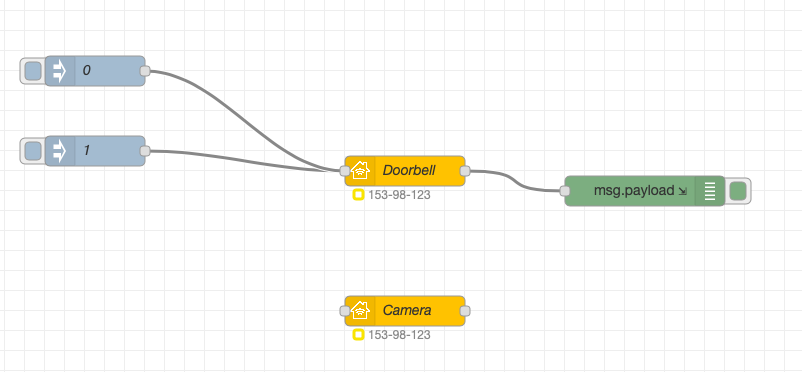
To run rich notification click blue square next to the node with name 0 or 1.
If you have problems then run in DEBUG mode and share logs, maybe there is something useful.
Shaquu
on 22 Jun 2019
@877dev here I gave you exact command to run. How do you start node-red right now?
I bet it's running as a system service.
You should be able to stop the system service with sudo systemctl stop nodered.service then run it with the command provided - then just watch your console (wherever you ssh to the pi from) to see the debug.
crxporter
on 22 Jun 2019
Now snapshot is using source if stillImageSource is empty.
@Shaquu this works! Rich notifications are being weird... Looks like it works on my computer but not on my phone or watch ...
I still can't get the Thor jpg to load... I'm going to delete the bridge and start fresh. See if I get lucky and clear something out from all the fiddling
Maybe it's an issue with the max streams only running for one device - the still image also only makes it to one device?
Edit: deleted everything, set up fresh, still getting smart notifications on the mac but not the phone... Very odd. Especially since I could "trick" the system into giving me rich notifications with my old camera setup.
crxporter
on 22 Jun 2019
I ssh into the pi using putty and use:
node-red-start
&
node-red-stop
I’ll try your command @Shaquu
Thanks for the help guys :)
877dev
on 22 Jun 2019
@crxporter I have checked and notification worked for my Mac and iPhone.
Max streams is the number of how many devices can watch Camera view at the same time.
Try to kill Home.app on iPhone or reset network or something like that. It should work.
@877dev so call node-red-stop and run command I provided.
Shaquu
on 22 Jun 2019
Home.app MacBook Air
Some screenshots
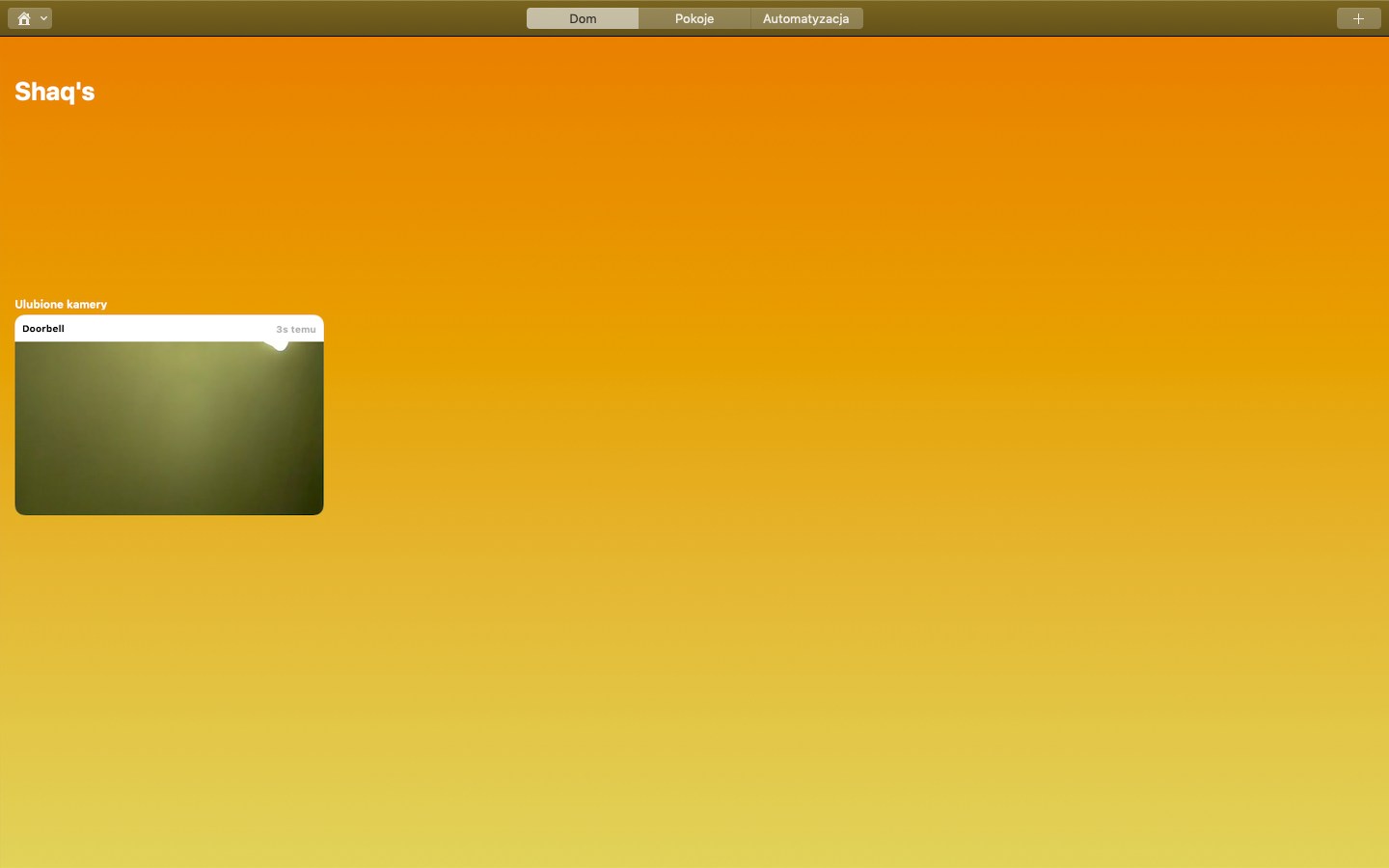
Notification MacBook Air
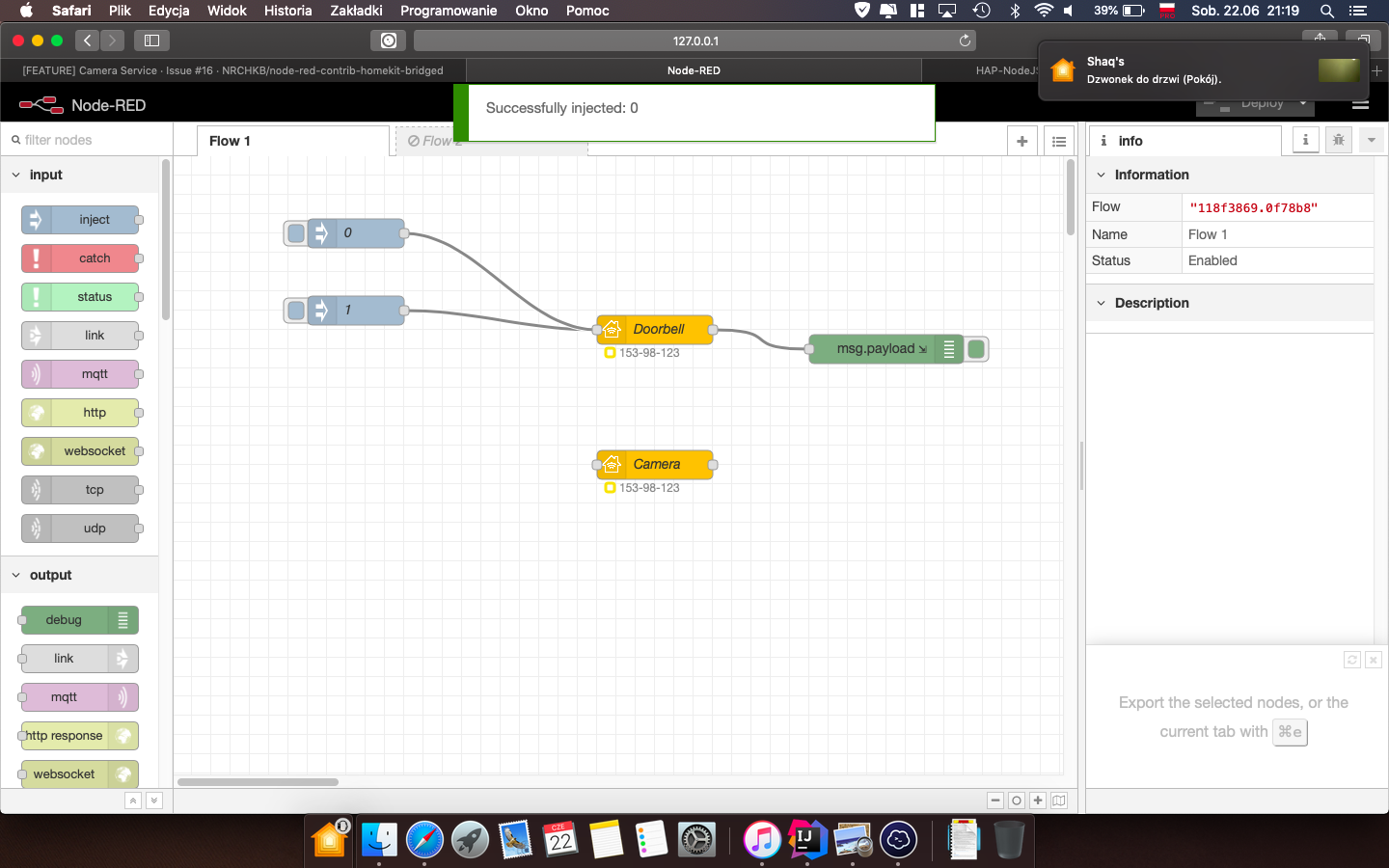
Home.app iPhone 6s
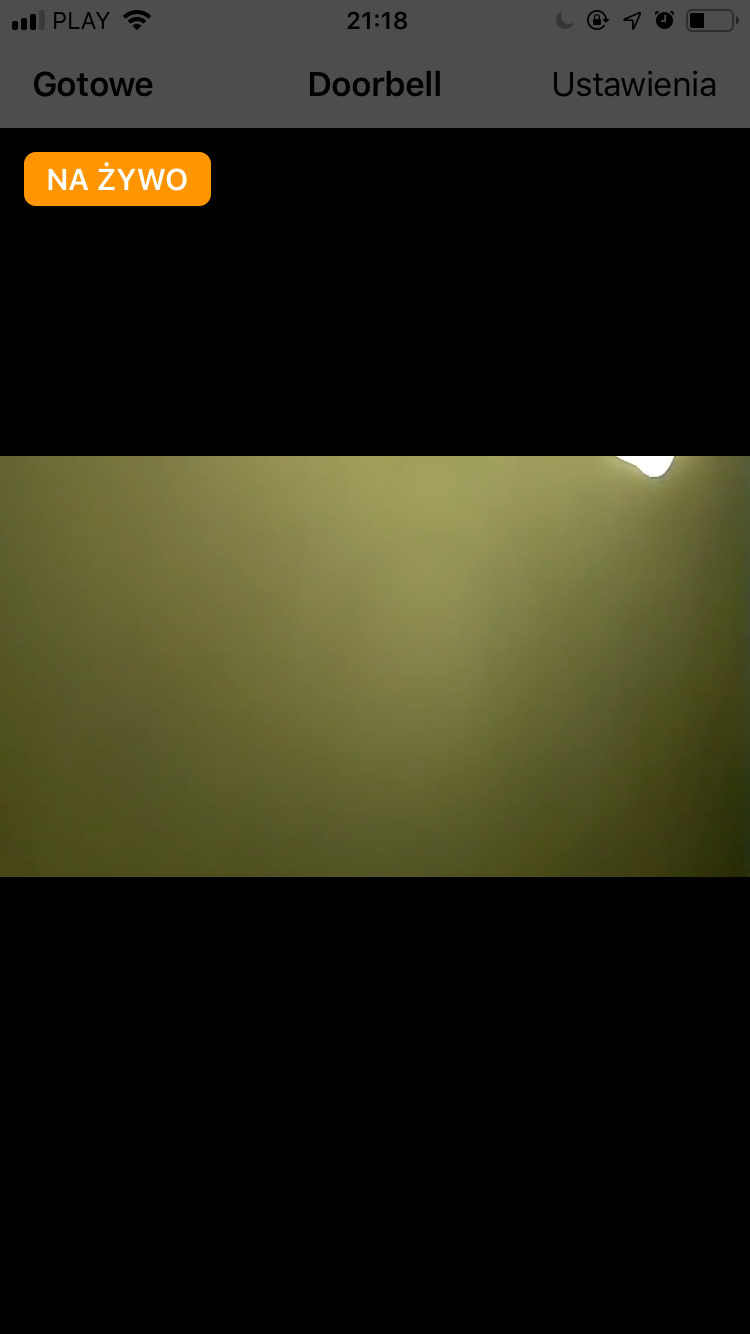
Home.app AW2
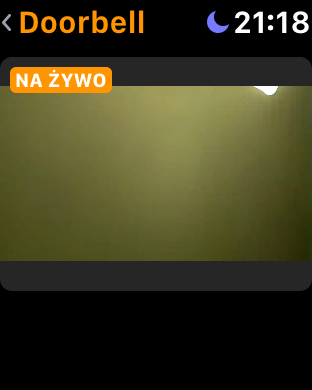
Notification iPhone 6s
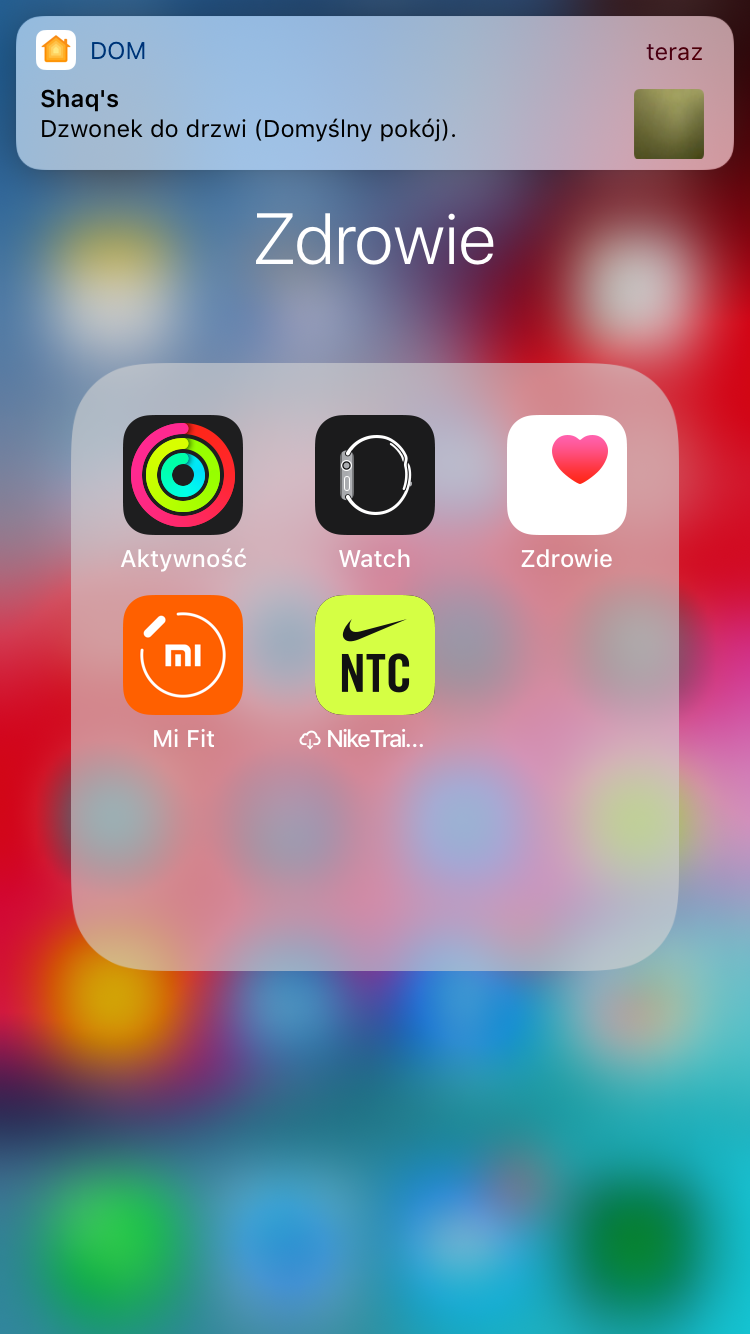
I failed to generate notification on AW2. I think it will not work or I need to meet some requirements to make notification be sent from iPhone to AW2 (Settings says that Home.app clones alerts from iPhone to AW2).
UPDATE 1: You have to restart node-red after changes in camera config.
UPDATE 2: I did received notification on AW2 with stillImageSource

Shaquu
on 22 Jun 2019
My findings about Camera snapshots.
When you open Home.app there will be request for snapshot and H.app will display stillImageSource (or last frame from source if you closed Camera view recently).
Snapshots are requested from time to time so there should be no need to force it (for example with exiting H.app and opening it again).
When you get rich notification then snapshot should be displayed in it (or last frame from source if you closed Camera view recently).
So when you are looking at Camera view then snapshot gets overwritten for some time until iPhone request for snapshot again.
Shaquu
on 22 Jun 2019
I turned off wifi on the phone and got a rich notification. Turned wifi back on and it's gone.
I'm taking out the "still image" line and letting it just source from the stream...
Yes now it's working - oh wow my watch rich notification just kicked right to a live view! Seems like a homekit issue being slow to update which features are available?
Awesome work, sir. This is getting very good.
crxporter
on 22 Jun 2019
Remember that it's environment specific.
If you have multiple Apple devices in the same network then Cloud can decide who should be notified first or if should be notified at all.
So if you are outside of WIFI then surely you should be notified.
If you have Mac and iPhone then it's not always necessary to push to all devices since it's a waste.
Shaquu
on 22 Jun 2019
Just wanted to report that with the new version the rich notification of my video doorbell works like a charm, I've received rich notifications on my pad etc, also the still images are showing up correctly now, this is fabulous work @Shaquu :tada: :tada: :tada:
matthub
on 22 Jun 2019
@matthub cool information!
Shaquu
on 22 Jun 2019
I have also made a little test - I have set up a new bridge in a Ubuntu VM and used an old Android phone to host an RTSP stream. It works great - the framerate and bitrate is low and the stream stucks a lot, but I think it is because the phone can't handle + the app is not the best...
radokristof
on 23 Jun 2019
Unfortunately there is a lot to tweak to get perfect setup.
If you really care about true live stream then you should try to make it as less wireless as possible and then start reading more about FFmpeg.
Wiadomość napisana przez Kristof Rado notifications@github.com w dniu 23.06.2019, o godz. 01:03:
I have also made a little test - I have set up a new bridge in a Ubuntu VM and used an old Android phone to host an RTSP stream. It works great - the framerate and bitrate is low and the stream stucks a lot, but I think it is because the phone can't handle + the app is not the best...
—
You are receiving this because you were mentioned.
Reply to this email directly, view it on GitHub, or mute the thread.
Shaquu
on 23 Jun 2019
I wouldn't care much about this now because this is just a test case and not cameras I will have in real setup. I will see what the performance looks like there. Besides this, I don't really care if it gets interrupted a few times, but would be great if it will not stop at every 3rd sec for 30 secs... But I will see this. Anyway, how many cameras can a RPi handle, what do you think?
radokristof
on 23 Jun 2019
Anyway, how many cameras can a RPi handle, what do you think?
Should be as many as you want. If I understand correctly, the streaming doesn’t start until the camera is clicked in homekit. I don’t think there is a constant connection to every camera...
crxporter
on 23 Jun 2019
@877dev so call node-red-stop and run command I provided.
@Shaquu thanks you, I ran your command and here's what comes out:
pi@raspberrypi:~ $ DEBUG=NRCHKB,NRCHKB_Camera node-red
23 Jun 11:23:05 - [info]

Welcome to Node-RED
===================

23 Jun 11:23:05 - [info] Node-RED version: v0.20.5
23 Jun 11:23:05 - [info] Node.js  version: v10.15.3
23 Jun 11:23:05 - [info] Linux 4.14.98-v7+ arm LE
23 Jun 11:23:06 - [info] Loading palette nodes
  NRCHKB RED settings available +0ms
  NRCHKB Initialize AccessoryAPI +0ms
  NRCHKB Initialize ServiceAPI +1ms
23 Jun 11:23:10 - [info] Dashboard version 2.15.4 started at /ui
23 Jun 11:23:11 - [info] Settings file  : /home/pi/.node-red/settings.js
23 Jun 11:23:11 - [info] Context store  : 'default' [module=memory]
23 Jun 11:23:11 - [info] User directory : /home/pi/.node-red
23 Jun 11:23:11 - [warn] Projects disabled : editorTheme.projects.enabled=false
23 Jun 11:23:11 - [info] Flows file     : /home/pi/.node-red/flows_raspberrypi.json
23 Jun 11:23:11 - [info] Server now running at http://127.0.0.1:1880/
23 Jun 11:23:11 - [warn]

---------------------------------------------------------------------
Your flow credentials file is encrypted using a system-generated key.

If the system-generated key is lost for any reason, your credentials
file will not be recoverable, you will have to delete it and re-enter
your credentials.

You should set your own key using the 'credentialSecret' option in
your settings file. Node-RED will then re-encrypt your credentials
file using your chosen key the next time you deploy a change.
---------------------------------------------------------------------

23 Jun 11:23:11 - [info] Starting flows
23 Jun 11:23:11 - [info] [blynk-ws-client:Blynk (Node Red Test)] LOG PINS ["0"]
23 Jun 11:23:11 - [info] [blynk-ws-client:Blynk (Node Red Test)] Start secure connection: wss://blynk-cloud.com/weckets
  NRCHKB Setting name to Virtual Bridge +0ms
  NRCHKB Creating Bridge with name 'Virtual Bridge' and UUID '5f9a41f6-a634-421f-9cc1-60dd9079e7e5' +2ms
  NRCHKB Starting Parent Service (Homekit) Left kitchen under cupboard +0ms
  NRCHKB Looking for accessory with UUID 'cf152906-3130-43c9-bacb-9bccb08e6e9e'... +0ms
  NRCHKB ... didn't find it. Adding new accessory with name '(Homekit) Left kitchen under cupboard' and UUID 'cf156-3130-43c9-bacb-9bccb08e6e9e' +0ms
  NRCHKB Bridge now has 1 accessories. +4ms
  NRCHKB Looking for service with UUID '22d4c3a3-6a12-48a2-9cf9-62c7537aebbf'... +0ms
  NRCHKB ... didn't find it. Adding new Switch service. +0ms
23 Jun 11:23:12 - [info] [blynk-ws-client:Blynk (Node Red Test)] Register input node - type: write pin: 104
23 Jun 11:23:12 - [info] [blynk-ws-client:Blynk (Node Red Test)] Register input node - type: style-btn pin: 104
23 Jun 11:23:12 - [info] [blynk-ws-client:Blynk (Node Red Test)] Register input node - type: app
23 Jun 11:23:12 - [info] [blynk-ws-client:Blynk (Node Red Test)] Register notify node
23 Jun 11:23:12 - [info] [blynk-ws-client:Blynk (Node Red Test)] Register input node - type: write pin: 106
23 Jun 11:23:12 - [info] [blynk-ws-client:Blynk (Node Red Test)] Register input node - type: write pin: 108
23 Jun 11:23:12 - [info] [blynk-ws-client:Blynk (Node Red Test)] Register input node - type: style-btn pin: 106
23 Jun 11:23:12 - [info] [blynk-ws-client:Blynk (Node Red Test)] Register input node - type: style-btn pin: 108
23 Jun 11:23:12 - [info] [blynk-ws-client:Blynk (Node Red Test)] Register input node - type: app
23 Jun 11:23:12 - [info] [blynk-ws-client:Blynk (Node Red Test)] Register input node - type: app
  NRCHKB Starting Parent Service Homekit Switch - garage heater +470ms
  NRCHKB Looking for accessory with UUID 'd71ea4d4-082c-4b73-b928-2cfef40c7cf1'... +0ms
  NRCHKB Accessory with UUID 'cf152906-3130-43c9-bacb-9bccb08e6e9e' doesn't match 'd71ea4d4-082c-4b73-b928-2cfef40f1' +0ms
  NRCHKB ... didn't find it. Adding new accessory with name 'Homekit Switch - garage heater' and UUID 'd71ea4d4-084b73-b928-2cfef40c7cf1' +0ms
  NRCHKB Bridge now has 2 accessories. +2ms
  NRCHKB Looking for service with UUID '05a7bfd7-8828-452a-b9dc-ac1039c3b730'... +0ms
  NRCHKB ... didn't find it. Adding new Switch service. +1ms
  NRCHKB Starting Parent Service Temperature +81ms
  NRCHKB Looking for accessory with UUID '37b2740c-4367-42be-a1f0-34e410681dfb'... +0ms
  NRCHKB Accessory with UUID 'cf152906-3130-43c9-bacb-9bccb08e6e9e' doesn't match '37b2740c-4367-42be-a1f0-34e4106fb' +1ms
  NRCHKB Accessory with UUID 'd71ea4d4-082c-4b73-b928-2cfef40c7cf1' doesn't match '37b2740c-4367-42be-a1f0-34e4106fb' +0ms
  NRCHKB ... didn't find it. Adding new accessory with name 'Temperature' and UUID '37b2740c-4367-42be-a1f0-34e410dfb' +0ms
  NRCHKB Bridge now has 3 accessories. +2ms
  NRCHKB Looking for service with UUID 'e8dcb8a3-0d89-4df2-8221-30a071c06c71'... +0ms
  NRCHKB ... didn't find it. Adding new TemperatureSensor service. +0ms
  NRCHKB Starting Parent Service Humidity +12ms
  NRCHKB Looking for accessory with UUID '237f2bac-b2b0-4b55-8540-add74391e976'... +0ms
  NRCHKB Accessory with UUID 'cf152906-3130-43c9-bacb-9bccb08e6e9e' doesn't match '237f2bac-b2b0-4b55-8540-add743976' +1ms
  NRCHKB Accessory with UUID 'd71ea4d4-082c-4b73-b928-2cfef40c7cf1' doesn't match '237f2bac-b2b0-4b55-8540-add743976' +0ms
  NRCHKB Accessory with UUID '37b2740c-4367-42be-a1f0-34e410681dfb' doesn't match '237f2bac-b2b0-4b55-8540-add743976' +0ms
  NRCHKB ... didn't find it. Adding new accessory with name 'Humidity' and UUID '237f2bac-b2b0-4b55-8540-add74391e' +1ms
  NRCHKB Bridge now has 4 accessories. +1ms
  NRCHKB Looking for service with UUID 'e40006d5-a0ea-41aa-aaf8-0a38be9f70a7'... +0ms
  NRCHKB ... didn't find it. Adding new HumiditySensor service. +0ms
23 Jun 11:23:12 - [info] [blynk-ws-client:Blynk (Node Red Test)] Register input node - type: write pin: 105
23 Jun 11:23:12 - [info] [blynk-ws-client:Blynk (Node Red Test)] Register input node - type: write pin: 102
23 Jun 11:23:12 - [info] [blynk-ws-client:Blynk (Node Red Test)] Register input node - type: style-btn pin: 102
23 Jun 11:23:12 - [info] [blynk-ws-client:Blynk (Node Red Test)] Register input node - type: app
23 Jun 11:23:12 - [info] [blynk-ws-client:Blynk (Node Red Test)] Register input node - type: write pin: 103
23 Jun 11:23:12 - [info] [blynk-ws-client:Blynk (Node Red Test)] Register notify node
23 Jun 11:23:12 - [info] [blynk-ws-client:Blynk (Node Red Test)] Register input node - type: write pin: 101
23 Jun 11:23:12 - [info] [blynk-ws-client:Blynk (Node Red Test)] Register input node - type: style-btn pin: 110
  NRCHKB Starting Parent Service Motion for 877dev +63ms
  NRCHKB Looking for accessory with UUID '7a6e0573-3806-40d5-ad06-9f91f3eaf0cd'... +0ms
  NRCHKB Accessory with UUID 'cf152906-3130-43c9-bacb-9bccb08e6e9e' doesn't match '7a6e0573-3806-40d5-ad06-9f91f3ecd' +1ms
  NRCHKB Accessory with UUID 'd71ea4d4-082c-4b73-b928-2cfef40c7cf1' doesn't match '7a6e0573-3806-40d5-ad06-9f91f3ecd' +0ms
  NRCHKB Accessory with UUID '37b2740c-4367-42be-a1f0-34e410681dfb' doesn't match '7a6e0573-3806-40d5-ad06-9f91f3ecd' +0ms
  NRCHKB Accessory with UUID '237f2bac-b2b0-4b55-8540-add74391e976' doesn't match '7a6e0573-3806-40d5-ad06-9f91f3ecd' +0ms
  NRCHKB ... didn't find it. Adding new accessory with name 'Motion for 877dev' and UUID '7a6e0573-3806-40d5-ad06-1f3eaf0cd' +1ms
  NRCHKB Bridge now has 5 accessories. +1ms
  NRCHKB Looking for service with UUID '02d83816-992a-4797-99b4-b6d1725d4517'... +0ms
  NRCHKB ... didn't find it. Adding new MotionSensor service. +0ms
  NRCHKB Starting Parent Service Camera 1 +8ms
  NRCHKB Looking for accessory with UUID '8fba8e47-e149-48d9-9b28-bed39cbfcbfd'... +0ms
  NRCHKB Accessory with UUID 'cf152906-3130-43c9-bacb-9bccb08e6e9e' doesn't match '8fba8e47-e149-48d9-9b28-bed39cbfd' +1ms
  NRCHKB Accessory with UUID 'd71ea4d4-082c-4b73-b928-2cfef40c7cf1' doesn't match '8fba8e47-e149-48d9-9b28-bed39cbfd' +0ms
  NRCHKB Accessory with UUID '37b2740c-4367-42be-a1f0-34e410681dfb' doesn't match '8fba8e47-e149-48d9-9b28-bed39cbfd' +0ms
  NRCHKB Accessory with UUID '237f2bac-b2b0-4b55-8540-add74391e976' doesn't match '8fba8e47-e149-48d9-9b28-bed39cbfd' +1ms
  NRCHKB Accessory with UUID '7a6e0573-3806-40d5-ad06-9f91f3eaf0cd' doesn't match '8fba8e47-e149-48d9-9b28-bed39cbfd' +0ms
  NRCHKB ... didn't find it. Adding new accessory with name 'Camera 1' and UUID '8fba8e47-e149-48d9-9b28-bed39cbfc' +0ms
  NRCHKB Bridge now has 6 accessories. +1ms
  NRCHKB Looking for service with UUID '816cc1ed-3cdf-44b1-a3db-713391fb3607'... +0ms
  NRCHKB ... didn't find it. Adding new CameraControl service. +1ms
  NRCHKB Configuring Camera Source +0ms
  NRCHKB_Camera Configuring services for Camera... +0ms
  NRCHKB_Camera ...added CameraControl Service +0ms
  NRCHKB_Camera ...audio not available +0ms
  NRCHKB_Camera Creating Camera Stream Controllers: 5 - Started +0ms
  NRCHKB_Camera Camera options: {"proxy":false,"srtp":true,"video":{"resolutions":[[320,240,"25"],[320,240,15],[3280,"25"],[320,180,15],[480,360,"25"],[480,270,"25"],[640,480,"25"],[640,360,"25"],[1280,720,"25"]],"codec":{"profi":[0,1,2],"levels":[0,1,2]}},"audio":{"codecs":[{"type":"OPUS","samplerate":24},{"type":"AAC-eld","samplerate":16} +1ms
  NRCHKB_Camera Creating Camera Stream Controllers - Finished +34ms
23 Jun 11:23:12 - [info] Started flows
23 Jun 11:23:12 - [error] [smart-plug:Kasa HS100 garage heater] not reachable
23 Jun 11:23:12 - [info] [mqtt-broker:5615eece.b3a81] Connected to broker: mqtt://192.168.1.95:1883
23 Jun 11:23:12 - [info] [blynk-ws-client:Blynk (Node Red Test)] Client logged
  NRCHKB publishing bridge with name 'Virtual Bridge', pin code '111-11-111' and 6 accessories. +6s
  NRCHKB Bridge [9679c348.3a24a] published +0ms
In the CameraControl node if I put ffmpeg as the video processor I get the following when running node-red-start :
pi@raspberrypi:~ $ node-red-start

Start Node-RED

Once Node-RED has started, point a browser at http://192.168.1.95:1880
On Pi Node-RED works better with the Firefox or Chrome browser

Use   node-red-stop                          to stop Node-RED
Use   node-red-start                         to start Node-RED again
Use   node-red-log                           to view the recent log output
Use   sudo systemctl enable nodered.service  to autostart Node-RED at every boot
Use   sudo systemctl disable nodered.service to disable autostart on boot

To find more nodes and example flows - go to http://flows.nodered.org

Starting as a systemd service.
Started Node-RED graphical event wiring tool.
23 Jun 11:28:17 - [info]
Welcome to Node-RED
===================
23 Jun 11:28:17 - [info] Node-RED version: v0.20.5
23 Jun 11:28:17 - [info] Node.js  version: v10.15.3
23 Jun 11:28:17 - [info] Linux 4.14.98-v7+ arm LE
23 Jun 11:28:18 - [info] Loading palette nodes
23 Jun 11:28:22 - [info] Dashboard version 2.15.4 started at /ui
23 Jun 11:28:23 - [info] Settings file  : /home/pi/.node-red/settings.js
23 Jun 11:28:23 - [info] Context store  : 'default' [module=memory]
23 Jun 11:28:23 - [info] User directory : /home/pi/.node-red
23 Jun 11:28:23 - [warn] Projects disabled : editorTheme.projects.enabled=false
23 Jun 11:28:23 - [info] Flows file     : /home/pi/.node-red/flows_raspberrypi.json
23 Jun 11:28:23 - [info] Server now running at http://127.0.0.1:1880/
23 Jun 11:28:23 - [warn]
---------------------------------------------------------------------
Your flow credentials file is encrypted using a system-generated key.
If the system-generated key is lost for any reason, your credentials
file will not be recoverable, you will have to delete it and re-enter
your credentials.
You should set your own key using the 'credentialSecret' option in
your settings file. Node-RED will then re-encrypt your credentials
file using your chosen key the next time you deploy a change.
---------------------------------------------------------------------
23 Jun 11:28:23 - [info] Starting flows
23 Jun 11:28:23 - [info] [blynk-ws-client:Blynk (Node Red Test)] LOG PINS ["0"]
23 Jun 11:28:23 - [info] [blynk-ws-client:Blynk (Node Red Test)] Start secure connection: wss://blynk-cloud.com/websockets
23 Jun 11:28:24 - [info] [blynk-ws-client:Blynk (Node Red Test)] Register input node - type: write pin: 104
23 Jun 11:28:24 - [info] [blynk-ws-client:Blynk (Node Red Test)] Register input node - type: style-btn pin: 104
23 Jun 11:28:24 - [info] [blynk-ws-client:Blynk (Node Red Test)] Register input node - type: app
23 Jun 11:28:24 - [info] [blynk-ws-client:Blynk (Node Red Test)] Register notify node
23 Jun 11:28:24 - [info] [blynk-ws-client:Blynk (Node Red Test)] Register input node - type: write pin: 106
23 Jun 11:28:24 - [info] [blynk-ws-client:Blynk (Node Red Test)] Register input node - type: write pin: 108
23 Jun 11:28:24 - [info] [blynk-ws-client:Blynk (Node Red Test)] Register input node - type: style-btn pin: 106
23 Jun 11:28:24 - [info] [blynk-ws-client:Blynk (Node Red Test)] Register input node - type: style-btn pin: 108
23 Jun 11:28:24 - [info] [blynk-ws-client:Blynk (Node Red Test)] Register input node - type: app
23 Jun 11:28:24 - [info] [blynk-ws-client:Blynk (Node Red Test)] Register input node - type: app
23 Jun 11:28:24 - [info] [blynk-ws-client:Blynk (Node Red Test)] Register input node - type: write pin: 105
23 Jun 11:28:24 - [info] [blynk-ws-client:Blynk (Node Red Test)] Register input node - type: write pin: 102
23 Jun 11:28:24 - [info] [blynk-ws-client:Blynk (Node Red Test)] Register input node - type: style-btn pin: 102
23 Jun 11:28:24 - [info] [blynk-ws-client:Blynk (Node Red Test)] Register input node - type: app
23 Jun 11:28:24 - [info] [blynk-ws-client:Blynk (Node Red Test)] Register input node - type: write pin: 103
23 Jun 11:28:24 - [info] [blynk-ws-client:Blynk (Node Red Test)] Register notify node
23 Jun 11:28:24 - [info] [blynk-ws-client:Blynk (Node Red Test)] Register input node - type: write pin: 101
23 Jun 11:28:24 - [info] [blynk-ws-client:Blynk (Node Red Test)] Register input node - type: style-btn pin: 110
23 Jun 11:28:24 - [info] Started flows
23 Jun 11:28:24 - [error] [smart-plug:Kasa HS100 garage heater] not reachable
23 Jun 11:28:24 - [info] [mqtt-broker:5615eece.b3a81] Connected to broker: mqtt://192.168.1.95:1883
23 Jun 11:28:24 - [info] [blynk-ws-client:Blynk (Node Red Test)] Client logged
**ERROR: FFmpeg exited with code 1**
So there is a error there : code 1
If I leave the video processor field blank I get no ffmpeg error.
877dev
on 23 Jun 2019
New comment as it's getting hard to read. I just noticed that when I press on the iPhone camera box to open the stream, node red spews out the following error and restarts:
23 Jun 11:46:11 - [red] Uncaught Exception:
23 Jun 11:46:11 - TypeError [ERR_INVALID_ARG_VALUE]: The argument 'file' cannot be empty. Received ''
    at normalizeSpawnArguments (child_process.js:402:11)
nodered.service: Main process exited, code=exited, status=1/FAILURE
nodered.service: Unit entered failed state.
nodered.service: Failed with result 'exit-code'.
nodered.service: Service hold-off time over, scheduling restart.
Stopped Node-RED graphical event wiring tool.
Started Node-RED graphical event wiring tool.
@877dev
Well _videoProcessor_ must not be empty.
So that's why you have second error here. I will add a guard for that.
update: landed on feature/camera
About **ERROR: FFmpeg exited with code 1**
Please run ffmpeg command in terminal and share you result.
By the way there is instruction how to install FFmpeg correctly on RaspberryPI.
@radokristof
As @crxporter wrote, usually there is no constant camera connection but you still have to run streaming process (on source device so for me it's RPi0). Every time you open Camera view there is new process spawned for connection (on NRCHKB device in my case I run node-red on Mac for dev tests).
Plus, there is snapshot request from time to time which make a quick connection to camera and closes it (on NRCHKB) but it should never run at the same time when Camera stream runs.
So it depends on RPi how much it can handle using it's resources.
For my RPi0 streaming video from camera takes 6%CPU and 3,3%MEM, in idle it's 3%CPU.
@crxporter you were right! It really looks like HomeKit need time to refresh all it's information about new Services etc.
Shaquu
on 23 Jun 2019
@Shaquu thank you, I will re-install just in case.
BTW here is the output from ffmpeg
pi@raspberrypi:~ $ ffmpeg
ffmpeg version 3.2.12-1~deb9u1+rpt1 Copyright (c) 2000-2018 the FFmpeg developers
  built with gcc 6.3.0 (Raspbian 6.3.0-18+rpi1+deb9u1) 20170516
  configuration: --prefix=/usr --extra-version='1~deb9u1+rpt1' --toolchain=hardened --libdir=/usr/lib/arm-linux-gnueabihf --incdir=/usr/include/arm-linux-gnueabihf --enable-gpl --disable-stripping --enable-avresample --enable-avisynth --enable-gnutls --enable-ladspa --enable-libass --enable-libbluray --enable-libbs2b --enable-libcaca --enable-libcdio --enable-libebur128 --enable-libflite --enable-libfontconfig --enable-libfreetype --enable-libfribidi --enable-libgme --enable-libgsm --enable-libmp3lame --enable-libopenjpeg --enable-libopenmpt --enable-libopus --enable-libpulse --enable-librubberband --enable-libshine --enable-libsnappy --enable-libsoxr --enable-libspeex --enable-libssh --enable-libtheora --enable-libtwolame --enable-libvorbis --enable-libvpx --enable-libwavpack --enable-libwebp --enable-libx265 --enable-libxvid --enable-libzmq --enable-libzvbi --enable-omx --enable-omx-rpi --enable-mmal --enable-openal --enable-opengl --enable-sdl2 --enable-libdc1394 --enable-libiec61883 --arch=armhf --enable-chromaprint --enable-frei0r --enable-libopencv --enable-libx264 --enable-shared
  libavutil      55. 34.101 / 55. 34.101
  libavcodec     57. 64.101 / 57. 64.101
  libavformat    57. 56.101 / 57. 56.101
  libavdevice    57.  1.100 / 57.  1.100
  libavfilter     6. 65.100 /  6. 65.100
  libavresample   3.  1.  0 /  3.  1.  0
  libswscale      4.  2.100 /  4.  2.100
  libswresample   2.  3.100 /  2.  3.100
  libpostproc    54.  1.100 / 54.  1.100
Hyper fast Audio and Video encoder
usage: ffmpeg [options] [[infile options] -i infile]... {[outfile options] outfile}...

Use -h to get full help or, even better, run 'man ffmpeg'
pi@raspberrypi:~ $
@Shaquu I have reinstalled ffmpeg as per the guide, and have put ffmpeg in _video processor_
Same result :
ERROR: FFmpeg exited with code 1
FFmpeg output:
pi@raspberrypi:~ $ ffmpeg
ffmpeg version 4.1.git Copyright (c) 2000-2019 the FFmpeg developers
  built with gcc 6.3.0 (Raspbian 6.3.0-18+rpi1+deb9u1) 20170516
  configuration: --prefix=/usr/local --arch=armel --target-os=linux --enable-omx-rpi                                --enable-nonfree --enable-gpl --enable-libfdk-aac --enable-mmal --enable-libx264 --                               enable-decoder=h264 --enable-network --enable-protocol=tcp --enable-demuxer=rtsp
  libavutil      56. 29.100 / 56. 29.100
  libavcodec     58. 53.100 / 58. 53.100
  libavformat    58. 28.100 / 58. 28.100
  libavdevice    58.  7.100 / 58.  7.100
  libavfilter     7. 55.100 /  7. 55.100
  libswscale      5.  4.101 /  5.  4.101
  libswresample   3.  4.100 /  3.  4.100
  libpostproc    55.  4.100 / 55.  4.100
Hyper fast Audio and Video encoder
usage: ffmpeg [options] [[infile options] -i infile]... {[outfile options] outfile}.                               ..

Use -h to get full help or, even better, run 'man ffmpeg'
Node setup:
[{"id":"69c10b0.a8d56f4","type":"homekit-service","z":"be5275e8.e06c78","isParent":true,"bridge":"9679c348.3a24a","parentService":"","name":"Camera 1","serviceName":"CameraControl","topic":"house/dafang_lounge/video","filter":false,"manufacturer":"Default Manufacturer","model":"Default Model","serialNo":"Default Serial Number","cameraConfigVideoProcessor":"ffmpeg","cameraConfigSource":"-rtsp_transport tcp -i rtsp://192.168.1.238:8554/unicast","cameraConfigStillImageSource":"-rtsp_transport tcp -i rtsp://192.168.1.238:8554/unicast -vframes 1 -r 1","cameraConfigMaxStreams":"2","cameraConfigMaxWidth":"1280","cameraConfigMaxHeight":"720","cameraConfigMaxFPS":"25","cameraConfigMaxBitrate":"","cameraConfigVideoCodec":"h264_omx","cameraConfigAudioCodec":"","cameraConfigAudio":false,"cameraConfigPacketSize":"","cameraConfigVerticalFlip":false,"cameraConfigHorizontalFlip":false,"cameraConfigMapVideo":"","cameraConfigMapAudio":"","cameraConfigVideoFilter":"","cameraConfigAdditionalCommandLine":"","cameraConfigDebug":true,"characteristicProperties":"{}","x":160,"y":1380,"wires":[[]]},{"id":"9679c348.3a24a","type":"homekit-bridge","z":"","bridgeName":"Virtual Bridge","pinCode":"111-11-111","port":"","allowInsecureRequest":false,"manufacturer":"Default Manufacturer","model":"Default Model","serialNo":"Default Serial Number","customMdnsConfig":false,"mdnsMulticast":true,"mdnsInterface":"","mdnsPort":"","mdnsIp":"","mdnsTtl":"","mdnsLoopback":true,"mdnsReuseAddr":true}]
Here is the results of DEBUG=NRCHKB,NRCHKB_Camera node-red :
pi@raspberrypi:~ $ DEBUG=NRCHKB,NRCHKB_Camera node-red
23 Jun 14:12:57 - [info]

Welcome to Node-RED
===================

23 Jun 14:12:57 - [info] Node-RED version: v0.20.5
23 Jun 14:12:57 - [info] Node.js  version: v10.15.3
23 Jun 14:12:57 - [info] Linux 4.14.98-v7+ arm LE
23 Jun 14:12:58 - [info] Loading palette nodes
  NRCHKB RED settings available +0ms
  NRCHKB Initialize AccessoryAPI +0ms
  NRCHKB Initialize ServiceAPI +1ms
23 Jun 14:13:02 - [info] Dashboard version 2.15.4 started at /ui
23 Jun 14:13:03 - [info] Settings file  : /home/pi/.node-red/settings.js
23 Jun 14:13:03 - [info] Context store  : 'default' [module=memory]
23 Jun 14:13:03 - [info] User directory : /home/pi/.node-red
23 Jun 14:13:03 - [warn] Projects disabled : editorTheme.projects.enabled=false
23 Jun 14:13:03 - [info] Flows file     : /home/pi/.node-red/flows_raspberrypi.json
23 Jun 14:13:03 - [info] Server now running at http://127.0.0.1:1880/
23 Jun 14:13:03 - [warn]

---------------------------------------------------------------------
Your flow credentials file is encrypted using a system-generated key.

If the system-generated key is lost for any reason, your credentials
file will not be recoverable, you will have to delete it and re-enter
your credentials.

You should set your own key using the 'credentialSecret' option in
your settings file. Node-RED will then re-encrypt your credentials
file using your chosen key the next time you deploy a change.
---------------------------------------------------------------------

23 Jun 14:13:03 - [info] Starting flows
23 Jun 14:13:03 - [info] [blynk-ws-client:Blynk (Node Red Test)] LOG PINS ["0"]
23 Jun 14:13:03 - [info] [blynk-ws-client:Blynk (Node Red Test)] Start secure connection: wss://blynk-cloud.com/websockets
  NRCHKB Setting name to Virtual Bridge +0ms
  NRCHKB Creating Bridge with name 'Virtual Bridge' and UUID '5f9a41f6-a634-421f-9cc1-60dd9079e7e5' +2ms
  NRCHKB Starting Parent Service (Homekit) Left kitchen under cupboard +0ms
  NRCHKB Looking for accessory with UUID 'cf152906-3130-43c9-bacb-9bccb08e6e9e'... +0ms
  NRCHKB ... didn't find it. Adding new accessory with name '(Homekit) Left kitchen under cupboard' and UUID 'cf152906-3130-43c9-bacb-9bccb08e6e9e' +1ms
  NRCHKB Bridge now has 1 accessories. +4ms
  NRCHKB Looking for service with UUID '22d4c3a3-6a12-48a2-9cf9-62c7537aebbf'... +0ms
  NRCHKB ... didn't find it. Adding new Switch service. +1ms
23 Jun 14:13:04 - [info] [blynk-ws-client:Blynk (Node Red Test)] Register input node - type: write pin: 104
23 Jun 14:13:04 - [info] [blynk-ws-client:Blynk (Node Red Test)] Register input node - type: style-btn pin: 104
23 Jun 14:13:04 - [info] [blynk-ws-client:Blynk (Node Red Test)] Register input node - type: app
23 Jun 14:13:04 - [info] [blynk-ws-client:Blynk (Node Red Test)] Register notify node
23 Jun 14:13:04 - [info] [blynk-ws-client:Blynk (Node Red Test)] Register input node - type: write pin: 106
23 Jun 14:13:04 - [info] [blynk-ws-client:Blynk (Node Red Test)] Register input node - type: write pin: 108
23 Jun 14:13:04 - [info] [blynk-ws-client:Blynk (Node Red Test)] Register input node - type: style-btn pin: 106
23 Jun 14:13:04 - [info] [blynk-ws-client:Blynk (Node Red Test)] Register input node - type: style-btn pin: 108
23 Jun 14:13:04 - [info] [blynk-ws-client:Blynk (Node Red Test)] Register input node - type: app
23 Jun 14:13:04 - [info] [blynk-ws-client:Blynk (Node Red Test)] Register input node - type: app
  NRCHKB Starting Parent Service Homekit Switch - garage heater +480ms
  NRCHKB Looking for accessory with UUID 'd71ea4d4-082c-4b73-b928-2cfef40c7cf1'... +0ms
  NRCHKB Accessory with UUID 'cf152906-3130-43c9-bacb-9bccb08e6e9e' doesn't match 'd71ea4d4-082c-4b73-b928-2cfef40c7cf1' +1ms
  NRCHKB ... didn't find it. Adding new accessory with name 'Homekit Switch - garage heater' and UUID 'd71ea4d4-082c-4b73-b928-2cfef40c7cf1' +0ms
  NRCHKB Bridge now has 2 accessories. +2ms
  NRCHKB Looking for service with UUID '05a7bfd7-8828-452a-b9dc-ac1039c3b730'... +0ms
  NRCHKB ... didn't find it. Adding new Switch service. +1ms
  NRCHKB Starting Parent Service Temperature +83ms
  NRCHKB Looking for accessory with UUID '37b2740c-4367-42be-a1f0-34e410681dfb'... +0ms
  NRCHKB Accessory with UUID 'cf152906-3130-43c9-bacb-9bccb08e6e9e' doesn't match '37b2740c-4367-42be-a1f0-34e410681dfb' +0ms
  NRCHKB Accessory with UUID 'd71ea4d4-082c-4b73-b928-2cfef40c7cf1' doesn't match '37b2740c-4367-42be-a1f0-34e410681dfb' +1ms
  NRCHKB ... didn't find it. Adding new accessory with name 'Temperature' and UUID '37b2740c-4367-42be-a1f0-34e410681dfb' +0ms
  NRCHKB Bridge now has 3 accessories. +1ms
  NRCHKB Looking for service with UUID 'e8dcb8a3-0d89-4df2-8221-30a071c06c71'... +0ms
  NRCHKB ... didn't find it. Adding new TemperatureSensor service. +0ms
  NRCHKB Starting Parent Service Humidity +11ms
  NRCHKB Looking for accessory with UUID '237f2bac-b2b0-4b55-8540-add74391e976'... +0ms
  NRCHKB Accessory with UUID 'cf152906-3130-43c9-bacb-9bccb08e6e9e' doesn't match '237f2bac-b2b0-4b55-8540-add74391e976' +1ms
  NRCHKB Accessory with UUID 'd71ea4d4-082c-4b73-b928-2cfef40c7cf1' doesn't match '237f2bac-b2b0-4b55-8540-add74391e976' +0ms
  NRCHKB Accessory with UUID '37b2740c-4367-42be-a1f0-34e410681dfb' doesn't match '237f2bac-b2b0-4b55-8540-add74391e976' +0ms
  NRCHKB ... didn't find it. Adding new accessory with name 'Humidity' and UUID '237f2bac-b2b0-4b55-8540-add74391e976' +1ms
  NRCHKB Bridge now has 4 accessories. +2ms
  NRCHKB Looking for service with UUID 'e40006d5-a0ea-41aa-aaf8-0a38be9f70a7'... +0ms
  NRCHKB ... didn't find it. Adding new HumiditySensor service. +0ms
23 Jun 14:13:04 - [info] [blynk-ws-client:Blynk (Node Red Test)] Register input node - type: write pin: 105
23 Jun 14:13:04 - [info] [blynk-ws-client:Blynk (Node Red Test)] Register input node - type: write pin: 102
23 Jun 14:13:04 - [info] [blynk-ws-client:Blynk (Node Red Test)] Register input node - type: style-btn pin: 102
23 Jun 14:13:04 - [info] [blynk-ws-client:Blynk (Node Red Test)] Register input node - type: app
23 Jun 14:13:04 - [info] [blynk-ws-client:Blynk (Node Red Test)] Register input node - type: write pin: 103
23 Jun 14:13:04 - [info] [blynk-ws-client:Blynk (Node Red Test)] Register notify node
23 Jun 14:13:04 - [info] [blynk-ws-client:Blynk (Node Red Test)] Register input node - type: write pin: 101
23 Jun 14:13:04 - [info] [blynk-ws-client:Blynk (Node Red Test)] Register input node - type: style-btn pin: 110
  NRCHKB Starting Parent Service Motion for 877dev +55ms
  NRCHKB Looking for accessory with UUID '7a6e0573-3806-40d5-ad06-9f91f3eaf0cd'... +0ms
  NRCHKB Accessory with UUID 'cf152906-3130-43c9-bacb-9bccb08e6e9e' doesn't match '7a6e0573-3806-40d5-ad06-9f91f3eaf0cd' +1ms
  NRCHKB Accessory with UUID 'd71ea4d4-082c-4b73-b928-2cfef40c7cf1' doesn't match '7a6e0573-3806-40d5-ad06-9f91f3eaf0cd' +0ms
  NRCHKB Accessory with UUID '37b2740c-4367-42be-a1f0-34e410681dfb' doesn't match '7a6e0573-3806-40d5-ad06-9f91f3eaf0cd' +0ms
  NRCHKB Accessory with UUID '237f2bac-b2b0-4b55-8540-add74391e976' doesn't match '7a6e0573-3806-40d5-ad06-9f91f3eaf0cd' +0ms
  NRCHKB ... didn't find it. Adding new accessory with name 'Motion for 877dev' and UUID '7a6e0573-3806-40d5-ad06-9f91f3eaf0cd' +1ms
  NRCHKB Bridge now has 5 accessories. +1ms
  NRCHKB Looking for service with UUID '02d83816-992a-4797-99b4-b6d1725d4517'... +0ms
  NRCHKB ... didn't find it. Adding new MotionSensor service. +0ms
  NRCHKB Starting Parent Service Camera 1 +9ms
  NRCHKB Looking for accessory with UUID '8fba8e47-e149-48d9-9b28-bed39cbfcbfd'... +0ms
  NRCHKB Accessory with UUID 'cf152906-3130-43c9-bacb-9bccb08e6e9e' doesn't match '8fba8e47-e149-48d9-9b28-bed39cbfcbfd' +1ms
  NRCHKB Accessory with UUID 'd71ea4d4-082c-4b73-b928-2cfef40c7cf1' doesn't match '8fba8e47-e149-48d9-9b28-bed39cbfcbfd' +0ms
  NRCHKB Accessory with UUID '37b2740c-4367-42be-a1f0-34e410681dfb' doesn't match '8fba8e47-e149-48d9-9b28-bed39cbfcbfd' +0ms
  NRCHKB Accessory with UUID '237f2bac-b2b0-4b55-8540-add74391e976' doesn't match '8fba8e47-e149-48d9-9b28-bed39cbfcbfd' +0ms
  NRCHKB Accessory with UUID '7a6e0573-3806-40d5-ad06-9f91f3eaf0cd' doesn't match '8fba8e47-e149-48d9-9b28-bed39cbfcbfd' +1ms
  NRCHKB ... didn't find it. Adding new accessory with name 'Camera 1' and UUID '8fba8e47-e149-48d9-9b28-bed39cbfcbfd' +0ms
  NRCHKB Bridge now has 6 accessories. +1ms
  NRCHKB Looking for service with UUID '816cc1ed-3cdf-44b1-a3db-713391fb3607'... +0ms
  NRCHKB ... didn't find it. Adding new CameraControl service. +0ms
  NRCHKB Configuring Camera Source +0ms
  NRCHKB_Camera Configuring services for Camera... +0ms
  NRCHKB_Camera ...added CameraControl Service +0ms
  NRCHKB_Camera ...audio not available +0ms
  NRCHKB_Camera Creating Camera Stream Controllers: 2 - Started +0ms
  NRCHKB_Camera Camera options: {"proxy":false,"srtp":true,"video":{"resolutions":[[320,240,"25"],[320,240,15],[320,180,"25"],[320,180,15],[480,360,"25"],[480,270,"25"],[640,480,"25"],[640,360,"25"],[1280,720,"25"]],"codec":{"profiles":[0,1,2],"levels":[0,1,2]}},"audio":{"codecs":[{"type":"OPUS","samplerate":24},{"type":"AAC-eld","samplerate":16}]}} +1ms
  NRCHKB_Camera Creating Camera Stream Controllers - Finished +19ms
23 Jun 14:13:04 - [info] Started flows
23 Jun 14:13:04 - [error] [smart-plug:Kasa HS100 garage heater] not reachable
23 Jun 14:13:04 - [info] [mqtt-broker:5615eece.b3a81] Connected to broker: mqtt://192.168.1.95:1883
23 Jun 14:13:04 - [info] [blynk-ws-client:Blynk (Node Red Test)] Client logged
  NRCHKB publishing bridge with name 'Virtual Bridge', pin code '111-11-111' and 6 accessories. +6s
  NRCHKB Bridge [9679c348.3a24a] published +0ms


(877dev comment - Pressed camera tile on Home App at this point)


  NRCHKB_Camera Request type: start +8s
  NRCHKB_Camera Start streaming video from Camera 1 with 1280x720@kBit +16ms
  NRCHKB_Camera ffmpeg -rtsp_transport tcp -i rtsp://192.168.1.238:8554/unicast -map  -vcodec h264_omx -pix_fmt yuv420p -r 25 -f rawvideo  -vf scale=1280:720 -b:v k -bufsize k -maxrate k -payload_type 99 -ssrc 4657628 -f rtp -srtp_out_suite AES_CM_128_HMAC_SHA1_80 -srtp_out_params a7vIchZCIPWojAzGN4eag54dw+qviZb0nMkVSMYd srtp://192.168.1.107:54630?rtcpport=54630&localrtcpport=54630&pkt_size=1316 +0ms
  NRCHKB_Camera ffmpeg version 4.1.git Copyright (c) 2000-2019 the FFmpeg developers
  NRCHKB_Camera   built with gcc 6.3.0 (Raspbian 6.3.0-18+rpi1+deb9u1) 20170516
  NRCHKB_Camera   configuration: --prefix=/usr/local --arch=armel --target-os=linux --enable-omx-rpi --enable-nonfree --enable-gpl --enable-libfdk-aac --enable-mmal --enable-libx264 --enable-decoder=h264 --enable-network --enable-protocol=tcp --enable-demuxer=rtsp
  NRCHKB_Camera   libavutil      56. 29.100 / 56. 29.100
  NRCHKB_Camera   libavcodec     58. 53.100 / 58. 53.100
  NRCHKB_Camera   libavformat    58. 28.100 / 58. 28.100
  NRCHKB_Camera   libavdevice    58.  7.100 / 58.  7.100
  NRCHKB_Camera   libavfilter     7. 55.100 /  7. 55.100
  NRCHKB_Camera   libswscale      5.  4.101 /  5.  4.101
  NRCHKB_Camera   libswresample   3.  4.100 /  3.  4.100
  NRCHKB_Camera   libpostproc    55.  4.100 / 55.  4.100
  NRCHKB_Camera  +6ms
  NRCHKB_Camera [mp3float @ 0x35195e0] Header missing
  NRCHKB_Camera  +50ms
  NRCHKB_Camera Input #0, rtsp, from 'rtsp://192.168.1.238:8554/unicast':
  NRCHKB_Camera   Metadata:
  NRCHKB_Camera     title           : LIVE555 Streaming Media v2017.10.28
  NRCHKB_Camera     comment         : LIVE555 Streaming Media v2017.10.28 +2s
  NRCHKB_Camera
  NRCHKB_Camera   Duration: N/A, start: 0.201889, bitrate: N/A
  NRCHKB_Camera     Stream #0:0: Video: h264 (Constrained Baseline), yuv420p(progressive), 1280x720, 25 fps, 25 tbr, 90k tbn, 50 tbc
  NRCHKB_Camera     Stream #0:1: Audio: mp3, 44100 Hz, mono, fltp, 64 kb/s
  NRCHKB_Camera Automatic encoder selection failed for output stream #0:1. Default encoder for format rawvideo (codec none) is probably disabled. Please choose an encoder manually.
  NRCHKB_Camera Error selecting an encoder for stream 0:1
  NRCHKB_Camera  +2ms
ERROR: FFmpeg exited with code 1
  NRCHKB_Camera Request type: stop +6s
I thought is may be the audio, MP3 not supported? So I disabled audio from the camera and get this now:
  NRCHKB_Camera Request type: start +10s
  NRCHKB_Camera Start streaming video from Camera 1 with 1280x720@kBit +28ms
  NRCHKB_Camera ffmpeg -rtsp_transport tcp -i rtsp://192.168.1.238:8554/unicast -map  -vcodec h264_omx -pix_fmt                           yuv420p -r 25 -f rawvideo  -vf scale=1280:720 -b:v k -bufsize k -maxrate k -payload_type 99 -ssrc 10367094 -f rt                          p -srtp_out_suite AES_CM_128_HMAC_SHA1_80 -srtp_out_params gA6JpRy9B8eA9zwy+1VAeZGyHw7ZutYyi8g+y9hq srtp://192.1                          68.1.107:54335?rtcpport=54335&localrtcpport=54335&pkt_size=1316 +1ms
  NRCHKB_Camera ffmpeg version 4.1.git Copyright (c) 2000-2019 the FFmpeg developers
  NRCHKB_Camera   built with gcc 6.3.0 (Raspbian 6.3.0-18+rpi1+deb9u1) 20170516
  NRCHKB_Camera   configuration: --prefix=/usr/local --arch=armel --target-os=linux --enable-omx-rpi --enable-no                          nfree --enable-gpl --enable-libfdk-aac --enable-mmal --enable-libx264 --enable-decoder=h264 --enable-network --e                          nable-protocol=tcp --enable-demuxer=rtsp
  NRCHKB_Camera   libavutil      56. 29.100 / 56. 29.100
  NRCHKB_Camera   libavcodec     58. 53.100 / 58. 53.100
  NRCHKB_Camera   libavformat    58. 28.100 / 58. 28.100
  NRCHKB_Camera   libavdevice    58.  7.100 / 58.  7.100
  NRCHKB_Camera   libavfilter     7. 55.100 /  7. 55.100
  NRCHKB_Camera   libswscale      5.  4.101 /  5.  4.101
  NRCHKB_Camera   libswresample   3.  4.100 /  3.  4.100
  NRCHKB_Camera   libpostproc    55.  4.100 / 55.  4.100
  NRCHKB_Camera  +13ms
  NRCHKB_Camera Input #0, rtsp, from 'rtsp://192.168.1.238:8554/unicast':
  NRCHKB_Camera   Metadata:
  NRCHKB_Camera     title           : LIVE555 Streaming Media v2017.10.28
  NRCHKB_Camera     comment         : LIVE555 Streaming Media v2017.10.28 +2s
  NRCHKB_Camera
  NRCHKB_Camera   Duration: N/A, start: 0.964911, bitrate: N/A
  NRCHKB_Camera     Stream #0:0: Video: h264 (Constrained Baseline), yuv420p(progressive), 1280x720, 25 fps, 24.                          83 tbr, 90k tbn, 50 tbc
  NRCHKB_Camera  +1ms
  NRCHKB_Camera : No such file or directory
  NRCHKB_Camera  +10ms
ERROR: FFmpeg exited with code 1
  NRCHKB_Camera Request type: stop +28s
No such file or directory ?
877dev
on 23 Jun 2019
@877dev about the audio. Your audioCodec in configuration is empty so that's why you got error about audio. About no such file I am still investigating but I feel like you have bad configuration in Camera node. Can you remove it and create a new one from dust?
_I updated feature/camera with videoProcessor validation fix_
Shaquu
on 23 Jun 2019
Update landed on feature/camera
New and fixed validators in UI:
- Added validators for Camera config.
Shaquu
on 23 Jun 2019
@Shaquu some success! I deleted the node, installed your latest version and now an image has come through on the Home app.
However the image remains frozen and does not refresh, pressing on the tile and going back out 'sometimes' creates a new image. There is no video at all.
Update - I get
ERROR: FFmpeg exited with code 1 message in SSH window.
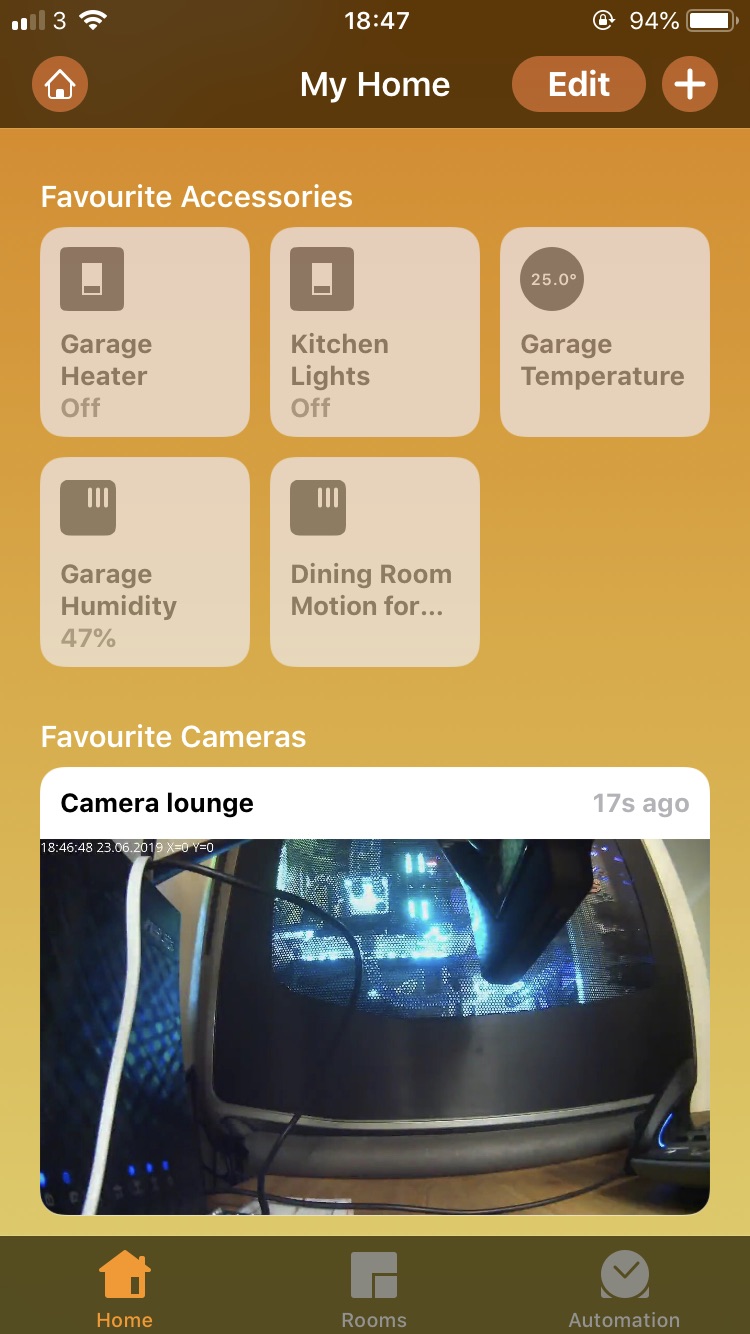
Here is the new node setup:
[{"id":"1b153eee.5db6a1","type":"homekit-service","z":"be5275e8.e06c78","isParent":true,"bridge":"9679c348.3a24a","accessoryCategory":"CAMERA","parentService":"","name":"Camera lounge","serviceName":"CameraControl","topic":"house/dafang_lounge/video","filter":false,"manufacturer":"Default Manufacturer","model":"Default Model","serialNo":"Default Serial Number","cameraConfigVideoProcessor":"ffmpeg","cameraConfigSource":"-rtsp_transport tcp -i rtsp://192.168.1.238:8554/unicast","cameraConfigStillImageSource":"-rtsp_transport tcp -i rtsp://192.168.1.238:8554/unicast -vframes 1 -r 1","cameraConfigMaxStreams":2,"cameraConfigMaxWidth":1280,"cameraConfigMaxHeight":720,"cameraConfigMaxFPS":10,"cameraConfigMaxBitrate":300,"cameraConfigVideoCodec":"libx264","cameraConfigAudioCodec":"libfdk_aac","cameraConfigAudio":false,"cameraConfigPacketSize":1316,"cameraConfigVerticalFlip":false,"cameraConfigHorizontalFlip":false,"cameraConfigMapVideo":"0:0","cameraConfigMapAudio":"0:1","cameraConfigVideoFilter":"scale=1280:720","cameraConfigAdditionalCommandLine":"-tune zerolatency","cameraConfigDebug":false,"characteristicProperties":"{}","x":160,"y":1400,"wires":[[]]},{"id":"9679c348.3a24a","type":"homekit-bridge","z":"","bridgeName":"Virtual Bridge","pinCode":"111-11-111","port":"","allowInsecureRequest":false,"manufacturer":"Default Manufacturer","model":"Default Model","serialNo":"Default Serial Number","customMdnsConfig":false,"mdnsMulticast":true,"mdnsInterface":"","mdnsPort":"","mdnsIp":"","mdnsTtl":"","mdnsLoopback":true,"mdnsReuseAddr":true}]
877dev
on 23 Jun 2019
Cool! Do you get new image on tile in the moment you open Home.app or when you click tile and Camera view opens?
Run in DEBUG mode and share you logs.
Maybe there is something more in the logs for Camera.
Shaquu
on 23 Jun 2019
Yes it's very cool! Thanks for your help :)
I press on the tile, top of screen shows "Loading", press Done to exit - then the image updates.
After a while it stops working, and I see the error FFmpeg exited with code 1
Here is the debug after a couple of minutes (very long sorry):
Debug results
```
pi@raspberrypi:~/.node-red $ DEBUG=NRCHKB,NRCHKB_Camera node-red
23 Jun 19:07:19 - [info]
Welcome to Node-RED
23 Jun 19:07:19 - [info] Node-RED version: v0.20.5
23 Jun 19:07:19 - [info] Node.js version: v10.15.3
23 Jun 19:07:19 - [info] Linux 4.14.98-v7+ arm LE
23 Jun 19:07:20 - [info] Loading palette nodes
NRCHKB RED settings available +0ms
NRCHKB Initialize AccessoryAPI +0ms
NRCHKB Initialize ServiceAPI +2ms
23 Jun 19:07:24 - [info] Dashboard version 2.15.4 started at /ui
23 Jun 19:07:25 - [info] Settings file : /home/pi/.node-red/settings.js
23 Jun 19:07:25 - [info] Context store : 'default' [module=memory]
23 Jun 19:07:25 - [info] User directory : /home/pi/.node-red
23 Jun 19:07:25 - [warn] Projects disabled : editorTheme.projects.enabled=false
23 Jun 19:07:25 - [info] Flows file : /home/pi/.node-red/flows_raspberrypi.json
23 Jun 19:07:25 - [info] Server now running at http://127.0.0.1:1880/
23 Jun 19:07:25 - [warn]
Your flow credentials file is encrypted using a system-generated key.
If the system-generated key is lost for any reason, your credentials
file will not be recoverable, you will have to delete it and re-enter
your credentials.
You should set your own key using the 'credentialSecret' option in
your settings file. Node-RED will then re-encrypt your credentials
file using your chosen key the next time you deploy a change.
23 Jun 19:07:25 - [info] Starting flows
23 Jun 19:07:25 - [info] [blynk-ws-client:Blynk (Node Red Test)] LOG PINS ["0"]
23 Jun 19:07:25 - [info] [blynk-ws-client:Blynk (Node Red Test)] Start secure connection: wss://blynk-cloud.com/webso ckets
NRCHKB Setting name to Virtual Bridge +0ms
NRCHKB Creating Bridge with name 'Virtual Bridge' and UUID '5f9a41f6-a634-421f-9cc1-60dd9079e7e5' +2ms
NRCHKB Starting Parent Service (Homekit) Left kitchen under cupboard +0ms
NRCHKB Looking for accessory with UUID 'cf152906-3130-43c9-bacb-9bccb08e6e9e'... +0ms
NRCHKB ... didn't find it. Adding new accessory with name '(Homekit) Left kitchen under cupboard' and UUID 'cf15290 6-3130-43c9-bacb-9bccb08e6e9e' and category 'OTHER:1' +0ms
NRCHKB Bridge now has 1 accessories. +5ms
NRCHKB Looking for service with UUID '22d4c3a3-6a12-48a2-9cf9-62c7537aebbf'... +0ms
NRCHKB ... didn't find it. Adding new Switch service. +0ms
23 Jun 19:07:26 - [info] [blynk-ws-client:Blynk (Node Red Test)] Register input node - type: write pin: 104
23 Jun 19:07:26 - [info] [blynk-ws-client:Blynk (Node Red Test)] Register input node - type: style-btn pin: 104
23 Jun 19:07:26 - [info] [blynk-ws-client:Blynk (Node Red Test)] Register input node - type: app
23 Jun 19:07:26 - [info] [blynk-ws-client:Blynk (Node Red Test)] Register notify node
23 Jun 19:07:26 - [info] [blynk-ws-client:Blynk (Node Red Test)] Register input node - type: write pin: 106
23 Jun 19:07:26 - [info] [blynk-ws-client:Blynk (Node Red Test)] Register input node - type: write pin: 108
23 Jun 19:07:26 - [info] [blynk-ws-client:Blynk (Node Red Test)] Register input node - type: style-btn pin: 106
23 Jun 19:07:26 - [info] [blynk-ws-client:Blynk (Node Red Test)] Register input node - type: style-btn pin: 108
23 Jun 19:07:26 - [info] [blynk-ws-client:Blynk (Node Red Test)] Register input node - type: app
23 Jun 19:07:26 - [info] [blynk-ws-client:Blynk (Node Red Test)] Register input node - type: app
NRCHKB Starting Parent Service Homekit Switch - garage heater +487ms
NRCHKB Looking for accessory with UUID 'd71ea4d4-082c-4b73-b928-2cfef40c7cf1'... +0ms
NRCHKB Accessory with UUID 'cf152906-3130-43c9-bacb-9bccb08e6e9e' doesn't match 'd71ea4d4-082c-4b73-b928-2cfef40c7c f1' +0ms
NRCHKB ... didn't find it. Adding new accessory with name 'Homekit Switch - garage heater' and UUID 'd71ea4d4-082c- 4b73-b928-2cfef40c7cf1' and category 'OTHER:1' +1ms
NRCHKB Bridge now has 2 accessories. +1ms
NRCHKB Looking for service with UUID '05a7bfd7-8828-452a-b9dc-ac1039c3b730'... +0ms
NRCHKB ... didn't find it. Adding new Switch service. +1ms
NRCHKB Starting Parent Service Temperature +84ms
NRCHKB Looking for accessory with UUID '37b2740c-4367-42be-a1f0-34e410681dfb'... +0ms
NRCHKB Accessory with UUID 'cf152906-3130-43c9-bacb-9bccb08e6e9e' doesn't match '37b2740c-4367-42be-a1f0-34e410681d fb' +1ms
NRCHKB Accessory with UUID 'd71ea4d4-082c-4b73-b928-2cfef40c7cf1' doesn't match '37b2740c-4367-42be-a1f0-34e410681d fb' +0ms
NRCHKB ... didn't find it. Adding new accessory with name 'Temperature' and UUID '37b2740c-4367-42be-a1f0-34e410681 dfb' and category 'OTHER:1' +0ms
NRCHKB Bridge now has 3 accessories. +1ms
NRCHKB Looking for service with UUID 'e8dcb8a3-0d89-4df2-8221-30a071c06c71'... +0ms
NRCHKB ... didn't find it. Adding new TemperatureSensor service. +0ms
NRCHKB Starting Parent Service Humidity +12ms
NRCHKB Looking for accessory with UUID '237f2bac-b2b0-4b55-8540-add74391e976'... +0ms
NRCHKB Accessory with UUID 'cf152906-3130-43c9-bacb-9bccb08e6e9e' doesn't match '237f2bac-b2b0-4b55-8540-add74391e9 76' +1ms
NRCHKB Accessory with UUID 'd71ea4d4-082c-4b73-b928-2cfef40c7cf1' doesn't match '237f2bac-b2b0-4b55-8540-add74391e9 76' +0ms
NRCHKB Accessory with UUID '37b2740c-4367-42be-a1f0-34e410681dfb' doesn't match '237f2bac-b2b0-4b55-8540-add74391e9 76' +0ms
NRCHKB ... didn't find it. Adding new accessory with name 'Humidity' and UUID '237f2bac-b2b0-4b55-8540-add74391e976 ' and category 'OTHER:1' +1ms
NRCHKB Bridge now has 4 accessories. +1ms
NRCHKB Looking for service with UUID 'e40006d5-a0ea-41aa-aaf8-0a38be9f70a7'... +0ms
NRCHKB ... didn't find it. Adding new HumiditySensor service. +1ms
23 Jun 19:07:26 - [info] [blynk-ws-client:Blynk (Node Red Test)] Register input node - type: write pin: 105
23 Jun 19:07:26 - [info] [blynk-ws-client:Blynk (Node Red Test)] Register input node - type: write pin: 102
23 Jun 19:07:26 - [info] [blynk-ws-client:Blynk (Node Red Test)] Register input node - type: style-btn pin: 102
23 Jun 19:07:26 - [info] [blynk-ws-client:Blynk (Node Red Test)] Register input node - type: app
23 Jun 19:07:26 - [info] [blynk-ws-client:Blynk (Node Red Test)] Register input node - type: write pin: 103
23 Jun 19:07:26 - [info] [blynk-ws-client:Blynk (Node Red Test)] Register notify node
23 Jun 19:07:26 - [info] [blynk-ws-client:Blynk (Node Red Test)] Register input node - type: write pin: 101
23 Jun 19:07:26 - [info] [blynk-ws-client:Blynk (Node Red Test)] Register input node - type: style-btn pin: 110
NRCHKB Starting Parent Service Motion for 877dev +54ms
NRCHKB Looking for accessory with UUID '7a6e0573-3806-40d5-ad06-9f91f3eaf0cd'... +0ms
NRCHKB Accessory with UUID 'cf152906-3130-43c9-bacb-9bccb08e6e9e' doesn't match '7a6e0573-3806-40d5-ad06-9f91f3eaf0 cd' +0ms
NRCHKB Accessory with UUID 'd71ea4d4-082c-4b73-b928-2cfef40c7cf1' doesn't match '7a6e0573-3806-40d5-ad06-9f91f3eaf0 cd' +0ms
NRCHKB Accessory with UUID '37b2740c-4367-42be-a1f0-34e410681dfb' doesn't match '7a6e0573-3806-40d5-ad06-9f91f3eaf0 cd' +1ms
NRCHKB Accessory with UUID '237f2bac-b2b0-4b55-8540-add74391e976' doesn't match '7a6e0573-3806-40d5-ad06-9f91f3eaf0 cd' +0ms
NRCHKB ... didn't find it. Adding new accessory with name 'Motion for 877dev' and UUID '7a6e0573-3806-40d5-ad06-9f9 1f3eaf0cd' and category 'OTHER:1' +0ms
NRCHKB Bridge now has 5 accessories. +1ms
NRCHKB Looking for service with UUID '02d83816-992a-4797-99b4-b6d1725d4517'... +0ms
NRCHKB ... didn't find it. Adding new MotionSensor service. +1ms
NRCHKB Starting Parent Service Camera lounge +8ms
NRCHKB Looking for accessory with UUID '6bfd6571-4e69-4f6c-b8f1-52fccd62320e'... +0ms
NRCHKB Accessory with UUID 'cf152906-3130-43c9-bacb-9bccb08e6e9e' doesn't match '6bfd6571-4e69-4f6c-b8f1-52fccd6232 0e' +0ms
NRCHKB Accessory with UUID 'd71ea4d4-082c-4b73-b928-2cfef40c7cf1' doesn't match '6bfd6571-4e69-4f6c-b8f1-52fccd6232 0e' +1ms
NRCHKB Accessory with UUID '37b2740c-4367-42be-a1f0-34e410681dfb' doesn't match '6bfd6571-4e69-4f6c-b8f1-52fccd6232 0e' +0ms
NRCHKB Accessory with UUID '237f2bac-b2b0-4b55-8540-add74391e976' doesn't match '6bfd6571-4e69-4f6c-b8f1-52fccd6232 0e' +0ms
NRCHKB Accessory with UUID '7a6e0573-3806-40d5-ad06-9f91f3eaf0cd' doesn't match '6bfd6571-4e69-4f6c-b8f1-52fccd6232 0e' +0ms
NRCHKB ... didn't find it. Adding new accessory with name 'Camera lounge' and UUID '6bfd6571-4e69-4f6c-b8f1-52fccd6 2320e' and category 'CAMERA:17' +1ms
NRCHKB Bridge now has 6 accessories. +1ms
NRCHKB Looking for service with UUID 'a05bfbe2-f058-4365-b82c-261a8acd9e4d'... +0ms
NRCHKB ... didn't find it. Adding new CameraControl service. +1ms
NRCHKB Configuring Camera Source +0ms
NRCHKB_Camera Configuring services for Camera... +0ms
NRCHKB_Camera ...added CameraControl Service +0ms
NRCHKB_Camera ...audio not available +0ms
NRCHKB_Camera Creating Camera Stream Controllers: 2 - Started +0ms
NRCHKB_Camera Camera options: {"proxy":false,"srtp":true,"video":{"resolutions":[[320,240,10],[320,180,10],[480,360 ,10],[480,270,10],[640,480,10],[640,360,10],[1280,720,10]],"codec":{"profiles":[0,1,2],"levels":[0,1,2]}},"audio":{"c odecs":[{"type":"OPUS","samplerate":24},{"type":"AAC-eld","samplerate":16}]}} +1ms
NRCHKB_Camera Creating Camera Stream Controllers - Finished +18ms
23 Jun 19:07:26 - [info] Started flows
23 Jun 19:07:26 - [error] [smart-plug:Kasa HS100 garage heater] not reachable
23 Jun 19:07:26 - [info] [mqtt-broker:5615eece.b3a81] Connected to broker: mqtt://192.168.1.95:1883
23 Jun 19:07:26 - [info] [blynk-ws-client:Blynk (Node Red Test)] Client logged
NRCHKB publishing bridge with name 'Virtual Bridge', pin code '111-11-111' and 6 accessories. +6s
NRCHKB Paired Camera from Accessory Camera lounge to Bridge Virtual Bridge +0ms
NRCHKB Bridge [9679c348.3a24a] published +0ms
NRCHKB_Camera Snapshot from Camera lounge at 480x270 +10m
NRCHKB_Camera ffmpeg -rtsp_transport tcp -i rtsp://192.168.1.238:8554/unicast -vframes 1 -r 1 -t 1 -s 480x270 -f im age2 - +1ms
NRCHKB_Camera Snapshot from Camera lounge at 480x270 +3s
NRCHKB_Camera ffmpeg -rtsp_transport tcp -i rtsp://192.168.1.238:8554/unicast -vframes 1 -r 1 -t 1 -s 480x270 -f im age2 - +1ms
NRCHKB_Camera Request type: start +1m
NRCHKB_Camera Start streaming video from Camera lounge with 1280x720@299kBit +24ms
NRCHKB_Camera ffmpeg -rtsp_transport tcp -i rtsp://192.168.1.238:8554/unicast -map 0:0 -vcodec libx264 -pix_fmt yuv420p -r 10 -f rawvideo -tune zerolatency -vf scale=1280:720 -b:v 299k -bufsize 299k -maxrate 299k -payload_type 99 -ssrc 9147164 -f rtp -srtp_out_suite AES_CM_128_HMAC_SHA1_80 -srtp_out_params 6eOkQ6KtyedEnZ7h0sAfGWQx9eTEO+NT3Q+DPkdl srtp://192.168.1.107:59282?rtcpport=59282&localrtcpport=59282&pkt_size=1316 +0ms
NRCHKB_Camera ffmpeg data: ffmpeg version 4.1.git Copyright (c) 2000-2019 the FFmpeg developers
NRCHKB_Camera built with gcc 6.3.0 (Raspbian 6.3.0-18+rpi1+deb9u1) 20170516
NRCHKB_Camera +9ms
NRCHKB_Camera ffmpeg data: configuration: --prefix=/usr/local --arch=armel --target-os=linux --enable-omx-rpi --enable-nonfree --enable-gpl --enable-libfdk-aac --enable-mmal --enable-libx264 --enable-decoder=h264 --enable-network --enable-protocol=tcp --enable-demuxer=rtsp
NRCHKB_Camera libavutil 56. 29.100 / 56. 29.100
NRCHKB_Camera libavcodec 58. 53.100 / 58. 53.100
NRCHKB_Camera libavformat 58. 28.100 / 58. 28.100
NRCHKB_Camera libavdevice 58. 7.100 / 58. 7.100
NRCHKB_Camera libavfilter 7. 55.100 / 7. 55.100
NRCHKB_Camera libswscale 5. 4.101 / 5. 4.101
NRCHKB_Camera libswresample 3. 4.100 / 3. 4.100
NRCHKB_Camera libpostproc 55. 4.100 / 55. 4.100
NRCHKB_Camera +2ms
NRCHKB_Camera ffmpeg data: Input #0, rtsp, from 'rtsp://192.168.1.238:8554/unicast':
NRCHKB_Camera Metadata:
NRCHKB_Camera title : LIVE555 Streaming Media v2017.10.28
NRCHKB_Camera comment : LIVE555 Streaming Media v2017.10.28
NRCHKB_Camera Duration: N/A, start: 0.841556, bitrate: N/A
NRCHKB_Camera +1s
NRCHKB_Camera ffmpeg data: Stream #0:0: Video: h264 (Constrained Baseline), yuv420p(progressive), 1280x720, 25 fps, 24.92 tbr, 90k tbn, 50 tbc
NRCHKB_Camera +1ms
NRCHKB_Camera ffmpeg data: Stream mapping:
NRCHKB_Camera Stream #0:0 -> #0:0 (h264 (native) -> h264 (libx264))
NRCHKB_Camera Press [q] to stop, [?] for help
NRCHKB_Camera +2ms
NRCHKB_Camera ffmpeg data: [libx264 @ 0x1aec850] using cpu capabilities: ARMv6 NEON
NRCHKB_Camera +237ms
NRCHKB_Camera ffmpeg data: [libx264 @ 0x1aec850] profile High, level 3.1
NRCHKB_Camera +29ms
NRCHKB_Camera ffmpeg data: Output #0, rtp, to 'srtp://192.168.1.107:59282?rtcpport=59282&localrtcpport=59282&pkt_size=1316':
NRCHKB_Camera Metadata:
NRCHKB_Camera title : LIVE555 Streaming Media v2017.10.28
NRCHKB_Camera comment : LIVE555 Streaming Media v2017.10.28
NRCHKB_Camera encoder : Lavf58.28.100
NRCHKB_Camera Stream #0:0: Video: h264 (libx264), yuv420p, 1280x720, q=-1--1, 299 kb/s, 10 fps, 90k tbn, 10 tbc
NRCHKB_Camera Metadata:
NRCHKB_Camera encoder : Lavc58.53.100 libx264
NRCHKB_Camera Side data:
NRCHKB_Camera cpb: bitrate max/min/avg: 299000/0/299000 buffer size: 299000 vbv_delay: -1
NRCHKB_Camera +1ms
NRCHKB_Camera ffmpeg data: frame= 4 fps=0.0 q=34.0 size= 20kB time=00:00:00.30 bitrate= 547.2kbits/s dup=0 drop= +328ms=0.505x
NRCHKB_Camera ffmpeg data: frame= 10 fps=8.7 q=33.0 size= 36kB time=00:00:00.90 bitrate= 324.5kbits/s dup=0 drop= +562msd=0.779x
NRCHKB_Camera ffmpeg data: frame= 16 fps=9.2 q=27.0 size= 53kB time=00:00:01.50 bitrate= 288.2kbits/s dup=0 drop= +584msd=0.863x
NRCHKB_Camera ffmpeg data: frame= 21 fps=9.2 q=26.0 size= 66kB time=00:00:02.00 bitrate= 272.2kbits/s dup=0 drop= +544msd=0.876x
NRCHKB_Camera ffmpeg data: [h264 @ 0x1ca0210] Increasing reorder buffer to 1
NRCHKB_Camera +29ms
NRCHKB_Camera ffmpeg data: frame= 26 fps=9.1 q=29.0 size= 82kB time=00:00:02.50 bitrate= 270.2kbits/s dup=0 drop= +559msd=0.871x
NRCHKB_Camera ffmpeg data: frame= 32 fps=9.4 q=22.0 size= 104kB time=00:00:03.10 bitrate= 274.4kbits/s dup=0 drop= +640msd=0.913x
NRCHKB_Camera ffmpeg data: frame= 37 fps=9.3 q=28.0 size= 123kB time=00:00:03.60 bitrate= 280.9kbits/s dup=0 drop= +598msd=0.904x
NRCHKB_Camera Request type: stop +161ms
NRCHKB_Camera ffmpeg data: frame= 39 fps=9.0 q=28.0 Lsize= 130kB time=00:00:03.80 bitrate= 281.3kbits/s dup=0 drop=47 speed=0.875x
NRCHKB_Camera video:129kB audio:0kB subtitle:0kB other streams:0kB global headers:0kB muxing overhead: 1.126130%
NRCHKB_Camera +73ms
NRCHKB_Camera ffmpeg data: [libx264 @ 0x1aec850] frame I:1 Avg QP:34.09 size: 15709
NRCHKB_Camera [libx264 @ 0x1aec850] frame P:38 Avg QP:27.38 size: 3064
NRCHKB_Camera [libx264 @ 0x1aec850] mb I I16..4: 22.8% 67.3% 9.9%
NRCHKB_Camera +8ms
NRCHKB_Camera ffmpeg data: [libx264 @ 0x1aec850] mb P I16..4: 1.2% 1.3% 0.0% P16..4: 20.1% 1.6% 1.4% 0.0% 0.0% skip:74.5%
NRCHKB_Camera [libx264 @ 0x1aec850] 8x8 transform intra:59.3% inter:76.7%
NRCHKB_Camera [libx264 @ 0x1aec850] coded y,uvDC,uvAC intra: 17.9% 43.2% 4.8% inter: 3.3% 10.1% 0.1%
NRCHKB_Camera [libx264 @ 0x1aec850] i16 v,h,dc,p: 29% 30% 17% 23%
NRCHKB_Camera [libx264 @ 0x1aec850] i8 v,h,dc,ddl,ddr,vr,hd,vl,hu: 19% 18% 46% 3% 3% 2% 4% 2% 3%
NRCHKB_Camera [libx264 @ 0x1aec850] i4 v,h,dc,ddl,ddr,vr,hd,vl,hu: 25% 31% 19% 5% 4% 3% 5% 3% 5%
NRCHKB_Camera [libx264 @ 0x1aec850] i8c dc,h,v,p: 64% 19% 15% 3%
NRCHKB_Camera [libx264 @ 0x1aec850] Weighted P-Frames: Y:0.0% UV:0.0%
NRCHKB_Camera [libx264 @ 0x1aec850] ref P L0: 77.4% 9.4% 9.3% 3.9%
NRCHKB_Camera [libx264 @ 0x1aec850] kb/s:271.04
NRCHKB_Camera +2ms
NRCHKB_Camera ffmpeg data: Exiting normally, received signal 15.
NRCHKB_Camera +7ms
NRCHKB_Camera Stopped streaming +4ms
NRCHKB_Camera Request type: start +10s
NRCHKB_Camera Start streaming video from Camera lounge with 1280x720@299kBit +24ms
NRCHKB_Camera ffmpeg -rtsp_transport tcp -i rtsp://192.168.1.238:8554/unicast -map 0:0 -vcodec libx264 -pix_fmt yuv420p -r 10 -f rawvideo -tune zerolatency -vf scale=1280:720 -b:v 299k -bufsize 299k -maxrate 299k -payload_type 99 -ssrc 13030647 -f rtp -srtp_out_suite AES_CM_128_HMAC_SHA1_80 -srtp_out_params LVaUqEupYzMCcp1kCFX2ICDyivOtKZcuag2eHCkS srtp://192.168.1.107:64518?rtcpport=64518&localrtcpport=64518&pkt_size=1316 +1ms
NRCHKB_Camera ffmpeg data: ffmpeg version 4.1.git Copyright (c) 2000-2019 the FFmpeg developers
NRCHKB_Camera built with gcc 6.3.0 (Raspbian 6.3.0-18+rpi1+deb9u1) 20170516
NRCHKB_Camera configuration: --prefix=/usr/local --arch=armel --target-os=linux --enable-omx-rpi --enable-nonfree --enable-gpl --enable-libfdk-aac --enable-mmal --enable-libx264 --enable-decoder=h264 --enable-network --enable-protocol=tcp --enable-demuxer=rtsp
NRCHKB_Camera libavutil 56. 29.100 / 56. 29.100
NRCHKB_Camera libavcodec 58. 53.100 / 58. 53.100
NRCHKB_Camera libavformat 58. 28.100 / 58. 28.100
NRCHKB_Camera libavdevice 58. 7.100 / 58. 7.100
NRCHKB_Camera libavfilter 7. 55.100 / 7. 55.100
NRCHKB_Camera libswscale 5. 4.101 / 5. 4.101
NRCHKB_Camera +7ms
NRCHKB_Camera ffmpeg data: libswresample 3. 4.100 / 3. 4.100
NRCHKB_Camera libpostproc 55. 4.100 / 55. 4.100
NRCHKB_Camera +3ms
NRCHKB_Camera Snapshot from Camera lounge at 480x270 +196ms
NRCHKB_Camera ffmpeg -rtsp_transport tcp -i rtsp://192.168.1.238:8554/unicast -vframes 1 -r 1 -t 1 -s 480x270 -f image2 - +1ms
NRCHKB_Camera ffmpeg data: Input #0, rtsp, from 'rtsp://192.168.1.238:8554/unicast':
NRCHKB_Camera Metadata:
NRCHKB_Camera title : LIVE555 Streaming Media v2017.10.28
NRCHKB_Camera comment : LIVE555 Streaming Media v2017.10.28
NRCHKB_Camera Duration: N/A, start: 0.759733, bitrate: N/A +1s
NRCHKB_Camera ffmpeg data:
NRCHKB_Camera Stream #0:0: Video: h264 (Constrained Baseline), yuv420p(progressive), 1280x720, 25 fps, 25 tbr, 90k tbn, 50 tbc
NRCHKB_Camera +2ms
NRCHKB_Camera ffmpeg data: Stream mapping:
NRCHKB_Camera Stream #0:0 -> #0:0 (h264 (native) -> h264 (libx264))
NRCHKB_Camera Press [q] to stop, [?] for help
NRCHKB_Camera +3ms
NRCHKB_Camera ffmpeg data: [libx264 @ 0x2b979d0] using cpu capabilities: ARMv6 NEON
NRCHKB_Camera +216ms
NRCHKB_Camera ffmpeg data: [libx264 @ 0x2b979d0] profile High, level 3.1
NRCHKB_Camera +30ms
NRCHKB_Camera ffmpeg data: Output #0, rtp, to 'srtp://192.168.1.107:64518?rtcpport=64518&localrtcpport=64518&pkt_size=1316':
NRCHKB_Camera Metadata:
NRCHKB_Camera title : LIVE555 Streaming Media v2017.10.28
NRCHKB_Camera comment : LIVE555 Streaming Media v2017.10.28
NRCHKB_Camera encoder : Lavf58.28.100
NRCHKB_Camera Stream #0:0: Video: h264 (libx264), yuv420p, 1280x720, q=-1--1, 299 kb/s, 10 fps, 90k tbn, 10 tbc
NRCHKB_Camera Metadata:
NRCHKB_Camera encoder : Lavc58.53.100 libx264
NRCHKB_Camera Side data:
NRCHKB_Camera cpb: bitrate max/min/avg: 299000/0/299000 buffer size: 299000 vbv_delay: -1
NRCHKB_Camera +1ms
NRCHKB_Camera ffmpeg data: frame= 3 fps=0.0 q=39.0 size= 19kB time=00:00:00.20 bitrate= 771.6kbits/s dup=0 drop= +288ms=0.374x
NRCHKB_Camera ffmpeg data: frame= 8 fps=7.3 q=33.0 size= 33kB time=00:00:00.70 bitrate= 389.5kbits/s dup=0 drop= +562msd=0.638x
NRCHKB_Camera ffmpeg data: frame= 12 fps=7.4 q=32.0 size= 44kB time=00:00:01.10 bitrate= 324.9kbits/s dup=0 drop= +521msd=0.68x
NRCHKB_Camera ffmpeg data: frame= 16 fps=7.4 q=29.0 size= 55kB time=00:00:01.50 bitrate= 301.9kbits/s dup=0 drop= +543msd=0.695x
NRCHKB_Camera ffmpeg data: [h264 @ 0x2ba16c0] Increasing reorder buffer to 1
NRCHKB_Camera +263ms
NRCHKB_Camera ffmpeg data: frame= 21 fps=7.6 q=25.0 size= 69kB time=00:00:02.00 bitrate= 283.1kbits/s dup=0 drop= +331msd=0.726x
NRCHKB_Camera Request type: reconfigure +2s
NRCHKB_Camera Snapshot from Camera lounge at 480x270 +2s
NRCHKB_Camera ffmpeg -rtsp_transport tcp -i rtsp://192.168.1.238:8554/unicast -vframes 1 -r 1 -t 1 -s 480x270 -f image2 - +1ms
NRCHKB_Camera Request type: stop +5s
NRCHKB_Camera ffmpeg data: [rtsp @ 0x2b0f470] CSeq 5 expected, 0 received.
NRCHKB_Camera +48s
NRCHKB_Camera Request type: start +13s
NRCHKB_Camera Start streaming video from Camera lounge with 1280x720@299kBit +23ms
NRCHKB_Camera ffmpeg -rtsp_transport tcp -i rtsp://192.168.1.238:8554/unicast -map 0:0 -vcodec libx264 -pix_fmt yuv420p -r 10 -f rawvideo -tune zerolatency -vf scale=1280:720 -b:v 299k -bufsize 299k -maxrate 299k -payload_type 99 -ssrc 6550636 -f rtp -srtp_out_suite AES_CM_128_HMAC_SHA1_80 -srtp_out_params HP5yNEofsPx3HuFH3HIqS+Jqt5Bgrg/CvSJ6B4fX srtp://192.168.1.107:62264?rtcpport=62264&localrtcpport=62264&pkt_size=1316 +1ms
NRCHKB_Camera ffmpeg data: ffmpeg version 4.1.git Copyright (c) 2000-2019 the FFmpeg developers
NRCHKB_Camera built with gcc 6.3.0 (Raspbian 6.3.0-18+rpi1+deb9u1) 20170516
NRCHKB_Camera configuration: --prefix=/usr/local --arch=armel --target-os=linux --enable-omx-rpi --enable-nonfree --enable-gpl --enable-libfdk-aac --enable-mmal --enable-libx264 --enable-decoder=h264 --enable-network --enable-protocol=tcp --enable-demuxer=rtsp
NRCHKB_Camera libavutil 56. 29.100 / 56. 29.100
NRCHKB_Camera libavcodec 58. 53.100 / 58. 53.100
NRCHKB_Camera libavformat 58. 28.100 / 58. 28.100
NRCHKB_Camera libavdevice 58. 7.100 / 58. 7.100
NRCHKB_Camera libavfilter 7. 55.100 / 7. 55.100
NRCHKB_Camera libswscale 5. 4.101 / 5. 4.101
NRCHKB_Camera libswresample 3. 4.100 / 3. 4.100
NRCHKB_Camera libpostproc 55. 4.100 / 55. 4.100
NRCHKB_Camera +7ms
NRCHKB_Camera Request type: stop +30s
NRCHKB_Camera ffmpeg data: rtsp://192.168.1.238:8554/unicast: Invalid data found when processing input
NRCHKB_Camera Exiting normally, received signal 15.
NRCHKB_Camera +3ms
ERROR: FFmpeg exited with code 1
NRCHKB_Camera Snapshot from Camera lounge at 480x270 +176ms
NRCHKB_Camera ffmpeg -rtsp_transport tcp -i rtsp://192.168.1.238:8554/unicast -vframes 1 -r 1 -t 1 -s 480x270 -f image2 - +1ms
NRCHKB_Camera Request type: start +1m
NRCHKB_Camera Start streaming video from Camera lounge with 1280x720@299kBit +14ms
NRCHKB_Camera ffmpeg -rtsp_transport tcp -i rtsp://192.168.1.238:8554/unicast -map 0:0 -vcodec libx264 -pix_fmt yuv420p -r 10 -f rawvideo -tune zerolatency -vf scale=1280:720 -b:v 299k -bufsize 299k -maxrate 299k -payload_type 99 -ssrc 343987 -f rtp -srtp_out_suite AES_CM_128_HMAC_SHA1_80 -srtp_out_params buidA1Ip/LXau50H85F6SDNudbYx3T8MPzCIymMV srtp://192.168.1.107:53438?rtcpport=53438&localrtcpport=53438&pkt_size=1316 +1ms
NRCHKB_Camera ffmpeg data: ffmpeg version 4.1.git Copyright (c) 2000-2019 the FFmpeg developers
NRCHKB_Camera built with gcc 6.3.0 (Raspbian 6.3.0-18+rpi1+deb9u1) 20170516
NRCHKB_Camera configuration: --prefix=/usr/local --arch=armel --target-os=linux --enable-omx-rpi --enable-nonfree --enable-gpl --enable-libfdk-aac --enable-mmal --enable-libx264 --enable-decoder=h264 --enable-network --enable-protocol=tcp --enable-demuxer=rtsp
NRCHKB_Camera +3ms
NRCHKB_Camera ffmpeg data: libavutil 56. 29.100 / 56. 29.100
NRCHKB_Camera libavcodec 58. 53.100 / 58. 53.100
NRCHKB_Camera libavformat 58. 28.100 / 58. 28.100
NRCHKB_Camera libavdevice 58. 7.100 / 58. 7.100
NRCHKB_Camera libavfilter 7. 55.100 / 7. 55.100
NRCHKB_Camera libswscale 5. 4.101 / 5. 4.101
NRCHKB_Camera libswresample 3. 4.100 / 3. 4.100
NRCHKB_Camera libpostproc 55. 4.100 / 55. 4.100
NRCHKB_Camera +1ms
NRCHKB_Camera Snapshot from Camera lounge at 480x270 +24s
NRCHKB_Camera ffmpeg -rtsp_transport tcp -i rtsp://192.168.1.238:8554/unicast -vframes 1 -r 1 -t 1 -s 480x270 -f image2 - +1ms
NRCHKB_Camera Request type: stop +1m
NRCHKB_Camera ffmpeg data: rtsp://192.168.1.238:8554/unicast: Invalid data found when processing input
NRCHKB_Camera Exiting normally, received signal 15.
NRCHKB_Camera +3ms
ERROR: FFmpeg exited with code 1
NRCHKB_Camera Request type: start +431ms
NRCHKB_Camera Start streaming video from Camera lounge with 1280x720@299kBit +14ms
NRCHKB_Camera ffmpeg -rtsp_transport tcp -i rtsp://192.168.1.238:8554/unicast -map 0:0 -vcodec libx264 -pix_fmt yuv420p -r 10 -f rawvideo -tune zerolatency -vf scale=1280:720 -b:v 299k -bufsize 299k -maxrate 299k -payload_type 99 -ssrc 16242503 -f rtp -srtp_out_suite AES_CM_128_HMAC_SHA1_80 -srtp_out_params d2meULrx34tWcSkBs6cY/XsCAbp9+zberYZCzAN7 srtp://192.168.1.107:62039?rtcpport=62039&localrtcpport=62039&pkt_size=1316 +0ms
NRCHKB_Camera ffmpeg data: ffmpeg version 4.1.git Copyright (c) 2000-2019 the FFmpeg developers
NRCHKB_Camera built with gcc 6.3.0 (Raspbian 6.3.0-18+rpi1+deb9u1) 20170516
NRCHKB_Camera configuration: --prefix=/usr/local --arch=armel --target-os=linux --enable-omx-rpi --enable-nonfree --enable-gpl --enable-libfdk-aac --enable-mmal --enable-libx264 --enable-decoder=h264 --enable-network --enable-protocol=tcp --enable-demuxer=rtsp
NRCHKB_Camera +4ms
NRCHKB_Camera ffmpeg data: libavutil 56. 29.100 / 56. 29.100
NRCHKB_Camera libavcodec 58. 53.100 / 58. 53.100
NRCHKB_Camera libavformat 58. 28.100 / 58. 28.100
NRCHKB_Camera libavdevice 58. 7.100 / 58. 7.100
NRCHKB_Camera libavfilter 7. 55.100 / 7. 55.100
NRCHKB_Camera libswscale 5. 4.101 / 5. 4.101
NRCHKB_Camera libswresample 3. 4.100 / 3. 4.100
NRCHKB_Camera libpostproc 55. 4.100 / 55. 4.100
NRCHKB_Camera +0ms
NRCHKB_Camera Request type: stop +30s
NRCHKB_Camera ffmpeg data: rtsp://192.168.1.238:8554/unicast: Invalid data found when processing input
NRCHKB_Camera Exiting normally, received signal 15.
NRCHKB_Camera +3ms
ERROR: FFmpeg exited with code 1
NRCHKB_Camera Snapshot from Camera lounge at 480x270 +27s
NRCHKB_Camera ffmpeg -rtsp_transport tcp -i rtsp://192.168.1.238:8554/unicast -vframes 1 -r 1 -t 1 -s 480x270 -f image2 - +1ms
877dev
on 23 Jun 2019
It is how correct log looks like (node-red Mac, camera on RPi0)
 NRCHKB_Camera Snapshot from Camera at 480x270 +30s
  NRCHKB_Camera ffmpeg -i https://i.imgur.com/rh8J3A1.jpg -t 1 -s 480x270 -f image2 - +0ms
  NRCHKB_Camera Request type: start +6s
  NRCHKB_Camera Start streaming video from Camera with 1280x720@299kBit +6ms
  NRCHKB_Camera ffmpeg -re -i rtsp://192.168.0.227:8554/unicast -map 0:0 -vcodec libx264 -pix_fmt yuv420p -r 10 -f rawvideo -tune zerolatency -vf scale=1280:720 -b:v 299k -bufsize 299k -maxrate 299k -payload_type 99 -ssrc 11185170 -f rtp -srtp_out_suite AES_CM_128_HMAC_SHA1_80 -srtp_out_params sk9ygyd+IPzjkqCJxUKBOkUtB+fN4YBvJ1YSNAo4 srtp://192.168.0.66:58108?rtcpport=58108&localrtcpport=58108&pkt_size=1316 +0ms
  NRCHKB_Camera ffmpeg data: ffmpeg version 4.1.3 +45ms
  NRCHKB_Camera ffmpeg data:  Copyright (c) 2000-2019 the FFmpeg developers
  NRCHKB_Camera   built with Apple LLVM version 10.0.1 (clang-1001.0.46.4)
  NRCHKB_Camera   configuration: --prefix=/usr/local/Cellar/ffmpeg/4.1.3_1 --enable-shared --enable-pthreads --enable-version3 --enable-hardcoded-tables --enable-avresample --cc=clang --host-cflags='-I/Library/Java/JavaVirtualMachines/adoptopenjdk-11.0.2.jdk/Contents/Home/include -I/Library/Java/JavaVirtualMachines/adoptopenjdk-11.0.2.jdk/Contents/Home/include/darwin' --host-ldflags= --enable-ffplay --enable-gnutls --enable-gpl --enable-libaom --enable-libbluray --enable-libmp3lame --enable-libopus --enable-librubberband --enable-libsnappy --enable-libtesseract --enable-libtheora --enable-libvorbis --enable-libvpx --enable-libx264 --enable-libx265 --enable-libxvid --enable-lzma --enable-libfontconfig --enable-libfreetype --enable-frei0r --enable-libass --enable-libopencore-amrnb --enable-libopencore-amrwb --enable-libopenjpeg --enable-librtmp --enable-libspeex --enable-videotoolbox --disable-libjack --disable-indev=jack --enable-libaom --enable-libsoxr
  NRCHKB_Camera   libavutil      56. 22.100 / 56. 22.100
  NRCHKB_Camera   libavcodec     58. 35.100 / 58. 35.100
  NRCHKB_Camera   libavformat    58. 20.100 / 58. 20.100
  NRCHKB_Camera   libavdevice    58.  5.100 / 58.  5.100
  NRCHKB_Camera   libavfilter     7. 40.101 /  7. 40.101
  NRCHKB_Camera   libavresample   4.  0.  0 /  4.  0.  0
  NRCHKB_Camera   libswscale      5.  3.100 /  5.  3.100
  NRCHKB_Camera   libswresample   3.  3.100 /  3.  3.100
  NRCHKB_Camera   libpostproc    55.  3.100 / 55.  3.100
  NRCHKB_Camera  +0ms
  NRCHKB_Camera ffmpeg data: Input #0, rtsp, from 'rtsp://192.168.0.227:8554/unicast':
  NRCHKB_Camera   Metadata:
  NRCHKB_Camera     title           : LIVE555 Streaming Media v2019.03.06
  NRCHKB_Camera     comment         : LIVE555 Streaming Media v2019.03.06
  NRCHKB_Camera  +774ms
  NRCHKB_Camera ffmpeg data:   Duration: N/A, start: 0.034533, bitrate: N/A
  NRCHKB_Camera     Stream #0:0: Video: h264 (High), yuv420p(progressive), 1280x720, 30 fps, 30 tbr, 90k tbn, 180k tbc
  NRCHKB_Camera  +1ms
  NRCHKB_Camera ffmpeg data: Stream mapping:
  NRCHKB_Camera   Stream #0:0 -> #0:0 (h264 (native) -> h264 (libx264))
  NRCHKB_Camera Press [q] to stop, [?] for help
  NRCHKB_Camera  +5ms
  NRCHKB_Camera ffmpeg data: [libx264 @ 0x7fb9de808800] using cpu capabilities: MMX2 SSE2Fast SSSE3 SSE4.2 AVX FMA3 BMI2 AVX2
  NRCHKB_Camera  +82ms
  NRCHKB_Camera ffmpeg data: [libx264 @ 0x7fb9de808800] profile High, level 3.1
  NRCHKB_Camera  +6ms
  NRCHKB_Camera ffmpeg data: Output #0, rtp, to 'srtp://192.168.0.66:58108?rtcpport=58108&localrtcpport=58108&pkt_size=1316':
  NRCHKB_Camera   Metadata:
  NRCHKB_Camera     title           : LIVE555 Streaming Media v2019.03.06
  NRCHKB_Camera     comment         : LIVE555 Streaming Media v2019.03.06
  NRCHKB_Camera     encoder         : Lavf58.20.100
  NRCHKB_Camera     Stream #0:0: Video: h264 (libx264), yuv420p, 1280x720, q=-1--1, 299 kb/s, 10 fps, 90k tbn, 10 tbc
  NRCHKB_Camera     Metadata:
  NRCHKB_Camera       encoder         : Lavc58.35.100 libx264
  NRCHKB_Camera     Side data:
  NRCHKB_Camera       cpb: bitrate max/min/avg: 299000/0/299000 buffer size: 299000 vbv_delay: -1
  NRCHKB_Camera  +0ms
 +441msB_Camera ffmpeg data: frame=    6 fps=0.0 q=30.0 size=      24kB time=00:00:00.50 bitrate= 388.4kbits/s dup=0 drop=7 speed=0.999x
 +502msB_Camera ffmpeg data: frame=   11 fps= 11 q=30.0 size=      42kB time=00:00:01.00 bitrate= 346.5kbits/s dup=0 drop=17 speed=0.998x
  NRCHKB_Camera ffmpeg data: [rtsp @ 0x7fb9de800000] max delay reached. need to consume packet
  NRCHKB_Camera [rtsp @ 0x7fb9de800000] RTP: missed 12 packets
  NRCHKB_Camera  +523ms
  NRCHKB_Camera ffmpeg data: [rtsp @ 0x7fb9de800000] max delay reached. need to consume packet
  NRCHKB_Camera [rtsp @ 0x7fb9de800000] RTP: missed 30 packets
  NRCHKB_Camera  +0ms
 +2msHKB_Camera ffmpeg data: frame=   15 fps=9.6 q=30.0 size=      60kB time=00:00:01.40 bitrate= 348.9kbits/s dup=0 drop=26 speed= 0.9x
  NRCHKB_Camera ffmpeg data: [rtsp @ 0x7fb9de800000] max delay reached. need to consume packet
  NRCHKB_Camera [rtsp @ 0x7fb9de800000] RTP: missed 1 packets
  NRCHKB_Camera  +345ms
  NRCHKB_Camera ffmpeg data: [h264 @ 0x7fb9dd828c00] error while decoding MB 73 30, bytestream -7
  NRCHKB_Camera  +5ms
  NRCHKB_Camera ffmpeg data: [h264 @ 0x7fb9dd828c00] concealing 1176 DC, 1176 AC, 1176 MV errors in P frame
  NRCHKB_Camera  +0ms
  NRCHKB_Camera ffmpeg data: [rtsp @ 0x7fb9de800000] max delay reached. need to consume packet
  NRCHKB_Camera  +32ms
  NRCHKB_Camera ffmpeg data: [rtsp @ 0x7fb9de800000] RTP: missed 1 packets
  NRCHKB_Camera  +1ms
  NRCHKB_Camera ffmpeg data: [h264 @ 0x7fb9dd834000] error while decoding MB 39 29, bytestream -7
  NRCHKB_Camera  +2ms
  NRCHKB_Camera ffmpeg data: [h264 @ 0x7fb9dd834000] concealing 1290 DC, 1290 AC, 1290 MV errors in P frame
  NRCHKB_Camera  +0ms
 +142msB_Camera ffmpeg data: frame=   20 fps=9.7 q=29.0 size=      74kB time=00:00:01.90 bitrate= 319.6kbits/s dup=1 drop=28 speed=0.92x
  NRCHKB_Camera ffmpeg data: [rtsp @ 0x7fb9de800000] max delay reached. need to consume packet
  NRCHKB_Camera [rtsp @ 0x7fb9de800000] RTP: missed 1 packets
  NRCHKB_Camera  +1ms
  NRCHKB_Camera ffmpeg data: [h264 @ 0x7fb9dd828c00] error while decoding MB 55 31, bytestream -5
  NRCHKB_Camera  +3ms
  NRCHKB_Camera ffmpeg data: [h264 @ 0x7fb9dd828c00] concealing 1114 DC, 1114 AC, 1114 MV errors in P frame
  NRCHKB_Camera  +0ms
  NRCHKB_Camera ffmpeg data: [rtsp @ 0x7fb9de800000] max delay reached. need to consume packet
  NRCHKB_Camera [rtsp @ 0x7fb9de800000] RTP: missed 1 packets
  NRCHKB_Camera  +115ms
  NRCHKB_Camera ffmpeg data: [h264 @ 0x7fb9dd828600] error while decoding MB 51 29, bytestream -5
  NRCHKB_Camera  +6ms
  NRCHKB_Camera ffmpeg data: [h264 @ 0x7fb9dd828600] concealing 1278 DC, 1278 AC, 1278 MV errors in P frame
  NRCHKB_Camera  +0ms
  NRCHKB_Camera ffmpeg data: [rtsp @ 0x7fb9de800000] max delay reached. need to consume packet
  NRCHKB_Camera [rtsp @ 0x7fb9de800000] RTP: missed 1 packets
  NRCHKB_Camera  +99ms
  NRCHKB_Camera ffmpeg data: [h264 @ 0x7fb9dd834600] concealing 1295 DC, 1295 AC, 1295 MV errors in P frame
  NRCHKB_Camera  +6ms
  NRCHKB_Camera ffmpeg data: [rtsp @ 0x7fb9de800000] max delay reached. need to consume packet
  NRCHKB_Camera [rtsp @ 0x7fb9de800000] RTP: missed 1 packets
  NRCHKB_Camera  +29ms
  NRCHKB_Camera ffmpeg data: [h264 @ 0x7fb9dd834c00] error while decoding MB 44 29, bytestream -6
  NRCHKB_Camera  +6ms
  NRCHKB_Camera ffmpeg data: [h264 @ 0x7fb9dd834c00] concealing 1285 DC, 1285 AC, 1285 MV errors in P frame
  NRCHKB_Camera  +1ms
 +224msB_Camera ffmpeg data: frame=   26 fps= 10 q=30.0 size=     101kB time=00:00:02.50 bitrate= 331.5kbits/s dup=1 drop=37 speed=0.972x
  NRCHKB_Camera ffmpeg data: [rtsp @ 0x7fb9de800000] max delay reached. need to consume packet
  NRCHKB_Camera [rtsp @ 0x7fb9de800000] RTP: missed 4 packets
  NRCHKB_Camera  +515ms
  NRCHKB_Camera ffmpeg data: [rtsp @ 0x7fb9de800000] max delay reached. need to consume packet
  NRCHKB_Camera [rtsp @ 0x7fb9de800000] RTP: missed 3 packets
  NRCHKB_Camera [rtsp @ 0x7fb9de800000] max delay reached. need to consume packet
  NRCHKB_Camera [rtsp @ 0x7fb9de800000] RTP: missed 9 packets
  NRCHKB_Camera [rtsp @ 0x7fb9de800000] max delay reached. need to consume packet
  NRCHKB_Camera [rtsp @ 0x7fb9de800000] RTP: missed 3 packets
  NRCHKB_Camera [rtsp @ 0x7fb9de800000] max delay reached. need to consume packet
  NRCHKB_Camera [rtsp @ 0x7fb9de800000] RTP: missed 9 packets
  NRCHKB_Camera [rtsp @ 0x7fb9de800000] max delay reached. need to consume packet
  NRCHKB_Camera [rtsp @ 0x7fb9de800000] RTP: missed 3 packets
  NRCHKB_Camera [rtsp @ 0x7fb9de800000] max delay reached. need to consume packet
  NRCHKB_Camera [rtsp @ 0x7fb9de800000] RTP: missed 6 packets
  NRCHKB_Camera [rtsp @ 0x7fb9de800000] max delay reached. need to consume packet
  NRCHKB_Camera [rtsp @ 0x7fb9de800000] RTP: missed 1 packets
  NRCHKB_Camera  +1ms
  NRCHKB_Camera ffmpeg data: [h264 @ 0x7fb9dd834600] error while decoding MB 10 31, bytestream -5
  NRCHKB_Camera  +6ms
  NRCHKB_Camera ffmpeg data: [h264 @ 0x7fb9dd834600] concealing 1159 DC, 1159 AC, 1159 MV errors in P frame
  NRCHKB_Camera [h264 @ 0x7fb9dd834c00] concealing 2139 DC, 2139 AC, 2139 MV errors in P frame
  NRCHKB_Camera  +4ms
 +36msKB_Camera ffmpeg data: frame=   31 fps= 10 q=30.0 size=     121kB time=00:00:03.00 bitrate= 329.5kbits/s dup=1 drop=46 speed=0.971x
  NRCHKB_Camera Request type: stop +186ms
  NRCHKB_Camera ffmpeg data: frame=   31 fps=9.3 q=30.0 Lsize=     121kB time=00:00:03.00 bitrate= 329.5kbits/s dup=1 drop=47 speed=0.903x
  NRCHKB_Camera video:119kB audio:0kB subtitle:0kB other streams:0kB global headers:0kB muxing overhead: 1.059863%
  NRCHKB_Camera  +2ms
  NRCHKB_Camera ffmpeg data: [libx264 @ 0x7fb9de808800] frame I:4     Avg QP:17.89  size:  6115
  NRCHKB_Camera [libx264 @ 0x7fb9de808800] frame P:27    Avg QP:20.21  size:  3623
  NRCHKB_Camera [libx264 @ 0x7fb9de808800] mb I  I16..4:  6.1% 93.9%  0.0%
  NRCHKB_Camera [libx264 @ 0x7fb9de808800] mb P  I16..4:  4.7% 38.5%  0.0%  P16..4: 12.8%  1.1%  0.2%  0.0%  0.0%    skip:42.7%
  NRCHKB_Camera [libx264 @ 0x7fb9de808800] 8x8 transform intra:90.4% inter:99.9%
  NRCHKB_Camera  +5ms
  NRCHKB_Camera ffmpeg data: [libx264 @ 0x7fb9de808800] coded y,uvDC,uvAC intra: 10.1% 19.5% 0.0% inter: 2.1% 10.8% 0.0%
  NRCHKB_Camera [libx264 @ 0x7fb9de808800] i16 v,h,dc,p: 49% 23% 24%  4%
  NRCHKB_Camera [libx264 @ 0x7fb9de808800] i8 v,h,dc,ddl,ddr,vr,hd,vl,hu: 44% 12% 40%  1%  1%  1%  1%  0%  0%
  NRCHKB_Camera [libx264 @ 0x7fb9de808800] i4 v,h,dc,ddl,ddr,vr,hd,vl,hu: 81% 16%  0%  0%  3%  0%  0%  0%  0%
  NRCHKB_Camera [libx264 @ 0x7fb9de808800] i8c dc,h,v,p: 70% 15% 15%  0%
  NRCHKB_Camera [libx264 @ 0x7fb9de808800] Weighted P-Frames: Y:3.7% UV:0.0%
  NRCHKB_Camera [libx264 @ 0x7fb9de808800] ref P L0: 43.8%  2.9% 36.5% 15.8%  0.9%
  NRCHKB_Camera [libx264 @ 0x7fb9de808800] kb/s:315.56
  NRCHKB_Camera  +0ms
  NRCHKB_Camera ffmpeg data: Exiting normally, received signal 15.
  NRCHKB_Camera  +9ms
  NRCHKB_Camera Stopped streaming +13ms
So there are some possibilities:
- You exit Camera view too fast. Some time ago it took me couple of minutes to load Camera stream.
- You have bad configuration in node-red
- You have bad configuration on camera side.
To test 1. you have to try to wait a little longer and see.
To test 3. you have to install VLC, and open RTSP address in browser and it should redirect to VLC (rtsp://192.168.1.238:8554/unicast)
To test 2. we should be sure 1 and 3 are positive (or negative?).
Shaquu
on 23 Jun 2019
That's good at least we are closer :)
To answer your possibilities:
1) I left it for 10 minutes so far and it's still loading, and showing same image frozen
2) TBC
3) Do you mean open the stream in VLC? I already have this playing smoothly (with aprox 2 second delay). I went to VLC>Media>Open Network Stream>Network tab > enter url > play
Update:
Just had a few seconds of stuttering video which is an improvement, and is showed "LIVE" . The VLC stream is still playing smoothly.
877dev
on 23 Jun 2019
Remember that VLC is one less connection which is a lot.
CAMERA > VLC
vs
CAMERA > node-red > iPhone
Shaquu
on 23 Jun 2019
feature/camera got merged into dev branch
Shaquu
on 23 Jun 2019
@Shaquu update!
I've noticed that the camera connects and goes "Live" as long as there is no motion in the field of view. I aimed it at a clock and it connects within 10secs and works for a long time.
As soon as there is any motion at all, it freezes instantly and ffmpeg seems to exit.
I'm not sure what the issue is, maybe the MQTT motion message or some kind of snapshot is taking place - need to investigate further.
The camera is set to 640 x 480, max 10FPS and max bitrate 150.
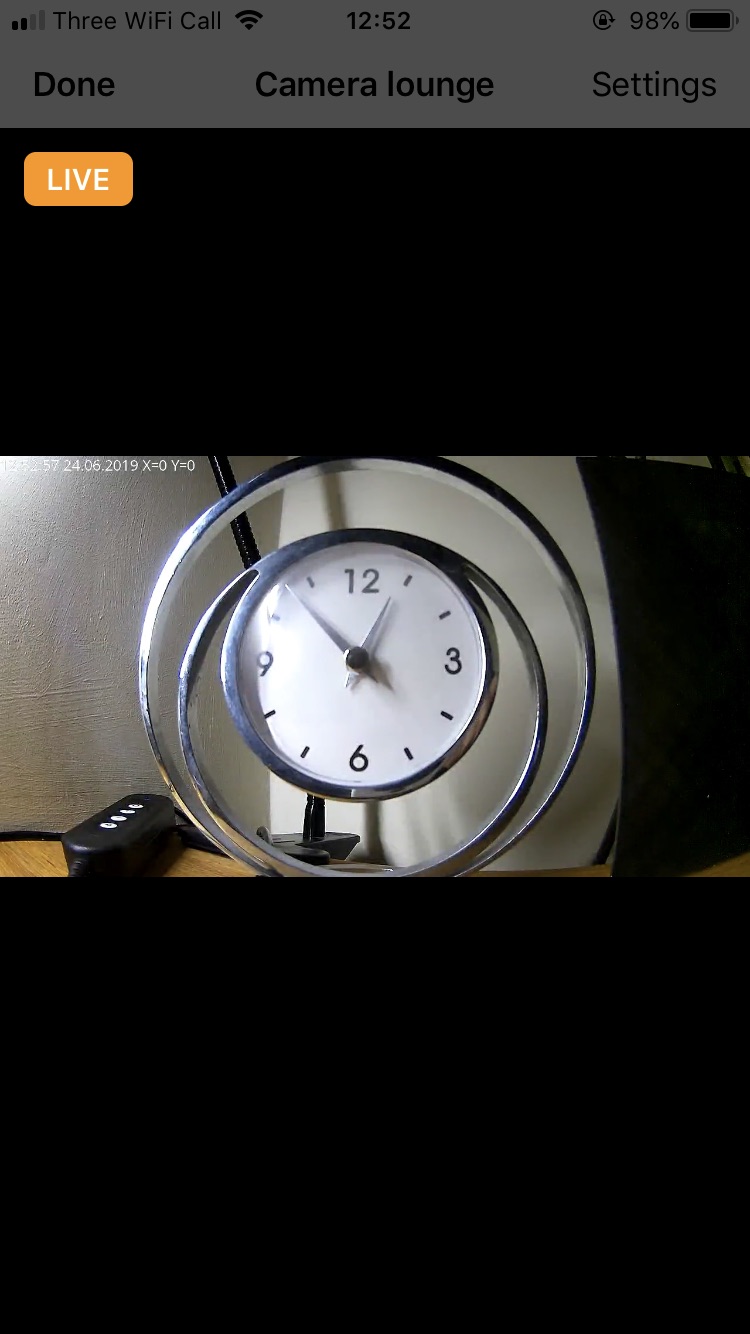
Node:
[{"id":"1b153eee.5db6a1","type":"homekit-service","z":"be5275e8.e06c78","isParent":true,"bridge":"9679c348.3a24a","accessoryCategory":"CAMERA","parentService":"","name":"Camera lounge","serviceName":"CameraControl","topic":"house/dafang_lounge/video","filter":false,"manufacturer":"Default Manufacturer","model":"Default Model","serialNo":"Default Serial Number","cameraConfigVideoProcessor":"ffmpeg","cameraConfigSource":"-rtsp_transport tcp -i rtsp://192.168.1.238:8554/unicast","cameraConfigStillImageSource":"-rtsp_transport tcp -i rtsp://192.168.1.238:8554/unicast -vframes 1 -r 1","cameraConfigMaxStreams":2,"cameraConfigMaxWidth":"640","cameraConfigMaxHeight":"480","cameraConfigMaxFPS":10,"cameraConfigMaxBitrate":"150","cameraConfigVideoCodec":"libx264","cameraConfigAudioCodec":"libfdk_aac","cameraConfigAudio":false,"cameraConfigPacketSize":1316,"cameraConfigVerticalFlip":false,"cameraConfigHorizontalFlip":false,"cameraConfigMapVideo":"0:0","cameraConfigMapAudio":"0:1","cameraConfigVideoFilter":"scale=1280:720","cameraConfigAdditionalCommandLine":"-tune zerolatency","cameraConfigDebug":false,"characteristicProperties":"{}","x":200,"y":1400,"wires":[[]]},{"id":"9679c348.3a24a","type":"homekit-bridge","z":"","bridgeName":"Virtual Bridge","pinCode":"111-11-111","port":"","allowInsecureRequest":false,"manufacturer":"Default Manufacturer","model":"Default Model","serialNo":"Default Serial Number","customMdnsConfig":false,"mdnsMulticast":true,"mdnsInterface":"","mdnsPort":"","mdnsIp":"","mdnsTtl":"","mdnsLoopback":true,"mdnsReuseAddr":true}]
Going into the Dafang web interface logs I find these messages when I move my hand in front of the camera (and it crashes):
Status>Logs>Video server - (relevant part only)
2019-06-24 13:06:23.106 (1501.723s) [ivsMoveDetection]         ImpEncoder.cpp:405      0| Will execute command /system/sdcard/scripts/detectionOn.sh
2019-06-24 13:06:23.401 (1502.018s) [ivsMoveDetection]         ImpEncoder.cpp:407      0| Execute /system/sdcard/scripts/detectionOn.sh returned:0
2019-06-24 13:06:23.401 (1502.018s) [ivsMoveDetection]         ImpEncoder.cpp:599      0| Detect !!
2019-06-24 13:06:24.545 (1503.161s) [main thread     ]ServerMediaSubsession.c:25       0| Creating Source...
2019-06-24 13:06:24.545 (1503.162s) [main thread     ]ServerMediaSubsession.c:29       0| Creating H264 Source...
2019-06-24 13:06:24.546 (1503.163s) [main thread     ]ServerMediaSubsession.c:51       0| Creating Sink for format : video/H264
2019-06-24 13:06:25.157 (1503.773s) [ivsMoveDetection]         ImpEncoder.cpp:405      0| Will execute command /system/sdcard/scripts/detectionOff.sh
2019-06-24 13:06:25.266 (1503.883s) [ivsMoveDetection]         ImpEncoder.cpp:407      0| Execute /system/sdcard/scripts/detectionOff.sh returned:0
2019-06-24 13:06:26.096 (1504.713s) [main thread     ]       DeviceSource.cpp:110      0| V4L2DeviceSource::doStopGettingFrames
2019-06-24 13:06:27.186 (1505.803s) [ivsMoveDetection]         ImpEncoder.cpp:405      0| Will execute command /system/sdcard/scripts/detectionOn.sh
2019-06-24 13:06:27.440 (1506.057s) [ivsMoveDetection]         ImpEncoder.cpp:407      0| Execute /system/sdcard/scripts/detectionOn.sh returned:0
2019-06-24 13:06:27.440 (1506.057s) [ivsMoveDetection]         ImpEncoder.cpp:599      0| Detect !!
2019-06-24 13:06:27.692 (1506.309s) [main thread     ]ServerMediaSubsession.c:25       0| Creating Source...
2019-06-24 13:06:27.693 (1506.309s) [main thread     ]ServerMediaSubsession.c:29       0| Creating H264 Source...
2019-06-24 13:06:27.693 (1506.310s) [main thread     ]ServerMediaSubsession.c:51       0| Creating Sink for format : video/H264
2019-06-24 13:06:29.226 (1507.842s) [ivsMoveDetection]         ImpEncoder.cpp:405      0| Will execute command /system/sdcard/scripts/detectionOff.sh
2019-06-24 13:06:29.315 (1507.932s) [ivsMoveDetection]         ImpEncoder.cpp:407      0| Execute /system/sdcard/scripts/detectionOff.sh returned:0
Here is the node red debug log, the video is streaming nicely until I move in front of the camera, then it tries to take a snapshot and freezes up:
Node Red debug
 +535msB_Camera ffmpeg data: frame=  185 fps=9.8 q=64.0 size=     287kB time=00:00:18.40 bitrate= 127.7kbits/s dup=0 drop=279 speed=0.979x
 +560msB_Camera ffmpeg data: frame=  189 fps=9.8 q=59.0 size=     290kB time=00:00:18.80 bitrate= 126.4kbits/s dup=0 drop=285 speed=0.971x
 +532msB_Camera ffmpeg data: frame=  193 fps=9.7 q=46.0 size=     296kB time=00:00:19.20 bitrate= 126.5kbits/s dup=0 drop=291 speed=0.965x
 +520msB_Camera ffmpeg data: frame=  199 fps=9.7 q=43.0 size=     304kB time=00:00:19.80 bitrate= 125.9kbits/s dup=0 drop=300 speed=0.97x
 +524msB_Camera ffmpeg data: frame=  205 fps=9.8 q=41.0 size=     311kB time=00:00:20.40 bitrate= 124.7kbits/s dup=0 drop=309 speed=0.974x
 +527msB_Camera ffmpeg data: frame=  212 fps=9.9 q=35.0 size=     319kB time=00:00:21.10 bitrate= 123.9kbits/s dup=0 drop=319 speed=0.983x
 +563msB_Camera ffmpeg data: frame=  220 fps= 10 q=42.0 size=     329kB time=00:00:21.90 bitrate= 123.2kbits/s dup=0 drop=331 speed=0.994x
 +550msB_Camera ffmpeg data: frame=  228 fps= 10 q=33.0 size=     341kB time=00:00:22.70 bitrate= 123.1kbits/s dup=0 drop=343 speed=1.01x
 +537msB_Camera ffmpeg data: frame=  235 fps= 10 q=35.0 size=     349kB time=00:00:23.40 bitrate= 122.2kbits/s dup=0 drop=354 speed=1.01x
 +526msB_Camera ffmpeg data: frame=  242 fps= 10 q=31.0 size=     358kB time=00:00:24.10 bitrate= 121.7kbits/s dup=0 drop=364 speed=1.02x
 +542msB_Camera ffmpeg data: frame=  249 fps= 10 q=35.0 size=     367kB time=00:00:24.80 bitrate= 121.4kbits/s dup=0 drop=375 speed=1.03x
 +518msB_Camera ffmpeg data: frame=  256 fps= 10 q=31.0 size=     376kB time=00:00:25.50 bitrate= 120.8kbits/s dup=0 drop=385 speed=1.03x
 +580msB_Camera ffmpeg data: frame=  262 fps= 10 q=30.0 size=     384kB time=00:00:26.10 bitrate= 120.5kbits/s dup=0 drop=394 speed=1.03x
 +519msB_Camera ffmpeg data: frame=  267 fps= 10 q=33.0 size=     391kB time=00:00:26.60 bitrate= 120.3kbits/s dup=0 drop=402 speed=1.03x
 +587msB_Camera ffmpeg data: frame=  272 fps= 10 q=33.0 size=     396kB time=00:00:27.10 bitrate= 119.8kbits/s dup=0 drop=409 speed=1.03x
  NRCHKB_Camera Snapshot from Camera lounge at 480x270 +1s
  NRCHKB_Camera ffmpeg -rtsp_transport tcp -i rtsp://192.168.1.238:8554/unicast -vframes 1 -r 1 -t 1 -s 480x270 -f image2 - +1ms
  NRCHKB_Camera Snapshot from Camera lounge at 480x270 +8s
  NRCHKB_Camera ffmpeg -rtsp_transport tcp -i rtsp://192.168.1.238:8554/unicast -vframes 1 -r 1 -t 1 -s 480x270 -f image2 - +1ms
  NRCHKB_Camera Request type: stop +20s
Update:
Switched off camera motion detection and MQTT, slightly better but camera crashes after a very short time (less than 10secs) of motion.....
SSH console shows:
ERROR: FFmpeg exited with code 1
feature/camera got merged into dev branch
Great to hear this @Shaquu. It works really good, maybe some further tweaks needed.
Just for curiosity. What do you plan to do next? QR code? Or releasing 0.7?
radokristof
on 24 Jun 2019
@877dev it looks like you camera is closing connection with our plugin.
Another thing. You have source:
-rtsp_transport tcp -i rtsp://192.168.1.238:8554/unicast
Let's make it like this:
-re -i rtsp://192.168.1.238:8554/unicast
@radokristof I don't know :) We have to wait couple of days to get stable here.
Then there will be some final tests and 0.7 I think. QRCode is postponed. For next release there are #94 #53 #72 and others
Shaquu
on 24 Jun 2019
@Shaquu thanks, I tried the new source re -i rtsp://192.168.1.238:8554/unicast .
It stays "Live" which is great but has around 15second delay and stutters/fragments a lot, it's really unusable.
The iOS VLC app plays stutters/fragments exactly the same if there is any movement in the frame, otherwise when pointed at a wall it's fine (node red not involved).
The VLC stream is perfect on Windows PC.
Makes me wonder what is the problem....probably not the plugin given other success and my issue with VLC iOS app.
But it is progress nonetheless!
877dev
on 24 Jun 2019
@877dev well it’s looks like a configuration for me.
Anyway, what about storing camera snapshots? Who would like to see it? homebridge-camera-FFmpeg has google drive support. It’s enough for us aswell?
Sent with GitHawk
Shaquu
on 25 Jun 2019
Regarding snapshots, I already have my local NAS configured to store snapshots, so I personally would not need the google drive support. Nevertheless it sounds like a very good idea, but I would not delay the next release for this feature.
matthub
on 25 Jun 2019
Thinking the google drive option further, this node could handle the storage
https://flows.nodered.org/node/node-red-contrib-google-storage
Seems pretty straight forward ( mind you I haven’t tried )
On Jun 25, 2019, at 3:12 PM, matthub notifications@github.com wrote:
Regarding snapshots, I already have my local NAS configured to store snapshots, so I personally would not need the google drive support. Nevertheless it sounds like a very good idea, but I would not delay the next release for this feature.
—
You are receiving this because you are subscribed to this thread.
Reply to this email directly, view it on GitHub, or mute the thread.
 NorthernMan54
on 25 Jun 2019
NorthernMan54
on 25 Jun 2019
Saving to Dropbox would be ideal 👍
877dev
on 25 Jun 2019
Mind me, but I would say this is out of the bounds of this project, or not? I mean you can view snapshots and video in HomeKit, but there is not any support for it to store it to the cloud (iOS 13 will bring it, we have to see what can be done towards that) and implementing any 3rd party cloud will be not convienient for everyone, and implementing every bigger 3rd party cloud service is really impossible. So what I think would be the best if another node will handle the saving to the cloud (who needs this), something like @NorthernMan54 showed.
There is also a similar node for Dropbox. So if these can work, that would mean there is no additional implementation required by the HomeKit nodes
Dropbox nodes: https://flows.nodered.org/node/node-red-node-dropbox
radokristof
on 25 Jun 2019
I don’t have any interest at all in integrating with google, Dropbox, or any other cloud platforms. I don’t allow non-Apple cloud products in my house.
I agree with @radokristof, that seems to be out of the scope of this project. Once iOS 13 secure video is available then it would be cool to send clips there.
Edit-If it’s about storing snapshots and simple to do, could there be an extra node output on the camera node that would pass these onto other nodes for everyone to save as they like? Then NRCHKB wouldn’t be tied or connected with anything but users could output the snapshots to other services?
crxporter
on 26 Jun 2019
I agree that implementing every cloud or api is bad as it would take too much time to accomplish and would make too much useless code (reinventing the wheel).
So let’s be it. We will consume existing nodes in node-red for data storage.
There will be a second output in our node for nrchkb specific data (for camera snapshots and other data in the future).
There will be two options for snapshots: file path or file content.
Thank you all for feedback!
I’m happy to see active users in our small community.
Sent with GitHawk
Shaquu
on 26 Jun 2019
Yes this is what I also thought of. This is a better way, maybe easier to implement and easier to use, re-use later.
Sent from my iPhone
On 2019. Jun 26., at 10:42, Shaq notifications@github.com wrote:
I agree that implementing every cloud or api is bad as it would take too much time to accomplish and would make too much useless code (reinventing the wheel).
So let’s be it. We will consume existing nodes in node-red for data storage.
There will be a second output in our node for nrchkb specific data (for camera snapshots and other data in the future).
There will be two options for snapshots: file path or file content.Thank you all for feedback!
I’m happy to see active users in our small community.Sent with GitHawk
—
You are receiving this because you were mentioned.
Reply to this email directly, view it on GitHub, or mute the thread.
radokristof
on 26 Jun 2019
Okay, I did implemented this as you requested (dev branch).
Please test snapshot output feature.
We have three options:
- disabled
- path (msg.payload.cameraSnapshot is a path string)
- content (msg.payload.cameraSnapshot is a buffer object)
What I see with Camera we have even more bugs regarding #12
Any Camera config change will require to full restart node-red...
There are two options now.
Release 0.7 after some tests over there.
or
Fix #12 and release 1.0 as I think I have an idea how to approach this problem but this would require more work and time. I think running NRCHKB as a child-process to the node-red would fix this. Every time there is deploy we would kill child-process and run it with new configuration.
Shaquu
on 28 Jun 2019
Fix #12 and release 1.0 as I think I have an idea how to approach this problem but this would require more work and time. I think running NRCHKB as a child-process to the node-red would fix this. Every time there is deploy we would kill child-process and run it with new configuration.
This option gets my vote. More of us can test the dev branch with cameras. Then once 1.0 is ready (with deploy fix?!!? Could it be??!!) then release it all together. Especially if it’s more broken than ever with cameras...
crxporter
on 29 Jun 2019
Question about cameras: I’m running the camera and node red on a pi zero.
Do you think my single device stream limit and quality limit would go away if I run node red on a more powerful device and have that device connect to the pi?
crxporter
on 29 Jun 2019
It’s not a simple question.
You should check memory and cpu usage and see yourself. For me running camera on pi0 was light (6% cpu and ram from what I remember).
Maybe think about connecting device via Ethernet? Maybe you should check WiFi speed on you raspberry? Try to ping it from your computer and see how packets are going.
And last thing. We can miss something and maybe it’s just a matter of adding one argument to the command and camera stream will be received faster and better...
https://ffmpeg.org/documentation.html
And in 1.0 there is a chance that our plugin will become slightly faster as it will run on separate process then node-red.
Wiadomość napisana przez crxporter notifications@github.com w dniu 29.06.2019, o godz. 00:37:
Question about cameras: I’m running the camera and node red on a pi zero.
Do you think my single device stream limit and quality limit would go away if I run node red on a more powerful device and have that device connect to the pi?
—
You are receiving this because you were mentioned.
Reply to this email directly, view it on GitHub, or mute the thread.
Shaquu
on 29 Jun 2019
Ping from the pi to my router is averaging ~5 ms no packet loss. I have an access point about 15 feet from the pi that only has about 4 devices connected. Nothing else running on that pi.
I’ll read over the ffmpeg link. I need a few days at home to test and fiddle.
Thanks for the information.
crxporter
on 29 Jun 2019
Well I have spent the list few days playing with uploading videos from my camera to Google Photo's account, and came up with this
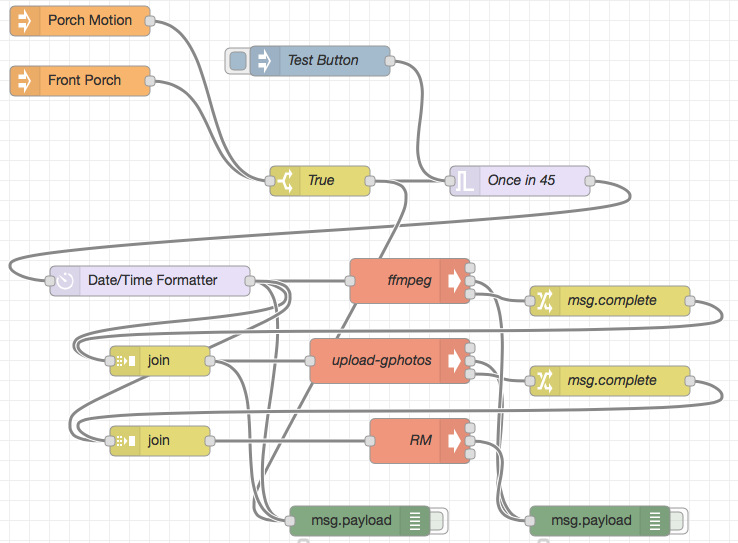
Basically it is a couple of Exec Node's that do this:
1) When one of my motion sensors trigger
2) Create a file name for the video
3) Use ffmpeg to capture 30 seconds of video to a file stored on a ram drive ( avoiding the SD card on my RPI )
4) Upload the video to Google Photo's using upload-photo's
5) Remove the video file from the ram drive
NorthernMan54
on 18 Jul 2019
Here is my final flow for the above, I added alerting only when no one is home, by using an Home App automation to Turn on Presence when no one is home.
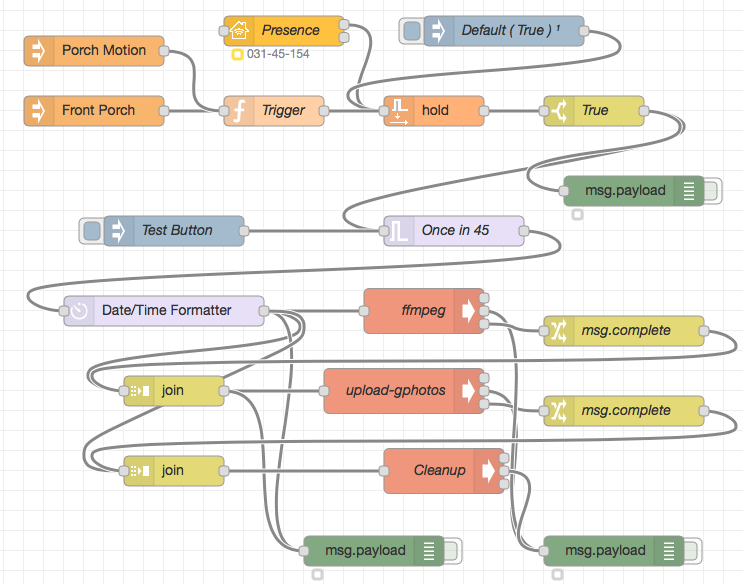
[{"id":"bbe816ee.604568","type":"debug","z":"34ad4d43.f95a52","name":"","active":false,"tosidebar":true,"console":false,"tostatus":true,"complete":"payload","x":390,"y":560,"wires":[]},{"id":"217ed363.31dd44","type":"trigger","z":"34ad4d43.f95a52","op1":"","op2":"","op1type":"date","op2type":"nul","duration":"45","extend":true,"units":"s","reset":"","bytopic":"all","name":"Once in 45","x":470,"y":240,"wires":[["cea237c3.0b491"]]},{"id":"eecd44db.66f43","type":"switch","z":"34ad4d43.f95a52","name":"True","property":"payload.MotionDetected","propertyType":"msg","rules":[{"t":"true"}],"checkall":"true","repair":false,"outputs":1,"x":610,"y":120,"wires":[["217ed363.31dd44","a7a962e3.6f873"]]},{"id":"c0dc424d.f09cc8","type":"exec","z":"34ad4d43.f95a52","command":"DEBUG= npm/bin/upload-gphotos","addpay":true,"append":"-q -c ~/t.json -a \"Front Porch\"","useSpawn":"false","timer":"","oldrc":false,"name":"upload-gphotos","x":420,"y":400,"wires":[[],["a15928ce.4e4918"],["190faef.a81a651"]]},{"id":"a15928ce.4e4918","type":"debug","z":"34ad4d43.f95a52","name":"","active":false,"tosidebar":true,"console":false,"tostatus":true,"complete":"payload","x":630,"y":560,"wires":[]},{"id":"d737ceb9.f46358","type":"exec","z":"34ad4d43.f95a52","command":"pkill ffmpeg; timeout -k 2 35 ffmpeg -rtsp_transport tcp -i rtsp://frontporch:8554/unicast -codec copy -t 30 -f mp4","addpay":true,"append":"","useSpawn":"false","timer":"","oldrc":false,"name":"ffmpeg","x":440,"y":320,"wires":[[],["a15928ce.4e4918"],["faa2e893.279b5"]]},{"id":"cea237c3.0b491","type":"moment","z":"34ad4d43.f95a52","name":"","topic":"","input":"","inputType":"msg","inTz":"America/Toronto","adjAmount":"0","adjType":"hours","adjDir":"subtract","format":"[/var/tmp/Front_Porch_]YYYY_MM_DD_HH_mm_ss[.mp4]","locale":"en_CA","output":"payload","outputType":"msg","outTz":"America/Toronto","x":180,"y":320,"wires":[["d737ceb9.f46358","9aead80d.fe2c48","bbe816ee.604568","aa256a7d.9b548"]]},{"id":"9aead80d.fe2c48","type":"join","z":"34ad4d43.f95a52","name":"","mode":"custom","build":"string","property":"payload","propertyType":"msg","key":"topic","joiner":"\n","joinerType":"str","accumulate":false,"timeout":"","count":"","reduceRight":false,"reduceExp":"","reduceInit":"","reduceInitType":"","reduceFixup":"","x":190,"y":400,"wires":[["c0dc424d.f09cc8","bbe816ee.604568"]]},{"id":"faa2e893.279b5","type":"change","z":"34ad4d43.f95a52","name":"msg.complete","rules":[{"t":"move","p":"payload","pt":"msg","to":"complete","tot":"msg"}],"action":"","property":"","from":"","to":"","reg":false,"x":640,"y":340,"wires":[["9aead80d.fe2c48"]]},{"id":"4e4d9da5.7cd92c","type":"hb-event","z":"34ad4d43.f95a52","name":"Front Porch","Homebridge":"Leonard-Amazon","Manufacturer":"homebridge-rtl_433","Service":"Motion Sensor","device":"Leonard-AmazonAC:22:3D:E3:CE:31homebridge-rtl_433Front Porch00000085","conf":"4838c9b4.13b638","x":110,"y":120,"wires":[["214b9b35.60797c"]]},{"id":"704ecf6c.bc6878","type":"hb-event","z":"34ad4d43.f95a52","name":"Porch Motion","Homebridge":"Penny","Manufacturer":"Heyu","Service":"Motion Sensor","device":"PennyCC:22:3D:E3:CE:30HeyuPorch Motion00000085","conf":"4838c9b4.13b638","x":110,"y":60,"wires":[["214b9b35.60797c"]]},{"id":"d6579b9f.c0d588","type":"exec","z":"34ad4d43.f95a52","command":"rm -rf ; pkill ffmpeg","addpay":true,"append":"","useSpawn":"false","timer":"","oldrc":false,"name":"Cleanup","x":460,"y":480,"wires":[[],["a15928ce.4e4918"],[]]},{"id":"aa256a7d.9b548","type":"join","z":"34ad4d43.f95a52","name":"","mode":"custom","build":"string","property":"payload","propertyType":"msg","key":"topic","joiner":"\n","joinerType":"str","accumulate":false,"timeout":"","count":"","reduceRight":false,"reduceExp":"","reduceInit":"","reduceInitType":"","reduceFixup":"","x":190,"y":480,"wires":[["d6579b9f.c0d588"]]},{"id":"190faef.a81a651","type":"change","z":"34ad4d43.f95a52","name":"msg.complete","rules":[{"t":"move","p":"payload","pt":"msg","to":"complete","tot":"msg"}],"action":"","property":"","from":"","to":"","reg":false,"x":640,"y":420,"wires":[["aa256a7d.9b548"]]},{"id":"f2b135a0.e48428","type":"inject","z":"34ad4d43.f95a52","name":"Test Button","topic":"","payload":"","payloadType":"date","repeat":"","crontab":"","once":false,"onceDelay":0.1,"x":190,"y":240,"wires":[["217ed363.31dd44"]]},{"id":"49c5c7a2.71d82","type":"homekit-service","z":"34ad4d43.f95a52","isParent":true,"bridge":"7055ec20.679b74","parentService":"","name":"Presence","serviceName":"Switch","topic":"","filter":false,"manufacturer":"Default Manufacturer","model":"Default Model","serialNo":"Default Serial Number","characteristicProperties":"{}","x":300,"y":40,"wires":[["b3315749.fe5d18"],[]]},{"id":"db3f23df.1337","type":"inject","z":"34ad4d43.f95a52","name":"Default ( True )","topic":"","payload":"{\"On\":true}","payloadType":"json","repeat":"","crontab":"","once":true,"onceDelay":0.1,"x":520,"y":40,"wires":[["b3315749.fe5d18"]]},{"id":"214b9b35.60797c","type":"function","z":"34ad4d43.f95a52","name":"Trigger","func":"msg.trigger = true;\nreturn msg;","outputs":1,"noerr":0,"x":290,"y":120,"wires":[["b3315749.fe5d18"]]},{"id":"b3315749.fe5d18","type":"hold","z":"34ad4d43.f95a52","name":"","x":450,"y":120,"wires":[["eecd44db.66f43"]]},{"id":"a7a962e3.6f873","type":"debug","z":"34ad4d43.f95a52","name":"","active":false,"tosidebar":true,"console":false,"tostatus":true,"complete":"payload","x":650,"y":200,"wires":[]},{"id":"4838c9b4.13b638","type":"hb-conf","z":"","username":"031-45-154"},{"id":"7055ec20.679b74","type":"homekit-bridge","z":"","bridgeName":"Bart-Node","pinCode":"031-45-154","port":"51826","allowInsecureRequest":true,"manufacturer":"Default Manufacturer","model":"Default Model","serialNo":"Default Serial Number","customMdnsConfig":false,"mdnsMulticast":true,"mdnsInterface":"","mdnsPort":"","mdnsIp":"","mdnsTtl":"","mdnsLoopback":true,"mdnsReuseAddr":true}]
NorthernMan54
on 19 Jul 2019
I’m having trouble installing the camera plugin. I have the following error when trying to install it. Did the URL for the download changed?
[18:13:45] openhabian@openHABianPi:~$ cd ~/.node-red/
[18:13:48] openhabian@openHABianPi:~/.node-red$ npm install --save https://github.com/NRCHKB/node-red-contrib-homekit-bridged/tarball/feature/camera
npm ERR! code E404
npm ERR! 404 Not Found - GET https://codeload.github.com/NRCHKB/node-red-contrib-bridged/legacy.tar.gz/feature/camera
npm ERR! 404
npm ERR! 404  'https://github.com/NRCHKB/node-red-contrib-homekit-bridged/tarball/feature/camera' is not in the npm registry.
npm ERR! 404 Your package name is not valid, because
npm ERR! 404  1. name can only contain URL-friendly characters
npm ERR! 404  2. name can no longer contain capital letters
npm ERR! 404
npm ERR! 404 Note that you can also install from a
npm ERR! 404 tarball, folder, http url, or git url.
npm ERR! A complete log of this run can be found in:
npm ERR!     /home/openhabian/.npm/_logs/2019-08-09T22_14_10_928Z-debug.log
[18:14:10] openhabian@openHABianPi:~/.node-red$
 Patmcfet
on 10 Aug 2019
Patmcfet
on 10 Aug 2019
I believe it’s been merged with the dev branch now. No more “feature camera” branch.
crxporter
on 10 Aug 2019
Thanks @crxporter !
I tried the following command and it worked :
cd ~/.node-red/
npm install --save NRCHKB/node-red-contrib-homekit-bridged#dev
I have a 8ch noname DVR (Sarmatt DSR-813-h), which can provide RTSP streams (720p, h264). It works fine with Source: -rtsp_transport tcp -re -i rtsp://192.168.100.20:80/ch0_0.264 and Still Image Source: -i http://192.168.100.20/cgi-bin/snapshot.cgi?chn=0&f=1&u=dvrusername&p=dvruserpassword.
2. You can only have one Camera per Bridge (so only one Accessory in Bridge can have CameraControl).
Don't read this, so I've added all 8 cameras and it is ok, but still images are same for all cameras =) Sometimes they simultaneously changes to another snapshots: https://youtu.be/CSPdAU-xTzw
Tried to change Still Image Source from url to locally stored jpegs, but no luck, same result. Any ideas?
 ptath
on 12 Aug 2019
ptath
on 12 Aug 2019
I had the same problem of having the same snapshot on all the cameras. I needed to have a separate Homekit bridge for each cameras
Patmcfet
on 12 Aug 2019
I believe this is a bug, same variable for all snapshots or smth. Homebridge plug-in somehow deals with it on single bridge.
Sent with GitHawk
Edited: Nope, one camera — one bridge, that is right. Hard to do this on current NRCHKB hierarchy.
ptath
on 12 Aug 2019
I've problem with ffmpeg on my PI. I use the following source: -loglevel verbose -rtsp_transport tcp -i rtsp://dafang:8554/unicast (dev brach, v0.6.2). That source works from VLC and kinda works from the pi terminal.
However logs show:
ERROR: FFmpeg exited with code 1
every time I access camera in Home.app on iOS device.
How to track it further?
 cayco
on 24 Sep 2019
cayco
on 24 Sep 2019
Okay, first try to run it in debug mode. And have a look at logs or share them.
Shaquu
on 24 Sep 2019
What do you mean by "it"? I run ffmped with -loglevel debug -rtsp_transport tcp -i rtsp://dafang:8554/unicast but the plugin output is the same:
25 Sep 11:03:43 - [info] Stopped flows
25 Sep 11:03:43 - [info] Starting flows
25 Sep 11:03:43 - [debug] red/nodes/flows.start : starting flow : global
25 Sep 11:03:43 - [debug] red/nodes/flows.start : starting flow : 8efca021.c0089
25 Sep 11:03:43 - [info] [openhab2-controller:PI] {"id":"ad4fb358.2edb3","type":"openhab2-controller","z":"","name":"PI","protocol":"http","host":"10.0.0.11","port":"8080","path":"","username":"","password":"","_users":["3b6947b2.ab1588","7fc9200a.cc7db","80ba2407.fbc328","e1acbc9c.3d6ec"]}
25 Sep 11:03:43 - [info] Started flows
ERROR: FFmpeg exited with code 1
You can run node-red in debug mode which will give you more information in node-red console.
You can read about it in the README.md here or just run node-red with this command (make sure to kill current node-red run first):
DEBUG=NRCHKB,Accessory,HAPServer,EventedHTTPServer node-red
Another thing is that you have FFPMEG debug specific option in Service node Camera configuration.
Here is more.
- Camera Configuration: Additional configuration for CameraControl service.
- Debug: Show the output of ffmpeg in the log, default false.
PS. Greetings from Poland
Shaquu
on 25 Sep 2019
OK, I have both set up.
cayco
on 25 Sep 2019
@cayco have you pasted correct log? It's very short and only contains logs after ffmpeg crash.
Shaquu
on 25 Sep 2019
It's not much there... Here's the full docker logs node-red-homekit output after containers spins up and request to the camera is made: https://pastebin.com/Q3SYw3Mw
I run if from my Synology Docker panel with DEBUG=NRCHKB,Accessory,HAPServer,EventedHTTPServer node-red variable passed to the container.
cayco
on 26 Sep 2019
When I run ffmpeg -loglevel debug -rtsp_transport tcp -i rtsp://dafang:8554/unicast output.mpg by hand, in the container, I get result as expected: https://pastebin.com/3XjSg7KQ
cayco
on 26 Sep 2019
I found out that I need to user full path: /usr/bin/ffmpeg and also add credentials to the URL. I doesn't exit 1 now but still I cannot see any picture in Home app.
cayco
on 27 Sep 2019
@Shaquu could this feature be merged to master soon?
radokristof
on 8 Oct 2019
@radokristof if you test current dev state then I can merge :)
Calling @NRCHKB/test @crxporter
Shaquu
on 8 Oct 2019
@Shaquu it works the same for me :)
radokristof
on 8 Oct 2019
Have a look at changelog and last commits.
I have removed some boundaries.
I am scared if I didn't brake something with it.
Shaquu
on 8 Oct 2019
@Shaquu I saw it and tried it now with the updated branch :) I just only did a quick test but I was able to add new bridge, devices appered in that bridge and was able to interact with them...
radokristof
on 8 Oct 2019
Thanks for tests. As usual I need somebody more to confirm :)
On 8 Oct 2019, 21:57 +0200, Kristof Rado notifications@github.com, wrote:
@Shaquu I saw it and tried it now with the updated branch :) I just only did a quick test but I was able to add new bridge, devices appered in that bridge and was able to interact with them...
—
You are receiving this because you were mentioned.
Reply to this email directly, view it on GitHub, or mute the thread.
Shaquu
on 8 Oct 2019
For sure!
radokristof
on 8 Oct 2019
I haven't touched my dev branch camera pi in months. Also haven't had camera issues.
Running dev branch with a built-in camera on a pi zero w.
I had big dreams to test more cameras but they are instead all in a kitchen cabinet. Comments here
Edit: are there recent changes to dev? If so I will update eventually but don't have time this weekend.
crxporter
on 10 Oct 2019
@crxporter they are changes on the dev but no new features.
I have removed write/read boundaries from characteristics.
Shaquu
on 11 Oct 2019
I have 8 cameras (NVR), all works fine about a month or so, no problems at all. It's time of 0.7 =)
ptath
on 12 Oct 2019
@ptath but current dev 0.6.2 changed a little :) I found one bug myself yesterday.
So it would be good if you download a new code and play a little with it.
Shaquu
on 12 Oct 2019
For example #129 is working now with Remote Key
Shaquu
on 12 Oct 2019
Merged to master as version 0.7.0
Enjoy! I am closing this issue.
If you have further questions then please comment or open new one.
- I am looking for someone to help with writing wiki page for Camera Service and updating README regarding Camera, I will be very grateful
Shaquu
on 12 Oct 2019
I'm having the same issue: FFmpeg exited with code 1. Previously I have tested it on an x86 PC, now on my RPi, it doesn't work. I have read somewhere that this is might be related to some RPi (kernel) issue...
radokristof
on 13 Oct 2019
It's definitely about RPi as code base didn't change. Try to run ffmpeg in comandline outside of nrchkb/node-red and see if it's true or it works good and nrchkb is bad here.
Shaquu
on 13 Oct 2019
Did you have an RPi to test it?
If I run from the command line it seems to work properly. This problem pops up in homebridge forums as well.
radokristof
on 13 Oct 2019
@crxporter are you running Node-Red on an RPi? Could you give me some example how it works for you? FFmpeg version, etc...
radokristof
on 13 Oct 2019
I connected camera to rpi0 and was running node-red on it. It worked.
Somewhere there are comments with my config.
Shaquu
on 13 Oct 2019
Ok got it working, there were 2 things which were wrong for me:
- I havent passed the switches (-re -i) for the source, noob mistake
- RPi 3B+ seems to be not enough to handle 2 cameras + openHAB + all my other things smoothly, so I had to wait around 20 secs for the first frames to appear.
radokristof
on 13 Oct 2019
So it works :)
Shaquu
on 13 Oct 2019
- RPi 3B+ seems to be not enough to handle 2 cameras + openHAB + all my other things smoothly, so I had to wait around 20 secs for the first frames to appear.
First of all u should understand your camera output. I have really old semi-analog NVR which perfectly send h.264 stream at 720p so vcodec copy works brilliant, 3-5% cpu usage
ptath
on 13 Oct 2019
@ptath you are right, people would like to have a config wizard and everything made automatically but we have a field where you have to type your command which can be difficult for some people to find out what is right.
Shaquu
on 13 Oct 2019
@crxporter are you running Node-Red on an RPi? Could you give me some example how it works for you? FFmpeg version, etc...
Looks like I am too slow - did you get things figured out @radokristof ? Let me know if you want more details of my setup. Pi zero w running built in camera.
crxporter
on 14 Oct 2019
@crxporter Thanks, yes I was able to set it up :) My actual indoor cameras haven't arrived yet, so I just tested with an rtsp stream from my PC, but it worked. When my actual cameras arrive, I will share more on this.
radokristof
on 14 Oct 2019
There are improvements in dev branch (acquired from homebridge-camera-ffmpeg)
Added validation for videoFilter (check if it is not none).
Added interface name field for better compatibility.
Shaquu
on 15 Oct 2019
As feature landed on master a while ago I am closing this Issue.
If you have a problem then file a bug please.
Shaquu
on 20 Oct 2019
Related issues
 djiwondee
·
7Comments
Shaquu
·
10Comments
djiwondee
·
7Comments
Shaquu
·
10Comments
 Delphius7
·
3Comments
djiwondee
·
4Comments
Delphius7
·
5Comments
Delphius7
·
3Comments
djiwondee
·
4Comments
Delphius7
·
5Comments
Most helpful comment
If anyone wonder about it.
I am planning to add Camera support in release 0.6
There will be a new node but I am not sure yet if this should be attachable to existing Services/Accesoriess or we should really create a new Accessory for Camera only.