Ngx-extended-pdf-viewer: Translation for the key is missing.
(see next message)
 asohail-numtra
All 10 comments
I am getting a long list of warnings in Chrome
l10n.js:836 Translation for the key #CONSTANT_NAME is missing.
I have tried all option mentioned on
https://github.com/stephanrauh/ngx-extended-pdf-viewer/issues/150
but didn't get any success.
Environment:
Angular 6
Chrome
Windows 10
package.json:
"ngx-extended-pdf-viewer": "^6.2.0-alpha.0"
angular.json:
{
  "glob": "**/*",
  "input": "node_modules/ngx-extended-pdf-viewer/assets/",
  "output": "/assets/"
}
HTML code:
 <ngx-extended-pdf-viewer
      [base64Src]="pdFileData"
      [useBrowserLocale]="true"
      height="50vh"
      [showOpenFileButton]="false"
      [showBookmarkButton]="false"
      [showSecondaryToolbarButton]="false"
      [showPresentationModeButton]="true"
      [textLayer]="true">
    </ngx-extended-pdf-viewer>
Issue screenshot:
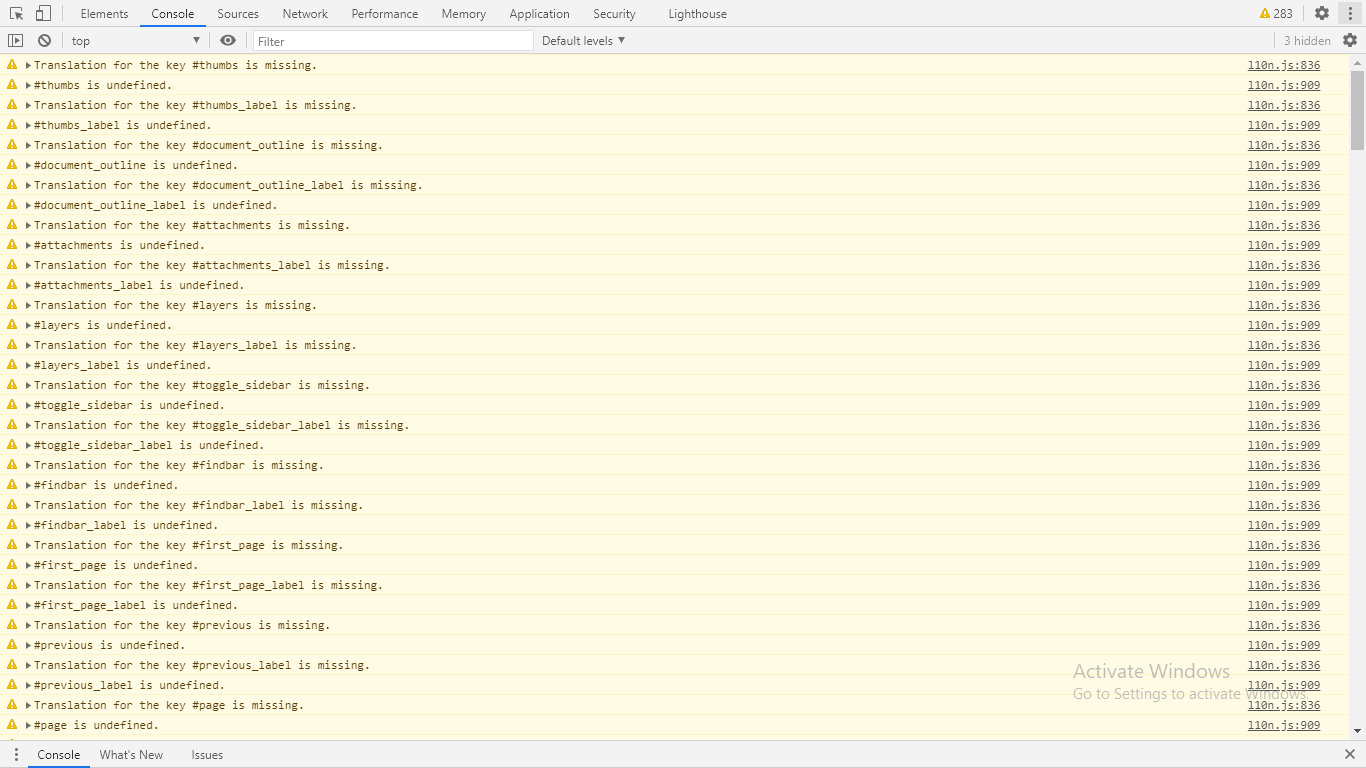
Please help me to fix this.
Thanks
asohail-numtra
on 20 Nov 2020
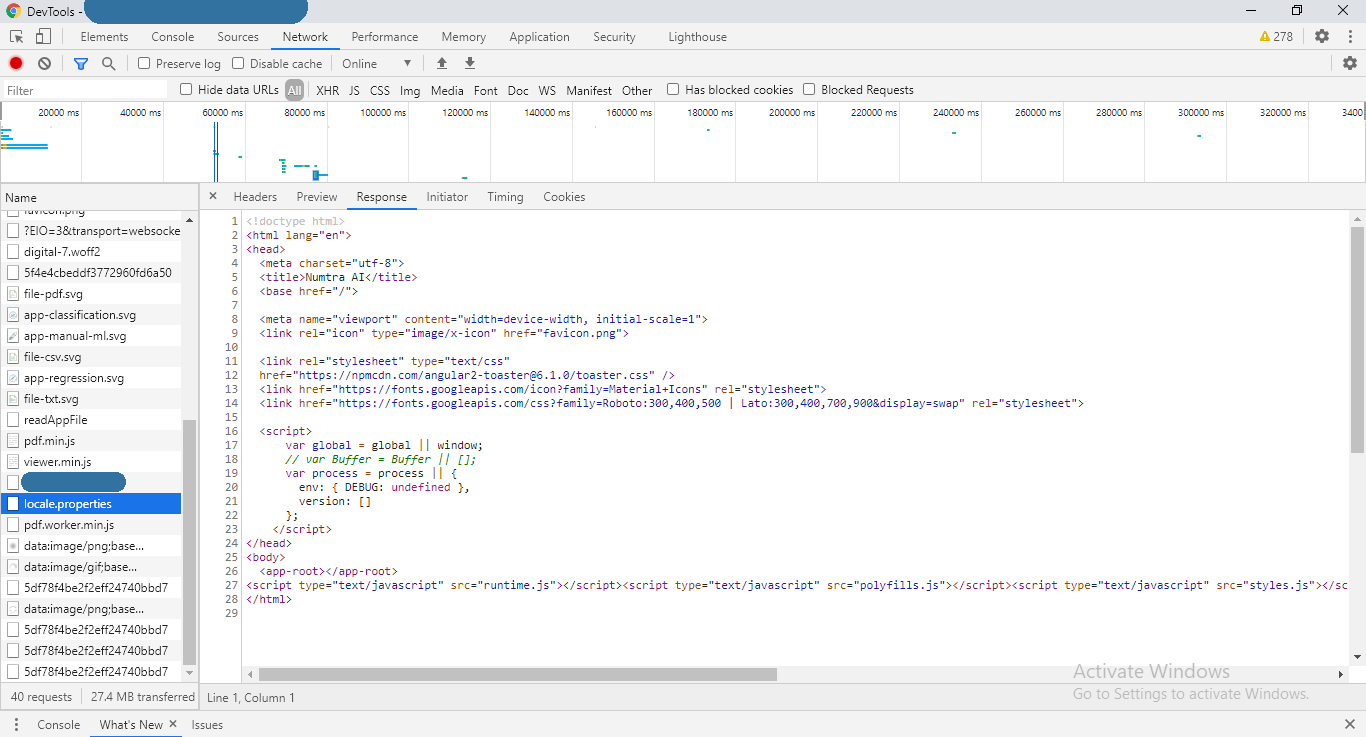
Can you upload a screenshot of the network tab? Probably your application can't access the language files.
 stephanrauh
on 20 Nov 2020
stephanrauh
on 20 Nov 2020

asohail-numtra
on 20 Nov 2020
All right, that clarifies things a lot. At first glance, the locale.properties is loaded correctly, but fails to load the en-GB/viewer.properties file containing the actual translations. (Or any of the other 132 language files, depending on where you're living).
However, you're also showing the content of the locale.properties. That looks like the index.html of Angular. Instead of showing the error code 404, your server is configured to redirect you to the index.html.
Here's what to do:
- Run
ng band have a look at thedistfolder. It should find a folder calledassets/locale. That folder, in turn, contains 132 folder and thelocale.propertiesfile. - If it doesn't, there's something wrong with your
angular.json. But that's unlikely. - Most likely, the browser loads the
locale.propertiesfrom the wrong path. Using the standard configuration, the path islocalhost:4200/assets/locale.properties. But many people use a different context path. If there's a difference, copy the locale folder to the correct path, or use the new attributelocaleFolderPathto tell the PDF viewer where to find the locale files.
stephanrauh
on 20 Nov 2020
Does this solve your bug? Usually I don't close the ticket until I know it's solved, so I'd appreciate a short "ping". :)
Best regards,
Stephan
stephanrauh
on 20 Nov 2020
Please let me check all stuff.
I will update you shortly.
Thanks
asohail-numtra
on 20 Nov 2020
@stephanrauh, you save my day. Thank you very much. 👍
Your help and guidelines are really appreciated. :)
Actually, I am using two child app under a single angular environment. I think that's the reason, the browser loads the locale.properties from the wrong path.
I have added this line in PDF viewer,
localeFolderPath="dist/PROJECT_NAME/assets/locale"
That fixed the issue.
Now my HTML code is:
<ngx-extended-pdf-viewer
      [base64Src]="pdfFileData"
      [useBrowserLocale]="true"
      height="50vh"
      [showOpenFileButton]="false"
      [showBookmarkButton]="false"
      [showSecondaryToolbarButton]="false"
      [showPresentationModeButton]="true"
      [textLayer]="true"
      **localeFolderPath="dist/PROJECT_NAME/assets/locale"**>
    </ngx-extended-pdf-viewer>
Once again thanks for the quick reply and guidance.
Best Regards,
Adnan Sohail
asohail-numtra
on 20 Nov 2020
The last thing, I have another warning for some specific pdf files (not for all files).
util.js:337 Warning: The font embedded in the PDF file contains errors: TT: undefined function: 32
Can you please guide me, how can I get rid of this one?
asohail-numtra
on 20 Nov 2020
I'm afraid I can't. I've seen the "undefined function: 32" message several times, too. As far as I can see, the PDF file is broken, but it's not broken too badly to be displayed properly.
@timvandermeij Tim, this time I don't request your help, but I'm curious. Google didn't manage to shed light on the topic. What's causing the message "Warning: The font embedded in the PDF file contains errors: TT: undefined function: 32"?
stephanrauh
on 21 Nov 2020
PDF.js tries to recover bad fonts, i.e., font data that doesn't adhere to the specification. If it falls back to recovery mode, it prints this message. See also https://github.com/mozilla/pdf.js/issues/3768#issuecomment-36468349. In short, the font data is invalid, but PDF.js is able to recover. To get rid of this, the PDF file should be regenerated with valid font data.
Note that it's a warning, not an error, generated here: https://github.com/mozilla/pdf.js/blob/46e60a266cc9bdb6ff952accc3957798fcb29826/src/core/fonts.js#L2524-L2545
 timvandermeij
on 21 Nov 2020
timvandermeij
on 21 Nov 2020
Related issues
 Prasanth-FrontendDeveloper
·
7Comments
Prasanth-FrontendDeveloper
·
7Comments
 vijucalicut
·
5Comments
vijucalicut
·
5Comments
 mkanwar
·
6Comments
mkanwar
·
6Comments
 leo6104
·
3Comments
leo6104
·
3Comments
 dheerajm91
·
3Comments
dheerajm91
·
3Comments
Most helpful comment
PDF.js tries to recover bad fonts, i.e., font data that doesn't adhere to the specification. If it falls back to recovery mode, it prints this message. See also https://github.com/mozilla/pdf.js/issues/3768#issuecomment-36468349. In short, the font data is invalid, but PDF.js is able to recover. To get rid of this, the PDF file should be regenerated with valid font data.
Note that it's a warning, not an error, generated here: https://github.com/mozilla/pdf.js/blob/46e60a266cc9bdb6ff952accc3957798fcb29826/src/core/fonts.js#L2524-L2545