Ngx-extended-pdf-viewer: Fail to view on iOS 12.4.5
I tried to open the demo: https://pdfviewer.net/simple on Safari or Chrome using an iPad with iOS 12.4.5. In this case the pdf viewer doesn't launch. It's showing this error message:
PDF.js v2.6.48 (compilation: 6dda20cc):
Message: The browser/environment lacks native support for critical functionality used by the PDF.js library (e.g: ReadableStream' and or 'Promise.allSettled'); please use an ES5-compatible build instead.
I have attached the image with the message error to:

 marcosalpha3
All 42 comments
It works on current iOS 13.5.1. Are you sure you want to support version 12.4.5? There are critical security issues with this version. Just think of the email vulnerability that has been fixed with 13.5.1. A friend of mine lost all their emails because of this vulnerability.
Maybe I could even help you by adding a compatibility check and using the ES5-Build instead. I just can't test ist, because I always updating early. Can you run the tests for me?
 stephanrauh
on 19 Jun 2020
stephanrauh
on 19 Jun 2020
Stephanrauh. Sure, I II test with this and let you know. Thank you very much for your help.
marcosalpha3
on 20 Jun 2020
To test this, you can use a simple trick: modify the angular.json so that the *-es5.js files overwrite the standard files (i.e. pdf-es5.js overwrites pdf.js, viewer-es5.js overwrites viewer.js, pdf-worker-es5.js overwrites pdf-worker.js, and the same for the minified files).
stephanrauh
on 20 Jun 2020
same problem with macOS mojave safari

 jordankkk
on 26 Jun 2020
jordankkk
on 26 Jun 2020
@marcosalpha3 Did the ES5 files do the trick?
stephanrauh
on 26 Jun 2020
Hi @stephanrauh I tried to do that, but doesn't work with iOS 12.
marcosalpha3
on 4 Jul 2020
What happens when you open the same PDF on https://mozilla.github.io/pdf.js/es5/web/viewer.html?
stephanrauh
on 5 Jul 2020
Hi @stephanrauh . This sample https://mozilla.github.io/pdf.js/es5/web/viewer.html works properly. I did something wrong when configureted then angular.json. How did you configurated this file ? Or if you have an example in github how can I do that ? Sorry, I’m not expert with Angular. Thank you very much for your support and patience :)
marcosalpha3
on 5 Jul 2020
There angular.json of the showcase is here: https://github.com/stephanrauh/extended-pdf-viewer-showcase/blob/master/angular.json
stephanrauh
on 6 Jul 2020
@marcosalpha3 Did you update zone.js to a current version? The PDF viewer requires a 0.10.x version.
stephanrauh
on 6 Jul 2020
@marcosalpha3 You can also add a current core.js (such as 3.6.5). This polyfills Promise.allSettled(), too. Just make sure that zone.js 0.10.3 is loaded after loading core.js because zone.js adds functionality to Promise.allSettled().
stephanrauh
on 6 Jul 2020
The same thing is happening with v 12.4.3 iPad as well.
 yesprasoon
on 6 Jul 2020
yesprasoon
on 6 Jul 2020
@yesprasoon I believe you... even though I can't reproduce it because I always update my mobile devices ASAP.
But what about the polyfills? Did you try using zone.js 0.10.3+ and maybe even core.js 3.6.5+? I'm pretty convinced they solve the problem.
stephanrauh
on 6 Jul 2020
@yesprasoon I believe you... even though I can't reproduce it because I always update my mobile devices ASAP.
But what about the polyfills? Did you try using zone.js 0.10.3+ and maybe even core.js 3.6.5+? I'm pretty convinced they solve the problem.
@stephanrauh Could you please elaborate a bit. I checked package.json - it's already using correct zone.js version. I have updated core.js version there, and installed. Anything else? After that, when I check in simulator - this is what I get:
[Warning] PDFSidebarResizer: The browser does not support resizing of the sidebar. (cordova.64810b8f864324959344.js, line 1)
[Warning] Translation for the key #find_fuzzy is missing. (cordova.64810b8f864324959344.js, line 1)
[Warning] #find_fuzzy is undefined. (cordova.64810b8f864324959344.js, line 1)
All right - now I'm officially confused. As far as I can see, you've done everything I'd do, too. So there's nothing to elaborate - you've followed my suggestions, they just don't seem to work. :(
Can you execute commands in the (remote) debugger? The error message is thrown in this piece of code:
      // Ensure that (primarily) Node.js users won't accidentally attempt to use
      // a non-translated/non-polyfilled build of the library, since that would
      // quickly fail anyway because of missing functionality (such as e.g.
      // `ReadableStream` and `Promise.allSettled`).
      if (
        (typeof PDFJSDev === "undefined" || PDFJSDev.test("SKIP_BABEL")) &&
        (typeof ReadableStream === "undefined" ||
          typeof Promise.allSettled === "undefined")
      ) {
        throw new Error(
          "The browser/environment lacks native support for critical " +
            "functionality used by the PDF.js library (e.g. " +
            "`ReadableStream` and/or `Promise.allSettled`); " +
            "please use an ES5-compatible build instead."
        );
      }
    }
Maybe it helps to know which part of the if condition causes problems.
stephanrauh
on 8 Jul 2020
According to https://caniuse.com/#search=Promise.allSettled, the problem must be Promise.allSettled (and probably a lot of JavaScript libraries that aren't supported, but aren't checked by the if statement). However, as far as a know, this method is added by core.js and enhanced by zone.js.
stephanrauh
on 8 Jul 2020
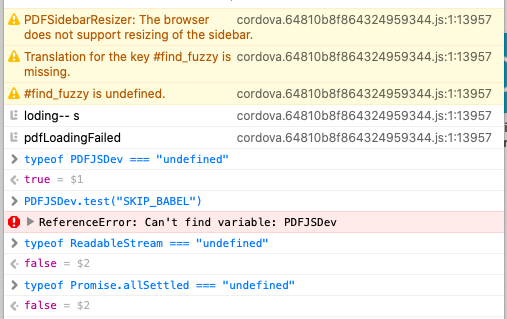
Does that help?
yesprasoon
on 8 Jul 2020
Strange. When building the library, the PDFJSDev expressions are removed, and all that remains is
    if (typeof ReadableStream === "undefined" || typeof Promise.allSettled === "undefined") {
      throw new Error("The browser/environment lacks native support for critical " + "functionality used by the PDF.js library (e.g. " + "`ReadableStream` and/or `Promise.allSettled`); " + "please use an ES5-compatible build instead.");
    }
According to your screenshot, the if condition is always false. Unless the console window executes the code on your desktop PC instead of running it on the mobile device.
stephanrauh
on 8 Jul 2020
@timvandermeij Do you know if it's possible to run pdf.js on iOS 12.4.5? Or what needs to be done to run it on such a device?
Thanks in advance,
Stephan
stephanrauh
on 8 Jul 2020
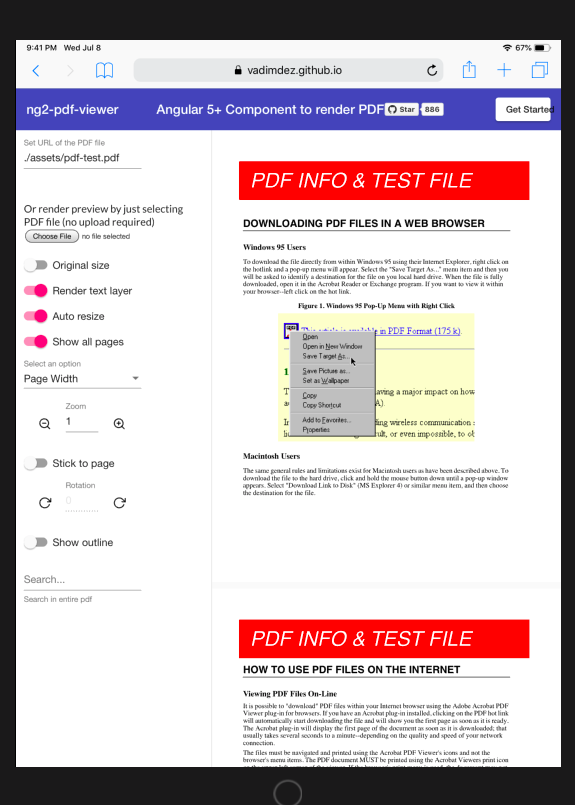
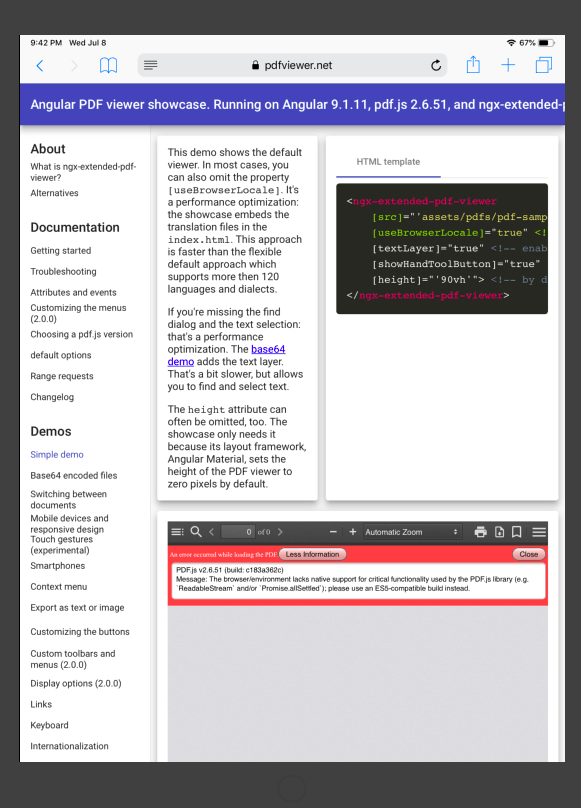
iOS 12.4 simulator - one with https://vadimdez.github.io/ng2-pdf-viewer/ and another with https://pdfviewer.net/simple
yesprasoon
on 8 Jul 2020
I don't have any experience with iOS, but it looks like the ES6 build is used while the browser does not support that properly. Most likely using the ES5 version is the only way forward here until the required ES6 features become available. The ES5 build contains the required polyfills.
 timvandermeij
on 8 Jul 2020
timvandermeij
on 8 Jul 2020
@marcosalpha3 You can also add a current
core.js(such as 3.6.5). This polyfillsPromise.allSettled(), too. Just make sure thatzone.js 0.10.3is loaded after loadingcore.jsbecausezone.jsadds functionality toPromise.allSettled().
Hi @stephanrauh Yes, my zone.js it's 0.10.3. I test with the the iPad (iOS 13) from the company that i work, and the viewer works properly. This problem occurs only with my older iPad Air with iOs 12 (I'can't update it because Apple doesn't support anymore.
marcosalpha3
on 9 Jul 2020
@marcosalpha3 You can also add a current
core.js(such as 3.6.5). This polyfillsPromise.allSettled(), too. Just make sure thatzone.js 0.10.3is loaded after loadingcore.jsbecausezone.jsadds functionality toPromise.allSettled().
@stephanrauh the Promise.allSettled() I have to put in the end of the polifills file ?
marcosalpha3
on 9 Jul 2020
Try updating to the latest alpha version. I've added a browser switch. I hope that your iPad is now detected as an ES5 device.
If it doesn't - yes, put the polyfill somewhere in the polyfills file.
stephanrauh
on 10 Jul 2020
I updated to the ^4.0.0-alpha.13. From three warnings - two are gone. PDF not visible. It comes up with one warning only:
[Warning] PDFSidebarResizer: The browser does not support resizing of the sidebar. (cordova.64810b8f864324959344.js, line 1)
yesprasoon
on 10 Jul 2020
@yesprasoon I've run out of ideas how to help you. If there's no error message, and as long as I can't reproduce the bug, there's little I can do.
stephanrauh
on 10 Jul 2020
@stephanrauh I understand. How can I check, whether my iPad is detected as an ES5 device or not?
yesprasoon
on 10 Jul 2020
@yesprasoon Navigate to https://pdfviewer.net/touch-gestures. Hit the "+" button 10 or 12 times until the red error message appears. Open the message details. My iPad reports the error in line 5250 of pdf.js. What does your iPad display?
(Sometimes even bugs on showcase are useful!) :)
stephanrauh
on 10 Jul 2020
@stephanrauh I am a bit confused - whether you are asking for iPad 12.4 issue or zoom issue. However, here is what I found with iOS simulator 13.1. Screen 1 - console, when I open the page. Screen 2 - console, after zooming 10-12 times. Screen 3 - simulator, after zooming 10-12 times.
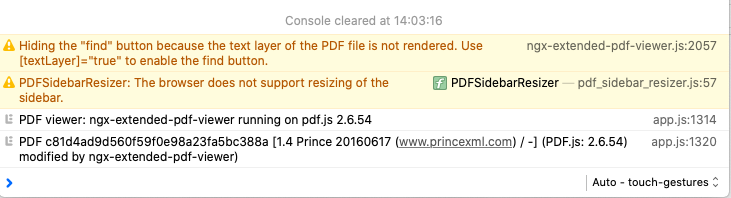

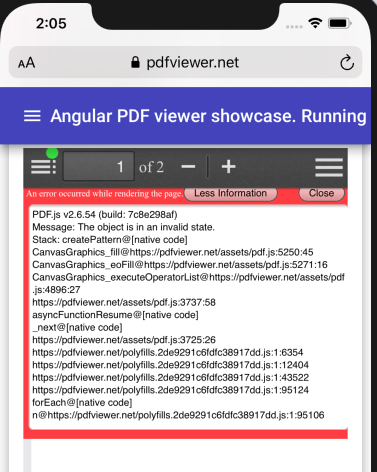
yesprasoon
on 11 Jul 2020
For 12.4 iPad - it's same as before - PDF doesn't load at all for the page you mentioned - so no question of zoom +/-.
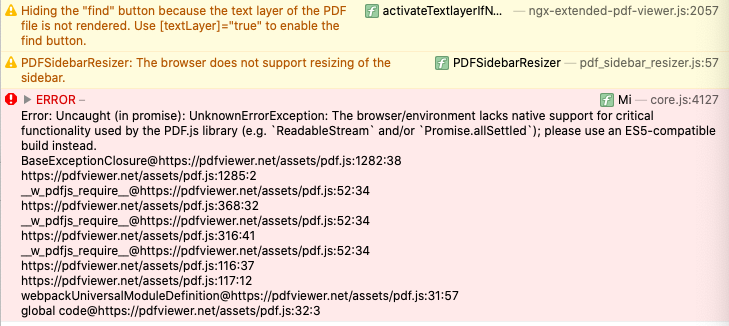
yesprasoon
on 11 Jul 2020
@yesprasoon We're back to square one. :) Well, almost - your error messages probably help me to improve the "zoom on iOS" ticket (#387).
Your screenshots indicate that the modern ES2015 version of the files are used. No idea how that's possible - I was sure my additional browser check catches your browser, too.
Before addressing this, I'd like to know if the ES5 code works.
Can you overwrite the ES2015 files with the content of the ES5 files? E.g. overwrite pdf.js with the content of pdf-es5.js? Plus pdf-worker.js and viewer.js, and the minified files.
The idea is to force Angular to load the ES5 version of the file. If your application is still broken when we've managed this, there's nothing I can do. But I'm pretty sure it works. If so, we can work on convincing your iOS device to load the legacy code.
Unfortunately, I haven't found an easy way to replace the files. Either you do it manually after running npm install, or you add a script to the package.json.
stephanrauh
on 11 Jul 2020
@yesprasoon Any news on this topic?
stephanrauh
on 26 Jul 2020
Sorry - was on other things. I tried overwriting files, but pdfLoadingFailed got called. I think, I did some mess while copy pasting - as there were multiple files.
I tried running www.pdfviewer.net - and it throws error as in image - not sure how much that is a help.
Looks like setting 13 as minimum target - is the only option as of now for the project.
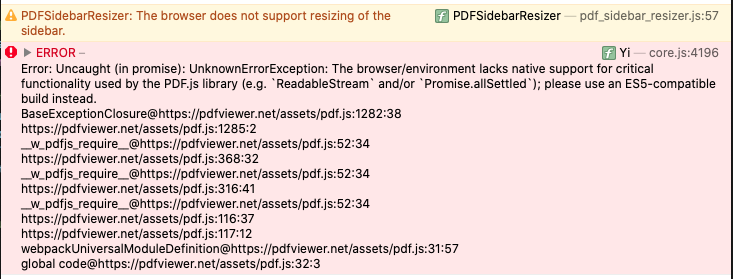
yesprasoon
on 26 Jul 2020
@yesprasoon I've just published version 4.0.5. It adds a check to detect iOS < 13. I hope that helps!
stephanrauh
on 26 Jul 2020
Let's close the ticket. But I'm still listening to this channel. If you run into trouble, just tell me!
stephanrauh
on 28 Jul 2020
Hello @stephanrauh
I'm having this same issue with at least a couple of devices (iOs 12 and android 10 with miui).
I managed to reproduce it with an old version of chrome for windows
which is version 72.0.3579.0
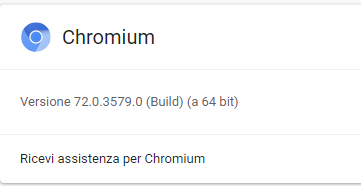
I tested it on the showcase example with the following result.
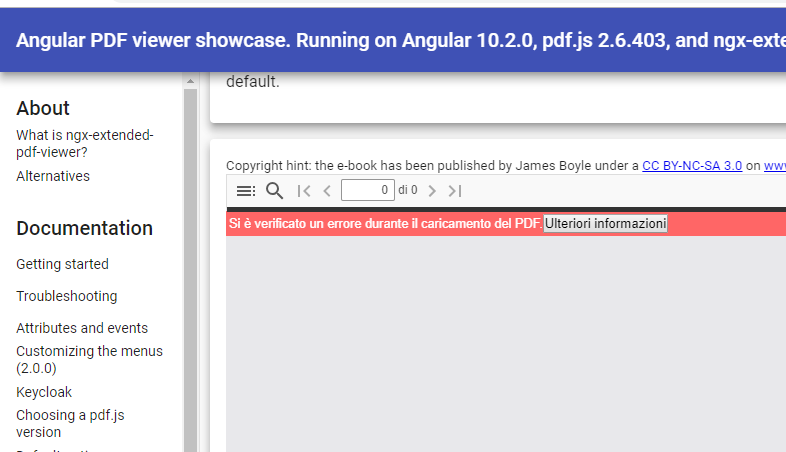
As far as I can tell the problem comes from the fact that the Promise.allSettled polyfill is loaded only in the main application thread and not in the pdf.worker thread

Switching betwee the two contexts gives inconsistent results about the availability of the allSettled method

The funny thing is that if I forge an on-the-fly Promise.allSettled = function(){} just before this breakpoint
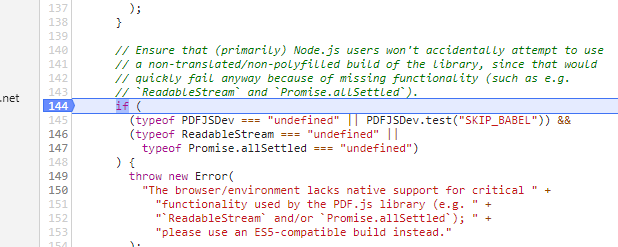
The PDF is correctly displayed.
Do you have any idea on how to inject a polyfill in a worker thread?
 danielebruni
on 28 Oct 2020
danielebruni
on 28 Oct 2020
Hello @stephanrauh
Since you reopened the issue there's an update.
I managed to fix the errors with a workaround, injecting a polyfill for the Promise.allSettled with a node script which is executed before the regular scripts
  "scripts": {
    "ng": "ng",
    "start": "node patch-pdf-worker.js && ng serve",
    "build": "node patch-pdf-worker.js && ng build",
    "build-test": "node patch-pdf-worker.js && ng build --configuration=test",
    "test": "ng test",
    "lint": "ng lint",
    "e2e": "ng e2e"
  },
The source of the patch-pdf-worker.js:
// This script adds a polyfill for the Promise.allSettled in the minified version of pdf.worker.min.js
// to solve problems with "not so old" versions of webkit based browsers (e.g.: safari 12 or chrome 71/72)

const fs = require("fs");
fs.readFile("node_modules/ngx-extended-pdf-viewer/assets/pdf.worker.min.js", (err, content) => {

  let contentString = content.toString();

  if (contentString.indexOf("// PATCHED") != 0) {

    contentString =
        `// PATCHED

        Promise.allSettled = function (promises) {
          let mappedPromises = promises.filter(o=>!!o).map((p) => {
            return p
              .then((value) => {
                return {
                  status: 'fulfilled',
                  value,
                };
              })
              .catch((reason) => {
                return {
                  status: 'rejected',
                  reason,
                };
              });
          });
          return Promise.all(mappedPromises);
        };\n\n\n`
        +
        contentString;

  }

  fs.writeFile("node_modules/ngx-extended-pdf-viewer/assets/pdf.worker.min.js", contentString, () => { });

});
It's a brutal approach but it will hold until I find a better solution, or the iPhone 6/6 plus and the other "not so old" phones exit the scene.
Screenshot of the PDF correcly shown on an iPhone 6 safari (iOS 12):

danielebruni
on 29 Oct 2020
Great idea! I'll add the polyfill to the worker ASAP. I'm surprised it's really so easy... and I'm also puzzled I never realized the worker doesn't benefit from the polyfills of the main thread. :)
stephanrauh
on 29 Oct 2020
Glad that I helped. And thank you for the great work you've done, this is by far the best pdf viewer component I've used.
danielebruni
on 30 Oct 2020
@danielebruni I've added the polyfill to the service worker. Would you mind to test version 5.3.0 and confirm it fixes the bug?
Thanks in advance,
Stephan
stephanrauh
on 30 Oct 2020
Hello @stephanrauh
Yes, I confirm the bug is fixed.
Thank you again
Daniele
danielebruni
on 2 Nov 2020
That's great news! This bug has been haunting me so long... :)
Best regards,
Stephan
stephanrauh
on 2 Nov 2020
Related issues
 StevenGarcia-CG
·
10Comments
StevenGarcia-CG
·
10Comments
 MKITConsulting
·
5Comments
MKITConsulting
·
5Comments
 leo6104
·
3Comments
leo6104
·
3Comments
 mkanwar
·
6Comments
mkanwar
·
6Comments
 4vitek
·
5Comments
4vitek
·
5Comments
Most helpful comment
That's great news! This bug has been haunting me so long... :)
Best regards,
Stephan