Ngx-extended-pdf-viewer: Rotation
Hello,
I have an image.jpg taken from my smartphone.
I rotate the image.jpg according to the metadata of the file and convert it into image.pdf. Then i upload the pdf file on a server in base64 form.
When i download the pdf file and open it with adobe, the image is displayed with the correct rotation in the pdf file.
But when i give it as a [base64Src]="image.pdf" the ngx-extended-pdf-viewer displays the image with wrong rotation.
 psarridis
All 15 comments
I'm pretty sure that's a bug that should be addressed by the base project. So please open a ticket here: https://github.com/mozilla/pdf.js/issues. To double-check, you can reproduce the bug with their online demo first: https://mozilla.github.io/pdf.js/web/viewer.html. If you've got a Firefox, you can also open the PDF file in the browser. It's using the same PDF viewer I'm using.
BTW, I don't think this has anything to do with uploading the file to a server or encoding it with BASE64. When you open a ticket on Mozilla's bug tracker, you shouldn't even mention these two topics. Every once in a while, they are closing tickets quickly for formal reasons.
Good luck!
Stephan
 stephanrauh
on 5 May 2020
stephanrauh
on 5 May 2020
Thanks for the quick reply.
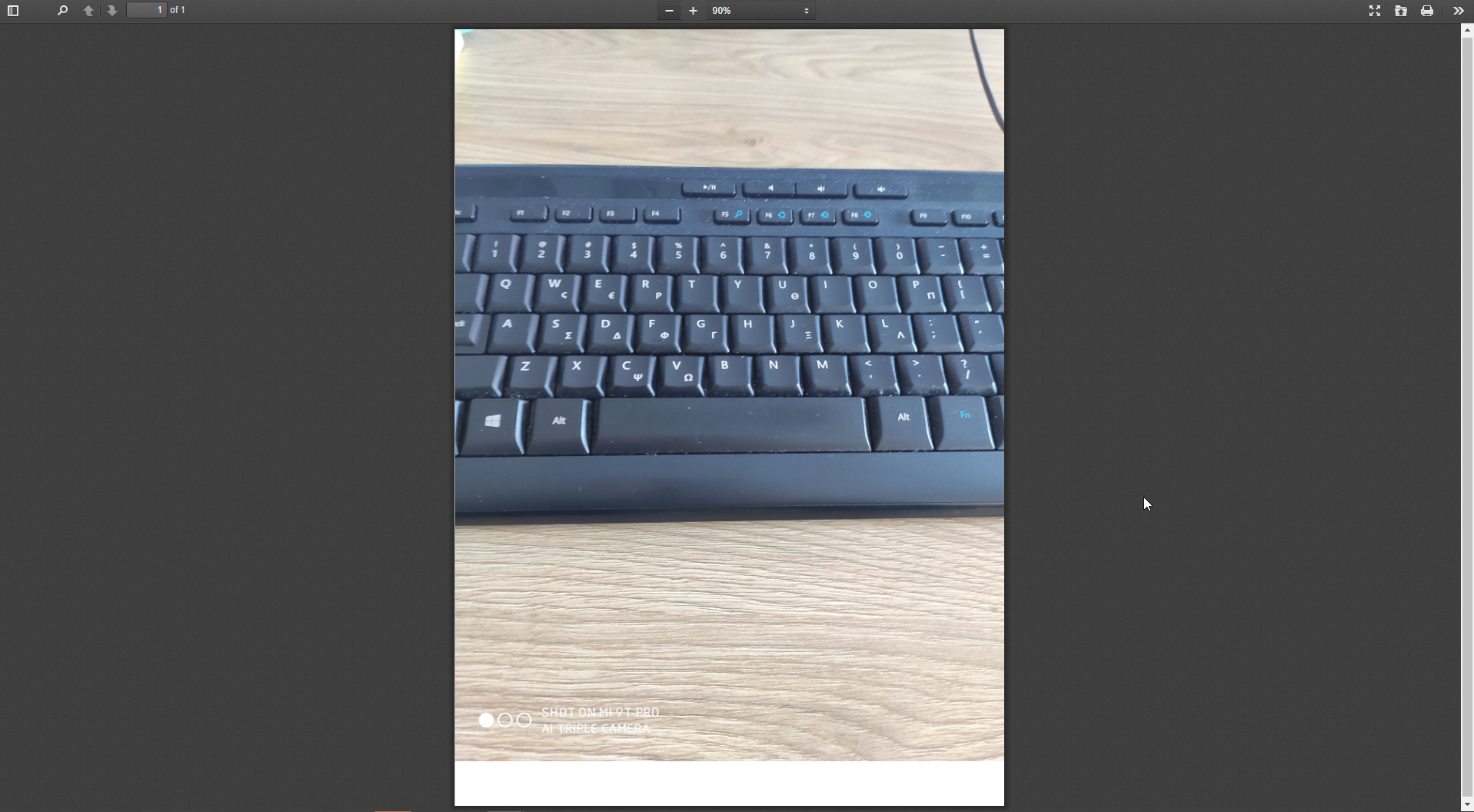
I opened the Image.pdf file in https://mozilla.github.io/pdf.js/web/viewer.html and the file is rotated correctly:
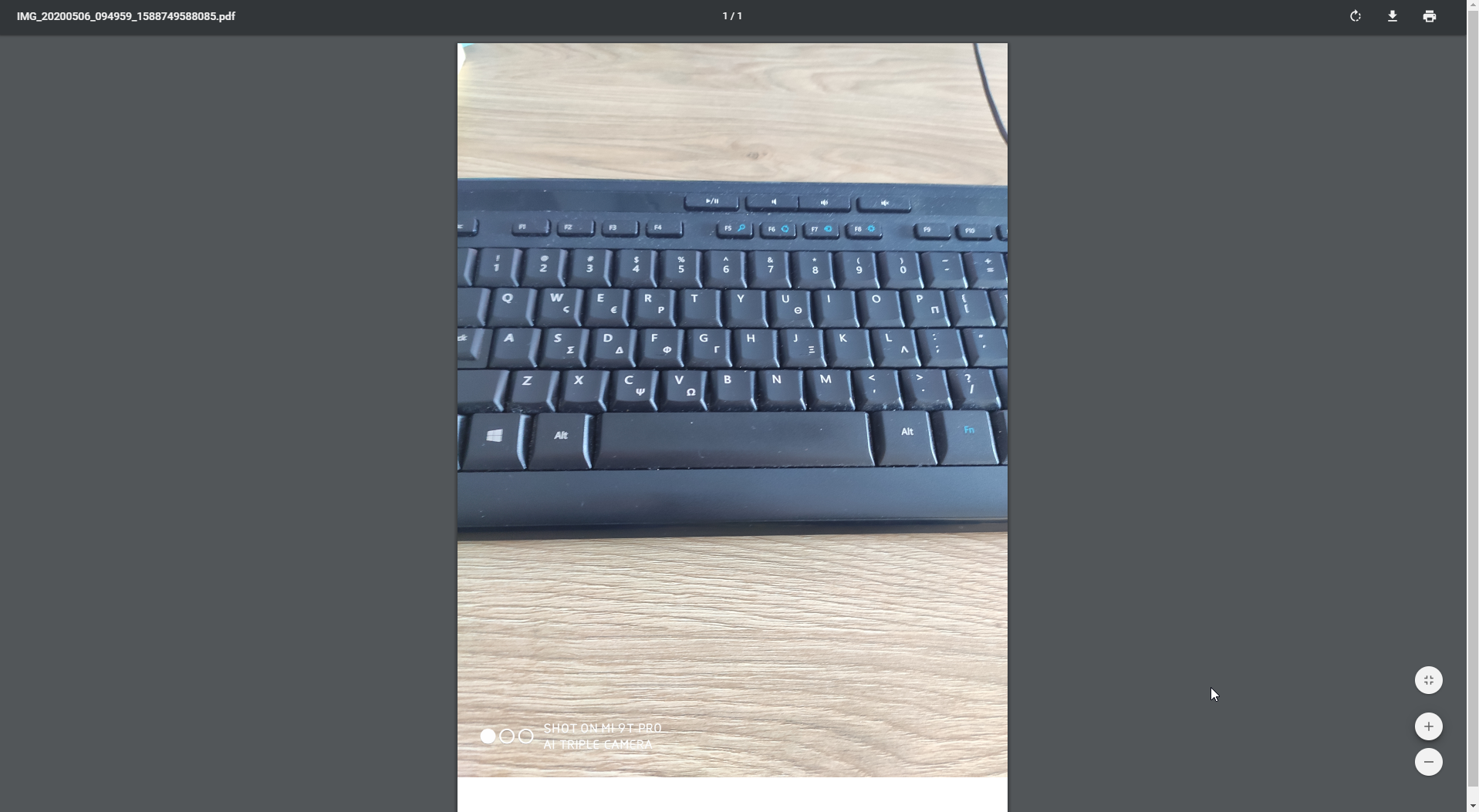
I also opened the same Image.pdf file in chrome pdf viewer and the image is rotated correctly:
The problem is when i open the Image.pdf file from ngx-extended-pdf-viewer within my application:

The code within my application is:
  <ngx-extended-pdf-viewer fxHide.sm fxHide.xs class="pdfViewer"
                           *ngIf="fileData.doc_Base64"
                           [base64Src]="fileData.doc_Base64"
                           useBrowserLocale="true"
                           height="30vh"
                           [textLayer]="true"
                           [showHandToolButton]="true"
                           [zoom]="'page-fit'"
                           [filenameForDownload]="fileData.doc_Name"
  ></ngx-extended-pdf-viewer>
Strange bug. I can reproduce some of it without rotating the image before storing it to a PDF file.
I've taken two picture, one landscape and one portrait. Mozilla's viewer rotates the landscape image counterclockwise. The preview app of my Mac does the same, so maybe it's just the way the PDF is created.
When I open the files in my viewer, the landscape PDF is rotated counterclockwise. But the portrait image is rotated clockwise.
stephanrauh
on 6 May 2020
Strange bug. I can reproduce some of it without rotating the image before storing it to a PDF file.
I've taken two picture, one landscape and one portrait. Mozilla's viewer rotates the landscape image counterclockwise. The preview app of my Mac does the same, so maybe it's just the way the PDF is created.
When I open the files in my viewer, the landscape PDF is rotated counterclockwise. But the portrait image is rotated clockwise.
Here is the File.pdf file i used.
psarridis
on 12 May 2020
@timvandermeij Maybe you can help me. For some reason, ngx-extended-pdf-viewer rotates JPG images embedded in a PDF file in unexpected ways. That's surprising because I simply wrap pdf.js, and pdf.js displays the images correctly. Do you have any idea what's going wrong?
Adding insult to injury, I failed to find the source code where pdf.js detects the image orientation and reacts to it. I hoped to find the root cause of the problem by debugging it. Do you happen to know where to look?
Thanks in advance,
Stephan
stephanrauh
on 19 May 2020
I'm only aware of rotation being handled in two places in PDF.js, namely https://github.com/mozilla/pdf.js/blob/1ee63dc465b11247a1d9194634d9f9fe01ecaba1/src/core/document.js#L195-L209 if the rotation is defined on the document level (which doesn't appear to be the case for the file from https://github.com/stephanrauh/ngx-extended-pdf-viewer/issues/285#issuecomment-627197271) and https://github.com/mozilla/pdf.js/blob/50bc4a18e8c564753365d927d5ec6a6d2cce3072/web/pdf_page_view.js#L84 where the viewport might be initialized with a custom rotation.
Given that in the final image of https://github.com/stephanrauh/ngx-extended-pdf-viewer/issues/285#issuecomment-624492904 the page itself is in portrait orientation but the image is in landscape leads me to think that the problem may be in the way the viewport is set? I can only think of comparing the viewports that ngx-extended-pdf-viewer and the PDF.js viewer use and seeing if there is any difference.
 timvandermeij
on 19 May 2020
timvandermeij
on 19 May 2020
It seems to be the algorithm painting the canvas. If you look closely, you'll see the image is distorted. The square keys are unusually wide. Adding insult to injury, the image has been cropped.
stephanrauh
on 30 May 2020
Updating to pdf.js 2.5 fixes the problem. Maybe they've silently fixed the bug there.
I'll add these files to the project. However, the 2.5 files are bleeding edge. The test coverage of pdf.js is pretty good, so the risk is low, but you should be aware it's not an official release.
stephanrauh
on 30 May 2020
I suspect this commit fixed the problem: https://github.com/mozilla/pdf.js/commit/0351852d746b2b7bf1b555989978fad8d2432edf
stephanrauh
on 30 May 2020
I've just published version 3.4.1. It allows you to use the developer version of pdf.js. That, in turn, fixes your bug. To activate it, you need to add a new entry to your angular.json:
            "assets": [
              "src/favicon.ico",
              "src/assets",
              {
                "glob": "**/*",
                "input": "node_modules/ngx-extended-pdf-viewer/assets",
                "output": "/assets/"
              },
              { // new - override the standard pdf.js files
                "glob": "**/*",
                "input": "node_modules/ngx-extended-pdf-viewer/assets-2.5/",
                "output": "/assets/"
              }
I reckon you'll reach out to me if the bugfix doesn't work. But I'd also like to hear from you if it works! Because if I don't hear anything, I'll never know for sure.
Best regards,
Stephan
stephanrauh
on 30 May 2020
Hi, just a heads-up that PDF.js 2.5.207 is an official pre-release since today; see https://github.com/mozilla/pdf.js/releases for the release details.
timvandermeij
on 1 Jun 2020
Yes, it's working great!!!
Now the image is displayed correctly.
Thank you @stephanrauh .
Best regards,
Panagiotis
 Panaith
on 1 Jun 2020
Panaith
on 1 Jun 2020
@timvandermeij Whow, you've been busy! Just out of curiosity: are you working full-time on the project?
stephanrauh
on 1 Jun 2020
No, I'm just a regular contributor. Even though I'm quite busy, my objective is to work on PDF.js on a daily basis. The last period, aside from bug fixes, I have been doing lots of reviews of other great work from contributors and working on a larger project for redoing the way we handle browsers in our test runner to make it much more stable on our test bots.
Today we planned for doing a release, which we hope to do more often from now on. PDF.js' release intervals used to be quite large, but there was a demand from the community to release more often and it does help us to get feedback sooner and iterate faster.
timvandermeij
on 1 Jun 2020
Related issues
 MKITConsulting
·
5Comments
MKITConsulting
·
5Comments
 Prasanth-FrontendDeveloper
·
7Comments
Prasanth-FrontendDeveloper
·
7Comments
 rscherer
·
7Comments
rscherer
·
7Comments
 mkanwar
·
6Comments
mkanwar
·
6Comments
 Avejack
·
4Comments
Avejack
·
4Comments