Ngx-extended-pdf-viewer: pdfLoadingFailed is not being triggered in some cases
Hi folks,
I'm facing an issue when uploading a corrupt pdf (in my case I renamed a file extension from jpeg to pdf to simulate it), the pdfLoadingFailed is not being triggered despite the information is properly shown in the viewer.
Version info
- Version of ngx-extended-pdf-viewer 1.8.4
- Version of the JavaScript files pdf.js, pdf-worker.js and viewer.js: default files
Desktop:
- OS: Windows
- Chrome
- Version 75.0.3770.80
To Reproduce
- Create a component that uses this library
- Bind the pdfLoadingFailed event to some function that console log the error
- Change the extension of a non-pdf file, to pdf to simulate a corrupt file
- try to upload it to the viewer
Actual result: A message is shown in the viewer but error isnt thrown in console
Expected result: Message should be shown, but also the event should be triggered
WhatsApp Image 2020-01-27 at 21.38.11.pdf
Attached there's the demo pdf file which I've been using
 manufabri91
All 11 comments
Pathological use case, but I agree... what use is an error event if it's never raised? I'll have a look.
 stephanrauh
on 7 Feb 2020
stephanrauh
on 7 Feb 2020
Yeah Stephan... I agree it's a corner case, don't hate me :) I wouldn't expect any user to do that, but still need to handle it since we are dealing with invoices that the user can upload itself, and I need to catch if pdf is corrupt or broken in some way. Thanks for taking a look at it!
Best regards,
Manu
manufabri91
on 7 Feb 2020
No worries, there are no hard feelings. :)
stephanrauh
on 8 Feb 2020
BTW, knowing why the feature is important really helps me. Plus, you're the first user telling me you're using my pet project commercially. Do you like writing? If so, I'd like to invite you to write a short story about your project (and how it uses the pdf viewer) on BeyondJava.net.
stephanrauh
on 8 Feb 2020
We are building an app where the suppliers of our company can upload the invoices for the provided services for a given purchase order, in order to the bussiness process the payments. To do that, we need to show them a preview of the .pdf they are sending to us (this is where your project came into play). This preview it also helps them to complete the invoice info we need them to provide to us. Since we are using the file as part of the payment process we really need it to be a valid and readable pdf file. that's why I need that event to work properly... I wouldn't be surprised if a user capture a photo of the invoice or scan it and try to upload it just by changing extensions
manufabri91
on 10 Feb 2020
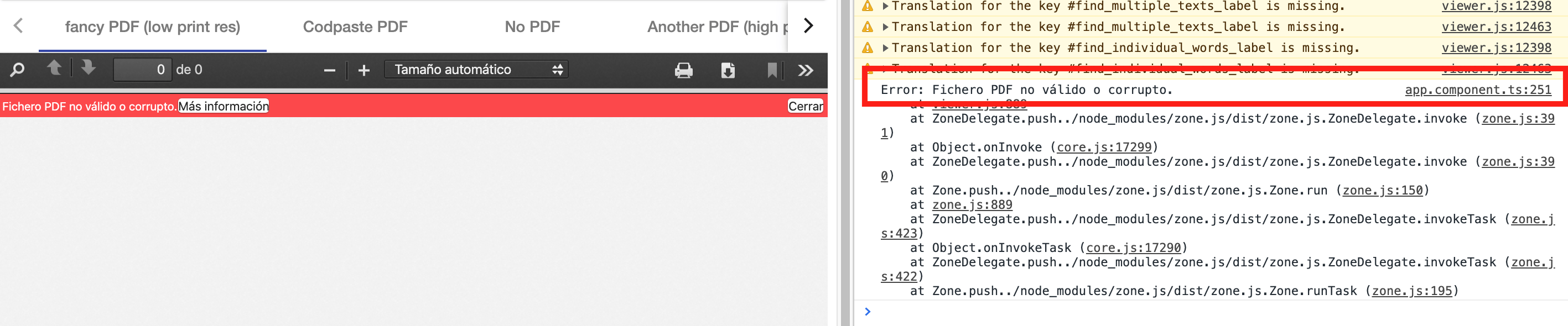
Ah, I see. The event is called when the PDF file is loaded using the [src] attribute:
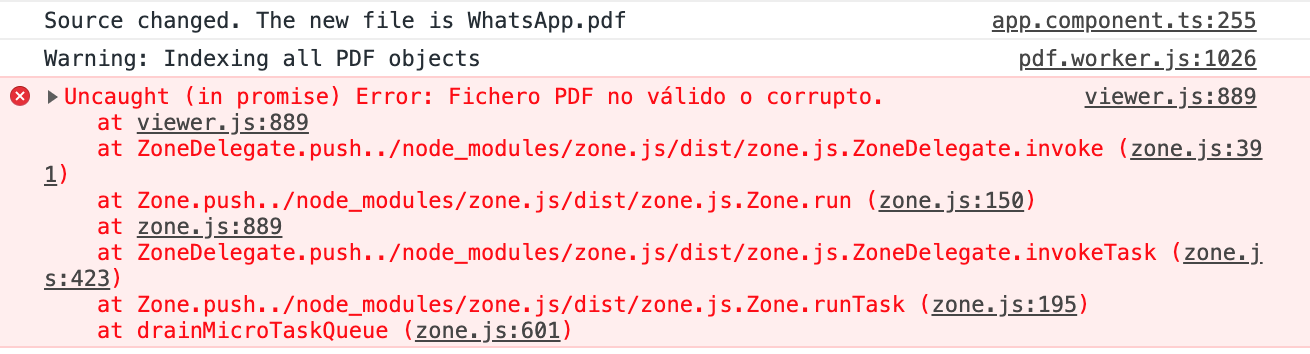
But it's not called when the PDF file is uploaded later, using the UI of the PDF viewer:
stephanrauh
on 10 Feb 2020
The feature has landed with version 2.0.0-alpha.7. You can see it on https://pdfviewer.net/pages-loaded.
stephanrauh
on 11 Feb 2020
Hi @stephanrauh! I was reviewing this again (had other things to close prior taking again this) and noticed that on es5 script of viewer-js is not working but it is with ES2015 (despite a minor error). So, I cloned the project and did some fixes around this and now is fully working. Also, I've added a script to generate es5 automatically from es2015 and avoid having to manually update both versions. Would you like me to send the PR and review it?
manufabri91
on 2 Apr 2020
@manufabri91 Yes, please do!
In particular, your script might save me a lot of time. Currently, I generate both the ES5 and the ES2015 version directly from the Mozilla source. After that, I run a script modifying them. You can imagine it's a pain to keep both version in sync. I'm working on a Mac, which makes ES5 support even more painful. Generating the ES5 version from the ES2015 version sounds like a good idea.
As for your fixes: please have a look at my latest commits. During the last couple of days, I've fixed several ES5 bug. Maybe your bug fix is among them.
I'd also like to ask to to have a look at https://github.com/stephanrauh/ngx-extended-pdf-viewer/blob/master/modifyPdfJs/modifyViewer.js. That's the script I use to add modifications and bug fixes to the original Mozilla source code. If you've modified viewer.js, it'd be great if you took the pain to edit modifyViewer.js, too. I should stress you don't have to: that's my job. But I'm always busy, so I'd appreciate your help!
stephanrauh
on 2 Apr 2020
@stephanrauh No problem! I can do it on my free time. It's time to contribute to the community from which I took advantage so many times :)
Is modifyViewer actually updating both versions? I find it a bit confusing to follow by just looking it and might need to debug it in order to understand what is doing. But if you could tell me just some high level details of what's doing you can save me some time so I can update it.
manufabri91
on 3 Apr 2020
@manufabri91 Sorry for answering late. It seems I've missed your message.
Yes, modifyViewer updates both the ES5 and the ES2015 version. And you're right, it's not a beautiful piece of code. But it does the trick.
The idea of the modifier scripts is simple: it scans the JavaScript files generated by Mozilla line by line. If a line matches a particular pattern, it's modified.
So each time I fix a bug or add a feature in the base file, I'm looking at the lines surrounding my patch. Usually it's easy to find a line that's unique in the file. That's my search criterium (i.e. the expression of the if statements). The body of the if statement adds my patch.
stephanrauh
on 30 May 2020
Related issues
 MKITConsulting
·
5Comments
MKITConsulting
·
5Comments
 vfabregat
·
5Comments
vfabregat
·
5Comments
 DHalilovic
·
6Comments
DHalilovic
·
6Comments
 mkanwar
·
6Comments
mkanwar
·
6Comments
 leo6104
·
3Comments
leo6104
·
3Comments