Ngx-charts: Cannot find module "." when running universal server
When I followed the Angular Universal: server-side rendering tutorial to start the universal server, I met the error:
Error: Cannot find module "."
    at webpackMissingModule (/home/zhezhu/Documents/fm-frontend-jobs/dist/server.js:164237:82)
    at Object.. (/home/zhezhu/Documents/fm-frontend-jobs/dist/server.js:164237:160)
    at __webpack_require__ (/home/zhezhu/Documents/fm-frontend-jobs/dist/server.js:164176:30)
    at Object../node_modules/@swimlane/ngx-charts/release/common/circle-series.component.js (/home/zhezhu/Documents/fm-frontend-jobs/dist/server.js:168816:59)
    at __webpack_require__ (/home/zhezhu/Documents/fm-frontend-jobs/dist/server.js:164176:30)
    at Object../node_modules/@swimlane/ngx-charts/release/common/circle-series.component.ngfactory.js (/home/zhezhu/Documents/fm-frontend-jobs/dist/server.js:169083:10)
    at __webpack_require__ (/home/zhezhu/Documents/fm-frontend-jobs/dist/server.js:164176:30)
    at Object../node_modules/@swimlane/ngx-charts/release/line-chart/line-chart.component.ngfactory.js (/home/zhezhu/Documents/fm-frontend-jobs/dist/server.js:192065:10)
    at __webpack_require__ (/home/zhezhu/Documents/fm-frontend-jobs/dist/server.js:164176:30)
    at Object../src/app/domains/inspector/dmarc-panel/dmarc-panel.component.ngfactory.js (/home/zhezhu/Documents/fm-frontend-jobs/dist/server.js:208172:11)
I tried to start it without webpack, then there would be another error with ngx-charts:
/home/zhezhu/Documents/fm-frontend-jobs/node_modules/@swimlane/ngx-charts/release/line-chart/line-series.component.js:10
import { Component, Input, ChangeDetectionStrategy } from '@angular/core';
       ^

SyntaxError: Unexpected token {
    at new Script (vm.js:74:7)
    at createScript (vm.js:246:10)
    at Object.runInThisContext (vm.js:298:10)
    at Module._compile (internal/modules/cjs/loader.js:646:28)
    at Object.Module._extensions..js (internal/modules/cjs/loader.js:689:10)
    at Module.load (internal/modules/cjs/loader.js:589:32)
    at tryModuleLoad (internal/modules/cjs/loader.js:528:12)
    at Function.Module._load (internal/modules/cjs/loader.js:520:3)
    at Module.require (internal/modules/cjs/loader.js:626:17)
    at require (internal/modules/cjs/helpers.js:20:18)
and I don't know why.
Thanks for your help.
 Zhefraudmarc
All 16 comments
I'm also having the same problem with server side rendering.
ngx-charts version: 7.3.0
Angular version: 5.0
 takumi-hoppler
on 30 May 2018
takumi-hoppler
on 30 May 2018
Found a fix after being stuck with this error for 3 days: 🙂
In your project root, open these two files:
i) 'node_modules/@swimlane/ngx-charts/release/common/circle-series.component.d.ts'
ii) 'node_modules/@swimlane/ngx-charts/release/common/circle-series.component.js'
In each file, replace the following line of code
import { ColorHelper } from '.'
````
with
```ts
import { ColorHelper } from '../common/color.helper'
````
You should be good to go. Just save and build your project.

### Additional Note
Afterwards, when you try to build the project you might experience the following error: "Prerendering failed because of error: ReferenceError: MouseEvent is not defined".

To solve this, install regexp-replace-loader:
```sh
npm i regexp-replace-loader --save-dev
Then in './webpack.server.config.js', update rules as follows:
module.exports = {
  ...
  module: {
    rules: [
      {
        test: /\.ts$/,
        loader: 'ts-loader'
      },
      {
        test: /\.(ts|js)$/,
        loader: 'regexp-replace-loader',
        options: {
          match: {
            pattern:'\\[(Mouse|Keyboard)Event\\]',
            flags:'g'
          },
          replaceWith:'[]'
        }
      }
    ]
  }
  ...
};
Future Considerations
This error occurs because of a simple mistake in the source code of the ngx-charts project. It is my askance, kindly, if the core team could replace the lines in the two files above with my proposed fixes, as this would ensure no future errors for developers using Angular Universal.
Happy coding! Cheers! 😎
 tawn33y
on 6 Jun 2018
tawn33y
on 6 Jun 2018
Merged the PR. This will be in the next release. Thanks for the contribution everyone!
 marjan-georgiev
on 17 Jul 2018
marjan-georgiev
on 17 Jul 2018
@marjan-georgiev Please ensure to merge #919 and #921 before the next release, as otherwise SSR is broken 😖 Fixing those two issues allowed to make it working (at least SSR doesn't fail for my app anymore).
 zvirja
on 17 Jul 2018
zvirja
on 17 Jul 2018
@zvirja awesome contribution, thank you! Merged the other 2 issues.
Any chance you can create a demo repository with ngx-charts workin in SSR and share it? Would be very helpful to everyone.
marjan-georgiev
on 17 Jul 2018
@marjan-georgiev I'll try my best, but I'm a newbie at front end. I'm working with the already configured solution and am not sure can configure the similar one from scratch. However, if I have free time I could give it a try.
Could you please share your plans regarding the next release timeline? I wish to consume the changes and make it finally work after spending 2 days on the fix 😊
I've just built the latest master and everything works fine.
zvirja
on 17 Jul 2018
I'll try to cut a release today.
marjan-georgiev
on 17 Jul 2018
@marjan-georgiev Would be super awesome, thanks! :heart_eyes:
zvirja
on 17 Jul 2018
Released in 9.0.0.
marjan-georgiev
on 18 Jul 2018
@marjan-georgiev Many thanks for the quick cooperation - really impressive!
BTW, it seems you forgot to push a git tag 😊
zvirja
on 18 Jul 2018
Oops. Pushed it, thanks!
marjan-georgiev
on 18 Jul 2018
Hi guys I'm experiencing this with the vertical bar chart component when trying to do SSR. I'm running version 9.0.0 of Ngx charts and Angular version 6.1.6. Any help would be appreciated
 Pibomeister
on 3 Sep 2018
Pibomeister
on 3 Sep 2018
@Pibomeister did you find a solution? I am getting the same problem running Angular 6.0.2 with ngx-charts 9.0.0
 yanivamrami
on 23 Sep 2018
yanivamrami
on 23 Sep 2018
@yanivamrami Yes as a matter of fact I did. The issue is with how ngx charts is packaged, currently node doesn't support the current packaging. To fix this I installed Babbel as a dev dependency and added the following scripts to my package.json:
"compile_@swimlane_ngx-charts": "babel node_modules/@swimlane/ngx-charts -d node_modules/@swimlane/ngx-charts --presets es2015"
"postinstall": "npm run compile_@swimlane_ngx-charts"
So whenever I run npm install, ngx charts is automatically compiled into a compatible format. I have no issues runnning this with Angular 6.1.6, @nguniversal/express-engine 6.1.0 and @nguniversal/common 6.1.0.
Hope I was of help!
Pibomeister
on 25 Sep 2018
Thanks @Pibomeister !!!
 robinComa
on 21 Oct 2018
robinComa
on 21 Oct 2018
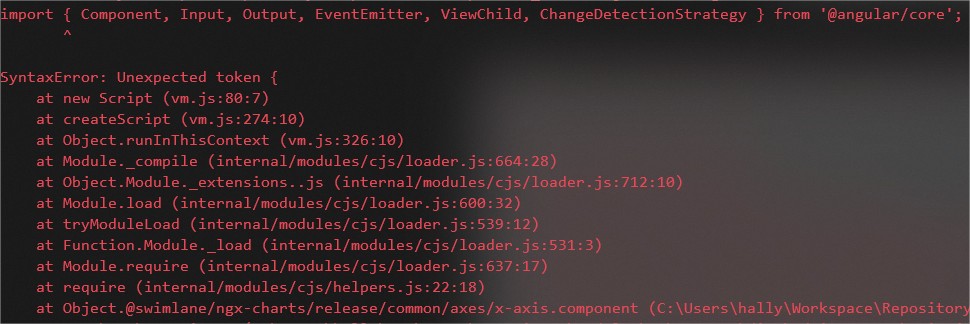
This problem is back. I am trying to make a app-shell using the angular cli generator and builder, guided by this link
Error: SyntaxError: Unexpected token { in @swimlane\ngx-charts\release\common\axes\x-axis.component.js:10
"@angular/animations": "^7.2.15",
"@angular/platform-browser-dynamic": "^7.2.15",
"@swimlane/ngx-charts": "^11.1.0",
"@angular/cli": "7.3.9",
 hallysonh
on 24 May 2019
hallysonh
on 24 May 2019
Related issues
 WoMayr
·
21Comments
WoMayr
·
21Comments
 kkakroo
·
21Comments
kkakroo
·
21Comments
 metodribic
·
26Comments
metodribic
·
26Comments
 cole21771
·
19Comments
cole21771
·
19Comments
 sjdemoor
·
20Comments
sjdemoor
·
20Comments
Most helpful comment
@yanivamrami Yes as a matter of fact I did. The issue is with how ngx charts is packaged, currently node doesn't support the current packaging. To fix this I installed Babbel as a dev dependency and added the following scripts to my package.json:
"compile_@swimlane_ngx-charts": "babel node_modules/@swimlane/ngx-charts -d node_modules/@swimlane/ngx-charts --presets es2015"
"postinstall": "npm run compile_@swimlane_ngx-charts"
So whenever I run npm install, ngx charts is automatically compiled into a compatible format. I have no issues runnning this with Angular 6.1.6, @nguniversal/express-engine 6.1.0 and @nguniversal/common 6.1.0.
Hope I was of help!