Ngx-charts: Chart does not fit inside container when used in Angular Material Tab
I'm submitting a ...
[X] bug report
[ ] feature request
[ ] support request
Current behavior
When inside a Angular Material Tab Component the Chart does not correctly fit inside the container. It does not matter if the size of the container is set to a fixed dimension (direct pixel values) or relavive (percentage).
Expected behavior
The Chart should resize itself to the container
Reproduction of the problem
https://plnkr.co/edit/m7V3cOa95tVx9jKiLxSR?p=preview
What is the motivation / use case for changing the behavior?
Using the ngx-charts inside an angular-material app with tabs
ngx-charts version: 6.0.2
Angular version: 4.3.6
Browser: Chrome, Firefox, Edge (all I tested)
Language: TypeScript
This issue is similar but I think not equal to #474. It maybe the same cause. Since as soon as you resize the window, the chart fixes its size.
 WoMayr
All 21 comments
I am getting Error: (SystemJS) Unexpected value 'undefined' exported by the module 'PlunkerMaterialModule'
Error: Unexpected value 'undefined' exported by the module 'PlunkerMaterialModule'
when opening the plunkr.
 marjan-georgiev
on 3 Oct 2017
marjan-georgiev
on 3 Oct 2017
Here is a working stackblitz : https://stackblitz.com/edit/angular-material2-issue-tlvbnv?file=app%2Fapp.component.ts
This issue is linked to mine #522 as i'm using material2 tabs too.
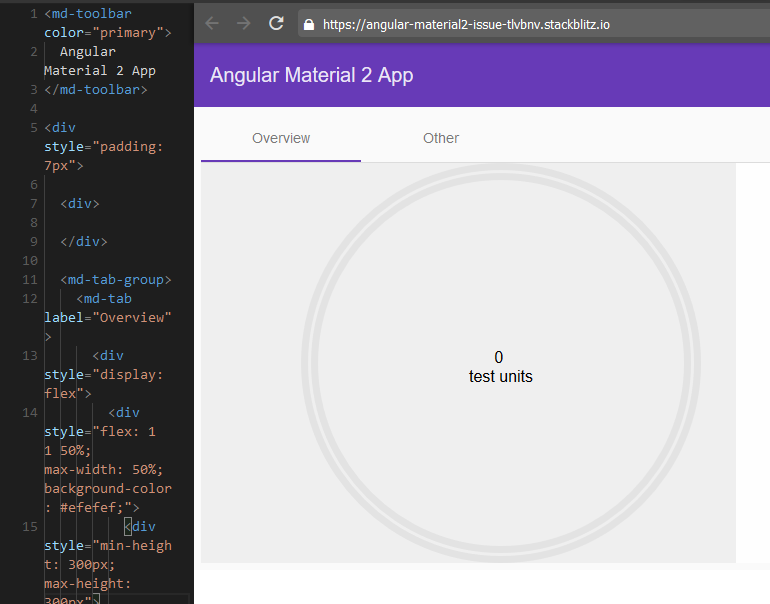
You can notice too the very small font (sometimes) when you resize the window :
 rbleuse
on 4 Oct 2017
rbleuse
on 4 Oct 2017
Do you have any update on this issue?
 zakaryaxali
on 23 Apr 2018
zakaryaxali
on 23 Apr 2018
any update?
 fdeniz
on 7 May 2018
fdeniz
on 7 May 2018
EDIT: Using the AfterViewChecked hook caused a performance issue on my web app !!! You better use AfterViewInit lifecycle hook which is called only once !
Hello, I got the same problem using material cards. I fixed the issue by reloading the chart after the view was checked by angular. You have to implement the AfterViewInit interface from @angular/core and after that just do:
ngAfterViewInit() {
this.chartData = [...this.chartData];
}
Enjoy !
 GO3LIN
on 28 May 2018
GO3LIN
on 28 May 2018
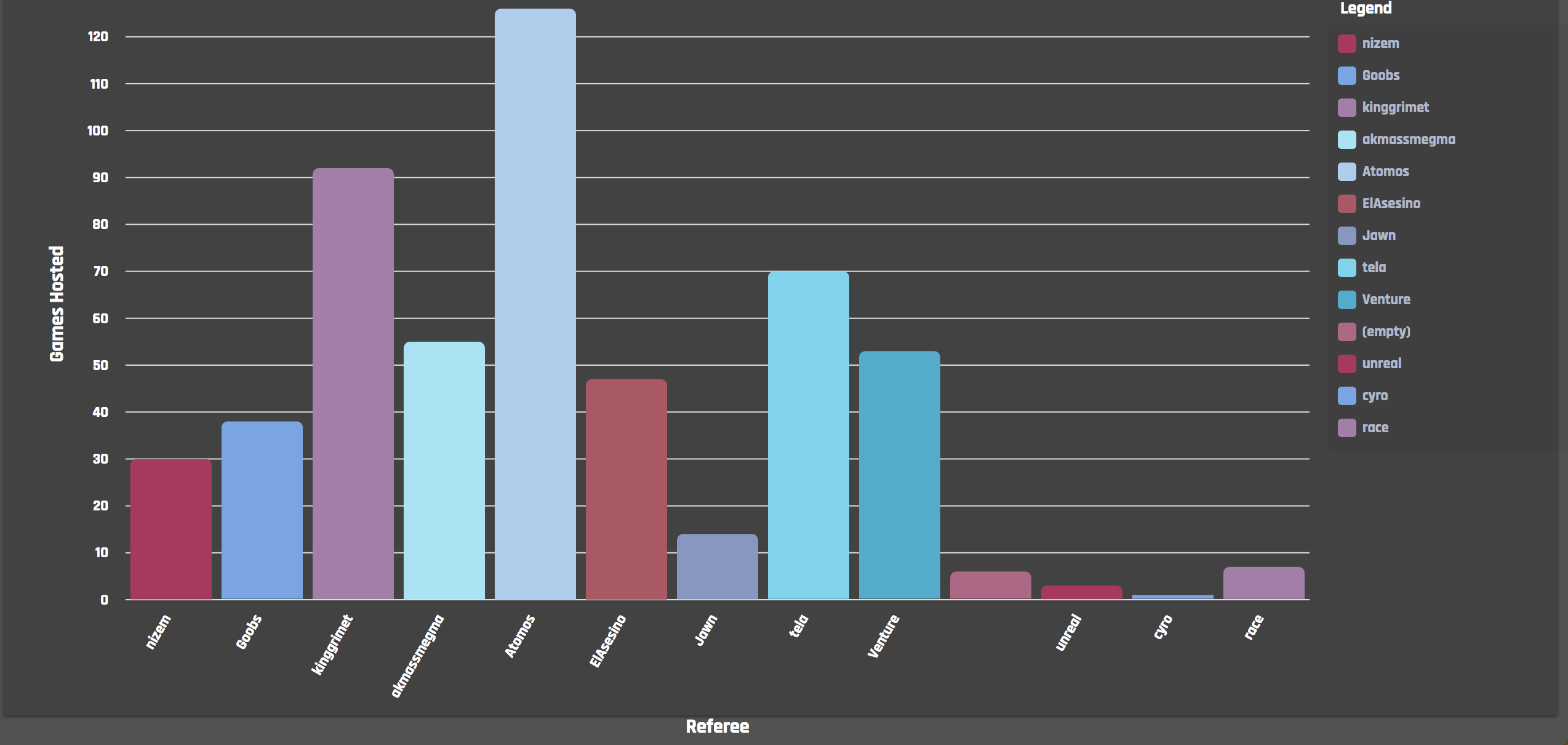
For me I'm seeing the bar chart Label outside of the <mat-card> with no idea how to fix =(
 jamesh38
on 15 Jun 2018
jamesh38
on 15 Jun 2018
Unfortunately GO3LIN's solution is not working for me, see this updated stackblitz :
https://stackblitz.com/edit/angular-material2-issue-erqwff?file=app%2Fapp.component.html
rbleuse
on 15 Jun 2018
@Spanja Remove the view attribute and it works !
@jamesh38 Have you tried my solution ?
GO3LIN
on 18 Jun 2018
@GO3LIN Indeed that's working with the gauge graph (first tab), but not with the line-chart (second tab)
rbleuse
on 18 Jun 2018
@Spanja Obviously, the ngAfterViewInit is only fired once, to get the chart fit in the tab content, you will have to add an event listener for the tab change in the mat-tab-group like this:
<mat-tab-group (selectedTabChange)="updateCharts()">
And in your component :
ngAfterViewInit() {
this.updateCharts();
}
updateCharts() {
this.graphData = [...this.graphData];
this.data = [...this.data];
}
@GO3LIN, I'm having a issue with the mat-card, and couldn't fix it with your solution. Do you mind loooking at the code below and tell me if i'm doing something odd?
In my component:
ngOnInit() {
this.myService.getData().subscribe(x => this.countryData = x);
}
ngAfterViewInit() {
this.countryData = [...this.countryData];
}
In the template:
<mat-card>
<mat-card-content>
<ngx-charts-pie-chart *ngIf="countryData"
[results]="countryData"
[labels]="true">
</ngx-charts-pie-chart>
</mat-card-content>
</mat-card>
 mrmokwa
on 13 Aug 2018
mrmokwa
on 13 Aug 2018
@MRMokwa Have you tried using the updateChart function, in your case I would write it like this:
ngOnInit() {
this.myService.getData().subscribe(x => {
this.countryData = x;
this.updateChart();
});
}
ngAfterViewInit() {
this.updateChart();
}
updateChart() {
this.countryData = [...this.countryData];
}
Yes, that's a lot of chart updating but It still the best solution I can provide.
GO3LIN
on 21 Sep 2018
@GO3LIN The above said solution is not working in my code. My platform is
Angular CLI: 6.2.4
Node: 8.12.0
OS: darwin x64
I added a ngx bar chart into a mat-card and updated the data dynamically through an API. Shall I downgrade angular from version 6 to 4.
 arunkumarv31
on 11 Oct 2018
arunkumarv31
on 11 Oct 2018
ngAfterViewInit does not work. Only when I use setInterval to re-set the data again and again.
In my case, I use ngx-charts-area-chart in the second tab of Angular Material Tabs.
But this workaround (setInterval) is dirty. Is there no solution yet?
I also checked some other lifecycle events.
Update: Currently I use selectedTabChange event of mat-tab-group. But I hope for a more official solution.
 Domvel
on 5 Dec 2018
Domvel
on 5 Dec 2018
Just change the material-tab element to be lazy loaded.
You have to put your tab-content inside
<mat-tab><ng-template matTabContent>{{yourcontent}}</ng-template></mat-tab>
 davidblumer
on 10 Jan 2019
davidblumer
on 10 Jan 2019
@GO3LIN, @MRMokwa, @arunkumarv31, @jamesh38
I had the same issue with my chart extending beyond the border of my mat-card. However, I also have a chart in a mat-accordion panel, and although in both cases my data arrives asynchronously, the accordion panel resizes properly and contains the chart just fine.
I discovered that the display settings for the container in the mat-accordion panel uses flex, while mat-card is simply disply: block. After overriding the mat-card css to use the same flex settings, the card expands properly to fit the chart.
Note that you may need to place the css rule in a global styles file to avoid View Encapsulation problems, in addition to !important for each of your css settings.
Here is the css rule I copied from the mat-accordion panel container and applied directly to my mat-card element (you may only need the one display: flex !important; property):
.my-flex-mat-card {
    display: flex !important;
    flex-direction: column !important;
    overflow: visible !important;
}

 <mat-card class="my-flex-mat-card">
     chart here
 </mat-card>
Works like a charm!
 andreisrob
on 11 Jan 2019
andreisrob
on 11 Jan 2019
For anyone who is looking to fit a ngx-charts-bar-horizontal in a material card content, here is a little trick
```
[results]="data"
[gradient]="gradient"
[xAxis]="showXAxis"
[yAxis]="showYAxis"
[legend]="showLegend"
legendPosition="below"
[showXAxisLabel]="showXAxisLabel"
[showYAxisLabel]="showYAxisLabel"
[xAxisLabel]="xAxisLabel"
[showDataLabel]="showDataLabel">
the point is do not set the view attribute, instead define a div within mat-card-content and set its width and height to your desired value
 jimmyaug
on 6 May 2019
jimmyaug
on 6 May 2019
I have a similiar problem with Angular Material Tabs and Material Cards.
I regularly receive data from a service. If I stay on a tab and receive new data, the chart updates itself. But if I change the tab, the chart no longer fits on the Mat Card. If I trigger a "windows resize" event after a tab change, the chart updates itself. The problem with this is that the diagrams "flicker". It looks like this:
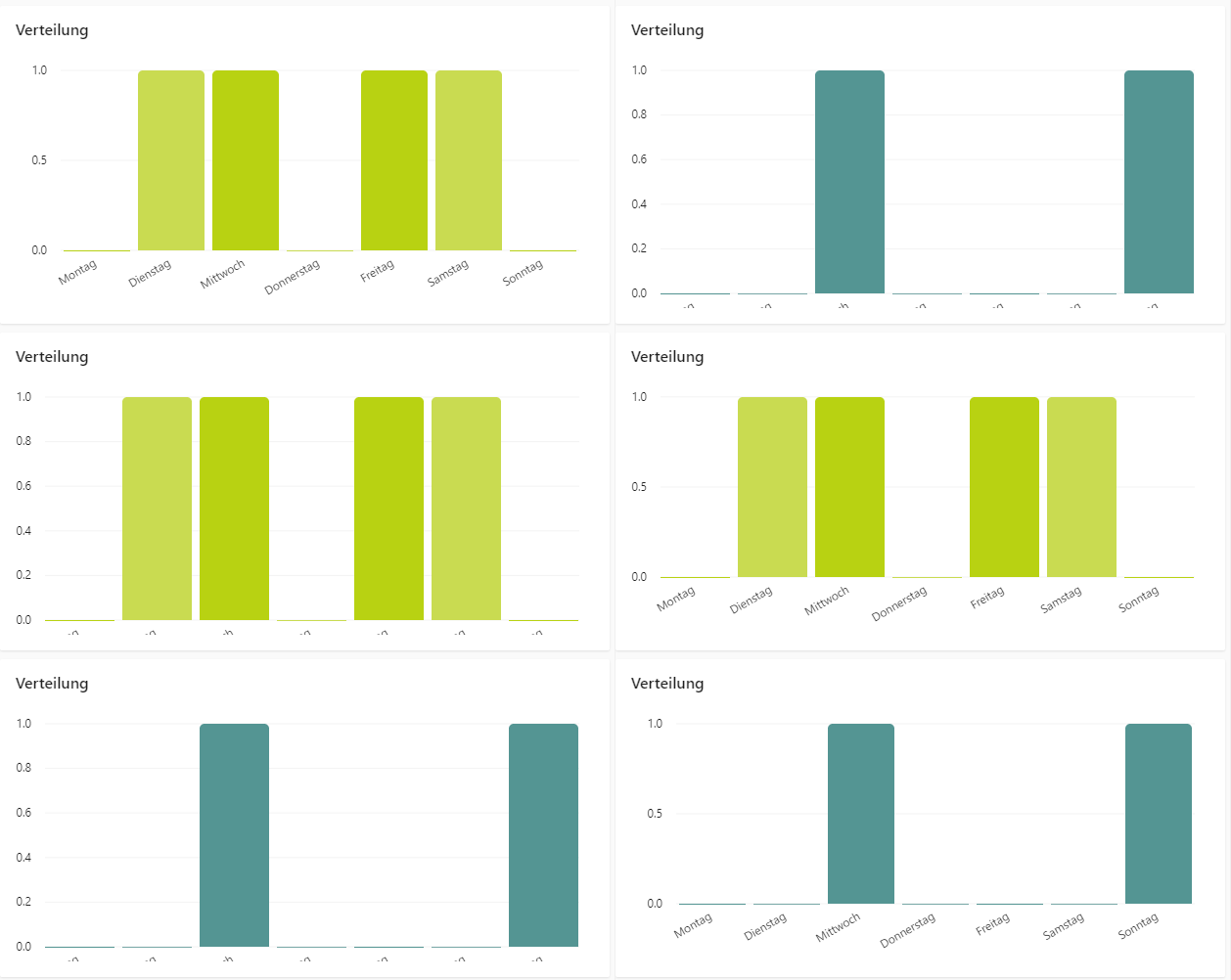
What do I have to do so that I don't have to trigger this event every time I change tabs?
Event I am calling after the tab change:
window.dispatchEvent(new Event('resize'));
Chart css:
.chart{
display: grid;
overflow: hidden;
}
 conting
on 9 May 2019
conting
on 9 May 2019
Lazyloading the mat tab as @davidblumer suggested looks like a good workaround.
Here's an example stackblitz: https://stackblitz.com/edit/angular-material2-issue-a8pujw?file=app/app.component.html
marjan-georgiev
on 21 May 2019
@GO3LIN, @mrmokwa, @arunkumarv31, @jamesh38
I had the same issue with my chart extending beyond the border of my mat-card. However, I also have a chart in a mat-accordion panel, and although in both cases my data arrives asynchronously, the accordion panel resizes properly and contains the chart just fine.
I discovered that the display settings for the container in the mat-accordion panel uses flex, while mat-card is simply
disply: block. After overriding the mat-card css to use the same flex settings, the card expands properly to fit the chart.Note that you may need to place the css rule in a global styles file to avoid View Encapsulation problems, in addition to
!importantfor each of your css settings.Here is the css rule I copied from the mat-accordion panel container and applied directly to my mat-card element (you may only need the one
display: flex !important;property):.my-flex-mat-card { display: flex !important; flex-direction: column !important; overflow: visible !important; } <mat-card class="my-flex-mat-card"> chart here </mat-card>Works like a charm!
it works
 saurabhpatelmi
on 7 Oct 2020
saurabhpatelmi
on 7 Oct 2020
@GO3LIN thanks
  ngAfterViewInit() {
    this.chartData = [...this.chartData];
  }
helped me with a pie Chart, on the contrary I don't know why but its not needed on stackedbar-chart or horizontal grouped bar chart.?
 EvaristoPerez
on 8 Feb 2021
EvaristoPerez
on 8 Feb 2021
Related issues
 faisalnet5
·
3Comments
faisalnet5
·
3Comments
 sjdemoor
·
3Comments
sjdemoor
·
3Comments
 ianfdk
·
3Comments
ianfdk
·
3Comments
 workfel
·
3Comments
workfel
·
3Comments
 jvbianchi
·
4Comments
jvbianchi
·
4Comments
Most helpful comment
@GO3LIN, @MRMokwa, @arunkumarv31, @jamesh38
I had the same issue with my chart extending beyond the border of my mat-card. However, I also have a chart in a mat-accordion panel, and although in both cases my data arrives asynchronously, the accordion panel resizes properly and contains the chart just fine.
I discovered that the display settings for the container in the mat-accordion panel uses flex, while mat-card is simply
disply: block. After overriding the mat-card css to use the same flex settings, the card expands properly to fit the chart.Note that you may need to place the css rule in a global styles file to avoid View Encapsulation problems, in addition to
!importantfor each of your css settings.Here is the css rule I copied from the mat-accordion panel container and applied directly to my mat-card element (you may only need the one
display: flex !important;property):Works like a charm!