Ng-zorro-antd: Could not override css classes
Reproduction link
https://stackblitz.com/edit/angular-md42sr?file=src/app/app.component.ts
Steps to reproduce
1- trying to add label float to left in component css based on simple form
What is expected?
label will be floated to left
What is actually happening?
css and other css rules are not reflected in the code
| Environment | Info |
|---|---|
| ng-zorro-antd | 7.2.0 |
| Browser | chrome |
it happens with all CSS ruled I trying to override, for example, ant-alerts-warning ... and a lot of class that are not be overridden and I don't see them in the console
How do I affect generaly on child component of ant
my angular json
      "architect": {
        "build": {
          "builder": "@angular-devkit/build-angular:browser",
          "options": {
            "outputPath": "dist",
            "index": "src/index.html",
            "main": "src/main.ts",
            "tsConfig": "src/tsconfig.app.json",
            "polyfills": "src/polyfills.ts",
            "assets": [
              "src/assets",
              "src/favicon.ico",
              "src/favicon.png",
              "src/favicon.icns",
              "src/favicon.256x256.png",
              "src/favicon.512x512.png",
              {
                "glob": "**/*",
                "input": "./node_modules/@ant-design/icons-angular/src/inline-svg/",
                "output": "/assets/"
              }
            ],
            "styles": [
              "src/theme.less",
              "src/styles.scss"
            ],
            "scripts": []
          },
 johnico
All 10 comments
Hello @johnico. Please provide a online reproduction by forking this link https://stackblitz.com/edit/ng-zorro-antd-start or a minimal GitHub repository. Issues labeled by Need Reproduce will be closed if no activities in 7 days.
你好 @johnico, 我们需要你提供一个在线的重现实例以便于我们帮你排查问题。你可以通过点击 此处 创建一个 stackblitz 或者提供一个最小化的 GitHub 仓库。7 天内未跟进的 issue 将会被自动关闭。
 ng-zorro-bot
on 4 Apr 2019
ng-zorro-bot
on 4 Apr 2019
fixed
reproduce link:
https://stackblitz.com/edit/angular-md42sr?file=src/app/app.component.ts
johnico
on 4 Apr 2019
You want to make labels left-aligned by this?
label {
float:left;
}
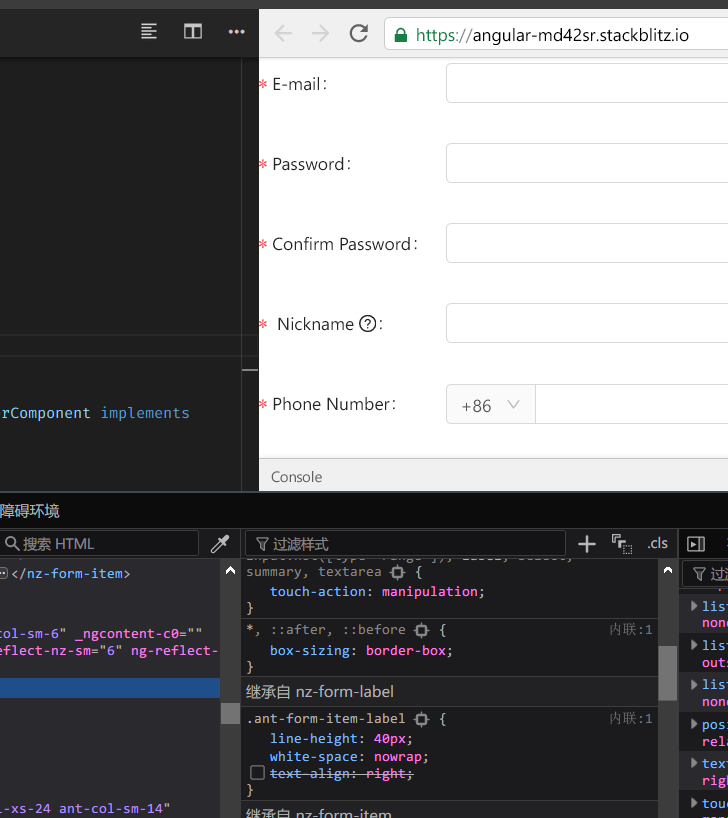
Of course it won't work. The labels are right aligned by text-align property.
 wendellhu95
on 4 Apr 2019
wendellhu95
on 4 Apr 2019
no its not working with text-aling . and i asked globally about override classes
please open the item
johnico
on 4 Apr 2019
I confirm that overriding default css classes is not working, either in component scope or globally!
 ltotsas
on 18 Apr 2019
ltotsas
on 18 Apr 2019
Is there any solution for this?
 electro75
on 6 May 2019
electro75
on 6 May 2019
I stumble over similar cases where I use a component and can not overwrite a value. It only works if i place overwrites in to the main application folder. But not when I use modules.
src/theme.less or src/style.scss (both imported in the angular.json file) works. But not in the
my-new.component.scss that I import
 creadicted
on 27 Aug 2019
creadicted
on 27 Aug 2019
IMHO, I guess that’s because of scoped CSS. See https://angular.io/guide/component-styles#style-scope https://angular.io/guide/component-styles#style-scope.
Could you please make a reproduction if it’s not the case?
在 2019年8月27日,16:00,Wenzel notifications@github.com 写道:
I stumble over similar cases where I use a component and can not overwrite a value. It only works if i place overwrites in to the main application folder. But not when I use modules.
src/theme.less or src/style.scss (both imported in the angular.json file) works. But not in the
my-new.component.scss that I import—
You are receiving this because you modified the open/close state.
Reply to this email directly, view it on GitHub https://github.com/NG-ZORRO/ng-zorro-antd/issues/3219?email_source=notifications&email_token=AC4PPJI6AA3FY2LQBX24TP3QGTNKVA5CNFSM4HDQC4IKYY3PNVWWK3TUL52HS4DFVREXG43VMVBW63LNMVXHJKTDN5WW2ZLOORPWSZGOD5G3VYY#issuecomment-525187811, or mute the thread https://github.com/notifications/unsubscribe-auth/AC4PPJJXKRC6DKS4X2SF3STQGTNKVANCNFSM4HDQC4IA.
wendellhu95
on 27 Aug 2019
You can override CSS class by using the deep selector
example:
::ng-deep .ant-table.ant-table-default

    {
          padding: 16px; 16px

    }
Source: https://stackoverflow.com/questions/58181488/how-to-change-styles-of-nz-table-in-ng-zorro
 DepickereSven
on 17 Dec 2019
DepickereSven
on 17 Dec 2019
Thank you so much Bro DepickereSven +1:
 dilipsinhrathod
on 5 Dec 2020
dilipsinhrathod
on 5 Dec 2020
Related issues
 WeslleyDeSouza
·
24Comments
WeslleyDeSouza
·
24Comments
 saeedrahimi
·
28Comments
saeedrahimi
·
28Comments
 chenling1983
·
19Comments
chenling1983
·
19Comments
 justwalk
·
34Comments
justwalk
·
34Comments
 Cyclone77
·
19Comments
Cyclone77
·
19Comments
Most helpful comment
You can override CSS class by using the deep selector
example:
Source: https://stackoverflow.com/questions/58181488/how-to-change-styles-of-nz-table-in-ng-zorro