What problem does this feature solve?
由于多语言化需求,对于英文字符较长,列宽无法有效的设置,设置太长则页页不美观,太短,又无法显示完整,所以希望列宽可以支持拖拽改变。
What does the proposed API look like?
列宽可以支持拖拽改变
 chenling1983
All 19 comments
也正好也需要这个,不知是否可以提供解决办法。
 deepthan
on 26 Feb 2019
deepthan
on 26 Feb 2019
我们的方案
import { AfterViewInit, Directive, ElementRef, Input } from '@angular/core';

import './index.scss';

@Directive({
  selector: '[tableResizable]',
})
export class TableResizableDirective implements AfterViewInit {
  @Input('tableResizable') columnWidths: string[];
  @Input() usePixel = false;

  constructor(private $element: ElementRef<HTMLTableElement>) {}

  ngAfterViewInit() {
    const el = (() => {
      let result = this.$element.nativeElement;
      if (result.tagName === 'NZ-TABLE') {
        result = result.querySelector('table');
      }
      if (result.tagName !== 'TABLE') throw new TypeError('Must be a TABLE element');
      if (!result.tHead) throw new TypeError('Must have a THEAD element');
      return result;
    })();
    el.classList.add('table-resizable');
    const tr = el.tHead.rows[0];
    if (!tr) throw new TypeError('Must have at least one TR element inside THEAD element');

    setTimeout(() => {
      const ths = Array.from(tr.cells) as HTMLTableHeaderCellElement[];
      if (ths.length <= 1) return;
      --ths.length; // 最后一个方格总是自动列宽的(用于占满整行)

      if (!Array.isArray(this.columnWidths)) {
        this.columnWidths = new Array(ths.length).fill('');
      } else {
        this.columnWidths.length = ths.length;
        this.columnWidths.forEach((x, i, arr) => {
          if (!x) arr[i] = '';
        });
      }

      ths.forEach(th => {
        if (th.classList.contains('no-resize')) return;
        if (this.columnWidths[th.cellIndex]) {
          th.width = this.columnWidths[th.cellIndex];
        }

        const i = document.createElement('i');
        i.classList.add('resize-indicator');
        th.appendChild(i);

        i.addEventListener('mousedown', e => {
          if (e.button === 1) { // 鼠标中键
            th.width = '';
            return;
          }
          if (e.button !== 0) return;
          const startX = e.pageX;
          const startThWidth = th.clientWidth;
          document.body.classList.add('table-resizing');

          let mousemoveHandler;

          document.body.addEventListener('mousemove', mousemoveHandler = e => {
            if (e.button !== 0) return;
            const pixel = e.pageX - startX + startThWidth;
            if (this.usePixel) {
              th.width = pixel + '';
            } else {
              th.width = pixel / tr.offsetWidth * 100 + '%';
            }
            this.columnWidths[th.cellIndex] = th.width;
          });

          document.body.addEventListener('mouseup', e => {
            if (e.button !== 0) return;
            document.body.removeEventListener('mousemove', mousemoveHandler);
            document.body.classList.remove('table-resizing');
          }, { once: true });
        });
      });
    });
  }
}
// index.scss
.table-resizable th {
  position: relative;
}

body.table-resizing {
  cursor: col-resize !important;
  user-select: none;
}

.resize-indicator {
  display: block;
  position: absolute;
  top: 0;
  right: -5px;
  width: 9px;
  height: 100%;
  cursor: col-resize;
}
用法:
<nz-table
  [tableResizable]></nz-table>
效果:
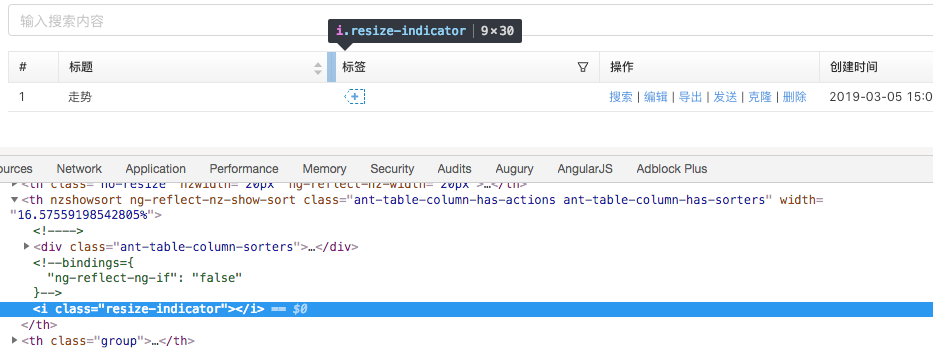
 CarterLi
on 5 Mar 2019
CarterLi
on 5 Mar 2019
@CarterLi 你好 ,这个Directive我放到我的nz-table没有反应,有什么注意事项吗?那两个input需要怎么设置?
 luver225
on 10 May 2019
luver225
on 10 May 2019
先确定directive的代码有没有执行,i标签有没有生成,自己调试一下,代码总共也没几行
那两个input没有特殊需求不用设置
CarterLi
on 10 May 2019
@CarterLi 谢谢回答,因为CSS没加载对,谢谢
luver225
on 10 May 2019
I know the same feature was rejected in #946 (https://github.com/NG-ZORRO/ng-zorro-antd/issues/946).
However, ant design now supports it (column resizable)
https://ant.design/components/table/#components-table-demo-resizable-column
@vthinkxie I wish NG-ZORRO can support it soon, although there is a workaround.
 DeepnetSecurity
on 10 May 2019
DeepnetSecurity
on 10 May 2019
@CarterLi 你好 ,这个Directive我放到我的nz-table没有反应,有什么注意事项吗?那两个input需要怎么设置?
我试了也没反应,到console 中查看在 th内没有生成 。你是如何解决的?有必要的话:QQ = 409223171
 chanchaw
on 16 Jul 2019
chanchaw
on 16 Jul 2019
@chanchaw 看看样式路径是否加载对
luver225
on 16 Jul 2019
我的项目放到 stackblitz 上了:https://stackblitz.com/github/chanchaw/zorroFormLayout
你看左侧导航栏对的第三个:表格组件换行问题
------------------ 原始邮件 ------------------
发件人: "luver225"notifications@github.com;
发送时间: 2019年7月16日(星期二) 下午4:02
收件人: "NG-ZORRO/ng-zorro-antd"ng-zorro-antd@noreply.github.com;
抄送: "葬天尘"409223171@qq.com; "Mention"mention@noreply.github.com;
主题: Re: [NG-ZORRO/ng-zorro-antd] Table支持拖拽改变列宽 (#2776)
@chanchaw 看看样式路径是否加载对
—
You are receiving this because you were mentioned.
Reply to this email directly, view it on GitHub, or mute the thread.
chanchaw
on 16 Jul 2019
@chanchaw 看看样式路径是否加载对
我的项目放到 stackblitz 上了:https://stackblitz.com/github/chanchaw/zorroFormLayout
你看左侧导航栏对的第三个:表格组件换行问题
chanchaw
on 16 Jul 2019
@chanchaw 看看样式路径是否加载对
我的项目放到 stackblitz 上了:stackblitz.com/github/chanchaw/zorroFormLayout
你看左侧导航栏对的第三个:表格组件换行问题
tableResizable 换 [tableResizable],然后自己慢慢调吧
CarterLi
on 16 Jul 2019
@chanchaw 看看样式路径是否加载对
我的项目放到 stackblitz 上了:stackblitz.com/github/chanchaw/zorroFormLayout
你看左侧导航栏对的第三个:表格组件换行问题tableResizable 换 [tableResizable],然后自己慢慢调吧
调整好了,没有报错,但是打开还是没有效果。能再帮忙看看么?我重新 commit 了,你 stackblitz 那个要重新打开了
chanchaw
on 16 Jul 2019
@chanchaw 缺少在app.module.ts中import TableResizableDirective组件
luver225
on 16 Jul 2019
@luver225 我在组件临近的 module 中 import 了,这做不行的?
我又试验了把临近的 module 中的 import 去掉,然后到 app.module.ts 中import
就报错 Error: Template parse errors:
Can't bind to 'tableResizable' since it isn't a known property of 'nz-table'.
chanchaw
on 16 Jul 2019
调不出来...
luver225
on 16 Jul 2019
@luver225 你能把你的成功项目放到 stackblitz 上么?
chanchaw
on 16 Jul 2019
Ref: https://github.com/NG-ZORRO/ng-zorro-antd/pull/3771.
@chanchaw @luver225 Please discuss in private for private problems.
 wendellhu95
on 16 Jul 2019
wendellhu95
on 16 Jul 2019
 vthinkxie
on 11 Oct 2019
vthinkxie
on 11 Oct 2019
版本9 的拖拽改进解决方案
import { AfterViewInit, Directive, ElementRef, Input, Renderer2, Output, EventEmitter, ChangeDetectorRef } from '@angular/core';
import { Subject, forkJoin, combineLatest } from 'rxjs';
import { NzTableComponent } from 'ng-zorro-antd';

@Directive({
  selector: '[appThWidthChanger2]',
})
export class ThWidthChanger2Directive implements AfterViewInit {
  private _widthConfig: number[] = [];
  nzTableEl: any;
  private get nzWidthConfig(): string[] {
    return [...this._widthConfig.map(u => u + 'px')];
  }
  @Input('appThWidthChanger2') set widthConfig(value: number[]) {
    this._widthConfig = value.map(u => u ? u : 136);
  }
  @Output() appThResizeComplete = new EventEmitter<number[]>();

  @Input() set appThDataInit(value: number) {
      console.log('table data init');
      if (value) {
        this.dataInitSubject.next(true);
      }
  }

// 自身业务要求,可以去掉。
  viewInitSubject = new Subject<boolean>();
  dataInitSubject = new Subject<boolean>();


  constructor(private $element: ElementRef<any>, private host: NzTableComponent, private cdr: ChangeDetectorRef) {
      this.nzTableEl = this.$element.nativeElement;
      combineLatest([this.viewInitSubject, this.dataInitSubject])
      .subscribe(data => {
        if (!this.nzWidthConfig || this.nzWidthConfig.length === 0) {
          throw new Error('必须有列宽数据');
        }
        if (this.nzTableEl.tagName !== 'NZ-TABLE') {
            throw new TypeError('必须绑定再nz-table元素上');
        }
        const thTableEl = this.nzTableEl.querySelector('.ant-table-header table');
        if (!thTableEl) {
            throw new Error('必须有头部Table元素');
        }
        thTableEl.classList.add('table-resizable');
        const tr = thTableEl.tHead.rows[0];
        if (!tr) {
            throw new TypeError('必须有列数据');
        }
        const ths = Array.from(tr.cells) as HTMLTableHeaderCellElement[];
        if (ths.length <= 1) {
            console.log(this.nzWidthConfig);
            return;
        }
        this.host.nzWidthConfig = this.nzWidthConfig;
        this.host.ngOnChanges({nzWidthConfig: {previousValue: null, currentValue: this.nzWidthConfig, isFirstChange: () => false, firstChange: false}});
        ths.forEach((th, index) => {
          if (th.classList.contains('no-resize')) {
            return 1;
          }
          const previousI = th.querySelector('i.resize-indicator');
          if (previousI) {
            th.removeChild(previousI);
          }
          const i = document.createElement('i');
          i.classList.add('resize-indicator');
          th.appendChild(i);

          i.addEventListener('mousedown', e => {
            const tempWidthConfig = [...this._widthConfig];
            if (e.button === 1) { // 鼠标中键
                return;
            }
            if (e.button !== 0) {return; }
            const startX = e.pageX;
            const startThWidth = th.clientWidth;
            console.log(this.nzWidthConfig);
            document.body.classList.add('table-resizing');
            let mousemoveHandler;
            document.body.addEventListener('mousemove', mousemoveHandler = e2 => {
                if (e2.button !== 0) { return; }
                const pixel = e2.pageX - startX + startThWidth;
                this._widthConfig[index - 1] = pixel;
                tempWidthConfig[index - 1] = pixel;
                this.host.nzWidthConfig = this.nzWidthConfig;
                this.host.ngOnChanges({nzWidthConfig: {previousValue: null, currentValue: this.nzWidthConfig, isFirstChange: () => false, firstChange: false}});
            });

            document.body.addEventListener('mouseup', e => {
                if (e.button !== 0) { return; }
                document.body.removeEventListener('mousemove', mousemoveHandler);
                document.body.classList.remove('table-resizing');
                this.appThResizeComplete.emit(tempWidthConfig);
            }, { once: true });
          });
        });
      });
  }

  ngAfterViewInit() {
      this.viewInitSubject.next(true);
  }
}
样式和上面的一样,但是在需要额外加一行<th></th>,如下:
<thead>
          <tr>
            <ng-container *ngFor="let th of thNames">
              <th></th>
            </ng-container>
            <th></th> <!--额外添加的一列-->
          </tr>
  </thead>

Related issues


Most helpful comment
我们的方案
用法:
效果: