Nextcloud-vue: Hover over navigationItem in dark mode returns black triangle
What is going wrong?
Describe the bug
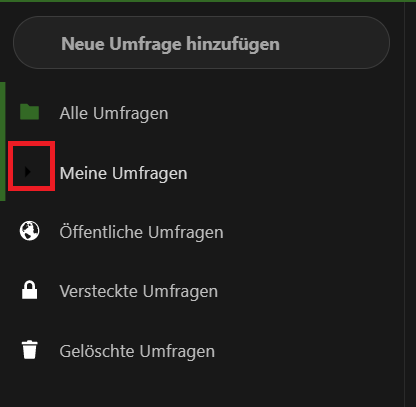
when hovering over the left sidebar items, the current icon kind of hides, because it gets dark?
To Reproduce
Steps to reproduce the behavior:
- activate dark mode
- hover over the items in the left sidebar
- the icon of the current item hides (gets dark?)
Expected behavior
the icon of the current item should stay visible
Screenshots
Information about your polls installation
Polls version? (see apps page)
1.0
Fresh installation or update from a prior version (from which one)?
upgrade from prior version
How did you install this version?(Appstore or describe installation)
appstore
Information about your Instance of Nextcloud/ownCloud
Nextcloud or ownCloud?
nextcloud
Which Version?
17.0.2
 szaimen
All 8 comments
Browser, OS? Darkmode activated where?
 dartcafe
on 21 Jan 2020
dartcafe
on 21 Jan 2020
Sry:
Browser: Chromium 79 based Browser
OS: Windows 10
Dark mode: only activated in Nextcloud
szaimen
on 21 Jan 2020
They are not getting dark, but are replaced with a triangle, which indicate, that the section is collapsed.
Compare:
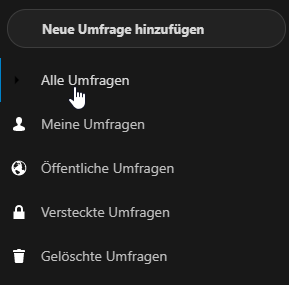
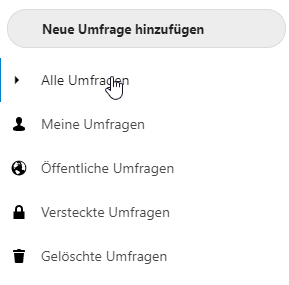
seems to be a bug in vue-nextcloud or in the dark mode.
dartcafe
on 21 Jan 2020
Is that an issue in nextcloud-vue or does it belong to the dark mode?
dartcafe
on 21 Jan 2020
Most likely the vue components?
 skjnldsv
on 22 Jan 2020
skjnldsv
on 22 Jan 2020
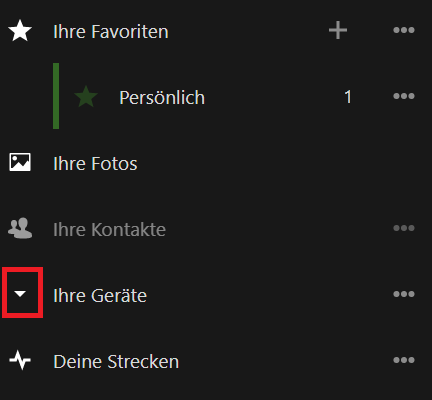
@dartcafe strangely enough the same feature works in nextcloud maps, so I would guess it is noth the vue component but the implementation in your app?
Here is a screenshot from the maps app:
szaimen
on 23 Jan 2020
@szaimen As far as I can see, maps doesn't use the nextcloud-vue components.
https://github.com/nextcloud/maps/blob/master/package.json
dartcafe
on 27 Feb 2020
Related issues
skjnldsv
·
9Comments
 raimund-schluessler
·
9Comments
raimund-schluessler
·
7Comments
raimund-schluessler
·
9Comments
raimund-schluessler
·
7Comments
 korelstar
·
7Comments
korelstar
·
7Comments
 roadrunnerjb
·
5Comments
roadrunnerjb
·
5Comments