Nextcloud-vue: AppNavigationItem: Design of Undo
I think we can optimize the design of the undo functionality of AppNavigationItem. Currently, it's hard to differentiate between normal items and undo items. The only difference is the undo action icon and title.
According to the design guidelines, the title should be "Deleted XXX". For some languages, translators need to change the order to "XXX t(deleted)". Hence, for long titles "XXX", the important part "t(deleted)" is not visible anymore.
Therefore, I suggest to add another design element to enhance differentiation between normal items and deleted items. An easy and effective way would be to use a background-color for deleted (undo) items. This could be e.g. color-error, lightened by ~40%. This approach would fit to the planned design change for hover/active/selected, see https://github.com/nextcloud/nextcloud-vue/issues/425#issuecomment-527914136.
| Before | After |
|---|---|
| 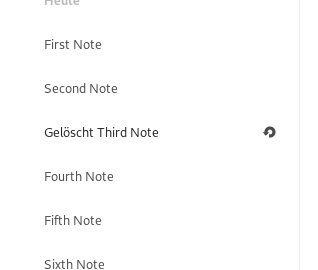 |
| 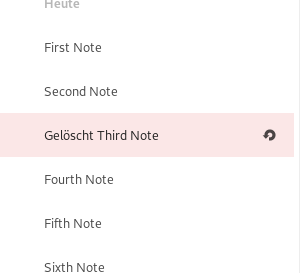 |
|
What do you think?
/cc @nextcloud/designers @jancborchardt
 korelstar
All 12 comments
I like the idea. Maybe the background-color you suggested could be animated to get white within a few seconds, so basically it catches much attention in the beginning and the decreases the attention by fading into white after the time has passed?
 stefan-niedermann
on 30 Oct 2019
stefan-niedermann
on 30 Oct 2019
Other systems like Android and Gmail don’t do undo in place, and that’s for the reason that it’s not the usual case.
If every time you delete something, the entry still stays for a few seconds, that creates a few issues:
- It seems like it actually didn’t work
- You need to wait until you delete the next entry because the list might move at any moment
- The interface feels not responsive because it doesn’t do what you want
- The case that you might have made a mistake is made the majority case, instead of the edge-case it is
So now that we have the cool new notification system courtesy of @juliushaertl, we should do undo by directly removing the entry on deletion (of course with a nice quick collapse animation as we do in Mail for example), and offering undo via the notification.
Deleted file.txt [ Undo ]
 jancborchardt
on 4 Nov 2019
jancborchardt
on 4 Nov 2019
I'm fine with that approach. However, I think we should have a common approach through all apps. Would you mind to update the design guidelines? We should also remove the undo functionality from AppNavigationItem since it's not necessary anymore, @skjnldsv @juliushaertl ?
korelstar
on 6 Nov 2019
Sorry guys, but I'm stuck on this. Can you please help me on implementing this? @nextcloud/vuejs
The problem is to realize the "Undo" action. In both (legacy) OC.Notification and OCP.Toast (from NC17), I have to pass some HTML code to the notification. Therefore, I can do something like OC.Notification.showHtml('<a href="#" onclick="undo()">Undo</a>'). But how could I implement a call to the correct Vue component instance?
korelstar
on 22 Dec 2019
@nextcloud/vuejs can someone help @korelstar ^ :)
jancborchardt
on 30 Dec 2019
@korelstar I might have found a way to deal with this issue. OC.Notification.showHtml() will return a jQuery object of the corresponding notification. You could use this object to find your link in the element and add a click listener. Something like this:
methods: {
  showUndoNotification() {
    const el = OC.Notification.showHtml('<a href="#" class="undo">Undo</a>');
    el.find('.undo').click(this.undoStuff)
  },
  undoStuff() { ... }
}
For Toasts you might be able to use a similar approach by using toast.toastElement or the provided callback.
Let me know what you think.
 paulschwoerer
on 4 Jan 2020
paulschwoerer
on 4 Jan 2020
@paulschwoerer Nice, thanks for your help!
I tried this approach and it seems to work so far. :smiley:
I think I will use this approach until there is a better way. Respective PR is https://github.com/nextcloud/notes/pull/431
korelstar
on 4 Jan 2020
@korelstar Glad I could be of assistance :)
paulschwoerer
on 6 Jan 2020
So now that we have the cool new notification system courtesy of @juliushaertl, we should do undo by directly removing the entry on deletion (of course with a nice quick collapse animation as we do in Mail for example), and offering undo via the notification.
But that means you create a timeout for the user. Isn't that one of the famous anti-patterns to avoid? We also had this in the old navigation sidebar once for some apps and it was always a bit strange.
Other systems like Android and Gmail don’t do undo in place, and that’s for the reason that it’s not the usual case.
If every time you delete something, the entry still stays for a few seconds, that creates a few issues:
What I've seen in some Android apps (AOSP mail IIRC) is that the deleted item changes its visual appearance (greys out or whatever) and stays where it was until you scroll. This is a pattern that would work rather for the app content list than the sidebar, but still maybe worth a though.
 ChristophWurst
on 8 Jan 2020
ChristophWurst
on 8 Jan 2020
The idea is that the notification shows "Undo" and an X to dismiss, not a timeout. On Android e.g. it works via toast, only with undo action.
What I've seen in some Android apps (AOSP mail IIRC) is that the deleted item changes its visual appearance (greys out or whatever) and stays where it was until you scroll.
This is what we have in Contacts and it has several drawbacks, see https://github.com/nextcloud/contacts/issues/1118
jancborchardt
on 12 Jan 2020
Oh, okay, so do you mean that should be a permanent notification which needs manual action to clear?
korelstar
on 12 Jan 2020
We need some mechanics to make sure it doesn’t stay there forever and stacks, for example:
- The next deletion should remove it as well
- Possibly some sort of longer timeout like 10s (check Gmail maybe)
- Other things?
jancborchardt
on 14 Jan 2020
Related issues
 ma12-co
·
7Comments
ma12-co
·
7Comments
 skjnldsv
·
9Comments
skjnldsv
·
9Comments
 raimund-schluessler
·
7Comments
raimund-schluessler
·
7Comments
 szaimen
·
8Comments
jancborchardt
·
3Comments
szaimen
·
8Comments
jancborchardt
·
3Comments
Most helpful comment
@korelstar I might have found a way to deal with this issue.
OC.Notification.showHtml()will return a jQuery object of the corresponding notification. You could use this object to find your link in the element and add a click listener. Something like this:For Toasts you might be able to use a similar approach by using
toast.toastElementor the provided callback.Let me know what you think.