Nextcloud-snap: Move data location to external drive .ocdata error
Hello I have been trying to research this all day and I keep getting the same error "your data directory is invalid Ensure there is a file called ".ocdata" in the root of the data directory.
Thanks!
 nathan99218
All 21 comments
Explain to me exactly what you're trying to do. You had the snap working without any external drive, and now you want to migrate all that date to the external drive?
 kyrofa
on 22 Dec 2017
kyrofa
on 22 Dec 2017
sorry if it sounded confusing. What I want to do is to be able to default all of my Nextcloud files on to an external drive instead of the internal drive on my Ubuntu machine. This previous ticket helped a lot but its still not working for me https://github.com/nextcloud/nextcloud-snap/issues/150#issuecomment-267641192. I have moved and changed the data directory to the /media/externaldrive and then I get this error. "your data directory is invalid ensure there is a file called ".ocdata" in the root of the data directory."
Thanks and sorry I'm new to this stuff.
nathan99218
on 22 Dec 2017
Okay much more clear, thank you :) .
Can I see the output of ls -ld /media/externaldrive, please?
kyrofa
on 22 Dec 2017
The data file is in the right place so I checked the data folder and the drive for the data file i got ls: cannot access '/media/woodriver/2godd/data' : permission denied and for the external drive I got drwx------ 4 root root 4096 dec 20 14:41

nathan99218
on 22 Dec 2017
Alright, use sudo in front of those commands to ensure you don't get permission denied. I'd like to see that as well.
kyrofa
on 22 Dec 2017
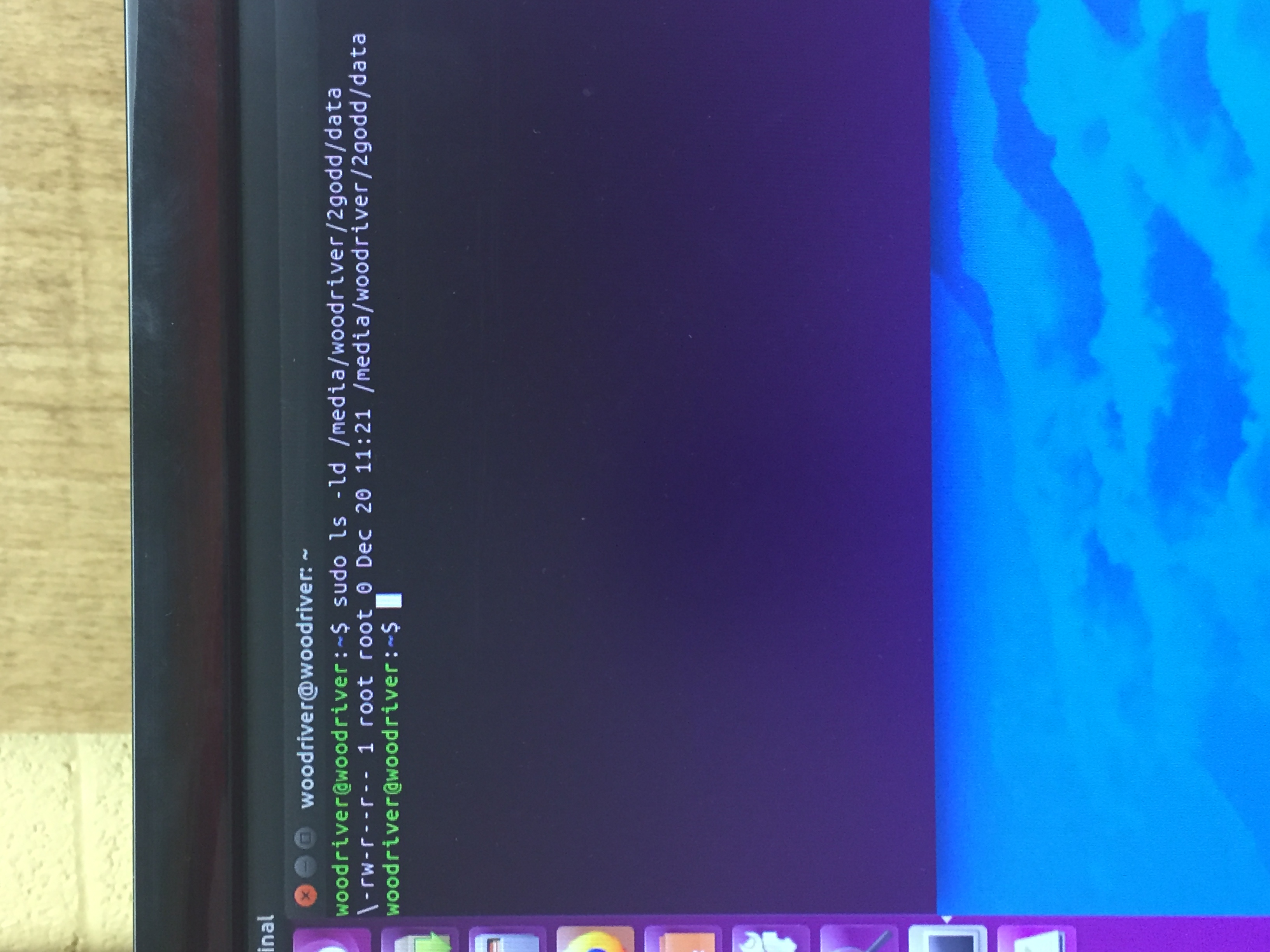
I should have known to do that sorry. for the data folder I got -rw-r--r--r 1 root root 0 Dec 20 11:21 /media/woodriver/2godd/data
nathan99218
on 22 Dec 2017
Alright, one more level: sudo ls -la /media/woodriver/2godd/data let's see if that file is in there...
kyrofa
on 22 Dec 2017
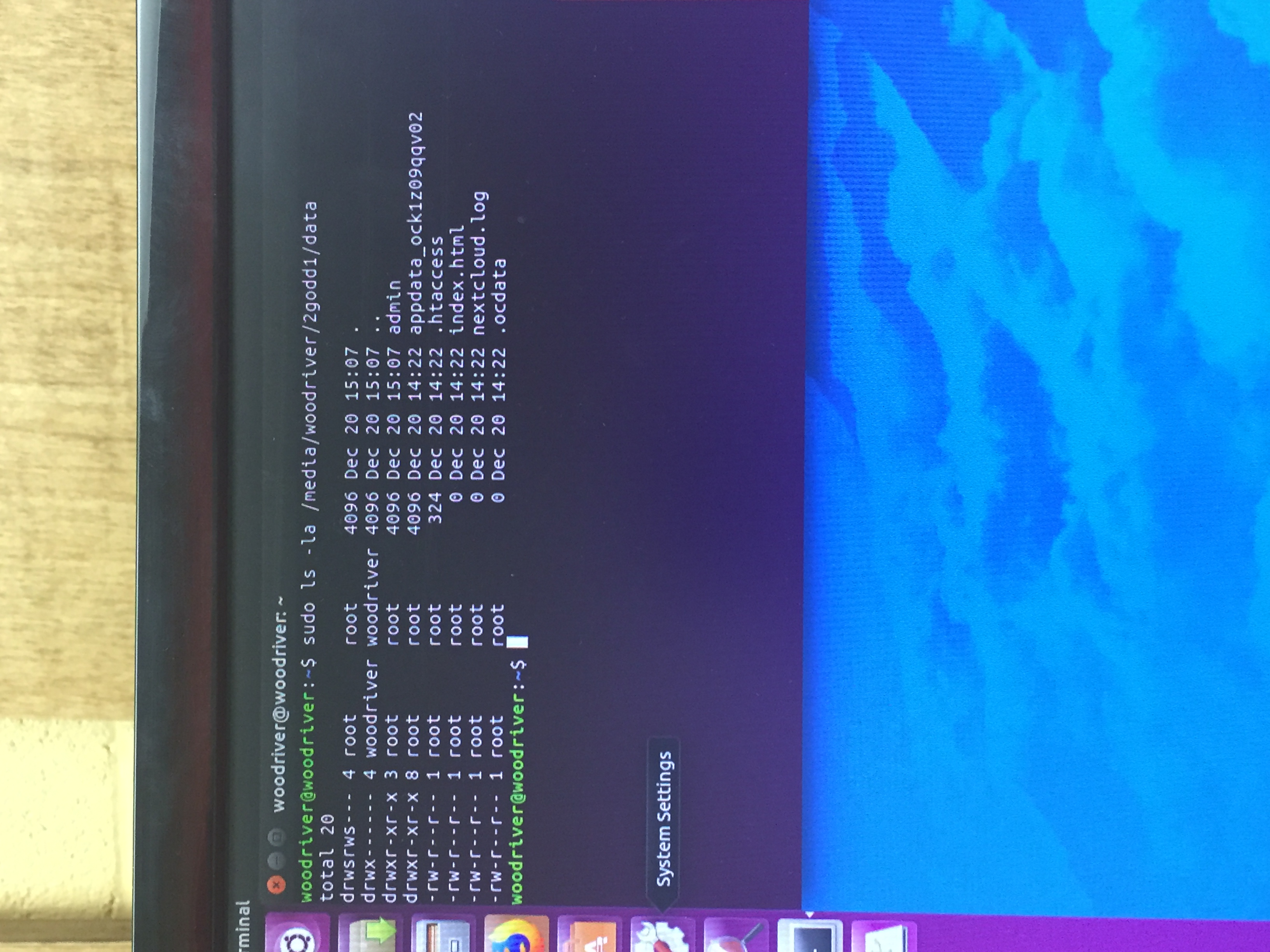
Weird the .ocdata is in there.
nathan99218
on 22 Dec 2017
Wait... that's showing 2godd1 as owned by woodriver. But an earlier snippet showed that directory was owned by root. What gives?
kyrofa
on 22 Dec 2017
You're switching things around... 2godd, 2godd1... I can't help you if I'm not getting consistent information!
kyrofa
on 22 Dec 2017
Sorry I did notice that too. I do have the data directory set as the 2godd1. I'm not sure why my external drive is showing up with 3 different names. I formatted it before I started using it.


nathan99218
on 22 Dec 2017
I'm facing similar issue after following directions here:
https://github.com/nextcloud/nextcloud-snap/wiki/Change-data-directory-to-use-another-disk-partition
Steps taken (as root):
- mounted new external hd as /mnt/external
- changed datadirectory in /var/snap/nextcloud/current/nextcloud/config/autoconfig.php
- ran snap disable nextcloud
- went to look at /mnt/external, saw a couple of files, if I remember correctly, one of which was .ocdata
- didn't bother with it and went on
- continued to the end of the instructions
Could it be that snap disable nextcloud should be run before changing the datadirectory in config.php?
 yatzy
on 28 Apr 2020
yatzy
on 28 Apr 2020
Ok I ran touch .ocdata and when signing to web ui through lan ip I was greeted with this
`Access through untrusted domain
Please contact your administrator. If you are an administrator, edit the "trusted_domains" setting in config/config.php like the example in config.sample.php.
Further information how to configure this can be found in the documentation.`
From wan the site could not be found.
nextcloud.occ config:system:get trusted_domains returns right domains...
yatzy
on 28 Apr 2020
Ok now after a moment access though domain works fine, from local ip I still get "Access through untrusted domain"
yatzy
on 28 Apr 2020
I had the same issue when following the instructions from https://github.com/nextcloud/nextcloud-snap/wiki/Change-data-directory-to-use-another-disk-partition
Solved it by running sudo chown -R root:root /mnt/nextcloud meaning one folder above the data folder
 slomo-official
on 5 May 2020
slomo-official
on 5 May 2020
Thanks slomo-official for the suggestion! Unfortunately that did not help in my case.
yatzy
on 7 May 2020
@slomo-official Thanks for mentioning! @kyrofa I ran into the same issue! Would you mind updating the wiki article? If the data directory is in /media/my/new/data, root must also own the directory /media/my/new to make this work:
$ sudo chown -R root:root /media/my/new
I had the same issue when following the instructions from https://github.com/nextcloud/nextcloud-snap/wiki/Change-data-directory-to-use-another-disk-partition
Solved it by runningsudo chown -R root:root /mnt/nextcloudmeaning one folder above the data folder
 wabuMike
on 12 May 2020
wabuMike
on 12 May 2020
make sure the mount point is also owned by root (/media/mymountingpoint), mine was owned by my current user, changed to root and everything was working again
 talski
on 19 Aug 2020
talski
on 19 Aug 2020
make sure the mount point is also owned by root (/media/mymountingpoint), mine was owned by my current user, changed to root and everything was working again
Thank you for this suggestion! It didn't work for me however it led me to change the owner to www-data and it is working now
 Quazmoz
on 19 Aug 2020
Quazmoz
on 19 Aug 2020
I have installed Ubuntu 20.04 with Snap.
When I follow the steps from this wiki article
https://github.com/nextcloud/nextcloud-snap/wiki/Change-data-directory-to-use-another-disk-partition
the file autoconfig.php is reverted back to its recent version after a couple of seconds, and the config doesn't come into effect.
 71ae
on 9 Jan 2021
71ae
on 9 Jan 2021
I ran into this same error message, after following the aforementioned instructions in the wiki to the letter, also using the Nextcloud Snap on Ubuntu.
It turns out there was a symlink in my data directory path in config.php. Apparently Nextcloud did not appreciate that. I used the full path instead and that resolved the issue.
@71ae the instructions state to edit config.php, not autoconfig.php.
 Poohblah
on 13 Jan 2021
Poohblah
on 13 Jan 2021
Related issues
 srkunze
·
6Comments
srkunze
·
6Comments
 hwiorn
·
5Comments
kyrofa
·
6Comments
hwiorn
·
5Comments
kyrofa
·
6Comments
 DAMONSTA360
·
3Comments
DAMONSTA360
·
3Comments
 dutchievj
·
4Comments
dutchievj
·
4Comments
Most helpful comment
make sure the mount point is also owned by root (/media/mymountingpoint), mine was owned by my current user, changed to root and everything was working again