Newpipe: Sharing to Newpipe fails if stream already playing
Checklist
- [x] I am using the latest version.
- [x] I checked, but didn't find any duplicates of this issue in the repo.
- [x] I have read the contribution guidelines given at https://github.com/TeamNewPipe/NewPipe/blob/HEAD/.github/CONTRIBUTING.md.
- [x] This issue contains only one bug. I will open one issue for every bug report I want to file.
Steps to reproduce the bug
- Play a video in popup or background (or make sure main player minimises to one of them)
- Switch to another app.
- Share a link to Newpipe/Open a link that would open in Newpipe.
Actual behaviour
The currently playing video opens, not the shared one.
Expected behavior
The shared video should open. This only happens now if the notification is absent (main player is paused and you're in another app).
 opusforlife2
All 8 comments
What happens now is, if there is already a playing queue, the video is enqueued. Isn't this the expected behaviour? Otherwise the queue would be gone on share
 Stypox
on 5 Oct 2020
Stypox
on 5 Oct 2020
Hmmm. Then we need a toast saying "added to queue" or that alert dialog we already have elsewhere "Playing this will erase your queue" or some other solution.
Anyway, this problem should only exist if autoplay is on. Opening Show Info by itself should still work correctly. That's not interfering with the stream, only adding a video page to the backstack.
opusforlife2
on 5 Oct 2020
Oh, that's true, I'll investigate further tomorrow
Stypox
on 5 Oct 2020
I've the same issue
 Jean757
on 8 Oct 2020
Jean757
on 8 Oct 2020
What happens now is, if there is already a playing queue, the video is enqueued
I just tried to do double-check, and it seems the video I shared didn't even get added to the background queue.
I would at least expect the info about the shared video to show up on screen (so that I can _manually_ decide to add it to the queue or do other stuff with it), but that doesn't happen either.
 shadow00
on 8 Oct 2020
shadow00
on 8 Oct 2020
@Stypox
What happens now is, if there is already a playing queue, the video is enqueued. Isn't this the expected behaviour?
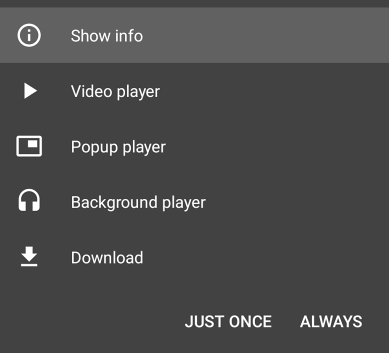
None of these options are titled "enqueue in...", so this behavior is incorrect for all of them. Expected behavior for "Show info" would be to always show video info (obviously), and for the player options to start playback of the selected video. For the sake of consistency, adding to the queue from this menu could be done by long press on one of the player options - the same way it works on the video details page.
 nbmrjuhneibkr
on 15 Oct 2020
nbmrjuhneibkr
on 15 Oct 2020
For the sake of consistency, adding to the queue from this menu could be done by long press on one of the player options - the same way it works on the video details page.
Doesn't it? I think it does work that way.
opusforlife2
on 15 Oct 2020
Hmm, it seems like you're right, but long press works only after the menu option is selected by tapping on it first.
nbmrjuhneibkr
on 15 Oct 2020
Related issues
 fnadde42
·
3Comments
fnadde42
·
3Comments
 Aevann
·
3Comments
Aevann
·
3Comments
 tty4242
·
3Comments
tty4242
·
3Comments
 ghost
·
3Comments
ghost
·
3Comments
 cool-student
·
3Comments
cool-student
·
3Comments
Most helpful comment
Oh, that's true, I'll investigate further tomorrow