Netlify-cms: Failed to persist entry: API_ERROR: Not Found for org/team repo
Describe the bug
Trying to create a new post or update an existing post throws
Failed to persist entry: API_ERROR: Not Found
error
To Reproduce
I used the template starter for Gatsby and then pushed the starter template to an org/team repo. Now when I go to Admin, the existing posts are shown fine but updating or creating a new post throws the above error.
This is the repo in question: https://github.com/awsugblr/awsugblr
This repo works fine: https://github.com/SathyaBhat/gatsby-starter-netlify-cms
Expected behavior
Post persists
Applicable Versions:
- Git provider: Github
- OS: macOS Mojave
- Browser version Chrome (Version 70.0.3538.67 (Official Build) (64-bit)) , Safari (Version 12.0 (14606.1.36.1.9))
- Node.JS version:
CMS configuration
https://github.com/awsugblr/awsugblr/blob/master/static/admin/config.yml
Additional context
This seems to affect the org/team repo, I'm not sure if it is related. Also noticed no web hooks are created for the repo in https://github.com/awsugblr/awsugblr/settings/hooks
 SathyaBhat
All 19 comments
Your org probably needs to grant access to your Netlify CMS instance.
 erquhart
on 26 Oct 2018
erquhart
on 26 Oct 2018
@erquhart I'm not sure how to do that? the Git gateway is enabled and I'm (currently) the sole person behing the org
SathyaBhat
on 29 Oct 2018
Ok, after some messing with the settings turns out if you have Application/oAuth App access restrictions enabled (cf: https://help.github.com/articles/about-oauth-app-access-restrictions/) netlifycms is not able to save the data. I don't see a way to enable access restriction and have NetlifyCMS be granted permission though.
The setting is available at https://github.com/organizations/<org-name>/settings/oauth_application_policy
SathyaBhat
on 29 Oct 2018
Organization members can request owner approval for OAuth Apps they'd like to use, and organization owners receive a notification of pending requests.
Have you already requested access? Help article here: https://help.github.com/articles/requesting-organization-approval-for-oauth-apps/
erquhart
on 2 Nov 2018
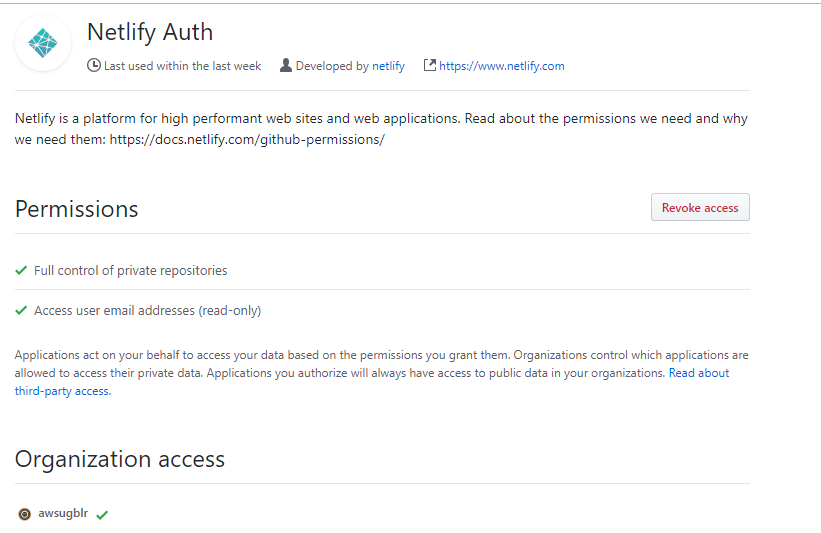
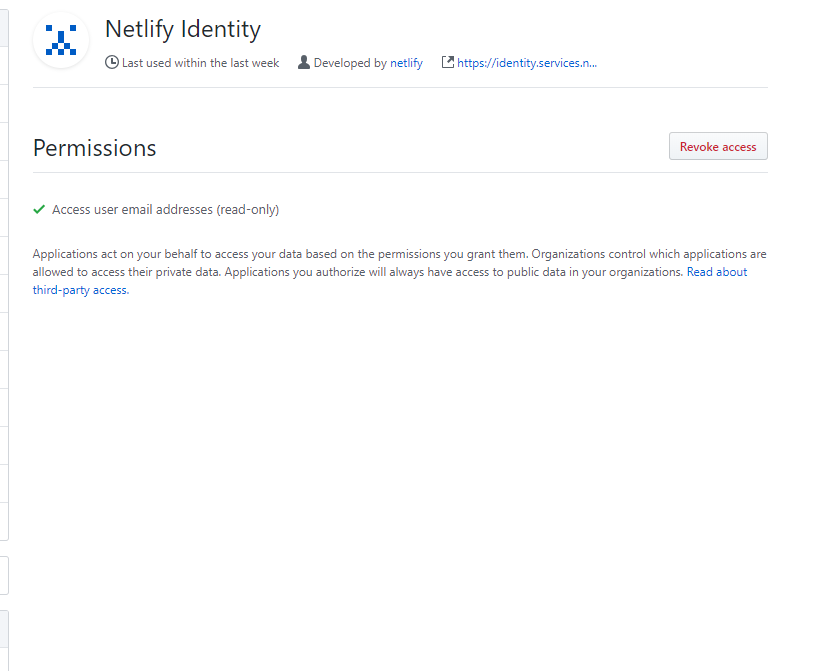
I don't see netlifyCMS an app there; Netflify Auth has been granted access and Netlify Identity doesn't show the orgs:
Netlify Auth:
Identity:
SathyaBhat
on 2 Nov 2018
You mentioned no webhooks are present on your repo, which is strange considering your closed PR's did have deploy previews. Are you sure no one else is making changes to the repo?
For now it's difficult to assess this as a Netlify CMS issue - the current disconnect is between the Netlify platform and your GitHub repo.
erquhart
on 2 Nov 2018
Yeah, pretty sure no one else has access to this. For now I have it working so I guess it's fine.
SathyaBhat
on 2 Nov 2018
Cool - feel free to reach out via chat if you have any other questions.
erquhart
on 5 Nov 2018
Here is what worked for me:
- Inside Github go to 'Settings'
- Click your org name under 'Organization Settings'
- Click 'Third-party access'
- Finally, click the button 'Remove restrictions'

 vitorbarbosa19
on 10 Dec 2018
vitorbarbosa19
on 10 Dec 2018
Was running into this issue and the solution was different for me. I created a new Collection type and was pointing the collections -> folder property in the config.yml file to a new folder. But because there was no existing markdown files in the folder nothing got pushed up to the repo. Thus, Netlify CMS did not know where to read or write the new collection type to. After creating a test markdown file in the new folder that the collection was referencing the issue was resolved.
 meinvolk
on 7 Jan 2019
meinvolk
on 7 Jan 2019
@meinvolk strange, the folder doesn't actually need to exist (or have files) for a folder collection to work, not sure why that happened.
erquhart
on 1 Feb 2019
What if my account is not under any organization?
 SeanAbstract
on 24 Sep 2019
SeanAbstract
on 24 Sep 2019
(not answering seanabstract directly)
just chiming in to say i had this problem and going to https://help.github.com/en/articles/requesting-organization-approval-for-oauth-apps and requesting and getting the organization owner to approve the Netlify Auth app worked for me
 sw-yx
on 9 Oct 2019
sw-yx
on 9 Oct 2019
What if my account is not under any organization?
Having the same problem. I am not under an organization.
My content overview works, but clicking on a blog post I get
{code: 401, msg: "Access to endpoint not allowed: this part of GitHub's API has been restricted"}
 chrfritsch
on 12 Oct 2019
chrfritsch
on 12 Oct 2019
Was running into this issue and the solution was different for me. I created a new Collection type and was pointing the collections -> folder property in the config.yml file to a new folder. But because there was no existing markdown files in the folder nothing got pushed up to the repo. Thus, Netlify CMS did not know where to read or write the new collection type to. After creating a test markdown file in the new folder that the collection was referencing the issue was resolved.
I fixed this issue in the same way - After creating a test markdown file in the new folder that the collection was referencing the issue was resolved.
 olegkvyatkovskiy
on 16 Nov 2019
olegkvyatkovskiy
on 16 Nov 2019
Ran into this issue, on a site that deployed via Stackbit. Occurred a couple of months after launch.
To fix this (or any similar API_ERROR message caused by an app) go to Github settings > Applications > Stackbit [or other app] > configure.
If you see a new/pending requests for access from Stackbit or another app, grant access and the API_ERROR will be fixed.

 SherG
on 15 Dec 2019
SherG
on 15 Dec 2019
I had the same issue, and resolved it by setting up the OAuth on my organisation
https://github.com/organizations/[my-org]/settings/applications
instead of my personal Github:
It's working with the protective restrictions back on now.
 jamespfarrell
on 20 May 2020
jamespfarrell
on 20 May 2020
(not answering seanabstract directly)
just chiming in to say i had this problem and going to https://help.github.com/en/articles/requesting-organization-approval-for-oauth-apps and requesting and getting the organization owner to approve the Netlify Auth app worked for me
I also had the "Failed to persist entry" error when I switched to using an organisational repo. The quoted link also solved it for me. Thanks!
 NathanSkene
on 1 Oct 2020
NathanSkene
on 1 Oct 2020
I was receiving this same error. None of the above worked, and completely removing restrictions should not be an answer - that is a huge security hole. Netlify Auth showed up under my profile's OAuth apps, but did not allow me to grant access to the organization.
What you need to do is login to Netlify, and under "Site Settings" -> "Identity", you need to generate an access token. _The authorization that pops up should allow you to grant access to your organization right then and there._ This worked for me.

 cskerbo
on 10 Nov 2020
cskerbo
on 10 Nov 2020
Related issues
 emckay
·
3Comments
emckay
·
3Comments
 dur41d
·
3Comments
dur41d
·
3Comments
 zebapy
·
3Comments
zebapy
·
3Comments
 papandreou
·
3Comments
papandreou
·
3Comments
 jake-101
·
3Comments
jake-101
·
3Comments
Most helpful comment
Here is what worked for me: