Environment: _Describe your Vim/NERDTree setup._
- Operating System:
win32_x64- Vim version
:version:
Vim_8.0_x64- NERDTree version
git rev-parse --short HEAD:
NERDTree_84c6819 installed by Vundle- NERDTree settings applied in your vimrc, if any:
Plugin 'scrooloose/nerdtree'
no any other settings about nerdtree
Process: _List the steps that will recreate the issue._
Current Result: _Describe what you you currently experience from this process._
After installing nerdtree, reload vim, then following errors arise
Error detected while processing C:Usersjianrenvimfilespluginnerdtreeli
bnerdtreepath.vim:
Partial Output:
line 3:
E121: Undefined variable: g:NERDTreeSortOrder
E116: Invalid arguments for function index(g:NERDTreeSortOrder, '*')
E15: Invalid expression: index(g:NERDTreeSortOrder, '*')
Error detected while processing C:Usersjianrenvimfilespluginnerdtreeli
bnerdtreetree_dir_node.vim:
line 6:
E121: Undefined variable: g:NERDTreeFileNode
E116: Invalid arguments for function copy(g:NERDTreeFileNode)
E15: Invalid expression: copy(g:NERDTreeFileNode)
line 7:
E121: Undefined variable: s:TreeDirNode
E15: Invalid expression: s:TreeDirNode
line 11:
E121: Undefined variable: s:TreeDirNode
line 12:
E121: Undefined variable: b:NERDTree
E15: Invalid expression: b:NERDTree.root
line 13:
E121: Undefined variable: currentNode
E15: Invalid expression: currentNode.parent != {}
line 16:
E133: :return not inside a function
line 17:
E193: :endfunction not inside a function
line 20:
E121: Undefined variable: s:TreeDirNode
line 21:
E121: Undefined variable: s:TreeDirNode
line 22:
E121: Undefined variable: a:0
E15: Invalid expression: a:0 ? a:1 : {}
line 23:
E121: Undefined variable: self
line 24:
E121: Undefined variable: self
line 25:
E121: Undefined variable: self
line 26:
E193: :endfunction not inside a function
line 34:
E121: Undefined variable: s:TreeDirNode
line 35:
E121: Undefined variable: self
E116: Invalid arguments for function add
line 36:
E121: Undefined variable: self
Expected Result: _Describe what you would expect to have resulted from this process._
No any Errors related with NERDTree plugin
Possible Fix: _(Have you poked around in the code?)_
follow NERDTree owner's commits on Apr,14 2013, my current verison seems same with commit changes
 Davidrjx
All 19 comments
What does the output of the :scriptnames command show? Is C:\Users\jianren\vimfiles\plugin\nerdtree\plugin\NERD_tree.vim listed? Is it the first NERDTree file in the list?
 PhilRunninger
on 7 Jun 2017
PhilRunninger
on 7 Jun 2017
@PhilRunninger output of :scriptnames are listed as screenshot

Davidrjx
on 12 Jun 2017
Are you using a plugin manager, such as vim-plug, Vundle, or pathogen? It looks like your plugins may be installed in the wrong place. Here is an explanation of what those managers do: https://howchoo.com/g/ztmyntqzntm/how-to-install-vim-plugins-without-a-plugin-manager. If you're installing your plugins manually, you could try the instructions in that link.
PhilRunninger
on 12 Jun 2017
@PhilRunninger, thanks
yes, i am using Vundle and installed nerdtree via it.
now, i will try solution provided by you first
Davidrjx
on 12 Jun 2017
Go ahead and include the code block that you used to configure Vundle. This should be at the top of your vimrc. This link will show you how to properly write this section. You're using windows, so minor adjustments are likely required.
 lifecrisis
on 12 Jun 2017
lifecrisis
on 12 Jun 2017
@PhilRunninger hi, link given by you refer to manually set runtimepath. for nerdtree, i do not clearly know how to process multiple core .vim files order. it will be better that you can give some details. thanks!
Davidrjx
on 13 Jun 2017
@lifecrisis hi, i really followed the windows setup tutorial about vundle mentioned by you. except some adjustments/changes in the documentation, are there any others? thanks!
Davidrjx
on 13 Jun 2017
@Davidrjx , I included the link in case you were manually configuring your plugins. I suspect your plugins are installed in the wrong place. With Vundle they're normally in the ~/vimfiles/bundle folder, not ~/vimfiles/plugin as seen in your :scriptnames screenshot. Can you post the Vundle setup portion of your vimrc?
PhilRunninger
on 13 Jun 2017
@PhilRunninger , thanks so much again for your help.
today, i change name of plugin to bundle , and only Vundle and nerdtree Plugins are managed.
At this moment, nerdtree seems not loaded in vim AND no any related errors. My simple _gvimrc as shown in screenshot below,

Davidrjx
on 13 Jun 2017
Let's do a quick sanity check and see where things stand here. What is in your plugin and bundle folders? bundle should have Vundle.vim and nerdtree. To also use command-t, you should have Plugin 'wincent/command-t' in your _gvimrc. Then when you execute the :PluginInstall in vim, it will clone command-t in the bundle folder too.
PhilRunninger
on 13 Jun 2017
@PhilRunninger yes, you are right. my plugin folder named bundle indeed includes Vundle.vim and nerdtree configured by my _gvimrc and extra command-t also is installed into bundle folder.
Davidrjx
on 14 Jun 2017
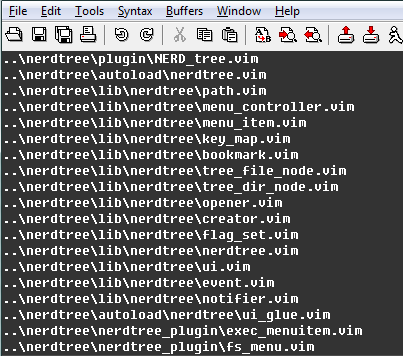
@PhilRunninger , my gvim is built by myself. Now i intend to manually install nerdtree into plugin dir and configure its rtp in my _gvimrc. is right loading order as shown in screenshot? if yes, could i set rtp+= expression with those vim files?
Davidrjx
on 14 Jun 2017
I'm sorry if I misled you with the link earlier. Manually configuring plugins is definitely more difficult, and that difficulty continues as you update your plugins with changes that have been committed to Github. It is far better to let Vundle handle all that for you. My guess, which could be wrong, is that you did a combination of manual installation and Vundle integration. Would you mind trying again from scratch?
- Delete everything except
Vundle.vimin your~/vimfiles/bundlefolder. - Your
~/vimfiles/pluginfolder may or may not be empty, but there should be no Vundle-controlled plugins there. - With the
_gvimrcyou showed above, start vim. - Run the
:PluginInstallcommand. That should install NERDTree in the~/vimfiles/bundlefolder. - Restart vim.
- Look for error messages. Let's hope there are none.
- See if the
:NERDTreecommand works.
PhilRunninger
on 14 Jun 2017
@PhilRunninger it does not matter, or my description may be unclear.
Following your steps above, re-start vim no any error, but :scriptnames show that no any NERDTree script is loaded and NERDTree command is unavailable, meanwhile :set runtimepath? shows that below,

alternatives, if i use plugin as my plugin dir name instead of bundle, restarting vim raise earlier same errors as shown below,
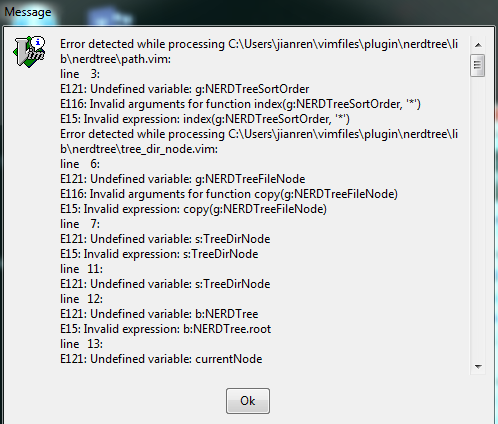
at this time, :set runtimepath? show as below, seems same with the case using bundle as plugin dir

otherwise, NERDTree command is available but output error messages as follow,

In conclusion, for plugin dir named bundle or plugin, the runtimepath both contain nerdtree but invalid. what i guess , is it possible that VIM can not search nerdtree runtime files by following VIM search conventions (:help 'runtimepath') or current dir structure of nerdtree is not portable for windows7 as it is available for vim7.4 and lastest nerdtree in CentOS Linux 7.0.
In a word, for windows, it is weird to load nerdtree script files in wrong order or isn't latest VIM compatible with lastest nerdtree?
Davidrjx
on 15 Jun 2017
I've never had any problem running NERDTree in Windows. I've used pathogen, Vundle, and vim-plug as my plugin managers. I've run vim versions 7.3, 7.4, and 8.0, all with the current-at-the-time version of NERDTree. You said you have your configuration in the _gvimrc file; however, your :scriptnames screenshot shows that it runs ~\_vimrc first. What is in that file? It's possible that the Vundle configuration needs to go there instead.
PhilRunninger
on 15 Jun 2017
@PhilRunninger, this is likely the problem. It's hard to follow because every post here is a wall of text.
Looking into :h gvimrc, we have:
                        gui-init gvimrc .gvimrc _gvimrc $MYGVIMRC
The gvimrc file is where GUI-specific startup commands should be placed.  It
is always sourced after the vimrc file.  If you have one then the $MYGVIMRC
environment variable has its name.
If the Vundle.vim config block is in the _gvimrc, there's a good chance that's the problem. Placing it at the top of the _vimrc is part of the instructions that Vundle.vim provides.
lifecrisis
on 15 Jun 2017
@PhilRunninger you are right , and as my gvim menu font is messy, what my _vimrc is as shown in screenshot below,
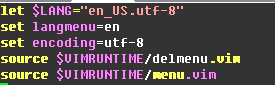
as @lifecrisis said, i plan to have a try for checking whether it is valid
Davidrjx
on 16 Jun 2017
@PhilRunninger , thanks for your much help! my problem is resolved. I am very sorry for misleading you into inertia scenarios. By transposing contents in both _gvimrc and _vimrc, nerdtree is available without any errors at this time.
besides, i make extra tests.
case 1: change plugin dir name to anyone excluding bundle
case 1 result: loading vim does raises same errors, but :NERDTree command can be executed
also for case 1, two kind of dirs can not co-exists.
case 2: follow config block of Vundle in Linux
case 2 result: can pull plugin repository normally, but vim booting and :NERDTree cmd are abnormal with errors.
In a word, it is necessary to study slight diff between _vimrc and _gvimrc for me.
Finally,again much appreciation for you and @lifecrisis.
Davidrjx
on 16 Jun 2017
Excellent! I'm glad it worked out for you.
PhilRunninger
on 16 Jun 2017
Related issues
 DapperFox
·
4Comments
DapperFox
·
4Comments
 jgandt
·
4Comments
jgandt
·
4Comments
 nicknisi
·
5Comments
nicknisi
·
5Comments
 milushov
·
4Comments
milushov
·
4Comments
 kevinSuttle
·
4Comments
kevinSuttle
·
4Comments
Most helpful comment
Are you using a plugin manager, such as vim-plug, Vundle, or pathogen? It looks like your plugins may be installed in the wrong place. Here is an explanation of what those managers do: https://howchoo.com/g/ztmyntqzntm/how-to-install-vim-plugins-without-a-plugin-manager. If you're installing your plugins manually, you could try the instructions in that link.