Neovim-qt: Problem with GuiFont and NerdFonts and Powerline
OS: ArchLinux
Version: git master
Fonts: https://github.com/ryanoasis/nerd-fonts and PowerlineFonts
ginit.vim: Guifont MesloLGLDZ NF RegularForPowerline:h13
Error: Unknown font: MesloLGLDZ NF RegularForPowerline
How to set Powerline fonts or NerdFonts?
On Gnome-Terminal fonts works.
 TheAifam5
All 44 comments
Lots of fonts, not entirely sure what is the right variation you wanted. I used this one
./unpatched-sample-fonts/Meslo/L-DZ/Meslo LG L DZ Regular for Powerline.otf
The name for this one is Meslo LG L DZ for Powerline. The Regular in the name is just the font style but it is usually not part of the font name. A good way to find this in linux systems to call fc-list it should show all the font files in your system, followed by their name and some more attributes.
 equalsraf
on 31 Jul 2016
equalsraf
on 31 Jul 2016
but how to set the font? i typed
:set guifont
and get
E519: Option not supported: guifont
 Jeffrey04
on 12 Aug 2016
Jeffrey04
on 12 Aug 2016
but how to set the font?
Instead of :set guifont=font use :GuiFont font, for example :Guifont DejaVu Sans Mono:h16 see :h GuiFont for more options.
equalsraf
on 12 Aug 2016
I got a similar problem (shocker, right? ;). This is what I have in my ginit.vim:
GuiFont Inconsolata for Powerline Nerd Font Complete:h8
Now, the font is installed:
; ls .local/share/fonts/Inconsolata\ for\ Powerline\ Nerd\ Font\ Complete*
896K .local/share/fonts/Inconsolata\ for\ Powerline\ Nerd\ Font\ Complete.otf
1.2M .local/share/fonts/Inconsolata\ for\ Powerline\ Nerd\ Font\ Complete\ Mono.otf
1.2M .local/share/fonts/Inconsolata\ for\ Powerline\ Nerd\ Font\ Complete\ Mono\ Windows\Compatible.otf
896K .local/share/fonts/Inconsolata\ for\ Powerline\ Nerd\ Font\ Complete\ Windows\ Compatible.otf
So the fonts are there. Yet, I get an Unknown font error. Any idea why?
 kierun
on 12 Aug 2016
kierun
on 12 Aug 2016
@kierun try
fc-list | grep Inconsolata
and get the font name, example:
/home/***/.fonts/Fura Mono Medium for Powerline Nerd Font Complete.otf: FuraMonoForPowerline Nerd Font:style=Medium
Guifont FuraMonoForPowerline Nerd Font:h9
 rafaelndev
on 12 Aug 2016
rafaelndev
on 12 Aug 2016
@rafaelndev WOOT! That worked. Thank you.
kierun
on 12 Aug 2016
Another problem… I am getting a lot of Font X is not a fixed pitched font error when setting some fonts. Now, those fonts do have mono in their names, so I'd assume they would be fixed pitch. Any idea how to find which fonts are fixed pitched or whether I can tell neovim-qt to use not-fixed-pitched fonts?
kierun
on 16 Aug 2016
Now, those fonts do have mono in their names, so I'd assume they would be fixed pitch.
If its throwing that error it is because the font metrics don't seem to be monospace. Sometimes this happens because the fonts are buggy, but there are other valid reasons for this depending on your system.
I can tell neovim-qt to use not-fixed-pitched fonts?
Add a bang, use GuiFont! ...
equalsraf
on 16 Aug 2016
Add a bang, use GuiFont! ...
Super that works.
fonts[…]
It's really boring to test them one-by-one to see if they render correctly or even load. But that's nothing to do with neovim-qt! ^_~
kierun
on 16 Aug 2016
There is some minimal tooling in the unit tests to generate shell screenshots. You could try automating the process for a bunch of font files.
equalsraf
on 16 Aug 2016
_Something is rotten in the Kingdom of Denmark…_
This is a screen shot using gvim:

This is a screen shot using neovim-qt:

I get some really different results between gvim and neovim-qt with the same font with neovim-qt being really ugly. I compile both neovim and neovim-qt from the latest master so I might have missed some option/parameter to include the right font support. I'm happy to provide more information if needed.
Any idea what I am doing wrong here?
kierun
on 18 Aug 2016
Could you post a link to the font you are using?
 khalidchawtany
on 18 Aug 2016
khalidchawtany
on 18 Aug 2016
This one which confusingly enough is called FiraCode but install files starting with Fura Code…!
kierun
on 18 Aug 2016
Do you have true color enabled in both nvim-qt and gvim?
I am using lightline (not powerline | airline).
I just tried that font and it renders correctly for me. Besides it is beautiful :D

khalidchawtany
on 18 Aug 2016
I have:
let $NVIM_TUI_ENABLE_TRUE_COLOR=1is set in my.config./nvim/init.vimfile andset t_Co=256in my~/.vimrc.
kierun
on 18 Aug 2016
https://github.com/neovim/neovim/wiki/Following-HEAD
This line is ignore in neovim since 2016/05/11
let $NVIM_TUI_ENABLE_TRUE_COLOR=1
try
set termguicolors
 EleDiaz
on 18 Aug 2016
EleDiaz
on 18 Aug 2016
@EleDiaz Oops. Set the new option and got something slightly better:

However, it still looks like some characters (especially the bold ones) are blurry and the spacing between the characters is much bigger than on the gvim screen shot. The size of the windows is the same on my machine and the neovim-qt text does wraps whereas it does not on gvim.
kierun
on 18 Aug 2016
Ref the color issue https://github.com/equalsraf/neovim-qt/pull/151
However, it still looks like some characters (especially the bold ones) are blurry and the spacing between the characters is much bigger
Did neovim-qt complain about font metrics? Are you using GuiFont! for this?
The GUI drawing API in Vim and Neovim is significantly different. AFAIK all Neovim GUIs draw chars one by one in a grid. Where in Vim the GUI can draw a sequence of chars at a time (maybe it would be possible to change this).
This makes no difference if you are using a truly monospace font, But if not, you will see different spacings between Vim and Neovim. In Vim you might also see certain letters "move" within their cell as you select a letter/word etc.
Other option is that the font makes use of kerning and ligatures in Vim, which we do not support here.
equalsraf
on 18 Aug 2016
@equalsraf I was sure I replied to you but cannot see it here…
Did neovim-qt complain about font metrics?
Not that I can see either on the console or in the neovim window.
Are you using GuiFont! for this?
Yes, I am. The exact command is GuiFont! FuraCode Nerd Font from the command prompt not the ginit.vim file. Although I understand that they are the same.
[…] Other option is that the font makes use of kerning and ligatures in Vim, which we do not support here.
This is possible. How could I check?
Needless to say, _I am very grateful to yourself and all who participate in this issue for the help and friendliness_. Thank you.
kierun
on 19 Aug 2016
Well the whole purpose of the bang in GuiFont! is so that it wont complain about metrics :D, it ignores them and keeps going forward regardless.
This is possible. How could I check?
There is no easy way to do it right away. And certainly no way to fix it right now.
Are you building from source? If you are, you can try to see some info about the font
$ make fontinfo
(...)
$ bin/fontinfo "Source Code Pro"
it should show the font metrics for several font sizes
equalsraf
on 19 Aug 2016
Well the whole purpose of the bang in GuiFont! is so that it wont complain about metrics :D, it ignores them and keeps going forward regardless.
^_~ Ah, there is that. If I do not add the bang, I still see nothing wrong…
it should show the font metrics for several font sizes
Here is the output:
(master|✓); ./bin/fontinfo "FuraCode Nerd Font"
Font family: FuraCode Nerd Font
Exact match: 1
Real family: FuraCode Nerd Font
Font size: 10
   (Regular) Average char width: 8 Max char width: 8 Width(MM): 16
    (Italic) Average char width: 8 Max char width: 8 Width(MM): 16
      (Bold) Average char width: 8 Max char width: 8 Width(MM): 16
   (Bold+It) Average char width: 8 Max char width: 8 Width(MM): 16
Font size: 11
   (Regular) Average char width: 9 Max char width: 9 Width(MM): 18
    (Italic) Average char width: 9 Max char width: 9 Width(MM): 18
      (Bold) Average char width: 9 Max char width: 9 Width(MM): 18
   (Bold+It) Average char width: 9 Max char width: 9 Width(MM): 18
Font size: 12
   (Regular) Average char width: 10 Max char width: 10 Width(MM): 20
    (Italic) Average char width: 10 Max char width: 10 Width(MM): 20
      (Bold) Average char width: 10 Max char width: 10 Width(MM): 20
   (Bold+It) Average char width: 10 Max char width: 10 Width(MM): 20
Font size: 13
   (Regular) Average char width: 10 Max char width: 10 Width(MM): 20
    (Italic) Average char width: 10 Max char width: 10 Width(MM): 20
      (Bold) Average char width: 10 Max char width: 10 Width(MM): 20
   (Bold+It) Average char width: 10 Max char width: 10 Width(MM): 20
Font size: 14
   (Regular) Average char width: 11 Max char width: 11 Width(MM): 22
    (Italic) Average char width: 11 Max char width: 11 Width(MM): 22
      (Bold) Average char width: 11 Max char width: 11 Width(MM): 22
   (Bold+It) Average char width: 11 Max char width: 11 Width(MM): 22
Font size: 15
   (Regular) Average char width: 12 Max char width: 12 Width(MM): 24
    (Italic) Average char width: 12 Max char width: 12 Width(MM): 24
      (Bold) Average char width: 12 Max char width: 12 Width(MM): 24
   (Bold+It) Average char width: 12 Max char width: 12 Width(MM): 24
Font size: 16
   (Regular) Average char width: 13 Max char width: 13 Width(MM): 26
    (Italic) Average char width: 13 Max char width: 13 Width(MM): 26
      (Bold) Average char width: 13 Max char width: 13 Width(MM): 26
   (Bold+It) Average char width: 13 Max char width: 13 Width(MM): 26
Font size: 17
   (Regular) Average char width: 14 Max char width: 14 Width(MM): 28
    (Italic) Average char width: 14 Max char width: 14 Width(MM): 28
      (Bold) Average char width: 14 Max char width: 14 Width(MM): 28
   (Bold+It) Average char width: 14 Max char width: 14 Width(MM): 28
Font size: 18
   (Regular) Average char width: 14 Max char width: 14 Width(MM): 28
    (Italic) Average char width: 14 Max char width: 14 Width(MM): 28
      (Bold) Average char width: 14 Max char width: 14 Width(MM): 28
   (Bold+It) Average char width: 14 Max char width: 14 Width(MM): 28
I am guessing that the width(MM): 16 might be the problem. Although:
(master|✓); ./bin/fontinfo "Terminess Powerline"
Font family: Terminess Powerline
Exact match: 1
Real family: Terminess Powerline
Font size: 10
   (Regular) Average char width: 8 Max char width: 8 Width(MM): 16
    (Italic) Average char width: 8 Max char width: 8 Width(MM): 16
      (Bold) Average char width: 8 Max char width: 8 Width(MM): 16
   (Bold+It) Average char width: 8 Max char width: 8 Width(MM): 16
[…]
So, maybe not… "Terminess Powerline" is the font I use in neovim-qt up to now.
kierun
on 19 Aug 2016
I am guessing that the width(MM): 16 might be the problem. Although:
No that is fine, width(MM) is literally the width of the string "MM" which is twice the char width.
equalsraf
on 19 Aug 2016
I am guessing that the width(MM): 16 might be the problem. Although:
No that is fine, width(MM) is literally the width of the string "MM" which is twice the char width.
Any clue form the rest of the output? Do you need more information?
kierun
on 19 Aug 2016
Any clue form the rest of the output? Do you need more information?
No, just need to do some deep thinking about font layout :D
equalsraf
on 19 Aug 2016
So, In installed vim-deicons and using mplus Nerd Font, I got this screen shot:

Some of the icons are truncated whereas they are not in a nvim session in a terminal (urxvt256c-ml) using the same font.
Not trying to hassle you, just providing even more work for you☺ Did I mention that I was grateful for the work you do?
kierun
on 22 Feb 2017
@kierun take a look at https://github.com/equalsraf/neovim-qt/pull/171
khalidchawtany
on 23 Feb 2017
I have the same problem and I am using:
set guifont=DroidSansMono\ Nerd\ Font\ 11
With vim and nvim is working without problems (I configured Konsole to use that font) but when I use nvim-qt the font is not loaded.
 Mte90
on 12 Feb 2018
Mte90
on 12 Feb 2018
My font renders pretty poorly on Windows.
Left is Git Bash's Vim running on a terminal, right is nvim-qt.
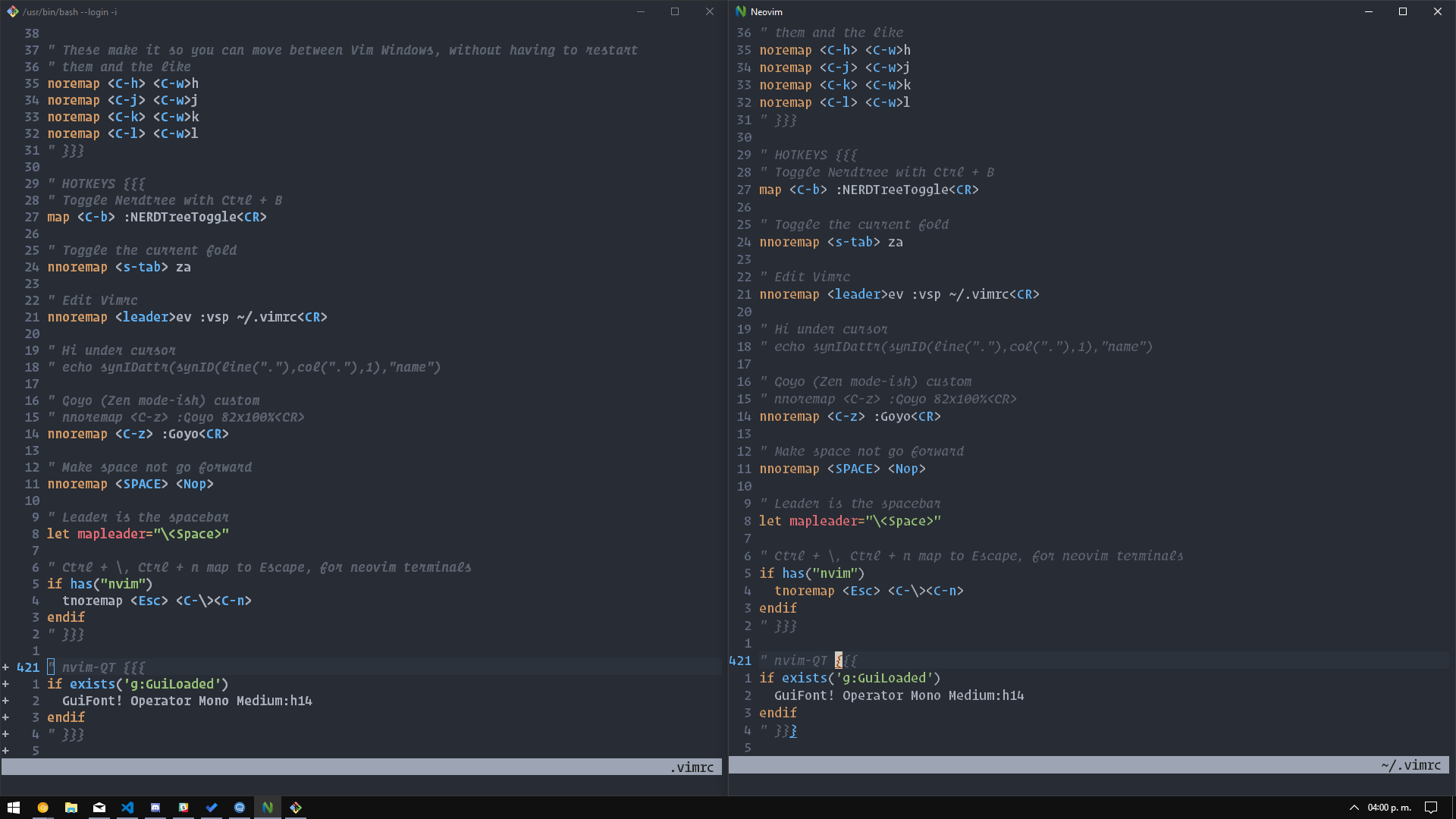
Not too sure what's going on there.
 Zyst
on 24 Apr 2018
Zyst
on 24 Apr 2018
@equalsraf , I can change the gui font when I open nvim-qt. But if put the setting in ginit.vim, the same setting does not work. Why?
 jdhao
on 17 Jan 2019
jdhao
on 17 Jan 2019
@jdhao It should work. It definitely works for me here.
Is there any error in :messages after startup?
equalsraf
on 17 Jan 2019
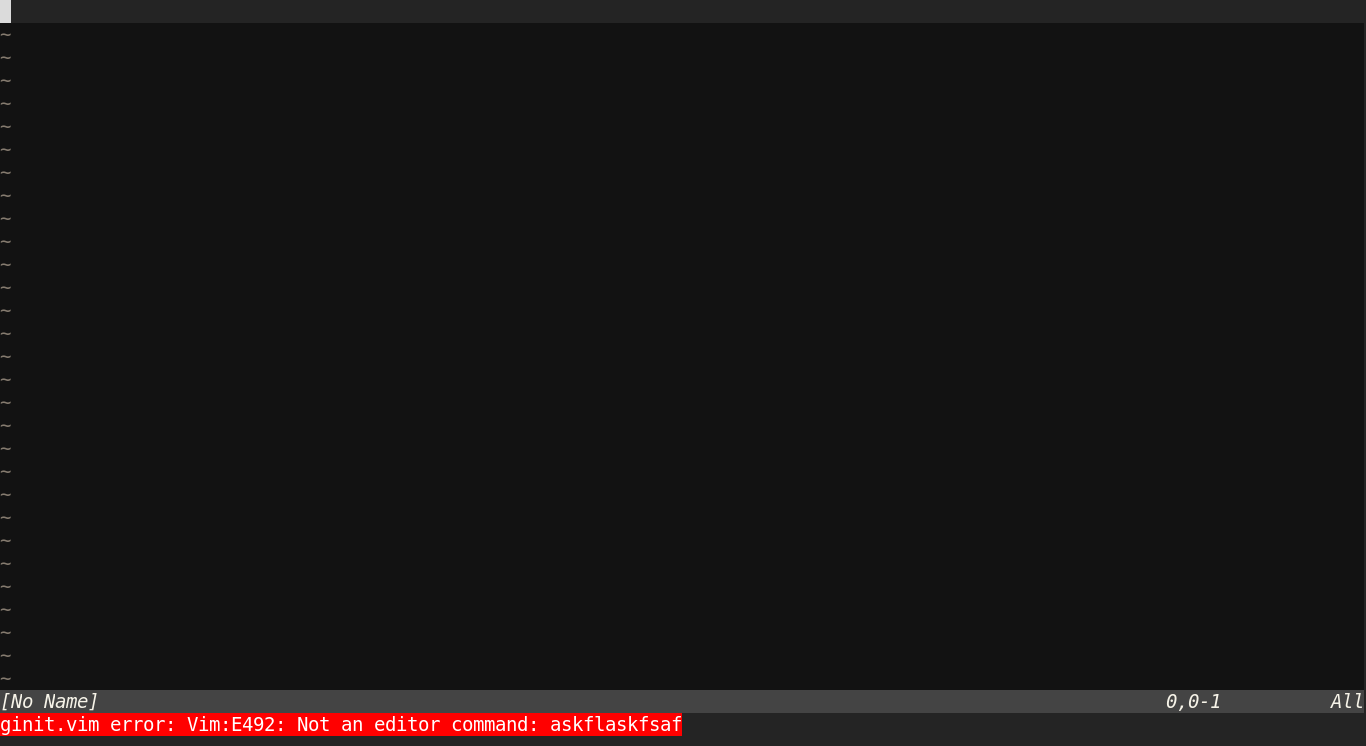
@equalsraf , I have checked the setting again and find that I have miss-spelled one setting: GuiLinespace is mistakenly spelled as Guilinespace. So the settings before it take effect, but the setting after it does not. I have checked :messages and there is no error or warning messages.
I think there should be warning or error message like what neovim gives when there are invalid settings in your init.vim file.
jdhao
on 18 Jan 2019
Ok we need to start cleaning that up anyway since nvim now forwards the options to us
Try using the following in init.vim
set guifont=Font\ Name:h12set linespace=XX
equalsraf
on 18 Jan 2019
What about the GuiTabline, GuiPopupmenu settings? There seems no direct correspondence between nvim's setting and these two options.
jdhao
on 19 Jan 2019
@jdhao neovim currently does not support this, but the option would be guioptions (which already existed in vim). This has been discussed a couple of times but I dont think there is an open issue for it.
Going back to the original issue. nvim-qt should show a message for errors in ginit.vim, for example like the following invalid command. If that is not the case we can open a new issue for this.
equalsraf
on 20 Jan 2019
I can confirm that use https://github.com/LER0ever/EverVim/pull/38/files will load the nerdfont without issues and now is working
Mte90
on 28 Feb 2019
Duplicate https://github.com/equalsraf/neovim-qt/issues/415 but seems that doesn't fix my issue now
Mte90
on 9 Oct 2019
how can i set the guifont command in my init.vim file?
when im in neovim-qt and i run :GuiFont! NotoMono Nerd Font:style=Book it works just fine. but only until i close the program- then it starts with the old font again.
if i write set guifont=NotoMono.... into my init.vim file it doesnt work.
set guifont!=NotoMono.... doesnt work either.
just GuiFont!=NotoMono... wont work too.
so what do i have to do for neovim-qt to use the NotoMono always?
 joe23rep
on 9 Jan 2020
joe23rep
on 9 Jan 2020
@joe23rep It should be in ginit.vim, something like:
function! IsOnSomeParticularMachine(hostname)
    return match(system("echo -n $HOST"), a:hostname) >= 0
endfunction

if IsOnSomeParticularMachine('jagupard')
    GuiFont! PragmataPro Nerd Font Mono:h10
else
    GuiFont! PragmataPro Nerd Font Mono:h9
endif
I prefer to use set guifont=Operator\ Mono\ Lig:h20 as it works in other GUIs too. The file name is ginit.vim not .ginit.vim. I think the above should work in init.vim too.
khalidchawtany
on 9 Jan 2020
@kierun , the config file for Neovim GUI client should be ginit.vim, not .ginit.vim, see :h ginit.vim inside Neovim.
@khalidchawtany , the guifont option seems to work for nvim-qt, but there is warning which can not be supressed even with silent!:
|| Warning: Font "Hack" reports bad fixed pitch metrics
With GuiFont command, we can supress this warning with the bang version of this command:
GuiFont! Hack:h12
@jdhao @khalidchawtany Thank you for spotting the typo, comment edited.
kierun
on 9 Jan 2020
idk why but it doesnt work in my case. neither with the function nore with the direct command. and quite frankly i dont understand why
again- when i wrote :GuiFont! NotoMono Nerd Font:style=Book directly into neovim-qt it works for that session.
if i write use the function or just write directly GuiFont! NotoMono Nerd Font:style=Book into my ginit.vim file it doesnt work. i always get an error
using set guifont=NotoMono\Nerd\Font:style=Book i get a millisecond the warning that its not a pitched font and then it switches back to the standart font
joe23rep
on 10 Jan 2020
@joe23rep Can you learn to use Markdown? You current comment is hard to read. Also, read the great post on how to ask questions, the smart way.
You said that there is an error, but you do not even bother to paste the error here. How do you suppose people try to help you solve your problem?
Inside ginit.vim, I believe you need to escape the space character inside the font name:
GuiFont! NotoMono\ Nerd\ Font:h10
I am not sure if :style=Book is valid.
jdhao
on 10 Jan 2020
Multiple issues being discussed in this thread, and the rendering has since improved.
Marking as closed. Please file a new issue if are still experiencing problems.
 jgehrig
on 1 Sep 2020
jgehrig
on 1 Sep 2020
Related issues
 einars
·
5Comments
equalsraf
·
10Comments
einars
·
5Comments
equalsraf
·
10Comments
 stu0292
·
3Comments
jdhao
·
7Comments
stu0292
·
3Comments
jdhao
·
7Comments
 eyalk5
·
3Comments
eyalk5
·
3Comments
Most helpful comment
If its throwing that error it is because the font metrics don't seem to be monospace. Sometimes this happens because the fonts are buggy, but there are other valid reasons for this depending on your system.
Add a bang, use
GuiFont! ...