Neovide: Multigrid: telescope.nvim plugin text is burred
When I enable multigrid, the telescope.nvim plugin's popup windows have blurred text. The popup window outlines are solid, but the contents are blurred and dimmed, as if they are in the background.
I'm reporting this here, but I'm not really sure if this is a telescope issue or a Neovide issue.
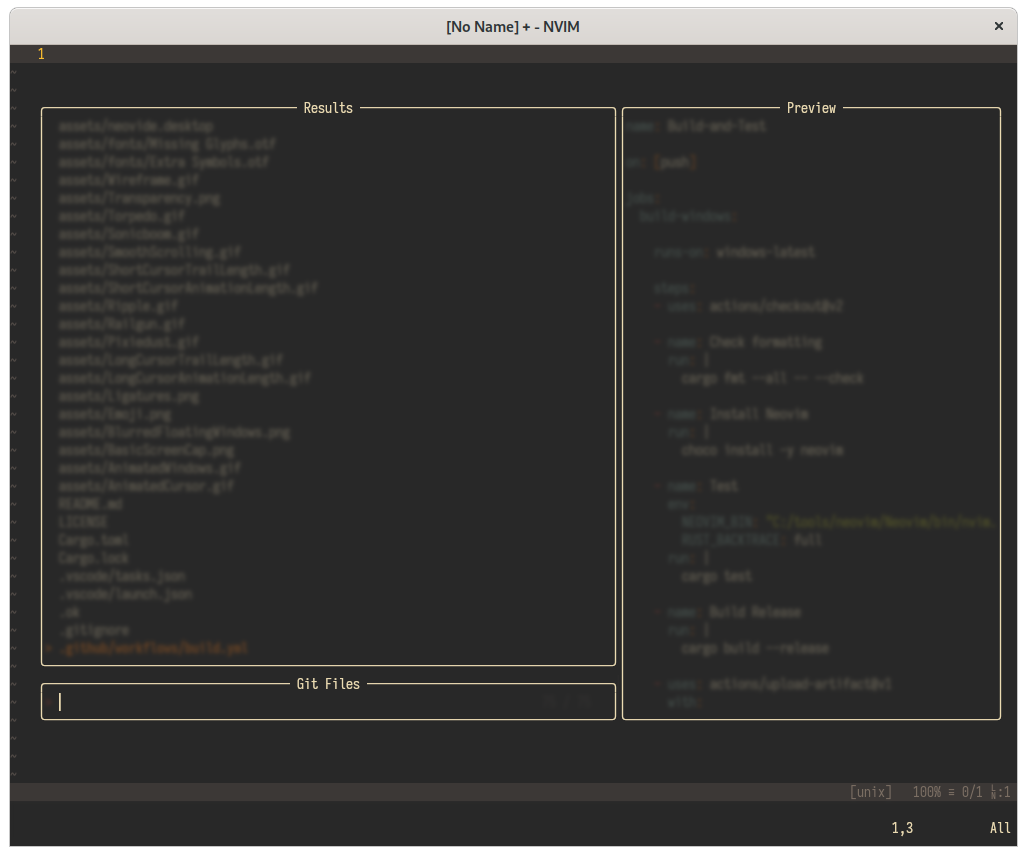
I'm using Neovide built today from e1d8d404167f5c6d5471ce1404493eb1805e94d2 (main) on Linux using Rust 1.50.0 stable.
 chrisbouchard
All 15 comments
(I deleted a comment about the buffer behind not being blurred because I was just crazy — it's not supposed to be.)
chrisbouchard
on 3 Apr 2021
This is a known issue. Telescope renders two windows, and neovide doesn't have a way to turn off window background blurring on a per window basis. The change to enable that is somewhat involved because it requires reworking the setting syncing logic. Its in progress, but I haven't gotten the time to go hammer it out yet.
 Kethku
on 5 Apr 2021
Kethku
on 5 Apr 2021
Understood. Thanks for letting me know; I'm happy to use Neovide without multigrid until that's resolved, but I get it may be low priority.
chrisbouchard
on 5 Apr 2021
its actually relatively high priority. The new multigrid stuff is awesome and I'd like to get it running for most people
Kethku
on 7 Apr 2021
I really love multiGrid mode and can't work without smooth scroll anymore!
So maybe someone would be interested in quick and dirty workaround for this - I disabled border from plenary.nvim that is used by popup.nvim plugin and use builtin neovim border. It does not support window titles but it looks like this:

To apply this go to directory where popup plugin sits, for me its ~/.local/share/nvim/site/pack/paqs/start/popup.nvim
Create file no-border.patch with diff below and git apply no-border.patch
diff --git a/lua/popup/init.lua b/lua/popup/init.lua
index 8d8fe6e..d036700 100644
--- a/lua/popup/init.lua
+++ b/lua/popup/init.lua
@@ -157,6 +157,10 @@ function popup.create(what, vim_options)

   win_opts.style = 'minimal'

+  if vim_options.border then
+      win_opts.border = 'single'
+  end
+
   -- Feels like maxheigh, minheight, maxwidth, minwidth will all be related
   --
   -- maxheight  Maximum height of the contents, excluding border and padding.
@@ -328,7 +332,7 @@ function popup.create(what, vim_options)

   local border = nil
   if should_show_border then
-    border = Border:new(bufnr, win_id, win_opts, border_options)
+    --border = Border:new(bufnr, win_id, win_opts, border_options)
   end

   if vim_options.highlight then
 p13nty
on 30 Apr 2021
p13nty
on 30 Apr 2021
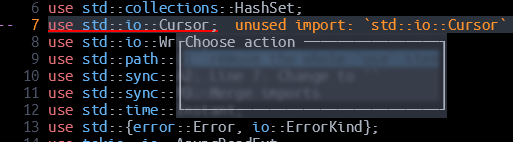
I have the same issue with coc.nvim's code actions window:
 igorsol
on 30 Apr 2021
igorsol
on 30 Apr 2021
Closing in favor of more detailed issue https://github.com/Kethku/neovide/issues/589
Kethku
on 14 Jun 2021
@Kethku I had a look at #589, and that seems to be more about font rendering than multigrid. It's possible I'm missing a more fundamental issue that underlies both, but I feel like this is different.
chrisbouchard
on 14 Jun 2021
https://github.com/Kethku/neovide/issues/720 woops this is the one I meant
Kethku
on 14 Jun 2021
let g:neovide_window_floating_opacity=1
I'm using this as workaround, floating windows are not longer transparent, but other features of multigrid working fine.
 last-partizan
on 5 Jul 2021
last-partizan
on 5 Jul 2021
I'm using this as workaround
Tried it, but the telescope windows just become the same color as the background instead of transparency.
 Shatur
on 5 Jul 2021
Shatur
on 5 Jul 2021
Hmmm, i must've changed some other option too. Yes.
let g:neovide_window_floating_blur=0
This one.
last-partizan
on 5 Jul 2021
let g:neovide_window_floating_blur=0
Tried this one too. The result is the same as above :(
Shatur
on 5 Jul 2021
Oh, i found one more constraint. It works only until you resize neovide window :)
last-partizan
on 5 Jul 2021
Or maybe you should resize it to some magick size.
Better to wait for proper fix :)
last-partizan
on 5 Jul 2021
Related issues
 svermeulen
·
26Comments
svermeulen
·
26Comments
 pranphy
·
36Comments
pranphy
·
36Comments
 habamax
·
67Comments
habamax
·
67Comments
 IBS27
·
29Comments
IBS27
·
29Comments
 deisi
·
28Comments
deisi
·
28Comments
Most helpful comment
its actually relatively high priority. The new multigrid stuff is awesome and I'd like to get it running for most people