Neovide: Some lines glitching visually after scrolling with Ctrl+Y/E w/ multiGrid
- Start with
--multiGrid - Scroll around with
<C-Y>and<C-E>. - Then move around with j, k
You can see in the below preview how some lines are visually glitched:
Another effect is that the lines can visually be ok, but once you hover over them with cursor the cursor shows the characters a little bit below/above.
I could not reproduce the issue without . Built from source, Windows 10 5c6d84a4f1cbec26ed72f41a0c1f058aaaaeffd8. Could not reproduce on the executable downloaded from releases tho--multiGrid
Looks like without --multiGrid it also happens:
 JakubKoralewski
All 7 comments
What font are you using? I think maybe the font handling isn't behaved with your font.
 Kethku
on 3 Mar 2021
Kethku
on 3 Mar 2021
It's the same init.vim config for both the build from source and the releases download, and it's using the same font, so I don't think that should be a problem? Anyway the font is set guifont=Cascadia\ Code\ PL:h15.
Couldn't reproduce for a while moving around with Consolas:h10, but h12 did show up issue. Changing to the same font temporarily fixes it. h11 also has this issue, checked again h10 could not reproduce. h13 also fine, h14 has issue. All these tests were with Consolas
JakubKoralewski
on 3 Mar 2021
I'd be happy to debug and gather some more information, let me know how if possible.
JakubKoralewski
on 6 Mar 2021
I honestly don't have any idea what would cause this issue. I can't get it to repro on my machine. Is there a minimal config and set of steps to get it to repro consistently?
Kethku
on 7 Mar 2021
I can't get it to repro on my machine.
Are you running on Windows too? I suspect it might be Windows related given noone has brought this issue up before.
Ok so I renamed my init.vim to init.vim.bkup, started .\\neovide-0.x.0.exe on Windows 10 Education 2004 from cmd.exe.
For each test the following text was used
aaaaaaaaaaaaaaaaaaaaaaaaaaaa
bbbbbbbbbbbbbbbbbbbbbbbbbbbb
cccccccccccccccccccccccccccc
dddddddddddddddddddddddddddd
eeeeeeeeeeeeeeeeeeeeeeeeeeee
aaaaaaaaaaaaaaaaaaaaaaaaaaaa
bbbbbbbbbbbbbbbbbbbbbbbbbbbb
cccccccccccccccccccccccccccc
dddddddddddddddddddddddddddd
eeeeeeeeeeeeeeeeeeeeeeeeeeee
aaaaaaaaaaaaaaaaaaaaaaaaaaaa
bbbbbbbbbbbbbbbbbbbbbbbbbbbb
cccccccccccccccccccccccccccc
dddddddddddddddddddddddddddd
eeeeeeeeeeeeeeeeeeeeeeeeeeee
aaaaaaaaaaaaaaaaaaaaaaaaaaaa
bbbbbbbbbbbbbbbbbbbbbbbbbbbb
cccccccccccccccccccccccccccc
dddddddddddddddddddddddddddd
eeeeeeeeeeeeeeeeeeeeeeeeeeee
I opened Neovide, pasted the afformentioned text with "*p, and started moving around with <C-e> and <C-y>. I set could reproduce to yes if there was any tearing or the cursor was misaligned.
Due to #478 I could not test 0.5.0 and 0.6.0 with the --multiGrid flag enabled. Neovide just didn't turn on and sent this to stderr: ERROR [neovide::bridge] Neovide requires version 0.4 or higher.
| version | --multiGrid | could reproduce | image |
|---------|----------------------|-----------------|-------|
| 0.5.0 | without | no | 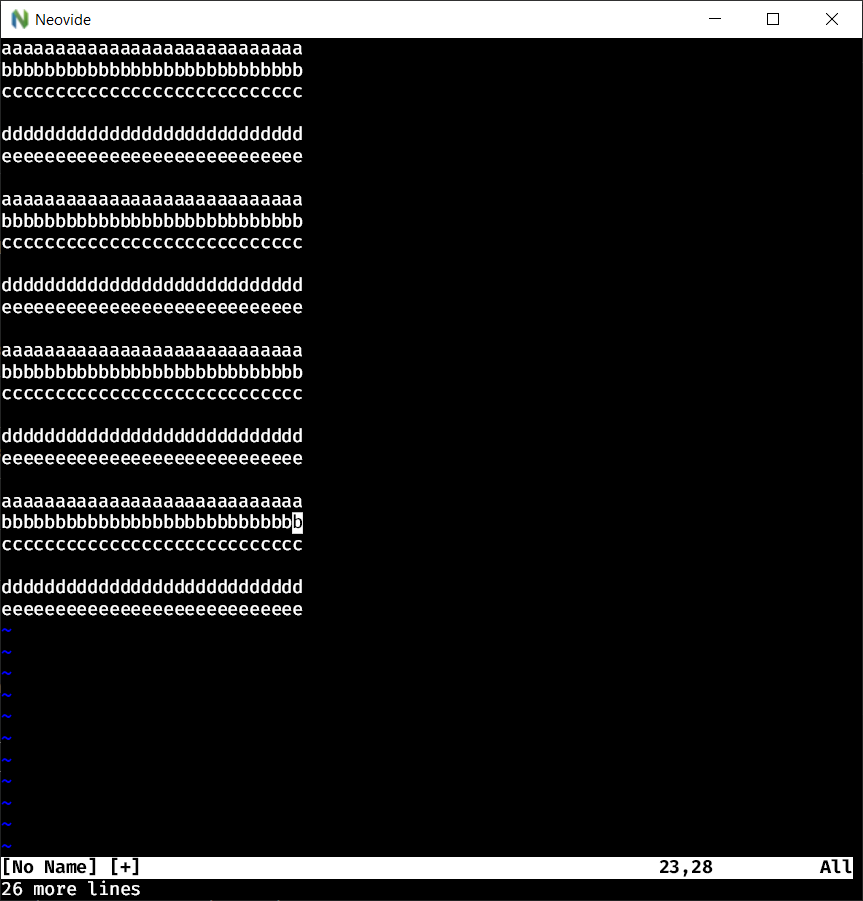 |
|
| 0.5.0 | could not start with | N/A |N/A|
| 0.6.0 | without | no |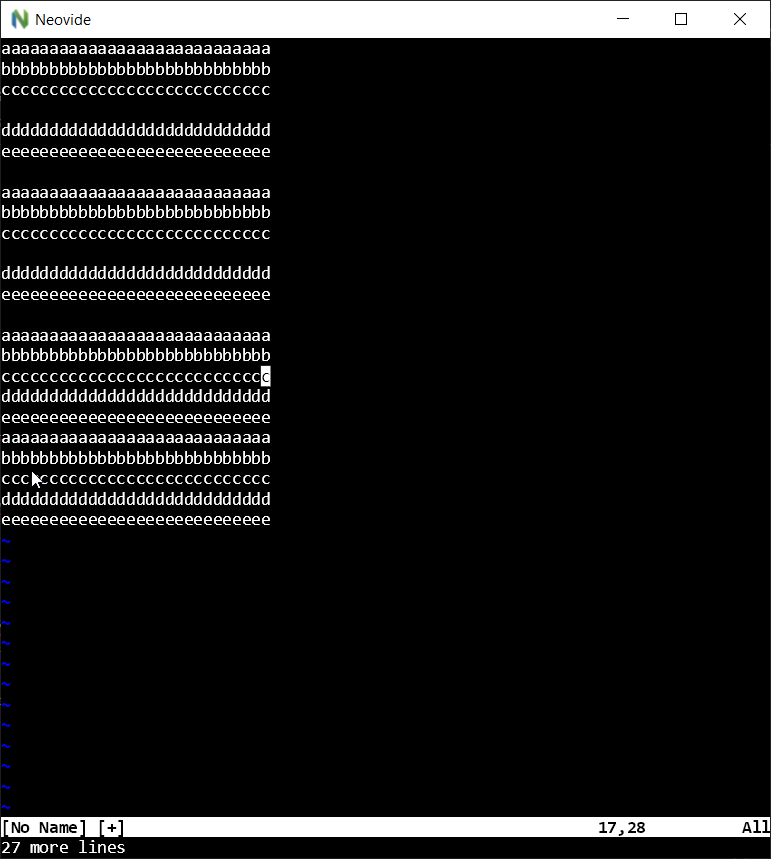 |
|
| 0.6.0 | could not start with | N/A |N/A|
| 0.7.0 | without | yes |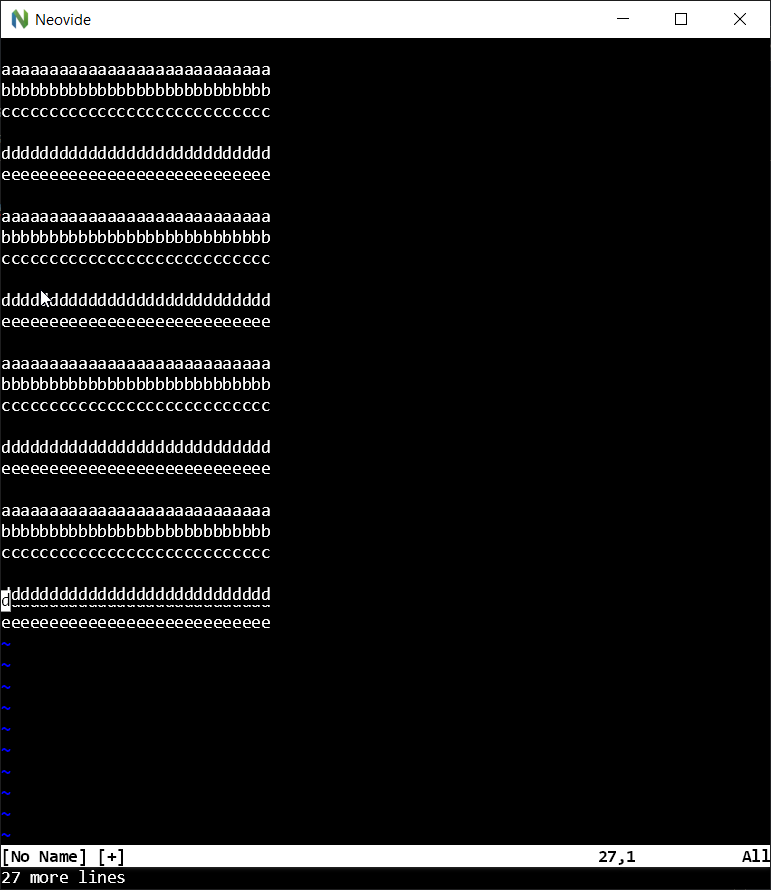 |
|
| 0.7.0 | with | yes |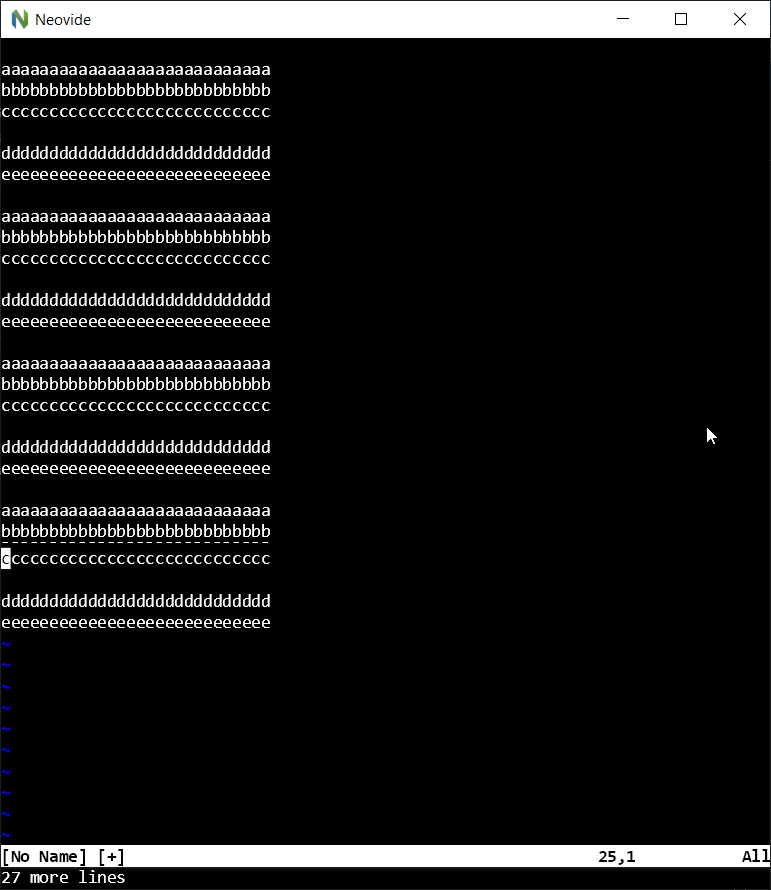 |
|
If I have time I could also do a binary search/bruteforce build on commits between 0.6.0 and 0.7.0 to get to the commit that broke it for me.
JakubKoralewski
on 7 Mar 2021
Okay so I looked into this because it has been really frustrating to deal with. I determined that the issue got created by commit a85c7dda3eb9c24768f07ed0b6f8aa26686b314f. I also made the observation that to replicate the bug I had to have display scaling turned on in windows (might be why it's not a common issue).
The actual code that is causing the issue can be found in src/renderer/rendered_window.rs around line 500.
let scrolled_region = Rect::new(
    left as f32 * renderer.font_width / scaling,
    top as f32 * renderer.font_height / scaling,
    right as f32 * renderer.font_width / scaling,
    bot as f32 * renderer.font_height / scaling,
);

let mut translated_region = scrolled_region;
translated_region.offset((
    -cols as f32 * renderer.font_width / scaling,
    -rows as f32 * renderer.font_height / scaling, // -1 * 17 / 0.5714286 = -29.75
));

{
    let background_snapshot = self.current_surfaces.background.image_snapshot();
    let background_canvas = self.current_surfaces.background.canvas();

    background_canvas.save();
    background_canvas.clip_rect(scrolled_region, None, Some(false));

    background_canvas.draw_image_rect(
        background_snapshot,
        Some((&scrolled_region, SrcRectConstraint::Fast)),
        translated_region, // the translation gets truncated to -29
        &renderer.paint,
    );

    background_canvas.restore();
}

{
   // again for foreground
}
Here is my best guess of what is happening that is causing the issue. On my system, without any init.vim, my font height was 17. and the value of the scaling variable was 0.5714286 (1 / 1.75 for 175% scale). This means that the actual line height in pixels is 29.75 pixels. So when we press Ctrl+E to scroll down one line, the translated region is -29.75 pixels vertically offset from the scrolled_region. Then we get the canvas in that region and redraw it higher. The issue is that it seems like the graphics library being used just rounds down / truncates decimal number of pixels. So we actually only scroll 29 pixels. We can repeat this scroll as many times as we want, each time only moving 29 pixels down. The issue is that the position of the text and of the cursor is calculated without a scale and then scaled afterwards. So the actual line height does average out to 29.75 pixels (every 4th line is one pixel shorter). This can be seen in this screenshot of "|" characters on separate lines.
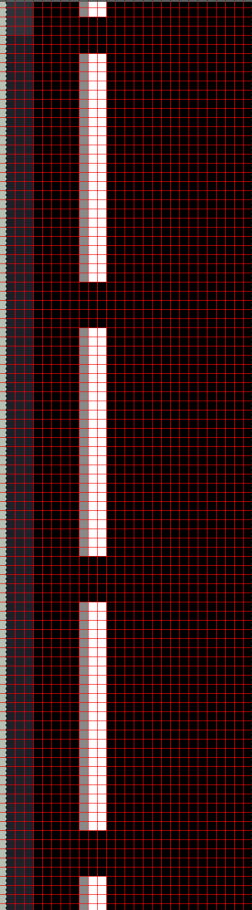
You can see that 3 of the vertical spaces are 5 pixels, but 1 is 4 pixels.
This means that once we scroll down twice, we are now one pixel off of the actual position of the we are supposed to be (and where the cursor thinks we are). This means that if anything causes the top line to be redrawn (scrolling back up for example), it will be redrawn over the other line that is off of where it is supposed to be. This issue compounds the more scrolling you do, which can cause very serious overlaps.
I don't know what the best fix to this is, the variable line height seem like it might be the thing to fix, otherwise I think you have to implement some counter of like total scroll amount, so you can keep track of any distance lost due to rounding.
 AlexKinley
on 26 Mar 2021
AlexKinley
on 26 Mar 2021
I think this has been fixed in main. Please reopen if you come back to this and the issue remains.
Kethku
on 14 Jun 2021
Related issues
 reisub0
·
39Comments
reisub0
·
39Comments
 wbthomason
·
35Comments
wbthomason
·
35Comments
 szbergeron
·
28Comments
szbergeron
·
28Comments
 SirJson
·
22Comments
SirJson
·
22Comments
 svermeulen
·
26Comments
svermeulen
·
26Comments
Most helpful comment
Okay so I looked into this because it has been really frustrating to deal with. I determined that the issue got created by commit a85c7dda3eb9c24768f07ed0b6f8aa26686b314f. I also made the observation that to replicate the bug I had to have display scaling turned on in windows (might be why it's not a common issue).
The actual code that is causing the issue can be found in src/renderer/rendered_window.rs around line 500.
Here is my best guess of what is happening that is causing the issue. On my system, without any init.vim, my font height was 17. and the value of the scaling variable was 0.5714286 (1 / 1.75 for 175% scale). This means that the actual line height in pixels is 29.75 pixels. So when we press Ctrl+E to scroll down one line, the translated region is -29.75 pixels vertically offset from the scrolled_region. Then we get the canvas in that region and redraw it higher. The issue is that it seems like the graphics library being used just rounds down / truncates decimal number of pixels. So we actually only scroll 29 pixels. We can repeat this scroll as many times as we want, each time only moving 29 pixels down. The issue is that the position of the text and of the cursor is calculated without a scale and then scaled afterwards. So the actual line height does average out to 29.75 pixels (every 4th line is one pixel shorter). This can be seen in this screenshot of "|" characters on separate lines.

You can see that 3 of the vertical spaces are 5 pixels, but 1 is 4 pixels.
This means that once we scroll down twice, we are now one pixel off of the actual position of the we are supposed to be (and where the cursor thinks we are). This means that if anything causes the top line to be redrawn (scrolling back up for example), it will be redrawn over the other line that is off of where it is supposed to be. This issue compounds the more scrolling you do, which can cause very serious overlaps.
I don't know what the best fix to this is, the variable line height seem like it might be the thing to fix, otherwise I think you have to implement some counter of like total scroll amount, so you can keep track of any distance lost due to rounding.