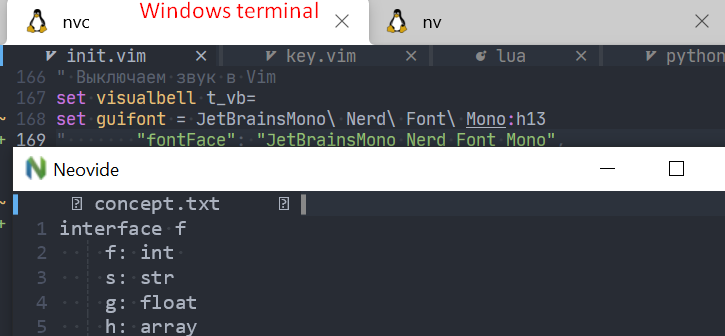
how I run neovde:
$ neovide.exe --wsl file.txt
where is my font? In windows terminal it works correctly.
 peach-lasagna
All 9 comments
hey, I have the same problem on Arch Linux, icons in airline's bar are replaced by squares. In terminal with the same font all is working
 chama-chomo
on 12 Feb 2021
chama-chomo
on 12 Feb 2021
After I wrote this I made one more attempt with Hack\ Nerd\ Font\ Mono and some of the icons in Airline bar started working, so I guess it's really about hitting the right font. Still strange, though, that in terminal all works 100%
chama-chomo
on 12 Feb 2021
In your init.vim:
set guifont=font:hsize
For example, if I wanted to use FiraCode NF at 16pt size:
set guifont=FiraCode\ NF:h16
(the backslash is used to escape the space)
Edit: Wait nvm I see you've already set guifont - well in that case idk what's the problem
 neelkarma
on 16 Feb 2021
neelkarma
on 16 Feb 2021
the font names may need to be slightly different for skia to pick them up. Do you encounter the same issue with other more standard fonts such as consolas?
If swapping that way works, I think probably you got the font name wrong.
 Kethku
on 17 Feb 2021
Kethku
on 17 Feb 2021
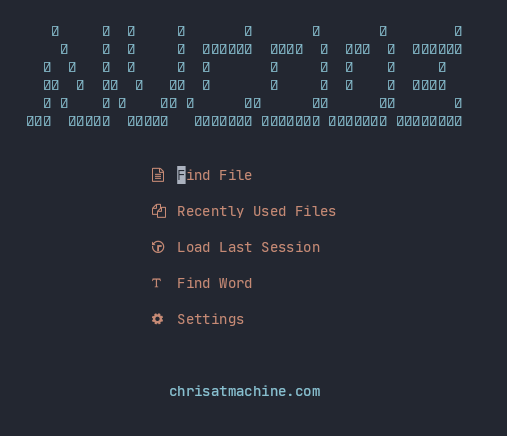
I seem to be having the same issue with:
vim.o.guifont = "JetBrainsMono Nerd Font"
and the mono variant as well.
Hack kinda works
SauceCodePro seems to work well
 ChristianChiarulli
on 7 Apr 2021
ChristianChiarulli
on 7 Apr 2021
Does the alphabetic text match the set font in your screen cap? If so, then the squares represent glyphs not present in the font and other systems are using some form of font fallback to render them. There is ongoing work tracked here: https://github.com/Kethku/neovide/issues/444 to add better font fallback, but its going to be a bit to get it right
Kethku
on 8 Apr 2021
Thanks for your help! The last question: how to zoom out and zoom in on the text?
peach-lasagna
on 8 Apr 2021
@peach-lasagna you can :set guifont with your preferred font size.
neelkarma
on 8 Apr 2021
oh, exactly!
peach-lasagna
on 8 Apr 2021
Related issues
 pranphy
·
36Comments
pranphy
·
36Comments
 aj3423
·
45Comments
aj3423
·
45Comments
 svermeulen
·
26Comments
svermeulen
·
26Comments
 habamax
·
67Comments
habamax
·
67Comments
 reisub0
·
39Comments
reisub0
·
39Comments
Most helpful comment
In your
init.vim:For example, if I wanted to use
FiraCode NFat 16pt size:(the backslash is used to escape the space)
Edit: Wait nvm I see you've already set guifont - well in that case idk what's the problem