Neos-ui: Inline editable document properties are not getting saved completely
Steps to Reproduce
- Use the demo-package and add a new property to the page nodetype
'Neos.NodeTypes:Page':
  properties:
    headline:
      type: string
      defaultValue: ''
      ui:
        inlineEditable: TRUE
        aloha:
          'format': []
          'table': []
          'link': []
          'list': []
          'alignment': []
          'formatlesspaste':
            'button': FALSE
            'formatlessPasteOption': TRUE
          'autoparagraph': FALSE
          placeholder: i18n
- Render the property
prototype(Neos.Neos:Page) {
    body.content.main {
        @process.addHeadline = Neos.Fusion:Array {
            headline = Neos.Fusion:Tag {
                tagName = 'h1'
                content = ${q(node).property('headline')}
                @process.contentElementEditableWrapping = Neos.Neos:ContentElementEditable {
                    property = 'headline'
                }
                @process.contentElementWrapping = Neos.Neos:ContentElementWrapping {
                    @position = 'end'
                }
            }
            content = ${value}
        }
    }
}
- Now go to the backend, add a new page document and enter some code into the inline property
- Save and publish it
- Open in in the frontend
Expected behavior
I see my entered content.
Actual behavior
I see just a part of my entered content.
See this video:
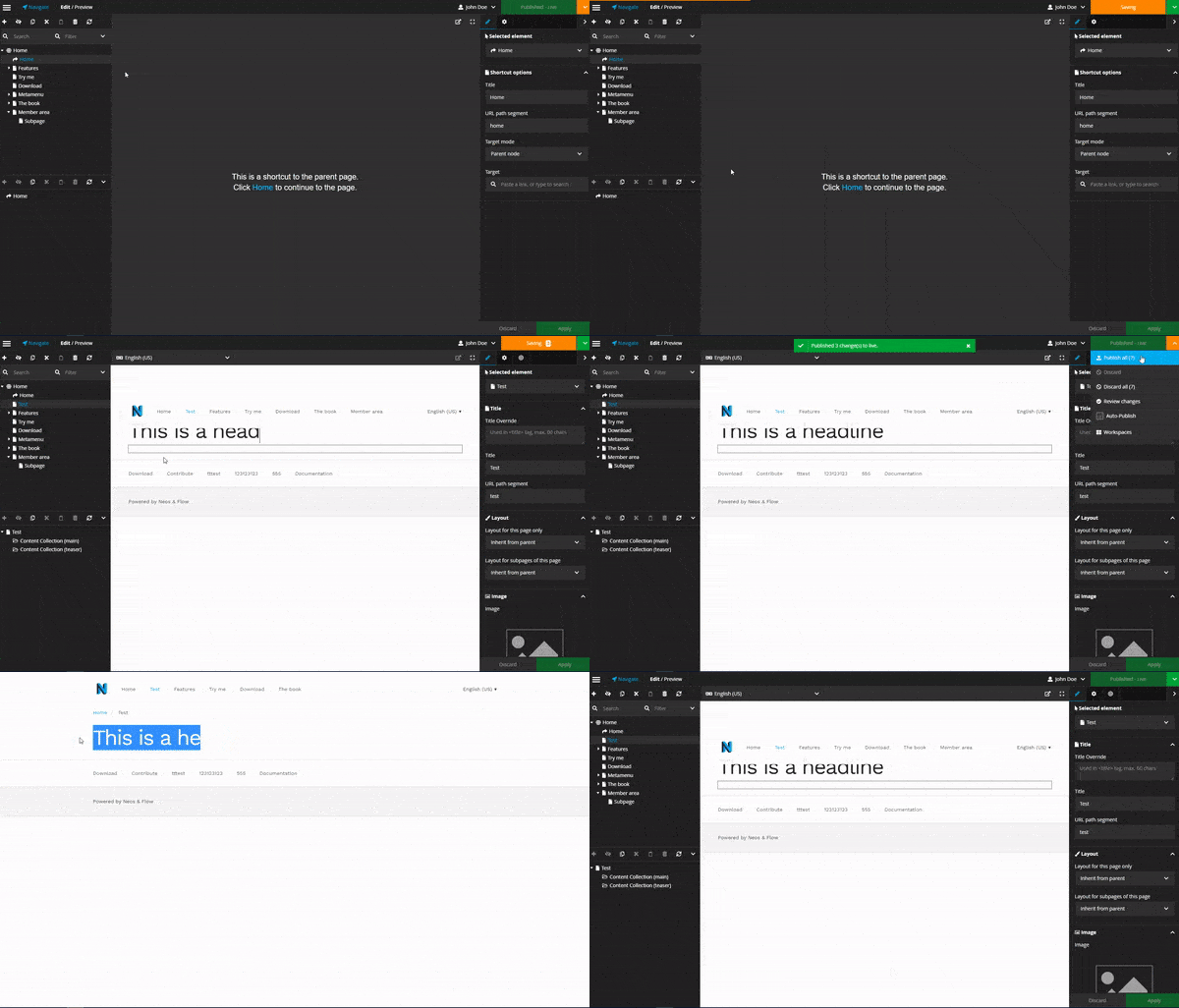
If you reload the backend document you see that indeed part of the entered content is not saved. Worst part of it is that the editor might not recognize that something got lost after publishing if he does not control the frontend.
Affected Versions
Neos: 3.3.12
UI: 1.1.1
 DrillSergeant
All 9 comments
Wow. Thanks for the report.
@kitsunet could that be related to your recent Saga change?
 dimaip
on 28 Jun 2018
dimaip
on 28 Jun 2018
Uhhh, maybe, probably... Will have a look!
 kitsunet
on 28 Jun 2018
kitsunet
on 28 Jun 2018
Looks good by testing with master branch. Could not reproduce the bug anymore. Thanks for that quick fix!!!
DrillSergeant
on 29 Jun 2018
Hi @kitsunet and @dimaip,
Before opening a new issue I will leave a comment within this one although it is already closed.
Unfortunately our current client is complaining about exactly the same problem and I was able to reproduce it with the most recent release 1.3 of Neos UI.
From my point of view it is the debounce function which is causing the issue. In https://github.com/neos/neos-ui/blob/master/packages/neos-ui-ckeditor5-bindings/src/ckEditorApi.js#L72 it is set to 350 ms. So in unlucky circumstances the last keystrokes won't be recognized if they were made within this 350 ms time frame.
350 ms correspond to about 171 keystrokes per minute which is not very much for experienced users. But at the latest when deleting characters using backspace nearly every user will face the issue.
 dennisirmscher
on 30 Jul 2018
dennisirmscher
on 30 Jul 2018
@dennisirmscher did you test master? There was no release after the fix.
Debounce does not discard keystrokes, it just delays them.
So the worst case scenario is this:
- user stops typing and immediately clicks publish
- the changes are published
- the debounced change kicks in and you'd still have 1 unpublished change
No data should ever be lost (unless the user closes the window within 350ms of typing).
dimaip
on 30 Jul 2018
did you test master? There was no release after the fix.
@dimaip no I didn't. But it looks to me like the fix from @kitsunet was from June the 29th and was released with 1.2.0 just a few days later:
https://github.com/neos/neos-ui/blob/1.2.0/packages/neos-ui/src/Sagas/Changes/index.js#L40
Or am I missing something here?
Debounce does not discard keystrokes, it just delays them.
Then I honestly don't know what is going wrong here. Just to make more clear what's happening, I created a screencast:

All I'm doing there is clicking inside the text field and hit backspace twice. As you can see only one request was send and only one keystroke was recognized by then (the text at the end is still "Ba" instead of "B"). There was no second request send. This only occurs, if you hit the key with a specific delay. Otherwise it works fine as described by you. Any clue what could possibly cause this?
dennisirmscher
on 30 Jul 2018
@dennisirmscher please test the latest master, I had an attempt to fix this as well that wasn't yet released (will do a release tonight).
This was what I did: https://github.com/neos/neos-ui/commit/db470e72f68b6da40dd06605c6a033f29899d576
dimaip
on 31 Jul 2018
I've just tested with latest master in a demo installation and wasn't able to provoke the error anymore. So I would say your fix worked.
I will let our client know, there will be an update soon and am looking forward to it. Thank you very much for your awesome work @dimaip!
dennisirmscher
on 31 Jul 2018
@dennisirmscher thanks! And yes, I tested the same fix with 15s delay instead of 350ms, it seemed to have worked, it saved all the changes, just with 15s delay.
dimaip
on 31 Jul 2018
Related issues
 jonnitto
·
8Comments
jonnitto
·
8Comments
 lorenzulrich
·
9Comments
dimaip
·
4Comments
jonnitto
·
7Comments
lorenzulrich
·
9Comments
dimaip
·
4Comments
jonnitto
·
7Comments
 skurfuerst
·
9Comments
skurfuerst
·
9Comments