Nemo: Right-click context menu jumps around too much for some files
```
- Nemo version (nemo --version)
nemo 4.6.3 - Is issue with desktop or windowed nemo?
Windowed - Distribution - (Mint 17.2, Arch, Fedora 25, etc...)
Arch - Graphics hardware and driver used
Nvidia 440.82 - 32 or 64 bit
64bit
```
Issue
Fairly recently, I've noticed that when I right-click on file and folder icons in nemo, there's a noticeable "jump" of the items. I have not been able to find out why it happens on some files/folders and doesn't happen on others. I believe that this behavior happens more often when you right click on files and folders that you haven't right clicked on before.
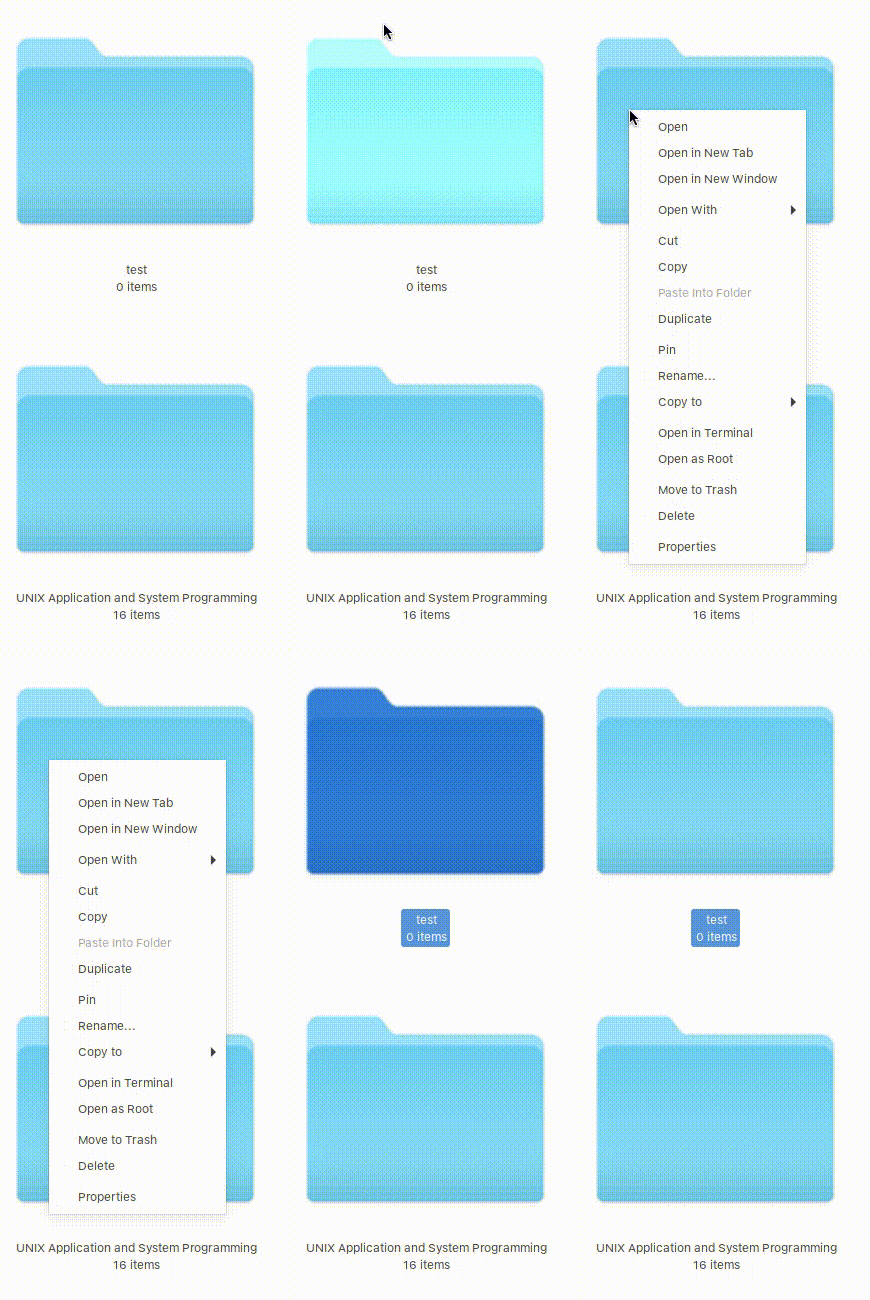
Basically, when you right click on some files, you get this type of behavior:
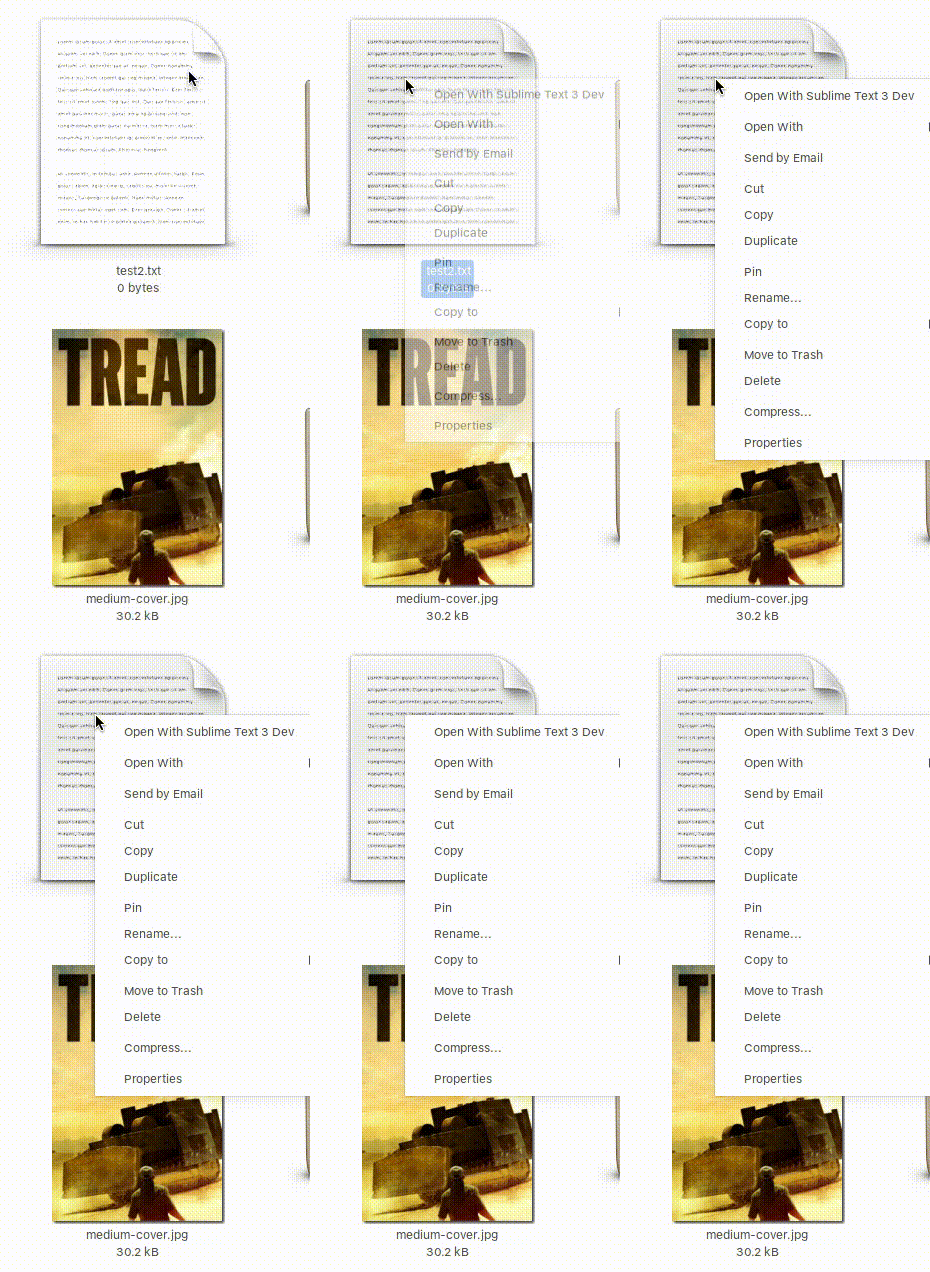
Context menu after right clicking:
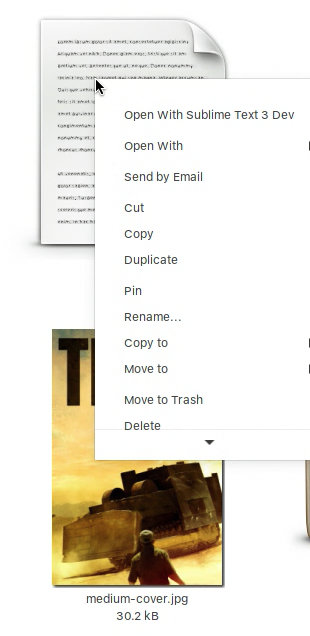
... and 0.5-1 sec after:
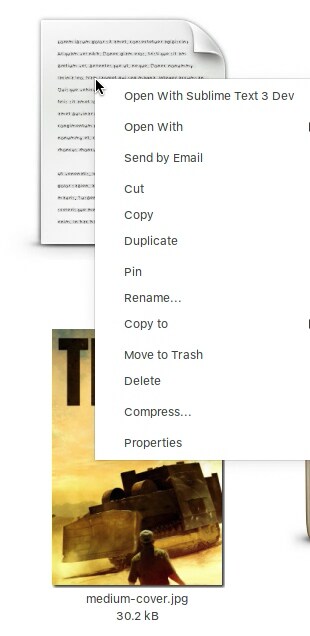
Sometimes, this delay and jump or slide upwards of all the context menu items can take around a second. I find this extremely annoying and has made me mis-select cut & copy and delete & move to trash numerous times. As you start moving your mouse pointer downwards, nemo changes the position of items and you make mistakes. Some mistakes, like mis-selecting `Delete, cannot be easily reversed.
Steps to reproduce
Open a fresh copy of nemo and go to any large folder. Select "Icon View" (works in other ones too) and right click on some files/folders that you haven't right click on before. Also, you can use Terminal to navigate to current folder and do a touch testfile.txt or something like that to create a new file. Then right click on it and observe the jump of all times.
Expected behaviour
Items shouldn't jump around this much.
Other information
 nick-s-b
All 13 comments
Does this happen with all plugins disabled?
 mtwebster
on 22 Jun 2020
mtwebster
on 22 Jun 2020
@mtwebster I've only had Nemo Fileroller plugin enabled. I've disabled it and the results are the same. On some files/folders, there's a noticeable delay and the shift upwards of some items. It happens maybe 1/10 times I try to right click on something and it happens more frequently on folders and especially brand new, never opened/right clicked on, folders. Icon Themes and Control Themes don't seem to make any difference (I've tried it with numerous ones I have installed... including all the Mint-Y ones).
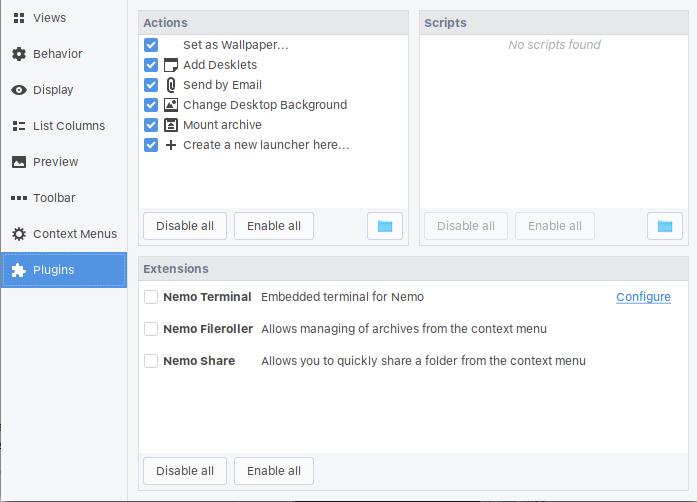
and...

Edit: Yes, happens on Folders too:
nick-s-b
on 22 Jun 2020
Since you say "_I believe that this behavior happens more often when you right click on files and folders that you haven't right clicked on before._"
Do you have extremely large numbers of thumbnails in ~/.cache/thumbnails/ (including any contents of the various sub-directories) -- say much more than a few thousand thumbnails?
I'm suggesting you have too many or perhaps too few thumbnails in your cache.
[I automatically delete any that haven't been accessed in the last 12 days.]
 Jeremy7701
on 23 Jun 2020
Jeremy7701
on 23 Jun 2020
@Jeremy7701 I have a script that cleans thumbnails every time I reboot (I clean up a bunch of cache/junk directories this way to keep junk stuff at manageable levels. That said, currently there's this many files there:
$ find ~/.cache/thumbnails -name "*" | wc -l
1596
Is that a lot? I can rm and see if it makes any difference.
nick-s-b
on 23 Jun 2020
@nick-s-b I cannot duplicate your problem on my PC (running LMDE4) and I have a similar cache size to you.
$ find ~/.cache/thumbnails -name "*" | wc -l
2450
So the cause must be down to some other reason.
Jeremy7701
on 23 Jun 2020
@Jeremy7701 can you do a nemo --version? I'm running the git version and I don't remember this being an issue for that long. You're probably running an old version.
nick-s-b
on 23 Jun 2020
Odd - it's looks like it's the move to context menu item disappearing
What's the output of
gsettings list-recursively org.nemo.preferences.menu-config
 smurphos
on 23 Jun 2020
smurphos
on 23 Jun 2020
I'm running the current release nemo 4.4.2 (not the git version)
$ gsettings list-recursively org.nemo.preferences.menu-config
org.nemo.preferences.menu-config selection-menu-make-link false
org.nemo.preferences.menu-config selection-menu-cut true
org.nemo.preferences.menu-config selection-menu-duplicate false
org.nemo.preferences.menu-config selection-menu-properties true
org.nemo.preferences.menu-config background-menu-create-new-folder true
org.nemo.preferences.menu-config background-menu-scripts true
org.nemo.preferences.menu-config background-menu-open-as-root true
org.nemo.preferences.menu-config selection-menu-open-as-root true
org.nemo.preferences.menu-config iconview-menu-organize-by-name true
org.nemo.preferences.menu-config selection-menu-scripts true
org.nemo.preferences.menu-config selection-menu-open-in-new-window true
org.nemo.preferences.menu-config selection-menu-paste true
org.nemo.preferences.menu-config selection-menu-open-in-terminal true
org.nemo.preferences.menu-config background-menu-properties true
org.nemo.preferences.menu-config iconview-menu-arrange-items true
org.nemo.preferences.menu-config background-menu-show-hidden-files true
org.nemo.preferences.menu-config background-menu-open-in-terminal true
org.nemo.preferences.menu-config selection-menu-move-to-trash true
org.nemo.preferences.menu-config selection-menu-copy true
org.nemo.preferences.menu-config selection-menu-open true
org.nemo.preferences.menu-config background-menu-paste true
org.nemo.preferences.menu-config selection-menu-move-to false
org.nemo.preferences.menu-config desktop-menu-customize true
org.nemo.preferences.menu-config selection-menu-open-in-new-tab true
org.nemo.preferences.menu-config selection-menu-copy-to false
org.nemo.preferences.menu-config selection-menu-rename true
org.nemo.preferences.menu-config selection-menu-pin true
Jeremy7701
on 23 Jun 2020
@smurphos Hi, here's the output:
$gsettings list-recursively org.nemo.preferences.menu-config
org.nemo.preferences.menu-config selection-menu-open-as-root true
org.nemo.preferences.menu-config background-menu-show-hidden-files true
org.nemo.preferences.menu-config selection-menu-duplicate true
org.nemo.preferences.menu-config background-menu-paste true
org.nemo.preferences.menu-config selection-menu-pin true
org.nemo.preferences.menu-config selection-menu-open-in-new-window true
org.nemo.preferences.menu-config iconview-menu-organize-by-name true
org.nemo.preferences.menu-config desktop-menu-customize true
org.nemo.preferences.menu-config selection-menu-copy-to true
org.nemo.preferences.menu-config selection-menu-open true
org.nemo.preferences.menu-config background-menu-scripts true
org.nemo.preferences.menu-config selection-menu-move-to false
org.nemo.preferences.menu-config selection-menu-scripts true
org.nemo.preferences.menu-config background-menu-properties true
org.nemo.preferences.menu-config selection-menu-cut true
org.nemo.preferences.menu-config selection-menu-copy true
org.nemo.preferences.menu-config background-menu-create-new-folder true
org.nemo.preferences.menu-config selection-menu-make-link false
org.nemo.preferences.menu-config selection-menu-move-to-trash true
org.nemo.preferences.menu-config selection-menu-rename true
org.nemo.preferences.menu-config iconview-menu-arrange-items true
org.nemo.preferences.menu-config background-menu-open-as-root true
org.nemo.preferences.menu-config background-menu-open-in-terminal true
org.nemo.preferences.menu-config selection-menu-open-in-new-tab true
org.nemo.preferences.menu-config selection-menu-paste true
org.nemo.preferences.menu-config selection-menu-properties true
org.nemo.preferences.menu-config selection-menu-open-in-terminal true
nick-s-b
on 23 Jun 2020
@Jeremy7701 thanks. After recompiling this morning, nemo is now up to 4.6.4. I don't remember this issue with 4.4.2.
@smurphos Steve, I think you might be onto something. I've set the move to preference to true and I haven't noticed this issue. I'll test it some more.
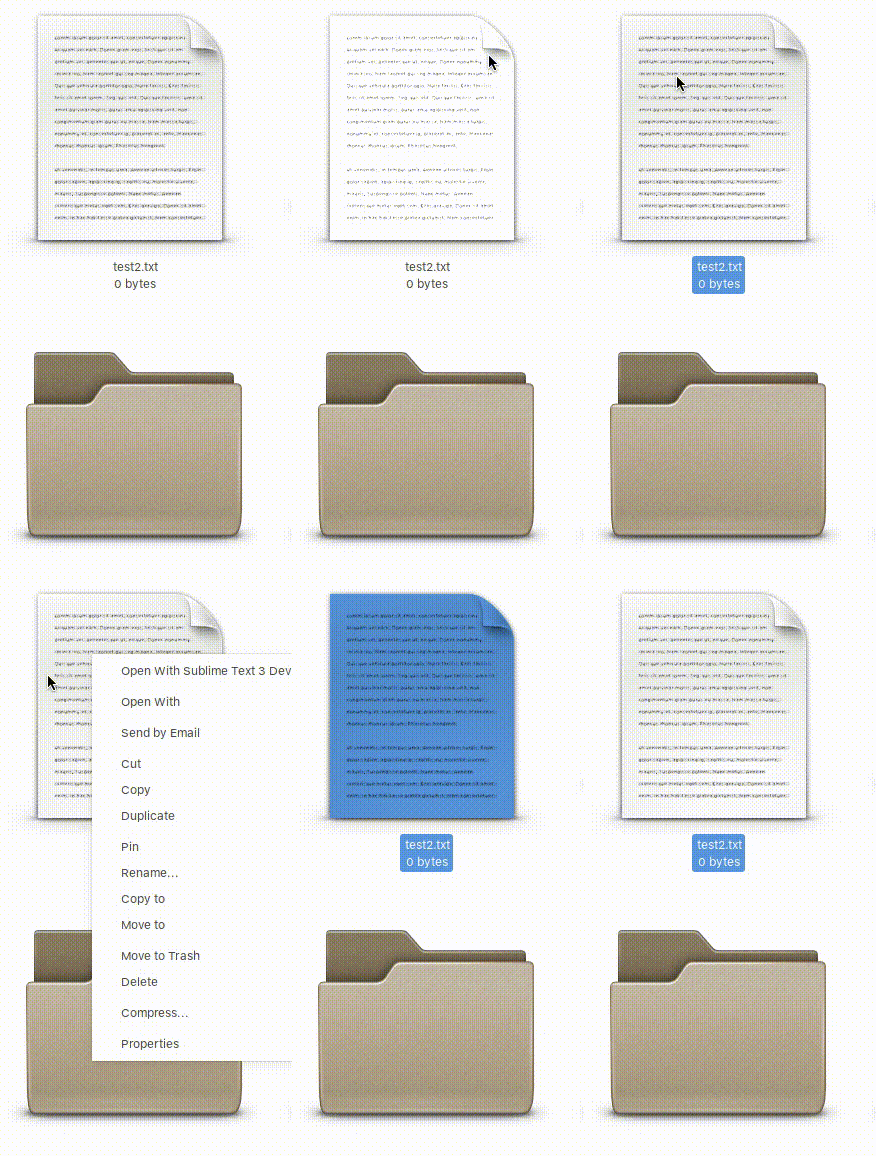
OK, after trying to recreate it for the past 5 min, I haven't been able to make it jump like that again. I think this could be the culprit! I don't really care about this "Move to" shortcut but it's strange that disabling it caused this issue. Also, I don't think I've messed with context menu options for over a year. Some recent code change must have caused this issue to show itself.
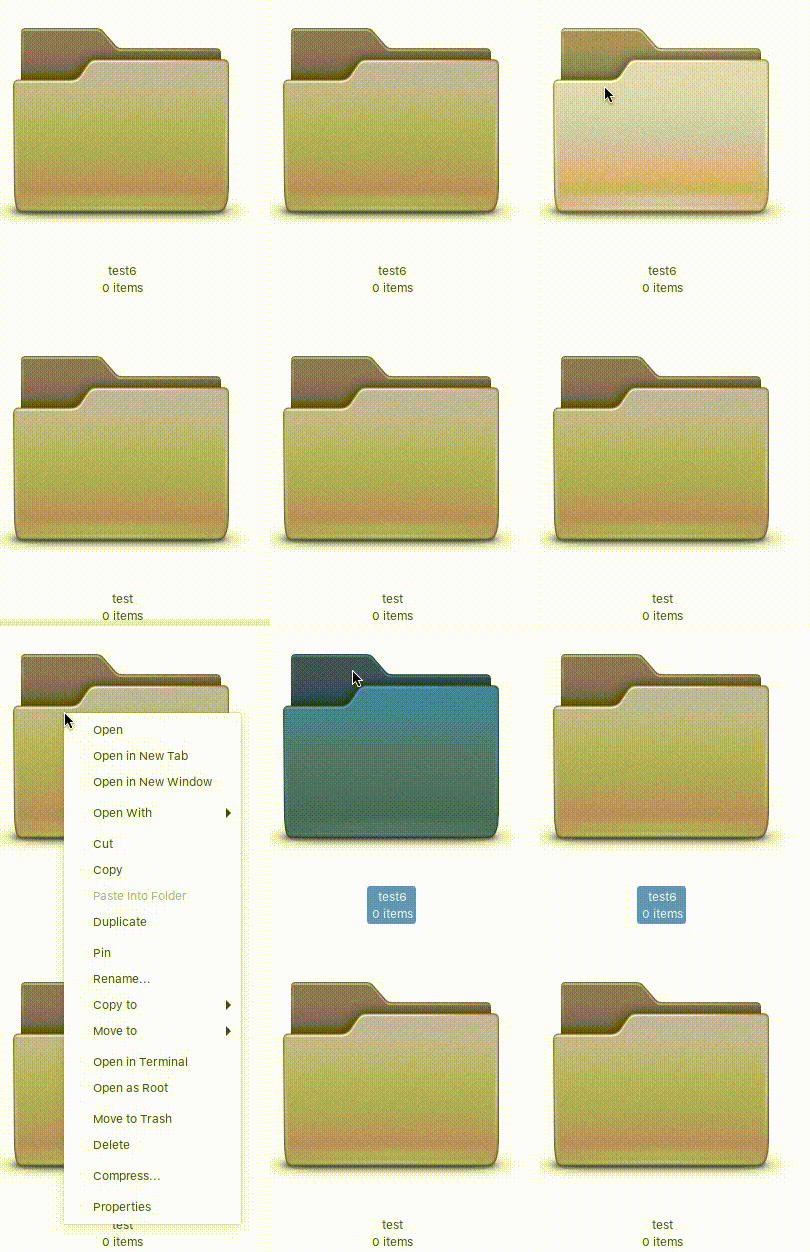
and...
nick-s-b
on 23 Jun 2020
If you look closely at the bottom animation on this one: https://github.com/linuxmint/nemo/issues/2427#issuecomment-647745723,
you can see the move-to entry is there at first (while the menu is fading in) and then disappears.
I can work with this :)
mtwebster
on 23 Jun 2020
@nick-s-b can you output all of your nemo settings please?
dconf dump /org/nemo/
Thanks - I've seen this happen very seldom, once in a blue moon. I'd like to be able to reproduce slightly more reliably.
mtwebster
on 23 Jun 2020
@mtwebster Thank you so much Michael!! I'm so glad we were able to narrow this down.
````
$ dconf dump /org/nemo/
[desktop]
font='Noto Sans Regular 9'
[extensions/nemo-terminal]
default-visible=true
[icon-view]
captions=['none', 'size', 'none']
default-use-tighter-layout=true
[list-view]
default-column-order=['name', 'size', 'type', 'date_modified', 'NemoPython::album_column', 'NemoPython::artist_column', 'NemoPython::bitrate_column', 'NemoPython::date_column', 'date_accessed', 'detailed_type', 'NemoPython::exif_datetime_original_column', 'NemoPython::exif_flash_column', 'NemoPython::exif_pixeldimensions_column', 'NemoPython::exif_rating', 'NemoPython::exif_software_column', 'NemoPython::genre_column', 'group', 'NemoPython::pixeldimensions_column', 'NemoPython::length_column', 'where', 'mime_type', 'date_modified_with_time', 'octal_permissions', 'owner', 'permissions', 'NemoPython::samplerate_column', 'NemoPython::title_column', 'NemoPython::tracknumber_column']
default-visible-columns=['name', 'size', 'type', 'date_modified']
search-visible-columns=['name', 'size', 'type', 'where', 'date_modified', 'date_modified_with_time']
[plugins]
disabled-extensions=['NemoTerminalProvider+NemoPython', 'NemoShare']
[preferences]
context-menus-show-all-actions=true
date-format='informal'
default-folder-viewer='list-view'
default-sort-in-reverse-order=true
default-sort-order='mtime'
inherit-show-thumbnails=true
last-server-connect-method=3
quick-renames-with-pause-in-between=true
saved-searches=['file:///home/user/Downloads::.txt']
show-bookmarks-in-to-menus=true
show-compact-view-icon-toolbar=true
show-computer-icon-toolbar=false
show-edit-icon-toolbar=true
show-hidden-files=true
show-home-icon-toolbar=false
show-icon-view-icon-toolbar=true
show-image-thumbnails='per-folder'
show-list-view-icon-toolbar=true
show-location-entry=false
show-new-folder-icon-toolbar=true
show-next-icon-toolbar=true
show-open-in-terminal-toolbar=true
show-places-in-to-menus=true
show-previous-icon-toolbar=true
show-reload-icon-toolbar=true
show-search-icon-toolbar=true
show-show-thumbnails-toolbar=true
show-up-icon-toolbar=true
sort-directories-first=false
thumbnail-limit=uint64 8589934592
tooltips-in-icon-view=true
tooltips-in-list-view=true
[preferences/menu-config]
selection-menu-copy-to=true
selection-menu-duplicate=true
selection-menu-move-to=true
[window-state]
bookmarks-expanded=true
devices-expanded=true
geometry='1592x951+1114+583'
maximized=false
my-computer-expanded=true
network-expanded=true
side-pane-view='places'
sidebar-bookmark-breakpoint=11
sidebar-width=185
start-with-sidebar=true
````
nick-s-b
on 23 Jun 2020
Related issues
 mdogancay
·
3Comments
mdogancay
·
3Comments
 blueray453
·
5Comments
blueray453
·
5Comments
 nitrocode
·
6Comments
nitrocode
·
6Comments
 mbluett88
·
5Comments
mbluett88
·
5Comments
 WhyNotHugo
·
6Comments
WhyNotHugo
·
6Comments
Most helpful comment
If you look closely at the bottom animation on this one: https://github.com/linuxmint/nemo/issues/2427#issuecomment-647745723,
you can see the move-to entry is there at first (while the menu is fading in) and then disappears.
I can work with this :)