Navcontainerhelper: Containers for Windows 10 2021 h1
When can we expect the containers for the May update of Windows 10?
Updated from yesterday from 20H2, as it said it had a fix for a problem causing the host windows to stop/die when using process isolation (something I have had an issue with for a very long time).
For now hyperv works fine, but prefer using process isolation.
 epernst
All 13 comments
The latest containerhelper preview actually defaults to 10.0.19041.985 generic for 21H1 - for some reason, that also works with process isolation on my machine.
 freddydk
on 9 Jun 2021
freddydk
on 9 Jun 2021
Didn't try with AllowPrerelease. But doesn't work either.
Platform: 14.0.46607.0
Generic Tag: 1.0.1.7
Container OS Version: 10.0.19042.985 (20H2)
Host OS Version: 10.0.19043.985 (21H1)
WARNING: Host OS and Base Image Container OS doesn't match and process isolation is specified. If you encounter issues, you could try to specify -isolation hyperv
and then it fails with:
_docker: Error response from daemon: hcsshim::CreateComputeSystem aa43ace4722d5a23833994875002b5b0c0380f3eb1fd08b5bcf6da89814f974f: The container operating system does not match the host operating system._
epernst
on 9 Jun 2021
I don't think that is the pre-release - or maybe you need -alwayspull
Did you restart PS?
pre-release should select 19041 container OS
freddydk
on 9 Jun 2021
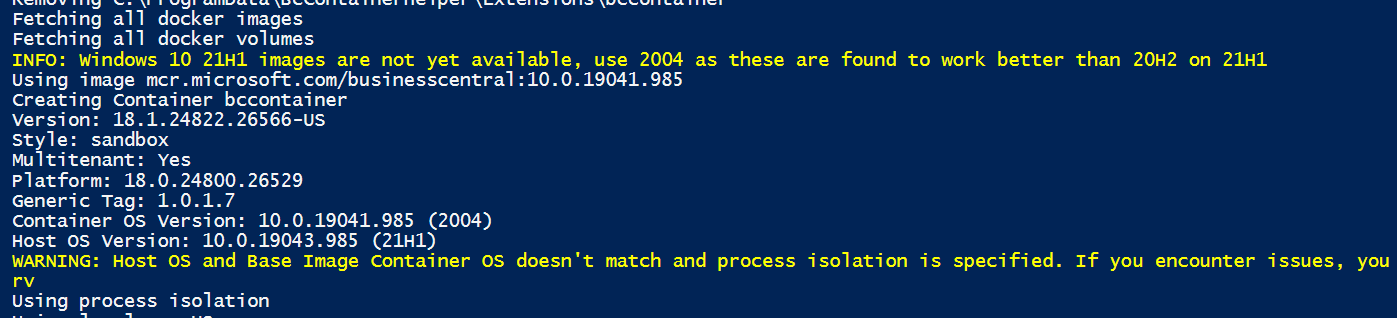
Preview should say this:
freddydk
on 9 Jun 2021
I did restart PS. But second time around it did display:
_INFO: Windows 10 21H1 images are not yet available, use 2004 as these are found to work better than 20H2 on 21H1
WARNING: Unable to find matching generic image for your host OS. Using mcr.microsoft.com/businesscentral:10.0.19041.985_
And process isolation didn't fail. :)
epernst
on 9 Jun 2021
Containers for 21h1 will be out as soon as the corresponding server core image ships.
freddydk
on 10 Jun 2021
With the latest update to 21H1 (build 10.0.19043.1052), the Resource is in use problems seems to have been fixed (on my machine at least).
I have just spun up 3 containers with 10.0.19042.1052 generic using hyperv - works fine.
and 10.0.19041.1052 can still be used with process isolation (so it seams).
freddydk
on 10 Jun 2021
Hello @freddydk ,
I've update to Windows 10 21H1 in my personal computer and I've tested to create a new container forcing issolation "process".
I've lost my old containers, but I think the problem is I've upgraded Docker Container to last version and reset containers to solve a crach at starting docker.
Script
$artifactUrl = Get-BCArtifactUrl -version 18.1 -country es -select Latest -type OnPrem
$credential = Get-Credential
$containerName = 'BC18V1'
New-BcContainer `
    -accept_eula `
    -accept_outdated `
    -containerName $containerName `
    -artifactUrl $artifactUrl `
    -Credential $credential `
    -auth UserPassword `
    -isolation Process `
    -updateHosts
Error
DockerDo : docker: Error response from daemon: hcsshim::CreateComputeSystem 46e4974173b2efded3b61a28e50a2f7fc648d102a20f3c4aa660d2bf38e863cc: The container operating
system does not match the host operating system.
Log detail
BcContainerHelper is version 2.0.12
BcContainerHelper is running as administrator
Host is Microsoft Windows 10 Education - 21H1
Docker Client Version is 20.10.6
Docker Server Version is 20.10.6
Removing BC18V1 from container hosts file
Removing BC18V1-* from container hosts file
Removing C:\ProgramData\BcContainerHelper\Extensions\BC18V1
Fetching all docker images
Fetching all docker volumes
Using image mcr.microsoft.com/businesscentral:10.0.19042.985
Creating Container BC18V1
Version: 18.1.24822.26330-es
Style: onprem
Multitenant: No
Platform: 18.0.24800.26311
Generic Tag: 1.0.1.7
Container OS Version: 10.0.19042.985 (20H2)
Host OS Version: 10.0.19043.1052 (21H1)
WARNING: Host OS and Base Image Container OS doesn't match and process isolation is specified. If you encounter issues, you could try to specify -isolation hyperv
Using Process isolation
Using locale es-ES
Disabling the standard eventlog dump to container log every 2 seconds (use -dumpEventLog to enable)
Files in C:\ProgramData\BcContainerHelper\Extensions\BC18V1\my:
- AdditionalOutput.ps1
- MainLoop.ps1
- SetupVariables.ps1
- updatehosts.ps1
Creating container BC18V1 from image mcr.microsoft.com/businesscentral:10.0.19042.985
46e4974173b2efded3b61a28e50a2f7fc648d102a20f3c4aa660d2bf38e863cc
DockerDo : docker: Error response from daemon: hcsshim::CreateComputeSystem 46e4974173b2efded3b61a28e50a2f7fc648d102a20f3c4aa660d2bf38e863cc: The container operating
system does not match the host operating system.
(extra info: {"SystemType":"Container","Name":"46e4974173b2efded3b61a28e50a2f7fc648d102a20f3c4aa660d2bf38e863cc","Owner":"docker","VolumePath":"\\\\?\\Volume{45a1ab64-e8e
b-49ec-93e7-20fe477142f6}","IgnoreFlushesDuringBoot":true,"LayerFolderPath":"C:\\ProgramData\\Docker\\windowsfilter\\46e4974173b2efded3b61a28e50a2f7fc648d102a20f3c4aa660d
2bf38e863cc","Layers":[{"ID":"d2f711ac-8999-5935-aa09-6bb99e6bb1e3","Path":"C:\\ProgramData\\Docker\\windowsfilter\\204af66ea2fb6bfa9b8844a586e68dd9f4a9a5e7d0e30a8539b9e4
109acecbde"},{"ID":"47fdac10-2ac3-528d-beb8-37c66abdc61d","Path":"C:\\ProgramData\\Docker\\windowsfilter\\e2e523821f17b11ff375c58f51c5adf286d1a3be38e790cfa2a872fe5cbc7a0b
"},{"ID":"240369b0-7600-5796-8b1c-6d9aa0dffb79","Path":"C:\\ProgramData\\Docker\\windowsfilter\\4befc0c56fbf58badca17b9b1e3b11030ba76de0d3e84c9e9610fb1998c5e028"},{"ID":"
1e728bdc-0be3-5f5b-a1e2-504cdb92d810","Path":"C:\\ProgramData\\Docker\\windowsfilter\\9d70ca65a18fb0b77830d17e25b64ae7b77f611ce1f27b4d864d507dd96d86a4"},{"ID":"4e9acfe5-0
cbe-525b-8995-f616fbd39cf6","Path":"C:\\ProgramData\\Docker\\windowsfilter\\3396e9ddd1dde2cfb8d3f59dc2e10ffe5f691867ff314a6096ae25b8c33d1c13"},{"ID":"7b3d903e-4af9-56bb-a
823-7c9e789dd87f","Path":"C:\\ProgramData\\Docker\\windowsfilter\\2f869d6bebb8aa4da43882933d51740770df15d7f5e6106c097520b9d2ddaec1"},{"ID":"667a6df6-5156-5deb-bbfd-a9dc76
e8a4b5","Path":"C:\\ProgramData\\Docker\\windowsfilter\\61283a1ed445ac180d73e2c63ea986df17d9583c57e2547c6df0ebecbd4e75ff"},{"ID":"fc35f11c-3151-583c-a149-efecffb2bb4b","P
ath":"C:\\ProgramData\\Docker\\windowsfilter\\88f1f373f36be74e795f2c719236e723e748b1adc5ef05221062b8bffe9f1ff5"},{"ID":"ae97c148-793f-5a9c-8861-69c25a472ef0","Path":"C:\\
ProgramData\\Docker\\windowsfilter\\d0d7261f8d25a2103203126bada02e638265529a44c35a495e6f6cc9034750a0"},{"ID":"79193fb9-0fc3-5038-a65a-966d25555c42","Path":"C:\\ProgramDat
a\\Docker\\windowsfilter\\f4f7d20543fa9cdf013897de9718a6acd0d6ff7f93bb0582f65734c42818f30b"},{"ID":"c7d5e2db-d395-5e50-b4e5-ba62d70d0108","Path":"C:\\ProgramData\\Docker\
\windowsfilter\\156be6f7572dcf90fd9b6fcfc3d5fe4af2dc83261211c0e4610ef8f7a6fdfbee"},{"ID":"8efa1a97-6829-5b8e-b676-046281201cce","Path":"C:\\ProgramData\\Docker\\windowsfi
lter\\ca8fd96fbe7ae23351fde2b09b84236818caec5aed0c6dc83213c295a8355e2c"},{"ID":"88b0893d-164f-5637-87f7-5ee5760c9615","Path":"C:\\ProgramData\\Docker\\windowsfilter\\692a
fc0f3200eb880aaed91ada7443d2be01047fe36c3c373a9d368a97ceb192"},{"ID":"e285aa0f-c908-5166-bcac-64178237f28a","Path":"C:\\ProgramData\\Docker\\windowsfilter\\5da0c0960d33af
e6684ae594642b160fad5b1233de92e18f57b7aaeee7c36c00"},{"ID":"f377ce24-7d34-5399-bc6c-f2494689e541","Path":"C:\\ProgramData\\Docker\\windowsfilter\\85bf376236e7af033fd10acc
ffefd3468b61ffe304a5a0bcf41be7d901cb1bb9"},{"ID":"656f59dd-25d8-57f5-b914-9d4d8d94dd6a","Path":"C:\\ProgramData\\Docker\\windowsfilter\\b897b20a304d6d1ad47c0dc48137e4db4f
2e2185cf1482b610edc06ec34ff13a"},{"ID":"9f730c58-1daf-5fb5-b528-56cafd7a8863","Path":"C:\\ProgramData\\Docker\\windowsfilter\\f73540744d15e1c32b7d4d2986fe68b01d4a0e3557f2
efb2cd51118f14bfb1c4"},{"ID":"3117a3b5-9bdb-5d6c-a470-bd256e6c06c9","Path":"C:\\ProgramData\\Docker\\windowsfilter\\3617731b4a6af7def13ac651b9f48bd3e0edee22640aba88a04750
f9f9c1ea7d"}],"HostName":"BC18V1","MappedDirectories":[{"HostPath":"c:\\windows\\system32\\drivers\\etc","ContainerPath":"c:\\driversetc","ReadOnly":false,"BandwidthMaxim
um":0,"IOPSMaximum":0,"CreateInUtilityVM":false},{"HostPath":"c:\\bcartifacts.cache","ContainerPath":"c:\\dl","ReadOnly":false,"BandwidthMaximum":0,"IOPSMaximum":0,"Creat
eInUtilityVM":false},{"HostPath":"c:\\programdata\\bccontainerhelper\\extensions\\bc18v1\\my","ContainerPath":"c:\\run\\my","ReadOnly":false,"BandwidthMaximum":0,"IOPSMax
imum":0,"CreateInUtilityVM":false},{"HostPath":"c:\\programdata\\bccontainerhelper","ContainerPath":"c:\\programdata\\bccontainerhelper","ReadOnly":false,"BandwidthMaximu
m":0,"IOPSMaximum":0,"CreateInUtilityVM":false}],"HvPartition":false,"EndpointList":["0fda7785-9f2b-48da-b4cc-f4d41aca171b"],"AllowUnqualifiedDNSQuery":true}).
ExitCode: 125
Commandline: docker run --volume "c:\bcartifacts.cache:c:\dl" --label nav= --env isBcSandbox=N --label version=18.1.24822.26330 --label platform=18.0.24800.26311 --label
country=es --env artifactUrl=https://bcartifacts.azureedge.net/onprem/18.1.24822.26330/es --env licenseFile="" --name BC18V1 --hostname BC18V1 --env auth=NavUserPassword
--env username="nav" --env ExitOnError=N --env locale=es-ES --env databaseServer="" --env databaseInstance="" --volume
"C:\ProgramData\BcContainerHelper:C:\ProgramData\BcContainerHelper" --volume "C:\ProgramData\BcContainerHelper\Extensions\BC18V1\my:C:\Run\my" --isolation Process
--restart unless-stopped --env filesOnly=False --env enableApiServices=Y --env useSSL=N --volume "c:\windows\system32\drivers\etc:C:\driversetc" --env securePassword=7649
2d1116743f0423413b16050a5345MgB8AEsAUQB3AEoAVgA4AEMAUQBkAGEARgA4ADYAeAAvADkAegBHAFkAZgBmAGcAPQA9AHwANwBiADYANAA5ADcAMwA2ADIAOQBiAGUANgA2AGEANAA4ADkAMwAxADIAMgAyAGIANAAyAD
YANQAxAGMAMgBkAGUAOQAwAGYANgBjADIAZgBmADAANgBjAGYAOQA3ADgAZQA5ADcAZgBkADEANgAwADAAMQA1ADIAYwBlADQANgA= --env passwordKeyFile="c:\run\my\aes.key" --env
removePasswordKeyFile=Y --env accept_eula=Y --env accept_outdated=Y --detach mcr.microsoft.com/businesscentral:10.0.19042.985
En C:\Program Files\WindowsPowerShell\Modules\BcContainerHelper\2.0.12\ContainerHandling\New-NavContainer.ps1: 1696 Carácter: 15
+ ...       if (!(DockerDo -accept_eula -accept_outdated:$accept_outdated - ...
+                 ~~~~~~~~~~~~~~~~~~~~~~~~~~~~~~~~~~~~~~~~~~~~~~~~~~~~~~~~~
    + CategoryInfo          : NotSpecified: (:) [Write-Error], WriteErrorException
   + FullyQualifiedErrorId : Microsoft.PowerShell.Commands.WriteErrorException,DockerDo
 ti-jalopez
on 10 Jun 2021
ti-jalopez
on 10 Jun 2021
I had to run
update-module bccontainerhelper -allowprerelease -force
for it to work
epernst
on 10 Jun 2021
I will ship 2.0.13 today, which defaults the generic image in use to be 10.0.19041.985.
You can also add
-usegenericimage 'mcr.microsoft.com/businesscentral:10.0.19041.985'
on New-BcContainer - then you should be able to use process isolation.
I also found that the latest windows 10 21H1 for the host works better (build 10.0.19043.1052)
freddydk
on 11 Jun 2021
In the latest containerhelper preview, I will also default to process isolation for the combination Host OS = 21H1 and Container OS = 2004.
freddydk
on 1 Jul 2021
It seems like 21H1 containers are not going to be released, they are waiting for/working on Windows 11.
BcContainerHelper will keep selecting the best container and use appropriate isolation by default and will be updated with whatever happens.
freddydk
on 10 Aug 2021
Thank you for the update. I did not have any issues with 21H1 and the latest version of BcContainerHelper.
epernst
on 10 Aug 2021
Related issues
 gintuoklis
·
5Comments
gintuoklis
·
5Comments
 staedter
·
3Comments
staedter
·
3Comments
 ashik-ivor
·
4Comments
ashik-ivor
·
4Comments
 lvanvugt
·
5Comments
lvanvugt
·
5Comments
 ashikivor
·
4Comments
ashikivor
·
4Comments
Most helpful comment
I will ship 2.0.13 today, which defaults the generic image in use to be 10.0.19041.985.
You can also add
-usegenericimage 'mcr.microsoft.com/businesscentral:10.0.19041.985'
on New-BcContainer - then you should be able to use process isolation.
I also found that the latest windows 10 21H1 for the host works better (build 10.0.19043.1052)