Navcontainerhelper: Pipeline does not fail when using Run-TestsInBCContainer with AzureDevops error parameter
Hey @freddydk,
There's something suspicious about Run-TestsInBCContainer command. I want my pipeline to fail, if test cases fails.
Plesek check the screesnshot. As you can see, test runner writes errors to the output, but task still goes green anyway.

Here's my pipeline code. Function "Run-NAVTests" is just a wrapper around yours Run-TestsInBCContainer (we use our function, since some developers are working with docker, and some with locally installed instances. so we basically support both scenarios within our function. For the docker part, we fully use bccontainerhelper functions)
 - powershell: |
              Import-Module $(Pipeline.Workspace)\scripts\imvcicd.psm1
              $cred = New-Object pscredential $(user), (ConvertTo-SecureString -String $(psw) -AsPlainText -Force)
              $resultFile = join-path $($(Get-BcContainerSharedFolders -containerName $(containerName)).keys)[0] "TestResults$(Build.BuildId).xml"
              echo "##vso[task.setvariable variable=testresultFile]$resultFile"
              $testCompanyName = 'AutoTest'
              $autoTestCompanyExist = Get-CompanyInBcContainer $(containerName) | Where-Object -Property CompanyName -eq $testCompanyName
              if (!$autoTestCompanyExist) {
                New-CompanyInNavContainer -containerName $(containerName) -companyName $testCompanyName
              }
              Update-NAVTestsSuite -containerName $(containerName) -companyName $testCompanyName
              Run-NAVTests -containerName $(containerName) -credential $cred -companyName $testCompanyName -AzureDevOps "Error" -XUnitResultFileName $resultFile
            displayName: RunTests
- task: PublishTestResults@2
            displayName: 'Publish Test Results'
            condition: succeededOrFailed()
            inputs:
              testResultsFormat: XUnit
              testResultsFiles: $(testresultFile)
              testRunTitle: 'BC Test Results: $(Build.BuildId)'
According to your blog post, if I set AzureDevOps to "Error" it should cause the pipeline to fail.

Container is running BC 14
Best Regards,
Gintautas
 gintuoklis
All 5 comments
Personally I use:
- task: PublishTestResults@2
displayName: 'Publish Test Results'
condition: and(succeeded(),ne(variables['TestResults'],''))
inputs:
testResultsFormat: JUnit
testResultsFiles: '$(testResults)'
failTaskOnFailedTests: true
I don't want the pipeline to fail on running the tests, I want it to fail when analyzing the tests.
 freddydk
on 12 Mar 2021
freddydk
on 12 Mar 2021
If the AzureDevOps was set correctly, it should spit out:
vso[task.logissue type=$AzureDevOps;sourcepath=$name;]$firstError
and not ##[Error]
I cannot find anywhere in PsTestFunctions where I output ##[Error] - that is a riddle to me?
freddydk
on 12 Mar 2021
I think, azuredevops translate this code
Write-Host "##vso[task.logissue type=$AzureDevOps;sourcepath=$($_.method);]$($_.message)"
to
[Error]...
I looked at the official documentation, and i believe you are missing exit 1 at the end of test run.
https://docs.microsoft.com/en-us/azure/devops/pipelines/tasks/utility/powershell?view=azure-devops
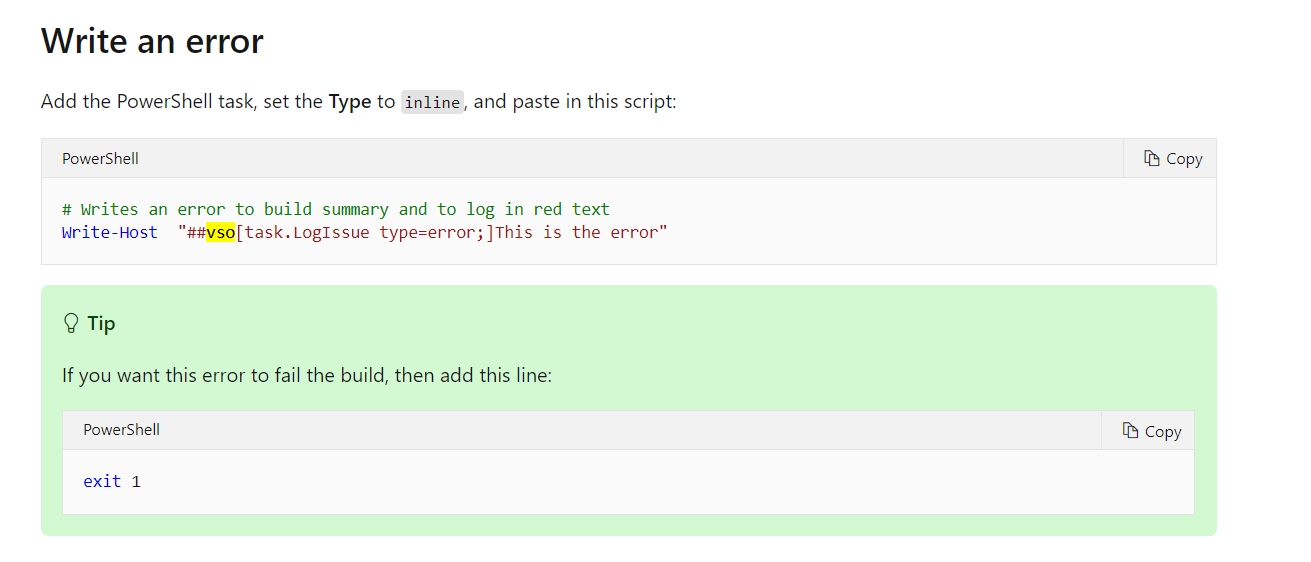
Nevermind, i will try your approach with failTaskOnFailedTests on PublishTestResults
gintuoklis
on 12 Mar 2021
This is how my pipelines look:
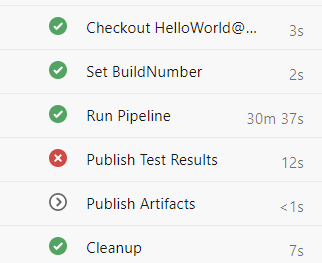
inside:
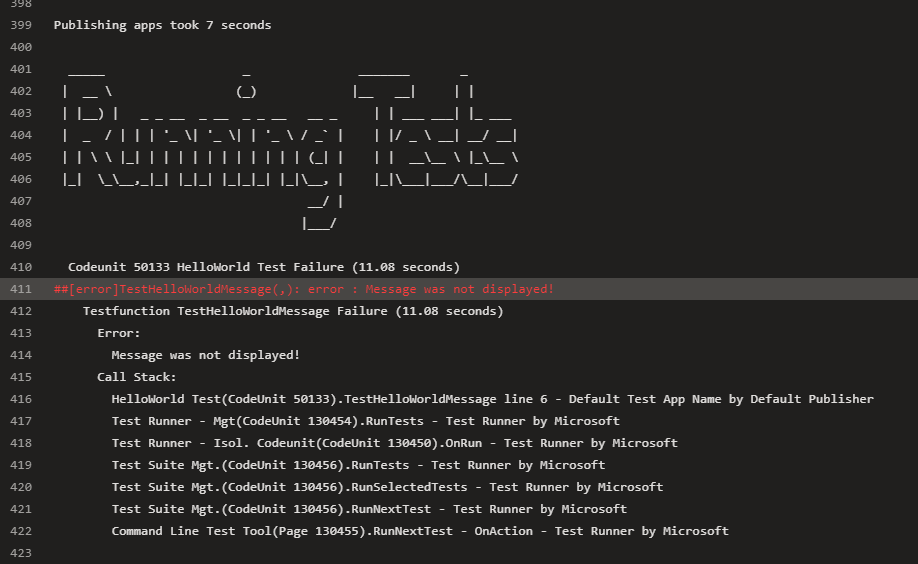
If you have 10 test apps you want to run, you do not want the pipeline to fail after the first.
You want to run all test and collect the results, so I definitely do not wait to add an exit 1.
freddydk
on 16 Mar 2021
If you don't do as Freddy suggest, then you will not be able to use the Azure DevOps test feature to mark individual failing tests as flaky.
 epernst
on 20 Mar 2021
epernst
on 20 Mar 2021
Related issues
 tfenster
·
3Comments
tfenster
·
3Comments
tfenster
·
3Comments
tfenster
·
3Comments
 chavansachin20
·
4Comments
chavansachin20
·
4Comments
 nudelwerfer
·
3Comments
nudelwerfer
·
3Comments
 FabioC34
·
3Comments
FabioC34
·
3Comments
Most helpful comment
If you don't do as Freddy suggest, then you will not be able to use the Azure DevOps test feature to mark individual failing tests as flaky.