Nativescript-plugin-firebase: Unable to copy google-services.json.
I'm new to Nativescript and trying to configure Firebase in my app.
I'm using nativescript 3.3.1 version
These are the steps I followed
- Added fire base plugin to the project (
tns plugin add nativescript-plugin-firebase) - Created Firebase project (with correct project Id) on web and got the google-services.json file
- Copied downloaded json file to app/App_Resources/Android folder.
- Added following code to app.component.ts file
import firebase = require('nativescript-plugin-firebase');
firebase.init()
.then(() => console.log('Firebase initialized!!!'))
.catch(error => console.log(
Failed to initialize Firebase ${error}));
- executed command
tns run android
But it is giving following output:

Am I mistaken anything?
 gambheera
All 23 comments
Did you run the postclone script and answered all the prompts? (see the readme). If so, please share that repo.
 EddyVerbruggen
on 14 May 2018
EddyVerbruggen
on 14 May 2018
Yes I answered.
This is my code base:
https://github.com/gambheera/my-log-app-1
gambheera
on 14 May 2018
I created a fresh project and tried. But same issue is comming...
gambheera
on 14 May 2018
I updated the nativescript vertion to 4.0.1
Now it is working... 👍
gambheera
on 14 May 2018
Doesn't work for me either. it looks like it's trying to copy the file from App_Resources into the platforms folder, but the file (google-services.json) doesn't exist. Tried reinstalling the plugin, removing platforms, all to no avail. Any ideas? (running NS 4.0.2)
 Burgov
on 21 May 2018
Burgov
on 21 May 2018
here's my firebase.nativescript.json, if it helps:
{
    "using_ios": true,
    "using_android": true,
    "firestore": false,
    "realtimedb": false,
    "remote_config": false,
    "messaging": false,
    "crashlytics": false,
    "crash_reporting": false,
    "storage": false,
    "facebook_auth": false,
    "google_auth": false,
    "admob": false,
    "invites": false,
    "ml_kit": true,
    "ml_kit_text_recognition": true,
    "ml_kit_barcode_scanning": true,
    "ml_kit_face_detection": false,
    "ml_kit_image_labeling": false,
    "ml_kit_custom_model": false
}
@Burgov What's the reason you didn't add the google-services.json file to your project?
EddyVerbruggen
on 21 May 2018
@EddyVerbruggen that would be because I'm too impatient to read documentation... Thanks for your quick response.
https://github.com/EddyVerbruggen/nativescript-plugin-firebase/pull/716
Burgov
on 21 May 2018
And TY for the PR ;)
EddyVerbruggen
on 21 May 2018
I have same issue, I'm used NS 4.0.2
 endytc
on 2 Jun 2018
endytc
on 2 Jun 2018
i got same issue too. i play around NS 4+ with angular typescript.
my issue is got like that. and sometimes my google-service.json is disappeared in my android platform folder when i run tns run android
 s-triar
on 24 Jun 2018
s-triar
on 24 Jun 2018
Does it work only with NS4? For now I have to use 3.x, I have google-services.json in app/App_Resources/Android but I'm still getting:
Executing after-prepare hook from /Users/pawel.dziura/Projects/DHL_POC/hooks/after-prepare/firebase-copy-google-services.js
Unable to copy google-services.json.
Failed to execute hook: /Users/pawel.dziura/Projects/DHL_POC/hooks/after-prepare/firebase-copy-google-services.js.
I did chmod 777 to platforms/android and app/App_Resources/Android/google-services.json
still error occurs
 Tukkan
on 11 Jul 2018
Tukkan
on 11 Jul 2018
`i got same issue too. i play around NS 4+ with angular typescript.
my issue is got like that. and sometimes my google-service.json is disappeared in my android platform folder when i run tns run android`
Accidentally i copy -paste in wrong folder so i got error like that. Sorry guys
s-triar
on 11 Jul 2018
@s-triar Which folder do you add that file to? It should be here.
EddyVerbruggen
on 11 Jul 2018
The problem is in hooks/after-prepare/firebase-copy-google-services.js line 10.
var destinationGoogleJson = path.join($projectData.platformsDir, "android", "app", "google-services.json");
platforms/android doesn't have app folder and that is why the hook is failing.
Correct me if I'm wrong but the google-services.json should be in platforms/android, not in platforms/android/app folder.
Changing
var destinationGoogleJson = path.join($projectData.platformsDir, "android", "app", "google-services.json");
to
var destinationGoogleJson = path.join($projectData.platformsDir, "android", "google-services.json");
fixes the problem. App builds correctly and gradle is not complaining about lack of google-services.json
Tukkan
on 11 Jul 2018
Whether or not the app folder exists perhaps depends on the NativeScript version(?). I'm on 4.x usually and see this:
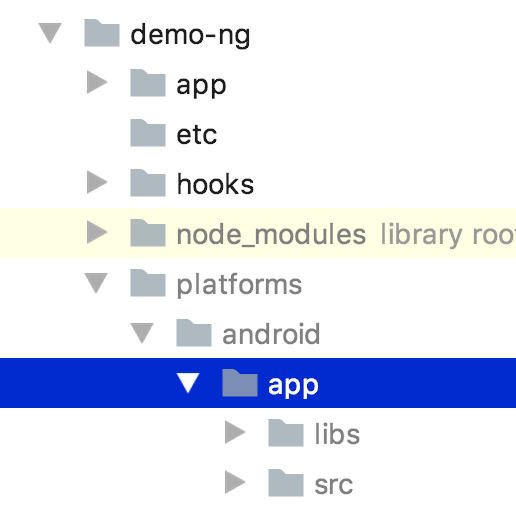
Can you check your N version and folder structure?
Perhaps we should try both folders in the hook?
EddyVerbruggen
on 11 Jul 2018
NativeScript 3.3.1, Android platform version 3.3.1
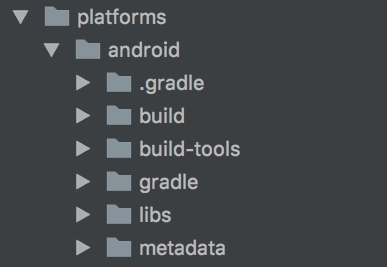
It seems to depend on the version then.
Yeah, checking if app folder exists would fix the problem.
Tukkan
on 11 Jul 2018
@paweldziura Thanks! Let me reopen and try to make this compatible with N 3.
EddyVerbruggen
on 11 Jul 2018
Plugin version 6.4.1 (not released yet, but will do later this week) will look for the platforms/android/app folder, and if your project doesn't have it (NativeScript < 4, allegedly) it will attempt to copy the file to platforms/android instead.
EddyVerbruggen
on 12 Jul 2018
@EddyVerbruggen I'm having this issue in version 6.8.1 "Unable to copy google-services.json"
So I looked up in the hook file firebase-copy-google-services.js.
Why you're checking for the destination file. fs.existsSync(path.dirname(destinationGoogleJson)) and the fs.existsSync(path.dirname(destinationGoogleJsonAlt))?.
I mean if you're using this hook to copy the file to the destination, why checking the existence if for sure it doesn't exist. it's always gonna be false until user itself copies it, right?. What's the point of the hook? I hope you're getting my point
Anyway after removing that check working fine for me. I can share my environment if you need me to.
 SalehMahmood
on 17 Sep 2018
SalehMahmood
on 17 Sep 2018
@SalehMahmood That code is checking the file to copy exists, and the folder to copy to exists as well. See the docs of path.dirname.
Those lines have been in the code since 2016 so I don't think they are the problem in your case, but dunno what is - perhaps this explanation helps somehow.
EddyVerbruggen
on 17 Sep 2018
For those struggling with "Non-Firebase Push Messaging" and getting the "Unable to copy google-services.json." warning. You still need to setup a FireBase Cloud Messaging account.
 inONEL
on 4 Jan 2019
inONEL
on 4 Jan 2019
I haved a this problem when I put 'tns run android' in my terminal :
Unable to apply changes on device: _device_name_. Error is: Failed to build plugin nativescript-plugin-firebase :
Error: Command gradlew.bat failed with exit code 1.
and when I just put 'tns run', it's worked !
Successfully synced application org.nativescript._project_name_ on device _device_name_.
 Zec2703
on 29 Jul 2019
Zec2703
on 29 Jul 2019
Related issues
 NickIliev
·
3Comments
NickIliev
·
3Comments
 SBD580
·
3Comments
SBD580
·
3Comments
 romandragan
·
3Comments
romandragan
·
3Comments
 tactusoft
·
3Comments
tactusoft
·
3Comments
 yencolon
·
4Comments
yencolon
·
4Comments
Most helpful comment
The problem is in hooks/after-prepare/firebase-copy-google-services.js line 10.
var destinationGoogleJson = path.join($projectData.platformsDir, "android", "app", "google-services.json");platforms/android doesn't have app folder and that is why the hook is failing.
Correct me if I'm wrong but the google-services.json should be in platforms/android, not in platforms/android/app folder.
Changing
var destinationGoogleJson = path.join($projectData.platformsDir, "android", "app", "google-services.json");to
var destinationGoogleJson = path.join($projectData.platformsDir, "android", "google-services.json");fixes the problem. App builds correctly and gradle is not complaining about lack of google-services.json