Nativescript-angular: Feature: Enable nesting page router outlets
With nativescript-angular 6.0 we will enable sibling named page-router-outlet at root level to enable the scenario with root TabView with navigations inside the tabs. This scenario is demonstrated in the template - https://github.com/NativeScript/template-tab-navigation-ng.
We would like to also support nested sibling named page-router-outlet. This will enable more scenarios with PROs that are now only possible with NG
Having a root page-router-outlet (PRO) that initially navigates to a Login page and upon login, navigates to a TabView with nested PRO navigations:
- PRO
- Login
- Tabs
- PRO: Tab 1 Master --> Tab 1 Detail
- PRO: Tab 2 Master --> Tab 2 Detail
Having a root RadSideDrawer that can switch between regular pages and TabView with nested PRO navigations:
- RadSideDrawer
- PRO
- Page 1 Master --> Page 2 Detail
- Tabs
- PRO: Tab 1 Master --> Tab 1 Detail
- PRO: Tab 2 Master --> Tab 2 Detail
 MartoYankov
All 73 comments
Any estimation on how complicated this feature is?
 YvesCandel
on 28 Jun 2018
YvesCandel
on 28 Jun 2018
@NickIliev / @vakrilov / @sis0k0 Are we depended on Angular to fix any issues on their end to complete this feature? Just curious, as I'm aware that there are few issues with Angular's router when nesting named outlets.
 manojdcoder
on 6 Jul 2018
manojdcoder
on 6 Jul 2018
@NickIliev @sis0k0 @vakrilov ???
 Bolhy10
on 19 Jul 2018
Bolhy10
on 19 Jul 2018
This is a greatly desired feature. In fact it is not desired, it is fundamentally necessary to create any kind of functional business application, most of which require some form of authentication/authorization through login before accessing the application.
In order to use NativeScript on the job, this feature is required.
 IAMtheIAM
on 22 Jul 2018
IAMtheIAM
on 22 Jul 2018
@IAMtheIAM @Bolhy10 @manojdcoder @YvesCandel thank you guys for your feedback. Indeed, we are aware that this feature is highly desirable and we are planning it for the next release of nativescript-angular. We will post all related updates here.
 NickIliev
on 24 Jul 2018
NickIliev
on 24 Jul 2018
@NickIliev That's great news! Thanks for the update. When the feature is available, I wonder if it is more appropriate to use an actual tabview component like being requested, or if its better to simulate a tabview and create normal page outlets using buttons styled like a tabview. What do you think?
IAMtheIAM
on 24 Jul 2018
That's awesome @NickIliev. Will it be in {N} 4.2 or a later version?
 gbaldeck
on 24 Jul 2018
gbaldeck
on 24 Jul 2018
Awesome! +1 for lazy loading the tab views too :)
 tskweres
on 26 Jul 2018
tskweres
on 26 Jul 2018
@gbaldeck the 4.2 release is a few days away and this feature is not ready and is still in the planning phase. I am sorry if I had misled anyone about the release date - the feature is planned for the 4.3 but still, in the end, it all depends on the complexity of the feature.
NickIliev
on 26 Jul 2018
@NickIliev In the meantime is there a workaround for having Tabs work with the RadSideDrawer?
gbaldeck
on 26 Jul 2018
@gbaldeck @NickIliev I could try making a test app using just
Login (eager)
Tabs (eager)
-- Tab one (lazy) (aux named outlet)
-- Tab Detail one
-- Tab two (lazy) (aux named outlet)
-- Tab Detail two
But - i'm curious if the page and header transitions, back button etc will still work as expected.
tskweres
on 26 Jul 2018
I have found some sort of workaround for now
I have 4 outlets: 3 for tabs and one for login:
<Page backgroundSpanUnderStatusBar="true">
  <AbsoluteLayout>
    <TabView androidTabsPosition="bottom" [visibility]="!logged ? 'hidden' : 'visible'">
      <page-router-outlet
          *tabItem="{title: 'Tasks', iconSource: '~/images/list.png'}"
          name="tasksTab">
      </page-router-outlet>

      <page-router-outlet
          *tabItem="{title: 'Messages', iconSource: '~/images/speech_buble.png'}"
          name="messagesTab">
      </page-router-outlet>

      <page-router-outlet
          *tabItem="{title: 'Settings', iconSource: '~/images/settings.png'}"
          name="settingsTab">
      </page-router-outlet>
    </TabView>
    <page-router-outlet name="main" [visibility]="logged ? 'hidden' : 'visible'">
    </page-router-outlet>
  </AbsoluteLayout>
</Page>
 sokolovstas
on 29 Jul 2018
sokolovstas
on 29 Jul 2018
@MartoYankov Can you please add Lazy Loading the Tab Views to your list. I think this is also really important. Here's an issue for reference. Nested routes / routes with children / lazy loaded routes do not work with named page router outlets.
 hettiger
on 9 Aug 2018
hettiger
on 9 Aug 2018
I have found another workaround for my application. Just show the modal dialog with login on start.
sokolovstas
on 9 Aug 2018
@sokolovstas This is indeed a valid workaround and in fact is the suggested pattern for login with root TabView in native mobile.
@hettiger The nested routes/routes with children problems are indeed tied to this feature request. However, the problems with lazy loading named outlet routes are a separate issue and is not well handled in angular. See https://github.com/angular/angular/issues/24657 .
MartoYankov
on 9 Aug 2018
@sokolovstas @MartoYankov
The suggested modal view workaround leads me to another problem:
Modal view navigation requires a PRO and it seems to cause issues?
A login view should support creating accounts and resetting lost passwords.
Navigation is a requirement for good UX in that case thought.
hettiger
on 10 Aug 2018
I agree that this is workaround only. For now, I have 3 modals and open one and close another on navigation.
sokolovstas
on 10 Aug 2018
@hettiger @sokolovstas The navigation inside a modal with PRO should work. Can you please share the issue you experience?
MartoYankov
on 10 Aug 2018
@MartoYankov
Then I am probably doing it wrong.
How am I supposed to register the modal routes?
Here's the active route when opening the modal:
    {
        path: "",
        redirectTo: "/(aTab:a//bTab:b//cTab:c)",
        pathMatch: "full"
    },
Children are not supported when using redirectTo.
That's what the examples suggest:
I don't see how the pieces can be put together.
My attempts so far didn't work out unfortunately.
If you tell me how to register the routes, I'll give it a shot and share a playground here if I'm still experiencing issues.
hettiger
on 10 Aug 2018
@hettiger You won't be able to open a modal page just with the router. At least we haven't figured it out yet. There is docs artcile here that explains the basics of modals and navigation in NS Angular, but yeah - the case with tabs is a bit more complex. I created a quick playground demo here. It displays two scenarios - a modal as a child to a route in the home tab and a login modal that opens from the root app component on app start. You can actually open the second (global) one from anywhere in your app, but you will have to pass the showModal() method the ViewContainerRef of the root app component. You can save it in a service. If you want, I can add this to the playground example too.
MartoYankov
on 13 Aug 2018
@MartoYankov Thank you for the playground. That was really helpful! :-)
hettiger
on 17 Aug 2018
Trying to achieve the functionality described in scenario 1, login page and a tab view, would there be a way to achieve this without a modal by using angular router instead of nsrouter for the login page? I have been fiddling with a modal, ngIf and [visibility] to recreate the effect of an actual login route but modals just dont cut it.
 mendeljacks
on 21 Aug 2018
mendeljacks
on 21 Aug 2018
My desired structure is:
const routes: Routes = [
    { path: "", redirectTo: "login", pathMatch: "full" },
    { path: "login", component: LoginComponent },
    { path: "home", children: [
       { path: "", redirectTo: "/(ordersTab:orders//productsTab:products//shelvesTab:shelves)", pathMatch: "full" },
        { path: "orders", component: OrdersComponent, outlet: "ordersTab" },
        { path: "products", component: ProductsComponent, outlet: "productsTab" },
        { path: "shelves", component: ShelvesComponent, outlet: "shelvesTab" },
    ]}

];
could it be that the pathMatch full is messing with the nested routes?
mendeljacks
on 21 Aug 2018
I gather this is also an issue for {N} core? I've trying to navigate to my login frame (unsuccessfully) using application.run(). Question over on stackoverflow.
 chrisbekas
on 24 Aug 2018
chrisbekas
on 24 Aug 2018
@chrisbekas Actually, this is quite possible to implement in {N} core. I answered your SO question.
The reason why this works in {N} core and not in NG is because of the default NG location history, which is browser based and linear. Nesting frames combined with tab navigation creates a non-linear history which must be handled differently. In other words, the main problem with nesting PROs is the back navigation. We`re actively working on this issue.
@mendeljacks The structure you specified should be possible. It's possible the redirect doesn't work, but you can navigate directly from login to home/(ordersTab:orders//productsTab:products//shelvesTab:shelves). However, as I mentioned above the back navigation in this scenario won't work correctly.
MartoYankov
on 24 Aug 2018
@MartoYankov Thanks so much Martin, works a treat!
chrisbekas
on 27 Aug 2018
Is there any news about this issue? Any thoughts about timing?
This issue is blocking our next app release 😟
 wvegteren
on 24 Sep 2018
wvegteren
on 24 Sep 2018
It's been 118 days since this has been reported! Is the NS team still actively developing the NS-Angular repo or...?
This is a critical issue for anyone using a TabView in their app. Do we really need to wait half a year to get a solution to problems like these?
YvesCandel
on 24 Sep 2018
@YvesCandel It's really unfortunate but I believe it is not a blocker at least if you use TabViews without router outlets inside and navigate to new pages on the parent outlet (like old times with {N} 3.x). It may not be desirable solution but works for now.
manojdcoder
on 24 Sep 2018
We need page router outlets inside of our tabviews. Otherwise you're missing out on the whole "history per tab" feature which literally every tabview app in the store has.
YvesCandel
on 25 Sep 2018
Looks like it is assigned to the 6.2 milestone. Is this actively being worked on?
 kspearrin
on 5 Oct 2018
kspearrin
on 5 Oct 2018
@kspearrin Yes, this is actively developed. There is a branch djenkov/nested-named-outlets with the feature in progress. There is a new e2e app there - nested-router-tab-view for testing. Keep in mind there is still a lot of work to be done there.
MartoYankov
on 5 Oct 2018
I discovered an alternative solution to this problem. I used Bottom Navigation instead of TabView.
Here is a sample project demonstrating it. Contains 4 tabs and a side drawer. Side drawer contains a link to a page and tab 4 contains a child page as well as a link to a normal page,
One issue: _Back navigation on details page is weird. If you call routerExtensions.back() it will work, but if you press the Android back button it closes the app. Back button does not appear on iOS, but you can call routerExtensions.back() through an ActionItem in the action bar to go back._
See demo gif below:

 keerl
on 12 Oct 2018
keerl
on 12 Oct 2018
@hettiger You won't be able to open a modal page just with the router. At least we haven't figured it out yet. There is docs artcile here that explains the basics of modals and navigation in NS Angular, but yeah - the case with tabs is a bit more complex. I created a quick playground demo here. It displays two scenarios - a modal as a child to a route in the home tab and a login modal that opens from the root app component on app start. You can actually open the second (global) one from anywhere in your app, but you will have to pass the
showModal()method theViewContainerRefof the root app component. You can save it in a service. If you want, I can add this to the playground example too.
@MartoYankov any chance that playground got lost? I'd love to take a dive but it's not loading on my end. Just the boilerplate.
 drewcovi
on 19 Oct 2018
drewcovi
on 19 Oct 2018
Hi, I implemented several solutions mentioned here, for TabWiew with multipe PRO is there any way to configure animation transition for page displaying when we change tab ?
Today when you switch between tabs the page "flashe". Example with the "tns-template-tab-navigation-ng" template

I have create a StackOverflow question with no success : https://stackoverflow.com/questions/52854414/nativescript-tabview-flashing-transition
Thx.
 jbarnabe
on 21 Oct 2018
jbarnabe
on 21 Oct 2018
@jbarnabe do you have a playground link you could send or a repo to look at?
tskweres
on 22 Oct 2018
@tskweres hi, you can simply check out the officialy tns-template-tab-navigation-ng here : https://github.com/NativeScript/template-tab-navigation-ng
jbarnabe
on 22 Oct 2018
@drewcovi I might have deleted it... Here is the example - https://play.nativescript.org/?template=play-ng&id=XfRwGm&v=8
@tskweres I think this might be a bug that is not connected to this story.
MartoYankov
on 22 Oct 2018
@MartoYankov thanks so much! I misunderstood and thought your example would provide a nested page-router-outlet inside the modal itself. Seems that's not the case but appreciate you quickly putting this together!
drewcovi
on 22 Oct 2018
@MartoYankov so, i must open a bug report ?
jbarnabe
on 22 Oct 2018
@jbarnabe Yes, please.
@drewcovi The example opens a modal view that has a page-router-outlet inside it and you can navigate in it. Isn't that what you are looking for?
MartoYankov
on 23 Oct 2018
@martoyankov yes! I’m on my way. And learning quite a bit as I go. 🙂
Thanks a million. This is a brilliant framework.
Now I’m sorting out how to style that tabview. But I’ll sort it out.
drewcovi
on 23 Oct 2018
@MartoYankov done : https://github.com/NativeScript/nativescript-angular/issues/1567.
jbarnabe
on 24 Oct 2018
i just saw the pull request , merged !
congratz
 ouss4m4
on 25 Oct 2018
ouss4m4
on 25 Oct 2018
@ADjenkov thank you for your effort in implementing this feature. We've been checking out the code since you've started working on it. It works like a charm in our application!
 FBorgonjen
on 25 Oct 2018
FBorgonjen
on 25 Oct 2018
@FBorgonjen oh wow this is awesome, how can I get a hold of this, just npm i nativescript@latest? Is there a starter or test app I can fork?
tskweres
on 25 Oct 2018
Thanks so much for implementing this feature, this is wonderful! Same question as @tskweres about how to get our hands on it/release schedule. Thanks again!
 martinstofko219
on 25 Oct 2018
martinstofko219
on 25 Oct 2018
Just tested the latest release for the modal navigation issue that I had for months, all works as expected now.
Great job, thanks!
manojdcoder
on 25 Oct 2018
I see that this was released with 6.2.0, great! Are there any docs on how to use nested paged router outlets?
kspearrin
on 1 Nov 2018
I'll pay someone for a starter with examples :)
tskweres
on 1 Nov 2018
@tskweres i just installed
nativescript-angular@next on my tns v4
And got it working
i refered to the e2e nested-tabview for some code. That's all
ouss4m4
on 1 Nov 2018
I tied running the e2e/nested-router-tab-view project from this repo, but it crashes on start.
kspearrin
on 1 Nov 2018
@kspearrin install naivescript-angular@next first (check the package.json first ) this is what i did and run it
ouss4m4
on 1 Nov 2018
e2e/nested-router-tab-view is referencing "nativescript-angular": "file:../../nativescript-angular". Seems like it should be the latest dev version?
kspearrin
on 1 Nov 2018
Yes i know it didn't work for me first till i installed @next (ref in package json will change)
ouss4m4
on 1 Nov 2018
@ouss4m4 Tried that and still doesn't seem to be working for me. Looks like its missing some resource asset or something.
An uncaught Exception occurred on "main" thread.
android.content.res.Resources$NotFoundException: Resource ID #0xfffffff6
    at android.content.res.ResourcesImpl.getValue(ResourcesImpl.java:215)
    at android.content.res.Resources.loadXmlResourceParser(Resources.java:2134)
    at android.content.res.Resources.getAnimation(Resources.java:1167)
    at android.view.animation.AnimationUtils.loadAnimation(AnimationUtils.java:107)
    at android.support.v4.app.FragmentManagerImpl.loadAnimation(FragmentManager.java:1102)
    at android.support.v4.app.FragmentManagerImpl.moveFragmentToExpectedState(FragmentManager.java:1600)
    at android.support.v4.app.FragmentManagerImpl.moveToState(FragmentManager.java:1641)
    at android.support.v4.app.BackStackRecord.executeOps(BackStackRecord.java:794)
    at android.support.v4.app.FragmentManagerImpl.executeOps(FragmentManager.java:2415)
    at android.support.v4.app.FragmentManagerImpl.executeOpsTogether(FragmentManager.java:2200)
    at android.support.v4.app.FragmentManagerImpl.optimizeAndExecuteOps(FragmentManager.java:2153)
    at android.support.v4.app.FragmentManagerImpl.execPendingActions(FragmentManager.java:2063)
    at android.support.v4.app.FragmentManagerImpl$1.run(FragmentManager.java:725)
    at android.os.Handler.handleCallback(Handler.java:790)
    at android.os.Handler.dispatchMessage(Handler.java:99)
    at android.os.Looper.loop(Looper.java:164)
    at android.app.ActivityThread.main(ActivityThread.java:6494)
    at java.lang.reflect.Method.invoke(Native Method)
    at com.android.internal.os.RuntimeInit$MethodAndArgsCaller.run(RuntimeInit.java:438)
    at com.android.internal.os.ZygoteInit.main(ZygoteInit.java:807)
@ADjenkov @MartoYankov Hi, it's possible to provide an example that works ?
Edit: wtih a template like this
- PRO
- Login
- Tabs
- PRO: Tab 1 Master --> Tab 1 Detail
- PRO: Tab 2 Master --> Tab 2 Detail
Edit 2: If possible with lazy loading 😄
jbarnabe
on 7 Nov 2018
Hi @jbarnabe,
The docs along with some blog/spec for this feature are currently in progress so stay tuned for more official info. For now you can refer to https://github.com/ADjenkov/login-tabs-ng for a sample application that covers the scenario you had described. The last commit adds lazy loading for the tabs and its nested players /teams. You can check the initial commit for non lazy loaded approach.
_Note: Take a look at the package.json. The sample app uses tns-core-modules@next and nativescript-angular@next_
 ADjenkov
on 9 Nov 2018
ADjenkov
on 9 Nov 2018
Edit: wtih a template like this
PRO
...Login
...Tabs
......PRO: Tab 1 Master --> Tab 1 Detail
......PRO: Tab 2 Master --> Tab 2 Detail
That setup was possible with "tns-core-modules": "4.1.1", and "nativescript-angular": "~5.3.0",
What happened since then? I am planning to upgrade to nativescript 5 but I guess I might need to wait.
 TishoTM
on 11 Nov 2018
TishoTM
on 11 Nov 2018
Hi @jbarnabe,
The docs along with some blog/spec for this feature are currently in progress so stay tuned for more official info. For now you can refer to https://github.com/ADjenkov/login-tabs-ng for a sample application that covers the scenario you had described. The last commit adds lazy loading for the
tabsand its nestedplayers/teams. You can check the initial commit for non lazy loaded approach._Note: Take a look at the
package.json. The sample app uses tns-core-modules@next and nativescript-angular@next_
Hi, @ADjenkov,
Thanks, after exporting and testing your sample I have 2 problems :
1/ I always have this errors in console just after launching the app (I have same problem with all my app after upgrading to tns-core-modules and nativescript-angular 5.0.0+) 😖 :
11-12 20:59:43.946  4597  4597 I art     :   at java.lang.Object com.tns.Runtime.callJSMethodNative(int, int, java.lang.String, int, boolean, java.lang.Object[]) (Runtime.java:-2)
11-12 20:59:43.946  4597  4597 I art     :   at java.lang.Object com.tns.Runtime.dispatchCallJSMethodNative(int, java.lang.String, boolean, long, java.lang.Class, java.lang.Object[]) (Runtime.java:1116)
11-12 20:59:43.946  4597  4597 I art     :   at java.lang.Object com.tns.Runtime.callJSMethodImpl(java.lang.Object, java.lang.String, java.lang.Class, boolean, long, java.lang.Object[]) (Runtime.java:996)
11-12 20:59:43.946  4597  4597 I art     :   at java.lang.Object com.tns.Runtime.callJSMethod(java.lang.Object, java.lang.String, java.lang.Class, boolean, long, java.lang.Object[]) (Runtime.java:983)
11-12 20:59:43.946  4597  4597 I art     :   at java.lang.Object com.tns.Runtime.callJSMethod(java.lang.Object, java.lang.String, java.lang.Class, boolean, java.lang.Object[]) (Runtime.java:967)
11-12 20:59:43.946  4597  4597 I art     :   at java.lang.Object com.tns.Runtime.callJSMethod(java.lang.Object, java.lang.String, java.lang.Class, java.lang.Object[]) (Runtime.java:959)
11-12 20:59:43.947  4597  4597 I art     :   at java.lang.Object com.tns.Runtime.callJSMethodNative(int, int, java.lang.String, int, boolean, java.lang.Object[]) (Runtime.java:-2)
11-12 20:59:43.947  4597  4597 I art     :   at java.lang.Object com.tns.Runtime.dispatchCallJSMethodNative(int, java.lang.String, boolean, long, java.lang.Class, java.lang.Object[]) (Runtime.java:1116)
11-12 20:59:43.947  4597  4597 I art     :   at java.lang.Object com.tns.Runtime.callJSMethodImpl(java.lang.Object, java.lang.String, java.lang.Class, boolean, long, java.lang.Object[]) (Runtime.java:996)
11-12 20:59:43.947  4597  4597 I art     :   at java.lang.Object com.tns.Runtime.callJSMethod(java.lang.Object, java.lang.String, java.lang.Class, boolean, long, java.lang.Object[]) (Runtime.java:983)
11-12 20:59:43.947  4597  4597 I art     :   at java.lang.Object com.tns.Runtime.callJSMethod(java.lang.Object, java.lang.String, java.lang.Class, boolean, java.lang.Object[]) (Runtime.java:967)
11-12 20:59:43.947  4597  4597 I art     :   at java.lang.Object com.tns.Runtime.callJSMethod(java.lang.Object, java.lang.String, java.lang.Class, java.lang.Object[]) (Runtime.java:959)
2/ After a click on "Go to home page" an error occurs (I also have this problem with all my applications that have Lazy Loading hence my request for an working sample) :
JS: Error: Cannot find module './app/tabs/tabs.module'
JS:     at file:///data/data/org.nativescript.nestedroutertabview/files/app/bundle.js:161:11 [angular]
JS:     at Object.onInvoke (file:///data/data/org.nativescript.nestedroutertabview/files/app/vendor.js:34929:33) [angular]
JS:     at file:///data/data/org.nativescript.nestedroutertabview/files/app/vendor.js:64160:34 [angular]
JS:     at Object.onInvokeTask (file:///data/data/org.nativescript.nestedroutertabview/files/app/vendor.js:34920:33) [angular]
JS:     at drainMicroTaskQueue (file:///data/data/org.nativescript.nestedroutertabview/files/app/vendor.js:63872:35) [<root>]
_Note : tns preview --bundle does not work either with same error like ErrorHandler Stack: Error: Uncaught (in promise): Error: com.tns.NativeScriptException: Failed to find module: "./app/tabs/tabs.module", relative to: app//_
Edit : for the second problem, it's working on emulator and device (with tns run) if I remplace "./app" by "~/app" for params "loadChildren" in routing module. But not working in Playground App with tns preview --bundle the error is the same : ### ErrorHandler Stack: Error: Uncaught (in promise): Error: com.tns.NativeScriptException: Failed to find module: "~/app/tabs/tabs.module", relative to: /app/
jbarnabe
on 12 Nov 2018
@TishoTM With the previous versions it was possible to do the scenario and it would work navigating forward. The main issue that led to lots of changes is that navigating back using the hardware buttons and the API didn't work in lots of scenarios.
@jbarnabe The first issue is already logged as a separate issue here.
Regarding the second issue both the --bundle and --hmr options for tns preview are considered in beta state. There are a number of issues about them one of which is that they don't work with lazy loaded modules. tns preview without the options should work though. This is logged here
Please log any further problems that you encounter in separate issues. It's better for maintainability.
MartoYankov
on 13 Nov 2018
@MartoYankov thx for reply and sorry for duplicate issues in this thread
jbarnabe
on 13 Nov 2018
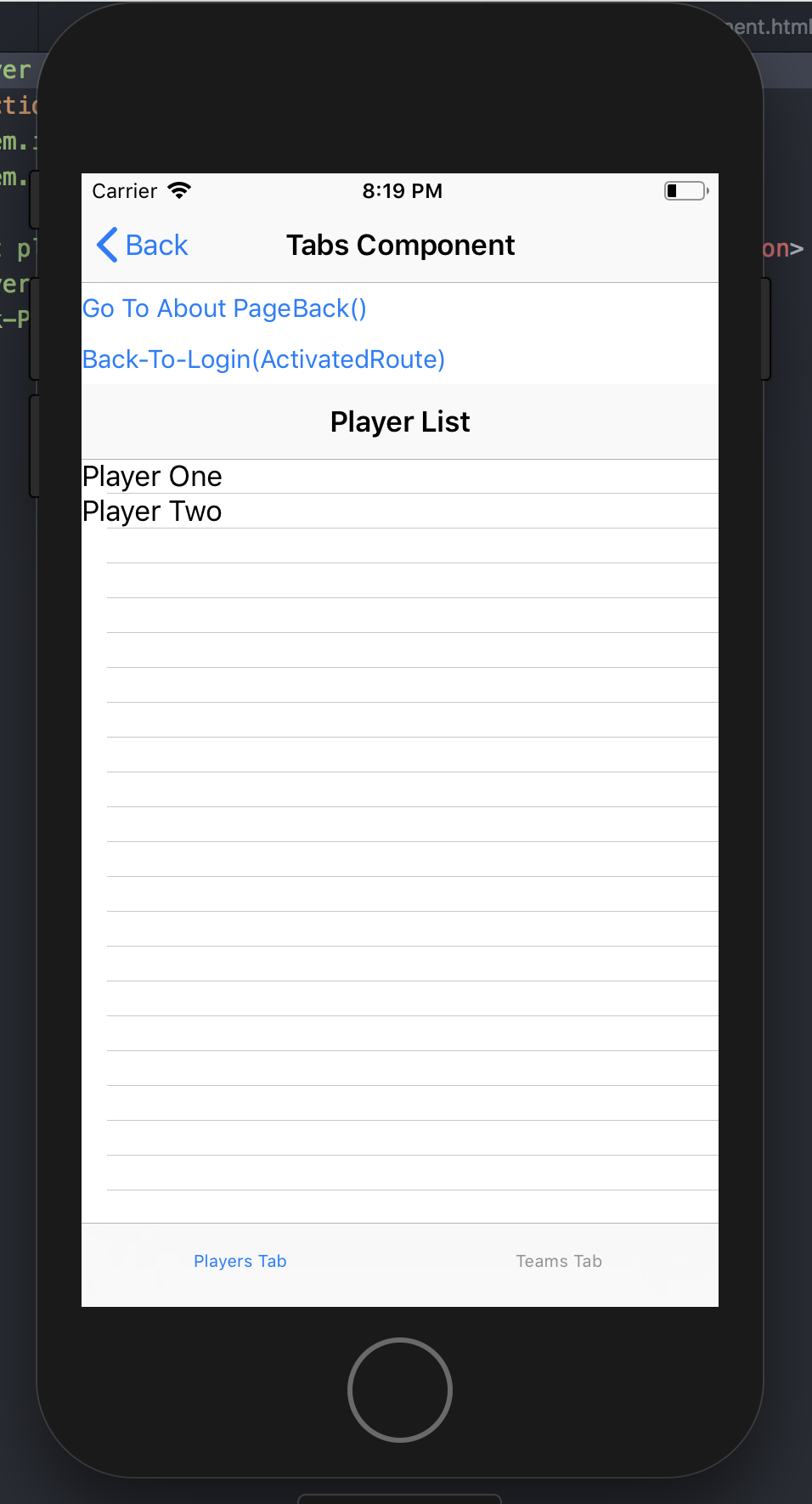
@ADjenkov your sample https://github.com/ADjenkov/login-tabs-ng functiionally works great! It's 95% there, but it looks like because of the nested page-router-outlet's you end up with two actionbars.
Any ideas to fix this? Screenshot attached:
tskweres
on 15 Nov 2018
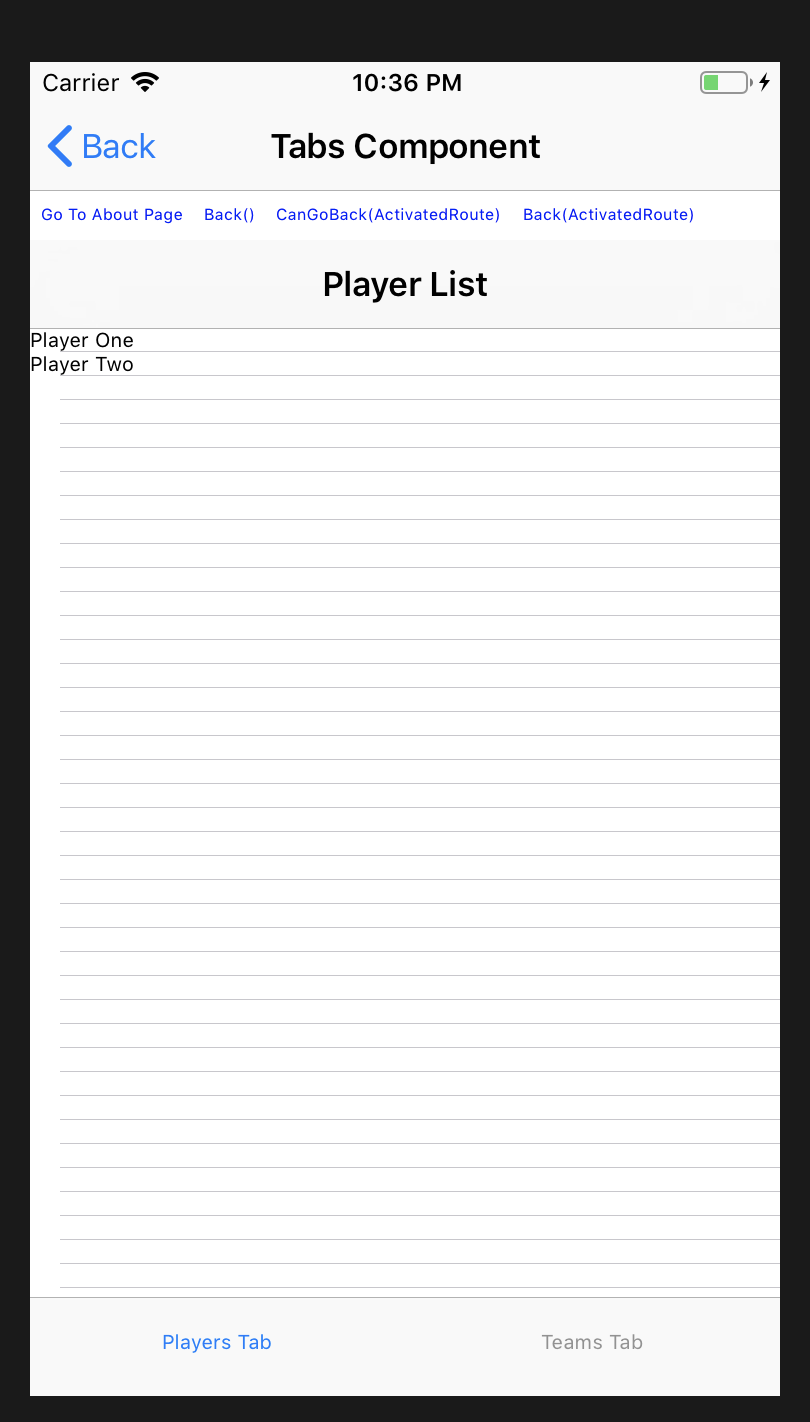
@ouss4m4 similar issue to above, I got the nativescript-angular/e2e/nested-router-tabview working, but it has two actionbars on the tabs page. Any idea what's causing this?
tskweres
on 15 Nov 2018
Solved, silly me. Just add visibility hidden to the parent actionbar:
<ActionBar title="Tabs Component" class="action-bar" visibility="hidden"></ActionBar>
tskweres
on 15 Nov 2018
Hi @tskweres,
We are not hiding any nested pages ActionBars automatically, since it is not clear which one should be visible. It's possible that the app scenario requires some nested page ActionBar to be visible for example.
There are a couple of ways that could be used to hide the actionBar. One of them is pretty new and it was inspired by this "Nested page router outlet" feature. You can now set actionBarVisibility="never" property directly on the <page-router-outlet> in order to hide the ActionBar of any page navigated in this <page-router-outlet>:
<page-router-outlet name="nested" actionBarVisibility="never"></page-router-outlet>
ADjenkov
on 15 Nov 2018
cant seem to make it work in latest version.
"tns-core-modules": "~5.0.2"
"nativescript-angular": "~7.0.0"
 seveneye
on 26 Nov 2018
seveneye
on 26 Nov 2018
Is it possible to make this
- PRO
- Login
- Tabs
- - - PRO: Tab 1 Master --> Tab 1 Detail
- - - PRO: Tab 2 Master --> Tab 2 Detail
- CustomComponent
- - - PRO
seveneye
on 27 Nov 2018
@MartoYankov so there's no way to run this feature with lazy loaded modules in an angular code shared project currently?
It would be quite useful to have a disclaimer somewhere in code sharing docs that one is getting into a beta state project there and some basic functionality would not be supported.
 artu-ole
on 27 Nov 2018
artu-ole
on 27 Nov 2018
@seveneye Yes, this should be possible. Take a look at this demo project - https://github.com/ADjenkov/login-tabs-ng.
@artu-ole I'm not sure where you got this from. The angular code sharing project should be working fine with lazy loaded modules with tns run <platform> --bundle as it is documented.
What currently doesn't work is any {N} NG project with lazy loaded modules with the tns preview --bundle command. The tsn preview --bundle command is in beta state and this is pointed in the docs.
If you are having trouble with running an angular code sharing project, please open a new issue.
MartoYankov
on 27 Nov 2018
@MartoYankov just lazy modules work a-okay. Lazy modules through page-router-outlet in a shared project - not so much. This feature is probably not the culprit, so I've created the issue with my troubles running all of this together: https://github.com/NativeScript/nativescript-angular/issues/1635
artu-ole
on 27 Nov 2018
Not sure if this is the place to write this - but does anyone know how to customize the tabs and make custom elements and designs? I find the tabs support and styling pretty bare-bones
tskweres
on 27 Nov 2018
@tskweres We are aware of this and we are currently looking into ways to provide more customization to the TabView component. Currently, only the native TabBar is available.
This issue has diverged significantly from its original purpose. The feature is already released and any issues related to it should be logged as separate ones, so that we can handle it appropriately. I will lock this conversation now.
MartoYankov
on 28 Nov 2018
Related issues
 bhavincb
·
3Comments
bhavincb
·
3Comments
 dxshindeo
·
3Comments
dxshindeo
·
3Comments
 okmttdhr
·
3Comments
okmttdhr
·
3Comments
 triniwiz
·
3Comments
manojdcoder
·
3Comments
triniwiz
·
3Comments
manojdcoder
·
3Comments
Most helpful comment
@IAMtheIAM @Bolhy10 @manojdcoder @YvesCandel thank you guys for your feedback. Indeed, we are aware that this feature is highly desirable and we are planning it for the next release of
nativescript-angular. We will post all related updates here.