Nativefier: [regression-9.0.0] TypeError: Cannot read property 'show' of undefined
Website: https://web.hike.in/
Error:
Uncaught Exception:
TypeError: Cannot read property 'show' of undefined
at App.
at App.emit (events.js:223:5)
 kerketta
All 11 comments
I am experiencing the same issues. Have tried on multiple websites.
 TheQureshi
on 26 Jun 2020
TheQureshi
on 26 Jun 2020
+1
 sesteva
on 29 Jun 2020
sesteva
on 29 Jun 2020
Same issue with me
 jihadaj
on 30 Jun 2020
jihadaj
on 30 Jun 2020
I had this issue in MacOS Mojave. I manage to solve it by uninstalling nativefier. Then, I updated my brew packages (which may have updated npm), then I updated my npm pacakges by running
npm -g update
And finally I reinstalled nativefier. Hope this is useful.
 psa-anddev
on 2 Jul 2020
psa-anddev
on 2 Jul 2020
I also had the issue described by @kerketta
I followed the steps outlined by @psa-anddev but then got
_Uncaught Exception:
Error: Image could not be created from /Users/....app/Contents/Resources/app/icon.png
at Object.createMainWindow (/Users/....app/Contents/Resources/app/lib/webpack:/src/components/mainWindow.ts:105:22)
at App.
at App.emit (events.js:223:5)_
I create the icon.png file inside the app bundle Contents/Resources/app/ and now it launches fine
 SSStechnical
on 13 Jul 2020
SSStechnical
on 13 Jul 2020
Hi everybody. If @SSStechnical is right and seeing these two issues popped up at the same time, this issue is correlated to https://github.com/jiahaog/nativefier/issues/992 , which I fixed with Nativefier 9.1.0.
With that, closing, please shout if I'm wrong and the issue persists in 9.1.0, I will re-open the issue and give it a second look. Thanks!
 ronjouch
on 18 Jul 2020
ronjouch
on 18 Jul 2020
@ronjouch 👋 I think this issues still exists:
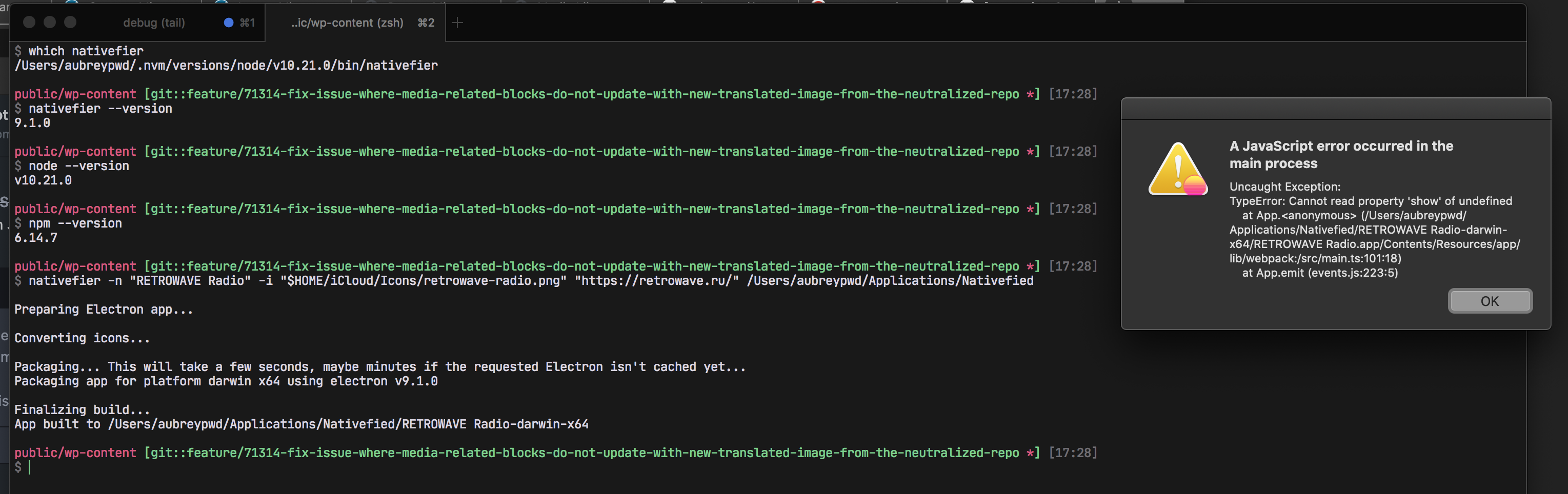
which nativefier
/Users/aubreypwd/.nvm/versions/node/v10.21.0/bin/nativefier

public/wp-content [git::feature/71314-fix-issue-where-media-related-blocks-do-not-update-with-new-translated-image-from-the-neutralized-repo *] [17:28]
$ nativefier --version
9.1.0

public/wp-content [git::feature/71314-fix-issue-where-media-related-blocks-do-not-update-with-new-translated-image-from-the-neutralized-repo *] [17:28]
$ node --version
v10.21.0

public/wp-content [git::feature/71314-fix-issue-where-media-related-blocks-do-not-update-with-new-translated-image-from-the-neutralized-repo *] [17:28]
$ npm --version
6.14.7

public/wp-content [git::feature/71314-fix-issue-where-media-related-blocks-do-not-update-with-new-translated-image-from-the-neutralized-repo *] [17:28]
$ nativefier -n "RETROWAVE Radio" -i "$HOME/iCloud/Icons/retrowave-radio.png" "https://retrowave.ru/" /Users/aubreypwd/Applications/Nativefied

Preparing Electron app...

Converting icons...

Packaging... This will take a few seconds, maybe minutes if the requested Electron isn't cached yet...
Packaging app for platform darwin x64 using electron v9.1.0

Finalizing build...
App built to /Users/aubreypwd/Applications/Nativefied/RETROWAVE Radio-darwin-x64

public/wp-content [git::feature/71314-fix-issue-where-media-related-blocks-do-not-update-with-new-translated-image-from-the-neutralized-repo *] [17:28]
 aubreypwd
on 6 Aug 2020
aubreypwd
on 6 Aug 2020
I also get:
Uncaught Exception:
Error: Image could not be created from /Users/aubreypwd/Applications/Nativefied/tlk.io-darwin-x64/tlk.io.app/Contents/Resources/app/icon.png
    at Object.createMainWindow (/Users/aubreypwd/Applications/Nativefied/tlk.io-darwin-x64/tlk.io.app/Contents/Resources/app/lib/webpack:/src/components/mainWindow.ts:105:22)
    at App.<anonymous> (/Users/aubreypwd/Applications/Nativefied/tlk.io-darwin-x64/tlk.io.app/Contents/Resources/app/lib/webpack:/src/main.ts:149:18)
    at App.emit (events.js:223:5)
Sometimes on some apps.
aubreypwd
on 6 Aug 2020
@aubreypwd when does this happen? On startup? On clicking the dock? A precise description, or screencast, would be extra helpful.
ronjouch
on 6 Aug 2020
Funnily enough after a restart and re-running it appears to be working again? I wonder if some cached version of Electron was the issue? Essentially I had checked out the latest version, made a new app and I was getting the above issues. I downgraded and tried again to get the same errors, then upgraded back and it persisted. But over the weekend I had restarted my machine and I opened the app and it worked! Not sure ¯\_(ツ)_/¯
aubreypwd
on 10 Aug 2020
Funnily enough after a restart and re-running it appears to be working again? I wonder if some cached version of Electron was the issue? Essentially I had checked out the latest version, made a new app and I was getting the above issues. I downgraded and tried again to get the same errors, then upgraded back and it persisted. But over the weekend I had restarted my machine and I opened the app and it worked! Not sure ¯\_(ツ)_/¯
@aubreypwd alright, thanks for responding 🙂. Closing again, if it happens again please shout with as much details as possible (steps to reproduce, screenshots/screencasts, logs, all the things). I'd bet it will happen again, though, I don't see why the rebuild/restart would have fixed it. Time will tell!
MOST IMPORTANT THING: I fixed your kamoji! On github you need to ¯\\\_(ツ)_/¯ else you break its left arm 😱
ronjouch
on 10 Aug 2020
Related issues
 DougBeney
·
5Comments
DougBeney
·
5Comments
 desimaniac
·
4Comments
desimaniac
·
4Comments
 mklaber
·
5Comments
mklaber
·
5Comments
 vegbrasil
·
4Comments
vegbrasil
·
4Comments
 toddself
·
5Comments
toddself
·
5Comments