Multi-account-containers: [Feature Request] Add hotkeys for opening diffrent types of tabs.
Enable the user to set hotkeys to open diffrent tabs, eg:
Ctrl + Shift + W for a work tab
Ctrl + Shift + P for a personal tab
This would make it easier to manage how your tabs open.
 ThisUserIsEpic2
All 14 comments
Yes, this is an extremely needed feature.
 rahulshw
on 10 Jan 2018
rahulshw
on 10 Jan 2018
We released 5.0.1 yesterday which includes more keyboard shortcuts to open container tabs. Please check https://github.com/mozilla/multi-account-containers/pull/992#issuecomment-346135625 to see if the helps.
 groovecoder
on 10 Jan 2018
groovecoder
on 10 Jan 2018
Trying to move from Chrome here. My workflow:
- Find the window with the profile I want to use.
- Hit Ctrl+T
While playing with Multi-Account containers today, I was hoping to get that same workflow, or similar workflow, which the original suggestion can facilitate with custom hotkeys.
 SnoFox
on 1 Feb 2018
SnoFox
on 1 Feb 2018
I'd love to set one container as "default" – so that Ctrl+T opens this kind of container instead of a "default-tab".
 Nudin
on 6 Apr 2018
Nudin
on 6 Apr 2018
Mac users only
Actually Mac has integrated shortcut internally. Since New Container Tab is a part of the menu bar File -> New Container Tab -> Container Name. We can use System Preference -> Keyboard -> App Shortcuts to create a keyboard shortcut anyway we want.
Like this
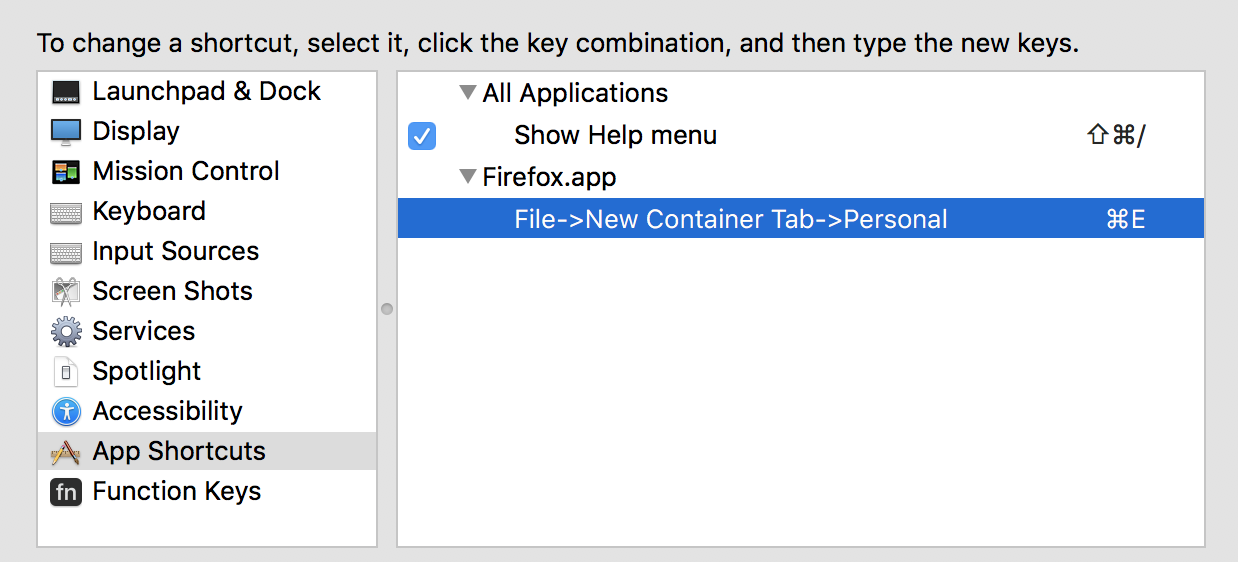
Actually Command + E is not working, but Command + Shift + E works, dunno why
 sparklesam
on 19 Apr 2018
sparklesam
on 19 Apr 2018
After a weeks using the amazing addon containers, it faults keyboard shortcuts to:
- hide container tabs
- show container tabs
- define wich container is this tab (plus button)
...
 zefilipe
on 23 Jul 2018
zefilipe
on 23 Jul 2018
Methinks the current tab container should dictate the container of the new tab, no?
Glad to see this is an issue being actively discussed!
 fooditron
on 24 Aug 2018
fooditron
on 24 Aug 2018
Just wanted to second @fooditron: 99% of the time it would be what I want if Command-T opened a tab using the same container as the one which had focus when I hit the hotkey.
 acdha
on 19 Sep 2018
acdha
on 19 Sep 2018
Looks like this suggestion from @ThisUserIsEpic2 hasn't gained any attention but this has been something I've been hoping for. I tend to use keyboard shortcuts to operate and ctrl+t opening a tab outside of a container isn't ideal, especially when the option _"Select a container for each new tab"_ is set.
-- BVS
 bettyvschmartz
on 23 Nov 2020
bettyvschmartz
on 23 Nov 2020
You can press Ctrl + . and then a number (1 for personal, 2 for work, etc.) to open a given container type.
 nikaro
on 23 Nov 2020
nikaro
on 23 Nov 2020
I highly recommend the Easy Container Shortcuts Add-on. I've been using it for a year now.
How it works:
to open a new container tab: CTRL + SHIFT + NumberRow
to switch containers: ALT + CTRL + NumberRow
fooditron
on 23 Nov 2020
You can press
Ctrl + .and then a number (1for personal,2for work, etc.) to open a given container type.
Sure, I mentioned this in issue #462
bettyvschmartz
on 23 Nov 2020
I highly recommend the Easy Container Shortcuts Add-on. I've been using it for a year now.
How it works:
to open a new container tab: CTRL + SHIFT + NumberRow
to switch containers: ALT + CTRL + NumberRow
I'd prefer something native from Mozilla for this. Plus, a number of add-ons seem to need a lot of permissions.
-- BVS
bettyvschmartz
on 23 Nov 2020
So would I. But this has been an acceptable substitute for me.
fooditron
on 23 Nov 2020
Related issues
 goodevilgenius
·
3Comments
goodevilgenius
·
3Comments
 skank
·
3Comments
skank
·
3Comments
 ericlathrop
·
3Comments
ericlathrop
·
3Comments
 brettcurrie346
·
3Comments
brettcurrie346
·
3Comments
 jnachtigall
·
5Comments
jnachtigall
·
5Comments
Most helpful comment
Yes, this is an extremely needed feature.