Multi-account-containers: Accessibility issue: need color universal design
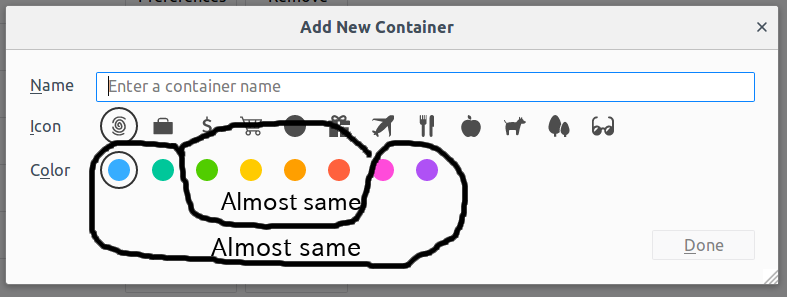
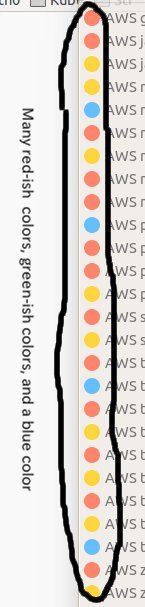
The color scheme has changed on Firefox 57, and it became harder to distinguish each container's color.
There are eight colors in the new scheme. For me, it looks like as if there were two types of colors in it: blue-ish and red-ish. What is worse, a red-ish color sometimes looks like a green-ish color. And each color starts to change its own color at its own pace. I have to gaze and concentrate just to find the desired color.
I'm a typical color blind person. And I know there are better color schemes to handle the issue. I hope this issue is fixed on the following release.
 harai
harai
All 14 comments
I second this!
Let the user modify the HEX/RGB values for the (8) possible container colors.
If that's not possible, at least change the 8 colors to the ones defined in Set of colors that is unambiguous both to colorblinds and non-colorblinds.
 WimSKW
on 21 Mar 2018
WimSKW
on 21 Mar 2018
Seconded.
 vibhas77
on 10 Apr 2018
vibhas77
on 10 Apr 2018
Hi, can I take this on as an issue for Outreachy? @groovecoder
 jcjiang
on 1 Oct 2018
jcjiang
on 1 Oct 2018
@jcjiang these colours are set in the code within Firefox. Even though the extension can present them to the user most of the code comes from Firefox. I'm not sure this is a good first bug for outreachy given the complexity.
 jonathanKingston
on 2 Oct 2018
jonathanKingston
on 2 Oct 2018
@maxxcrawford this is the one I'm currently looking at.
This is the PR (or whatever it's called in Phabricator) that shows you where the files that define and use the colors are. https://phabricator.services.mozilla.com/D39972
I like your idea of letting the user choose if they would like to switch to CUD colors. I would have to add that to both MAC and Firefox. I will look at it for a few days and see if I think it's doable in my timeframe. Let me know if you think this is too much. Thanks!
 kendallcorner
on 3 Oct 2019
kendallcorner
on 3 Oct 2019
also @groovecoder
kendallcorner
on 3 Oct 2019
Link to the Mozilla-Central issue: https://bugzilla.mozilla.org/show_bug.cgi?id=1586960
kendallcorner
on 8 Oct 2019
@maxxcrawford
We discussed having these colors turn on if the browser is in high contrast mode. The browser has a flag it uses in high contrast mode, but the extension has no way of knowing this, so I think the best option is this: https://stackoverflow.com/questions/55241841/high-contrast-mode-on-mozilla-browser. I've tested this and it looks like it works if the user lets FF override colors always or with high contrast themes.
After that, I can just add a class to the icon elements that switches to the accessible colors (with the same color names in the CSS). I will also need to do something very similar in mozilla-central (mostly just CSS changes).
How does that sound?
kendallcorner
on 11 Oct 2019
@kendallcorner
High contrast mode and accessible colors can both help people with some form of impaired vision, but they serve very different purposes. A colorblind person typically does NOT use high contrast mode and people who use high contrast mode are typically not colorblind.
So automatically using accessible colors in high contrast mode does not sound as a good idea to me.
If one can toggle the use of accessible colors, they can choose to switch it on in high contrast mode or not. Don't do it automatically; leave the choice to the user.
WimSKW
on 12 Oct 2019
Yes, this is what I was afraid of.
kendallcorner
on 14 Oct 2019
@kendallcorner Marking this issue as unassigned for now.
 maxxcrawford
on 15 Oct 2019
maxxcrawford
on 15 Oct 2019
@maxxcrawford I just can't let it go, though ...
kendallcorner
on 16 Oct 2019
@kendallcorner I just found the gif: https://bugzilla.mozilla.org/attachment.cgi?id=9099901 that you put in https://bugzilla.mozilla.org/show_bug.cgi?id=1586960. That's perfect! If you could implement it like that, I would be very happy.
Reading further in the bug comments, I'm afraid that that suggestion by @mixedpuppy to create a complete "colorblind" theme is overkill and completely unnecessary. I don't have a problem with the overall theme colors. It's just the colors in the Multi-Account Containers extension (that I use a lot) so I think the colors should be user-selectable there. Small detail: I would prefer to put the check box on the main window of the extension (that appears when you click the icon -with the three squares and the plus sign- next to the menu) and also in about:preferences#containers, rather than in the Add New Container window.
WimSKW
on 17 Oct 2019
Thanks for the feedback @WinSKW. Unfortunately we're not going to implement it like that, because that required an API just for this, and the firefox team doesn't want an API just for this very specific issue, which makes sense.
Current plan is to allow a theme extension to alter these colors in firefox itself. Currently this is not possible, so I am sending them a theme proposal (or theme experiment). I'll share my repo when that is up. The theme experiment would be usable right away in Developer and Nightly Firefox editions, and if the proposal is accepted, a theme at addons.mozilla.org would eventually be put into general release, or we might be able to put the color changes directly into Multi Account Containers.
The theme experiment will change the colors in Firefox for the tabs and icons. Additional changes will be needed in MAC to detect a theme like this and change the MAC colors as needed. I'm working on that when I have time. I have it mostly working, so maybe soon!
kendallcorner
on 18 Oct 2019
Related issues
 o-l-a-v
·
4Comments
o-l-a-v
·
4Comments
 fire9901
·
3Comments
fire9901
·
3Comments
 budhajeewa
·
4Comments
budhajeewa
·
4Comments
 emyarod
·
3Comments
emyarod
·
3Comments
 nekromoff
·
3Comments
nekromoff
·
3Comments
Most helpful comment
I second this!
Let the user modify the HEX/RGB values for the (8) possible container colors.
If that's not possible, at least change the 8 colors to the ones defined in Set of colors that is unambiguous both to colorblinds and non-colorblinds.