Multi-account-containers: Can't login to imgur
I click on the Google button. A new tab opens detailing what account details imgur can see. Once I confirm the new tab closes but nothing else happens.
 ruipacheco
All 9 comments
Have you assigned google.com to a Container? Are you opening imgur from that Container?
Please provide more specific steps to reproduce.
 groovecoder
on 5 Dec 2017
groovecoder
on 5 Dec 2017
Google is assigned to my personal container. I try to open imgur from the same container.
ruipacheco
on 5 Dec 2017
@SoftVision-EmilPasca - can you help us reproduce this? I was unable to reproduce it.
groovecoder
on 19 Dec 2017
Is there anything else I can do to provide diagnostics? At this point I can't login to anything that uses Google OAuth.
ruipacheco
on 19 Dec 2017
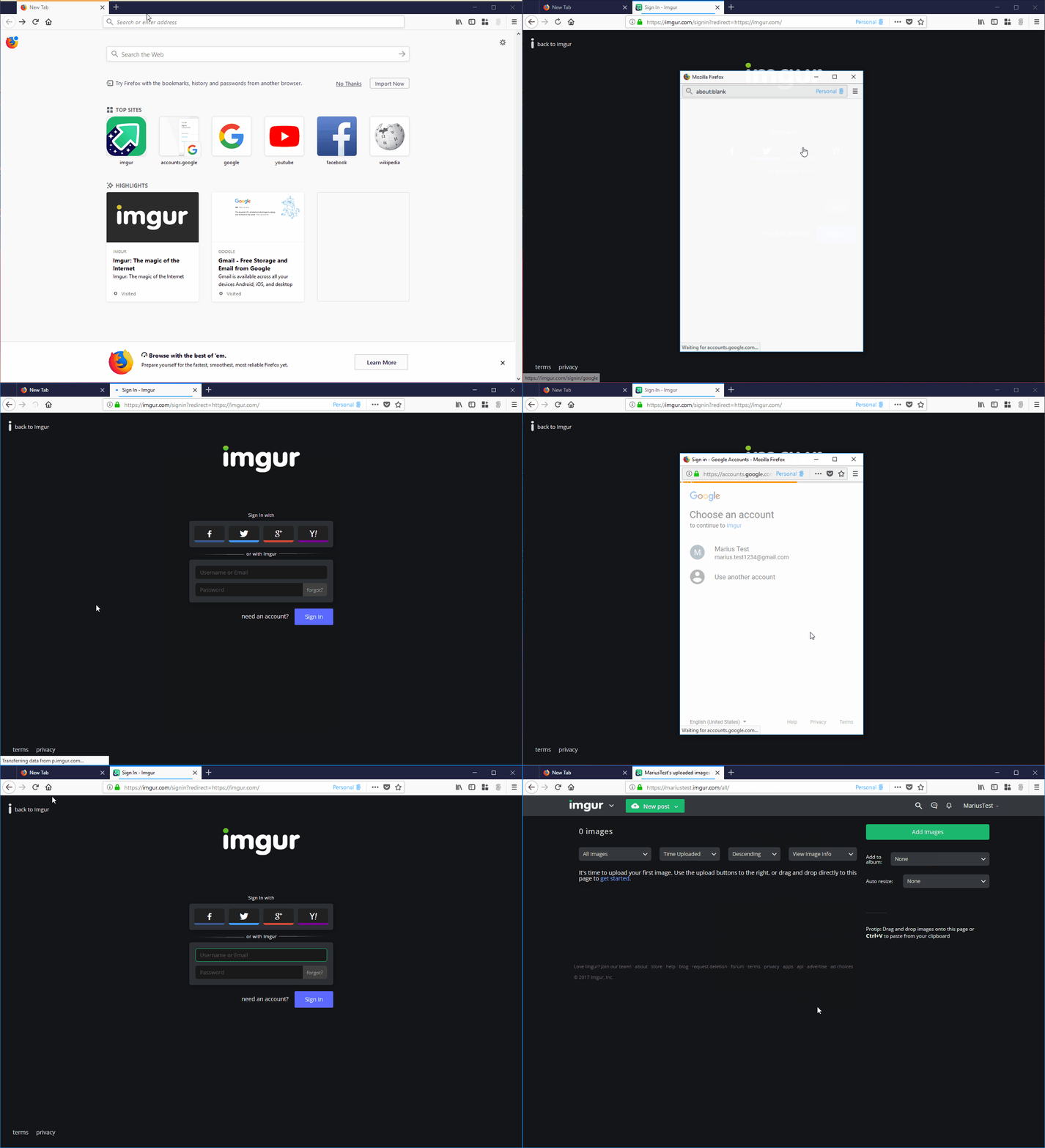
I have managed to reproduce the issue using the following STR:
[Prerequisites]:
- Have a Firefox profile with the latest "Multi-Account Containers" add-on version 4.1.0 installed.
- Have the "Gmail" domain assigned to a container (e.g. Personal).
[Steps to reproduce]:
- Open the browser with the profile from prerequisites.
- Open a "Personal" container tab and navigate to https://imgur.com/signin?redirect=https://imgur.com/.
- Click the "Google" button from the "Sing in" page.
- Select your Google account and then click on the "Allow" button.
[Actual result]:
- You are not logged in and the "Imgur - Sing In" page is still displayed.
However, after following the STR if you refresh the page, you are automatically redirected to the Imgur homepage and you are correctly logged.
@ruipacheco can you please look over the STR and confirm if this is the issue that are you encountering on? Also, what happens in your case if you refresh the page after you try to log in?
[Notes]:
- Attached a screen recording of the issue:
 Softvision-MariusComan
on 20 Dec 2017
Softvision-MariusComan
on 20 Dec 2017
This thing is totaly broken on my side. Can't use it anymore...
 litrax
on 15 May 2018
litrax
on 15 May 2018
Can't use it to create an account on https://www.indiehackers.com/
ruipacheco
on 19 May 2018
I got the same problem on imgur.com, but I am not using multi-account-containers.
Same procedure as in Marius Comans' screen recording, except, that I don't get a prompt to allow anything and I'm not logged in, after reloading the page.
 stubbornGarrett
on 22 Aug 2019
stubbornGarrett
on 22 Aug 2019
(deleted my comment, as it turned out to be caused by Privacy Badger, not Multi Account Containers, apologies for the spam)
 adamalton
on 26 Feb 2020
adamalton
on 26 Feb 2020
Related issues
 anbenson
·
3Comments
anbenson
·
3Comments
 coot
·
3Comments
coot
·
3Comments
 jnachtigall
·
5Comments
jnachtigall
·
5Comments
 fire9901
·
3Comments
fire9901
·
3Comments
 bcb44
·
4Comments
bcb44
·
4Comments
Most helpful comment
I got the same problem on imgur.com, but I am not using multi-account-containers.
Same procedure as in Marius Comans' screen recording, except, that I don't get a prompt to allow anything and I'm not logged in, after reloading the page.