Multi-account-containers: Can't login to Pocket
I've got a Container where I'm logged in to Gmail. Using the same container I navigate to getpocket.com and click on the button "Login with Google". This opens a new tab on the same container where I'm asked to select which Google account I want to use. I select the one and only I have and this causes login tab to spin seemingly eternally.
I can login to Pocket with other browsers, not with Containerized Firefox.
I'm on the latest Firefox running on the latest macOS. I also have Ghostery, uBlock, HTTPSEverywhere, Imagus, Switch Container and Toby.
 ruipacheco
All 13 comments
Can you try with other add-ons disabled?
 groovecoder
on 5 Dec 2017
groovecoder
on 5 Dec 2017
I tried this and 1025 with all add-ons disabled except for the containers and did not help.
ruipacheco
on 5 Dec 2017
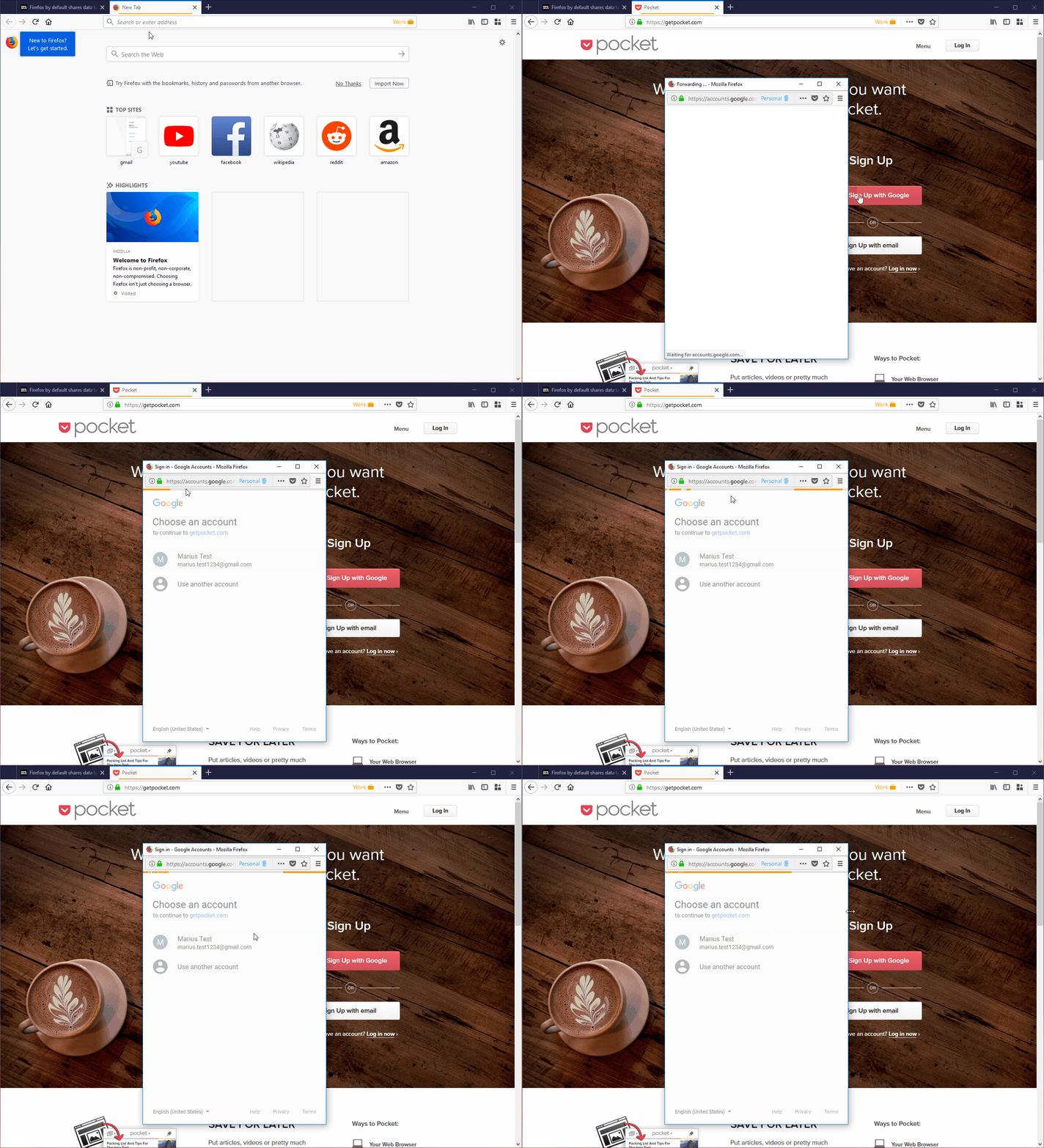
I have managed to reproduce the issue using the following STR:
[Prerequisites]:
- Have a Firefox profile with the latest "Multi-Account Containers" add-on version 4.1.0 installed.
- Have the "Gmail" domain assigned to a container (e.g. Personal) and the "Remember my decision for this site" option checked.
- Have "https://getpocket.com/" assigned to another container (e.g. Work).
[Steps to reproduce]:
- Open the browser with the profile from prerequisites.
- Open a "Work" container tab and navigate to "https://getpocket.com/".
- Click the "Sign Up with Google" and select your account.
[Actual result]:
- The loading animation from the "Sign in - Google accounts" pop-up enter in a loop and you will not be logged.
[Notes]:
- Attached a screen recording of the issue:
 Softvision-MariusComan
on 20 Dec 2017
Softvision-MariusComan
on 20 Dec 2017
Have "https://getpocket.com/" assigned to another container (e.g. Work).
Just to clarify, this happens when both accounts are on the same container too.
ruipacheco
on 20 Dec 2017
Experiencing this issue as well.
Unable to get Pocket save button to work, when trying to save from 'Personal' container.
Pocket is opened in same 'Personal' container.
 christopherhex
on 1 Aug 2018
christopherhex
on 1 Aug 2018
I encountered a similar problem when signing in with email. I don't get the spinning login page, but I do find the Firefox doesn't remember my Pocket login and clicking the icon in the address bar always prompts me to sign in.
The only workaround I've found is to temporarily disable containers, sign in, and then re-enable containers. The plugin then works as expected, and across different containers too.
 lildude
on 4 Sep 2018
lildude
on 4 Sep 2018
and across different containers too.
Which is what is not supposed to happen with containers.
ruipacheco
on 4 Sep 2018
Reproduce it too after enabled multi-containers.
 onetuser
on 18 Sep 2018
onetuser
on 18 Sep 2018
Barging in the conversion after almost a year, I am having same issue, not just with pocket, but many other services.
For example, I can't login to disqus with my twitter account, I have twitter container. I can never login to dbdiagram.io which turned out not a problem from their end but my end because I am using google container.
I tried login after disabling all my addons, And was able to login to these services.
Additional problem with disqus is that for some reason, I have to login to disqus on every other blog that uses it. For example I logged in to disqus at omgubuntu, but when I am on some other blog which uses disqus for comments, I need to login again. Which means I need to disable addons, and login and reenable addons.
 Abhinav1217
on 31 Jul 2019
Abhinav1217
on 31 Jul 2019
My solution to the pocket issue was to log in via the "no container" container. I might have had to set pocket to use that by default, can't remember.
 kyounger
on 31 Jul 2019
kyounger
on 31 Jul 2019
I should have been more clear, My issue isn't with pocket specifically, But It is with using social login on any service. For example, I use twitter login on disqus, facebook login on multiple news sites, google login on multiple dev sites, etc. I have separate containers for all these social services.
So for example I am on someone's blog, and I want to add a comment on the post, and comments are managed by disqus widget. I need to disable container, to login with twitter. And maybe because of cors, If I am on a different blog, I need to login to disqus there too.
@kyounger Can you elobrate on no-container? I can't find an option for a no-container container on the addons setting. Is it possible to separate container for login via oauth ?
Abhinav1217
on 1 Aug 2019
@Abhinav1217 The workaround to this is to disable Always open in X for the Twitter domain. So in those instances, the necessary cookies remain in the container that initiated the login.
Regards
 lhorace
on 5 Aug 2019
lhorace
on 5 Aug 2019
I encountered a similar problem when signing in with email. I don't get the spinning login page, but I do find the Firefox doesn't remember my Pocket login and clicking the icon in the address bar always prompts me to sign in.
The only workaround I've found is to temporarily disable containers, sign in, and then re-enable containers. The plugin then works as expected, and across different containers too.
Disable add-on "Firefox Multi-Account Containers" AND, if use, "Simple Tab Groups" or all add-on that use firefox's container...
 anankee26
on 26 Feb 2020
anankee26
on 26 Feb 2020
Related issues
 coot
·
3Comments
coot
·
3Comments
 bcb44
·
4Comments
bcb44
·
4Comments
 budhajeewa
·
4Comments
budhajeewa
·
4Comments
 goodevilgenius
·
3Comments
goodevilgenius
·
3Comments
 jnachtigall
·
5Comments
jnachtigall
·
5Comments
Most helpful comment
I encountered a similar problem when signing in with email. I don't get the spinning login page, but I do find the Firefox doesn't remember my Pocket login and clicking the icon in the address bar always prompts me to sign in.
The only workaround I've found is to temporarily disable containers, sign in, and then re-enable containers. The plugin then works as expected, and across different containers too.