Multi-account-containers: Lost my created containers
After reboot nightly today, custom Containers disappeared from the list, and now only standard appear. My custom Containers were converted to the "standard one" with the same Color and Icon (but different name)
58.0a1 (2017-11-10) (64-bits) on Manjaro Linux (but installed through tar.gz downloaded from Mozilla's website). Multi-Account Containers addon: 4.0.3
 deimidis
All 76 comments
Same here. All my containers gone. I didn't even get a conversion, just the basic four you start with.
 drod3763
on 10 Nov 2017
drod3763
on 10 Nov 2017
Can also confirm.
I tried re-creating them but they get lost on each restart.
 TheSweetLily
on 11 Nov 2017
TheSweetLily
on 11 Nov 2017
same on macOS 10.12.6 -- I didn't realize how bad I was hooked on them - withdrawal is not fun
 hwine
on 11 Nov 2017
hwine
on 11 Nov 2017
Chiming in with 58.0a1 (2017-11-10) (64-bits) on Windows 10
@hwine same story here, love my container tabs.
 thurloat
on 11 Nov 2017
thurloat
on 11 Nov 2017
Same here, lost on each restart.
 btric-development
on 11 Nov 2017
btric-development
on 11 Nov 2017
Same here, lost on each restart.
Can confirm this part as well.
Steps to reproduce, with latest Nightly (tested in 20171110100139 and 20171111100349) and Multi-Account Containers 4.0.3.
- Remove default containers.
- Create a few custom containers.
- Restart Nightly.
Result:
- containers created in step 2 are lost;
- tabs that were assigned to those containers are reopened in general context.
 fvsch
on 11 Nov 2017
fvsch
on 11 Nov 2017
User Agent: Mozilla/5.0 (Windows NT 6.3; Win64; x64; rv:58.0) Gecko/20100101 Firefox/58.0
Build ID: 20171111100349
I have experienced the same behavior with the last 2 nightly updates I have run.
Further Information:
The containers actually appear to be intact however the Manage Containers page is reset to the 4 defaults. If I add the 3 additional containers I utilize, then all of the state within them appear to still exist and their functionality is normal at that point. Also the labels don't matter at all, I renamed the 4 defaults however their state is carried over despite them reverting back to the original default names; it would seem that the containers are simply referenced by their array index.
Moreover, I use Cookie AutoDelete https://addons.mozilla.org/en-US/firefox/addon/cookie-autodelete/ which has container support and the results are the same here. The array position of the containers simply maps over despite whether they have been renamed (reset to defaults).
The underlying bug seems to simply be that the container label/icon settings are cleared out, however the underlying containers themselves still exist and make it through the nightly update.
 zaleb
on 11 Nov 2017
zaleb
on 11 Nov 2017
Are symptoms reproducible if you use Firefox (without the extension) to manage the containers?
 grahamperrin
on 12 Nov 2017
grahamperrin
on 12 Nov 2017
Are symptoms reproducible if you use Firefox (without the extension) to manage the containers?
Yes.
I reported it on bugzilla before knowing about this github (and the extension), and zaleb's comment was posted on that thread as well.
 rgamici
on 12 Nov 2017
rgamici
on 12 Nov 2017
I mentioned this in the Reddit thread regarding this:
For what it's worth, I'm not using Cookie-AutoDelete and my containers are fine. I have 14 individual containers and I'm using the Multi-Accounts Container addon. Nightly has updated.
On Linux and Windows 10.
I didn't mention, I deleted the default containers and just use my own.
Build ID: 20171111100349
 Radagast
on 12 Nov 2017
Radagast
on 12 Nov 2017
Looks like @Radagast is right. I tried disabling Cookie AutoDelete and restoring the old containers.json from backup. The containers are fine after restarting Nightly. After further testing it looks like the problem is Cookie AutoDelete "Enable Support for Firefox's Container Tabs" setting.
 rhssk
on 12 Nov 2017
rhssk
on 12 Nov 2017
Here's another data point. I'm running Nightly on Ubuntu 16.04.03. No Cookie AutoDelete extension installed.
After nightly updates itself, all my containers are gone and the defaults containers are only present. As others have noted, my session data is still present in the containers, because if I delete the default containers and recreate my containers with their original names again, I'm able to access my session data. However, the feature that catches your requests and asks you if you want to load the page in your specific container, doesn't work anymore. I need to open the container tabs first and then load the page.
 arashpayan
on 12 Nov 2017
arashpayan
on 12 Nov 2017
@rhssk Interesting; I tried to both disable CAD and just turn off the Containers support and my Containers are still resetting after each restart. When I have more time on my hands I will do a full test of all my addons but for now I don't think it is EXCLUSIVELY CAD causing the problem. Also, @rgamici would you mind linking your bugzilla report so I (and others) may follow it?
 cole-h
on 12 Nov 2017
cole-h
on 12 Nov 2017
I’m having this bug without Cookie Auto Delete (never used that extension).
But I do have Nightly set to forget cookies at the end of the session:
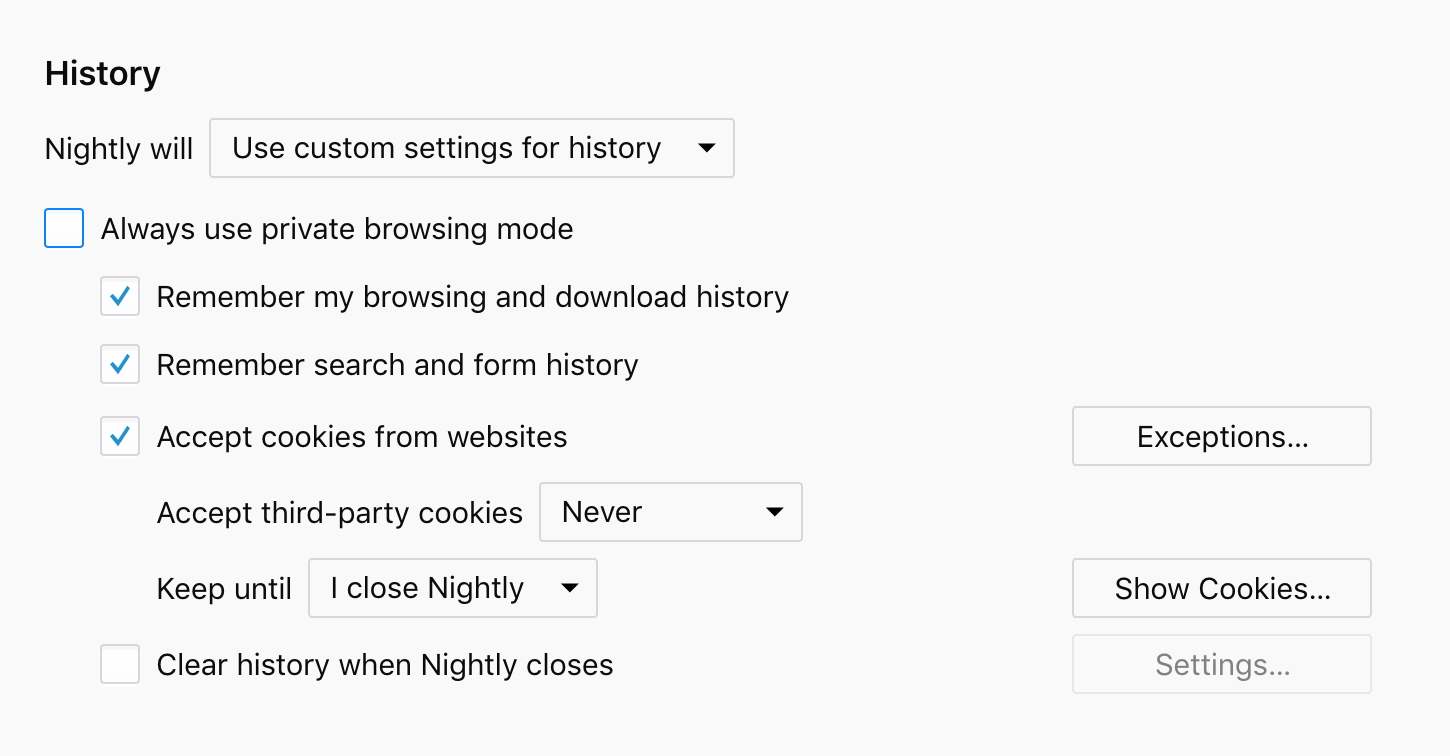
Perhaps relevant settings:
privacy.clearOnShutdown.cache;true
privacy.clearOnShutdown.cookies;true
privacy.clearOnShutdown.downloads;true
privacy.clearOnShutdown.formdata;true
privacy.clearOnShutdown.history;true
privacy.clearOnShutdown.offlineApps;false
privacy.clearOnShutdown.openWindows;false
privacy.clearOnShutdown.sessions;true
privacy.clearOnShutdown.siteSettings;false
Also can someone link to the relevant bugzilla bug(s)?
fvsch
on 12 Nov 2017
Referenced bugzilla bug:
https://bugzilla.mozilla.org/show_bug.cgi?id=1416468
but do note that the preferred workflow for containers bugs is via Github
 bunnybooboo
on 12 Nov 2017
bunnybooboo
on 12 Nov 2017
I perhaps should have mentioned that I block cookies and only allow a select few.
Radagast
on 12 Nov 2017
This has happened for each update I ran this weekend--two in total. All of my custom containers are gone, and the defaults are restored with their original color and icon.
Edit:
I've been using the default work container, so I didn't lose those, but I've noticed that I can click on its "Show this container" open even though it's already open, and it will duplicate all the tabs every time I click it. In other words, I can hit it fifty times, and if there were ten tabs in the container, that would open 500 tabs, 490 of which are duplicates. I should also note that this means I cannot hide containers anymore.
Edit2:
Now every time I close the browser and re-open it, my custom containers are gone and the originals are restored. This also means that if I delete the Work container with a bunch of tabs, that upon restarting the browser, the work container is restored, including all the tabs that were in it.
Containers are effectively broken.
 danemacmillan
on 12 Nov 2017
danemacmillan
on 12 Nov 2017
I can confirm that its reset upon each restart. This has made containers totally useless to me at this time.
drod3763
on 12 Nov 2017
I've been experiencing this as well for the past three days, and the issue is still present in the latest Nightly update (58.0a1 build 20171112100435).
 jaybaeta
on 13 Nov 2017
jaybaeta
on 13 Nov 2017
For me, it regressed between 20171105220721 and 20171112220346
 lissyx
on 13 Nov 2017
lissyx
on 13 Nov 2017
No CAD, never used it. Same thing. And just happened again on 58.0a1 (2017-11-12) (64-bit) 20171112220346. Sucks, cause I was using a custom container to isolate Facebook and now it's been dumped in with the rest of my tabs.
 shadowbottle
on 13 Nov 2017
shadowbottle
on 13 Nov 2017
For me, it started this weekend, and the last firefox update (59.0a1 20171113100232) didn't solve it.
Reproduce both on Windows and Linux versions.
 Kourai
on 13 Nov 2017
Kourai
on 13 Nov 2017
I have managed to reproduce this issue on Windows 10 x64, Ubuntu 14.04 x64, Mac 10.12.6 with the latest Nightly (58.0a1) build installed.
The issue is 100% reproducible if you have the "about:preferences#containers" page opened when you restart the browser.
However the issue is also reproducible without the "about:preferences#containers" page opened, but is intermittent.
To reproduce the issue please use the following STR:
[Prerequisites]:
- Have a Firefox profile with the latest "Multi-Account Containers" add-on version (4.0.3 custom built on 11.13.2017) installed.
- Have at least 1 custom container created.
[Steps to reproduce]:
- Open the browser with the profile from prerequisites
- Open the "about:preferences#containers" page.
- Restart the browser and observe the behavior.
[Expected result]:
- The custom containers are still displayed.
[Actual result]:
- Only the default containers are displayed.
[Regression window]:
Last good revision: 6d174f463c1a70aa68e4f2292bd0aee6297c4947
First bad revision: 31b7eb1946621744296146e50b719b326dde10c9
Pushlog:
https://hg.mozilla.org/integration/mozilla-inbound/pushloghtml?fromchange=6d174f463c1a70aa68e4f2292bd0aee6297c4947&tochange=31b7eb1946621744296146e50b719b326dde10c9
[Notes]:
- If you choose to delete the default containers, after restart they will be re-displayed.
- Attached a screen recording of the issue:
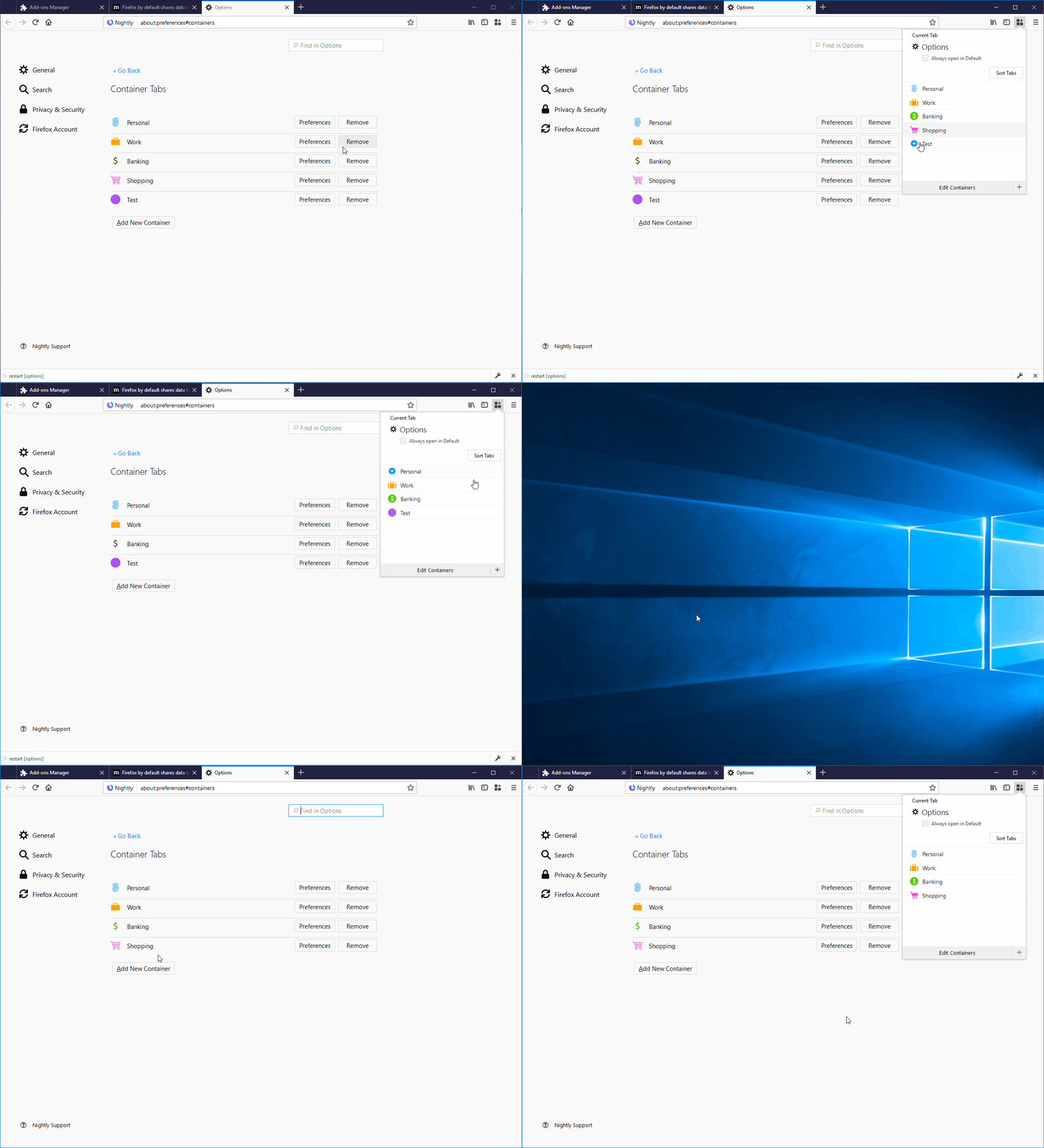
 Softvision-MariusComan
on 13 Nov 2017
Softvision-MariusComan
on 13 Nov 2017
@Softvision-MariusComan Also reproducible on Nightly 59 (as expected). Thanks for dealing with the STR, as the rest of us forgot.
cole-h
on 13 Nov 2017
@bakulf Looks like @Softvision-MariusComan did the mozregress before I could, and it's bug https://bugzilla.mozilla.org/show_bug.cgi?id=1347515 as you feared.
lissyx
on 13 Nov 2017
If anyone here needs a work-around until it's fixed, you can turn off session auto-restore and restore manually from the app menu on restart, the bug only occurs during auto-restore, I believe.
(But it should hopefully be fixed soonish)
 KwanEsq
on 13 Nov 2017
KwanEsq
on 13 Nov 2017
@KwanEsq That worked; many thanks! Only downside is all my default sites seem to have been forgotten.
cole-h
on 14 Nov 2017
IIRC this breakage happened somewhere between 20171109* and 20171110* as I update twice daily and use Nightly as my everyday browser. Not sure how to edit MozRegression persistence to preserve containers so can't be more helpful right now.
bunnybooboo
on 14 Nov 2017
Seems to be fixed in latest nightly. Older containers are lost, but new ones I added are there.
 xolve
on 14 Nov 2017
xolve
on 14 Nov 2017
@xolve same here
Worth mentioning that when I re-added the removed containers using the same names, I got my tabs back! better than nothing :-)
 bkatbeh
on 14 Nov 2017
bkatbeh
on 14 Nov 2017
any recovery path to get the config back? I had a lot of tabs configured in different containers and all this is gone... :-/
 staabm
on 14 Nov 2017
staabm
on 14 Nov 2017
@staabm if you mean existing tabs, they are still in their containers, they just don't have styling. If you recreate the containers, they will be styled again. Try and recreate containers in the same order though, otherwise tabs won't be in the container you expect. Although you can just create containers one at a time, see which tabs are in them, then rename them appropriately. (The tab bar styling won't initially return though, you'll have to check the address bar)
If you mean the "Always open in ${container}" settings for different domains, I'm afraid those are gone, and I do not think retrievable.
KwanEsq
on 14 Nov 2017
I just restarted to the latest nightly update, and my containers remained intact. I tested 2 default pages and they both correctly redirected to their appropriate container.
Thank you so much for the speedy fix! :)
arashpayan
on 15 Nov 2017
@staabm AFAIK containers and their properties are stored in containers.json file. "Always open in X" settings are found in browser-extension-data/@testpilot-containers/storage.js file. In my case updating Nightly to the newest version and restoring both files from backup were enough.
rhssk
on 15 Nov 2017
@rhssk does FF automatically create backups of this files when updating major versions or did you have backups on your own of this things?
staabm
on 15 Nov 2017
@staabm Don't think so, I used my own backups. Might be useful for you or somebody else but on Linux it's fairly easy to automate profile backups before upgrading Nightly with a package manager. For example, alpm-hooks for Arch Linux and DPkg::Pre-Invoke for Debian.
rhssk
on 15 Nov 2017
Should be fixed by https://github.com/mozilla/multi-account-containers/commit/a7be3c9935ac42469a1030c3714c656d6e6d0948 in the latest 4.1.0 release. It's available here on GitHub and in the review queue on AMO now.
 groovecoder
on 16 Nov 2017
groovecoder
on 16 Nov 2017
Same issue again after updating nightly to the latest version! I lost the custom containers, but after adding them and restart the browser all is fine!
bkatbeh
on 4 Dec 2017
yep, this has happened again...
 kubrickfr
on 4 Dec 2017
kubrickfr
on 4 Dec 2017
Hmm ... re-opening for @jonathanKingston and/or @bakulf.
groovecoder
on 4 Dec 2017
@bkatbeh @kubrickfr Can you document more which update you are on? With 20171203220339 I have no issue (nightly/linux).
lissyx
on 4 Dec 2017
@lissyx 20171204100103 for me, on linux
kubrickfr
on 4 Dec 2017
I just upgraded to 20171204100103 and my containers are not lost ; session restore broke, however, I had to revive file upgrade.jsonlz4* from sessionstore-backups.
lissyx
on 4 Dec 2017
Could these recent problems be related to https://bugzilla.mozilla.org/show_bug.cgi?id=1419591 ?
cole-h
on 4 Dec 2017
@lissyx 20171204100103 on Mac
bkatbeh
on 4 Dec 2017
@SoftVision-EmilPasca - can you reproduce this on latest Nightly with latest Containers add-on installed?
groovecoder
on 5 Dec 2017
I had tested this issue on Windows 10 x64, Mac 10.12 and Ubuntu 14.04 x64 with the latest Nightly (59.0a1-20171205220055) and the latest Multi-Account Containers (4.1.0) and haven't managed to reproduce the issue.
I have tested this having a new clean Firefox profile and Multi-Account Containers installed with a few custom containers created and whenever restarting or updating the browser to the latest Nightly version, the custom container tabs aren't deleted.
I have also tried to reproduce this with an older Firefox profile, with the latest Containers and also other add-ons installed and haven't been able to reproduce this.
@groovecoder Will investigate this further and come back with the results.
 SoftVision-EmilPasca
on 6 Dec 2017
SoftVision-EmilPasca
on 6 Dec 2017
No reports for 15 days. Looks like everyone has the fix. Please re-open if you see this again.
groovecoder
on 19 Dec 2017
This just happened to me when I updated to FF 58.0b12 (64-bit). I'm on macOS 10.13.1 and Multi-Account Containers 4.1.0. All my custom containers disappeared and only the basic four are present (Personal, Work, Banking, Shopping).
Just a heads up since I'm unable to reproduce this and everything currently works as expected, so I'm assuming this only happened when I updated FF.
(Apologies if this issue isn't related — I didn't want to create a new ticket.)
 half0wl
on 24 Dec 2017
half0wl
on 24 Dec 2017
This just happened to me when I updated to FF 60.0.1 (64-bit). I'm on Linux and Multi-Account Containers 6.0.0. All my custom containers disappeared and only the basic four are present (Personal, Work, Banking, Shopping).
 seniorivn
on 1 Jun 2018
seniorivn
on 1 Jun 2018
I ran into the same issue: all custom containers are deleted after restarting Firefox. In my case I think it had to do with the cookies settings I used in Firefox ("keep until I close Firefox"). After changing the settings to "keep until they expire", the custom containers are still there after restarting Firefox. I would like to delete cookies after each session though, so it would be great if this could be fixed somehow?
Edit: I spoke to soon, even with my new cookie settings, the custom containers disappear every time I restart Firefox (version 60.0.2 (64-bit)). I am on Windows10.
 apaijmans
on 18 Jun 2018
apaijmans
on 18 Jun 2018
Just lost all of my containers after restarting Firefox too. This is not the first time it has happened, but I frequently use Firefox and it has only happened twice now. In neither case did I change any settings.
However, I think Firefox did just update, and I use a single Firefox installation with two separate profiles so it may have been something to do with the update and profile combination.
62.0.3 (64-bit) on OSX
 wsot
on 8 Oct 2018
wsot
on 8 Oct 2018
@wsot happens to me regularly now, feels like bad design
seniorivn
on 9 Oct 2018
I've only noticed this happen when I switch channels with the same profile - e.g., from Nightly to Release, or Release to Beta, etc. Or sometimes when my channel gets a fresh update - e.g., when Nightly goes from 63 to 64.
Anyone else notice that's when it seems to happen?
groovecoder
on 9 Oct 2018
I have experienced this "clearing" of the containers. Using only one nightly in the W10.
 jacekmusial
on 2 Nov 2018
jacekmusial
on 2 Nov 2018
I've only noticed this happen when I switch channels with the same profile - e.g., from Nightly to Release, or Release to Beta, etc. Or sometimes when my channel gets a fresh update - e.g., when Nightly goes from 63 to 64.
Anyone else notice that's when it seems to happen?
I've had the same thing happen to me today :/
Accidentally clicked on the regular Firefox icon instead of Nightly and now all my containers are gone...
About 20 or more...
 Xorok
on 4 Feb 2019
Xorok
on 4 Feb 2019
https://blog.nightly.mozilla.org/2019/01/14/moving-to-a-profile-per-install-architecture/ ?
If this is the issue, running Nightly should give you your containers back.
 escapewindow
on 4 Feb 2019
escapewindow
on 4 Feb 2019
No, it didn't. I had to recreate them.
Regular Firefox still opens with the same profile as Nightly on my machine, the default profile as seen in the profile manager. Probably because I have had several profiles to begin with when this change was rolled out?
Users who already have created manually separate profile for different installations will not notice the change (this has been the advised procedure on Nightly for a while).
How was this change implemented? How can I limit my profiles to Nightly or Release channel? Does it work by passing -p on the default shortcuts that the Firefox (Nightly) installer creates?
Xorok
on 4 Feb 2019
@Xorok when I tested after the upgrade, it looked like each install can have a different default set in its profile manager. Maybe you can fix it that way?
 AluisioASG
on 5 Feb 2019
AluisioASG
on 5 Feb 2019
@AluisioASG Yes, that worked. I see the same profiles in both managers but I can select different defaults. Thank you :)
Xorok
on 8 Feb 2019
Just lost all my containers. Seems one of the Firefox windows crashed and now there is no option to use or create containers. Restarted Firefox, still no options.
 wjessop
on 4 May 2019
wjessop
on 4 May 2019
Same, today I lost all my containers. I had about 14 containers and now I just have Personal, Work, Banking and Shopping. Strang that work still keeps my hidden tabs but got the original name "Work" and I lost all my cookies.
 sbssk8
on 4 May 2019
sbssk8
on 4 May 2019
Is there an alternative to this shit?
 T3chminator
on 4 May 2019
T3chminator
on 4 May 2019
I also had same issue but fortunately after several hours of being unable to do my work, finally my browser get the studies and the addons enabled again but lost all my +10 containers.
I am creating all of them now :
Its OK, all people may do mistakes but i hope firefox plan more in the future so this problems become lower.
 3j9fkyahunqoxwqu
on 5 May 2019
3j9fkyahunqoxwqu
on 5 May 2019
This just happened to me as well.
For a few hours the Multi-containers addon was considered not having the Mozilla signature and disabled. After reboot, the addon was re-enabled , but the settings are in default now, so I lost all my containers. Not cool.
 raulcano
on 5 May 2019
raulcano
on 5 May 2019
Also happened to me.
I left Firefox downloading a file, I logged in the computer after a day without using it,and there was a message about some add-on being problematic or something (sorry, I don't exactly remember what it said). There was a link to "know more" and a new tab opened, it was a submenu of the add-ons config, but nothing appeared about that problematic addon. See @raulcano's comment as it seems that was the problem.
I restarted Firefox, everything looked the same but when I'm about to open one hidden container, I see it's not there.
I was able to recover my tabs from %appdata%\Mozilla\Firefox\Profiles\<<<my-profile>>>\browser-extension-data\@testpilot-containers\storage.js.migrated, but I don't know what caused this or how to restore it without parsing the JSON file and reopen everything by hand.
Edit: I noticed previous comment explained more than I thought.
 Temporalin
on 5 May 2019
Temporalin
on 5 May 2019
People suffering from this early may 2019 (including me) -- seems to be a side-effect of the issue at https://blog.mozilla.org/addons/2019/05/04/update-regarding-add-ons-in-firefox/
Bug https://bugzilla.mozilla.org/show_bug.cgi?id=1548973
 andrewmcguinness
on 5 May 2019
andrewmcguinness
on 5 May 2019
Been hitting this too, due to the extensions signing issue listed above.
I did not have a storage.migrated file to recover from.
I did end up recovering my container tabs: By clicking "edit containers" in the extension, then clearing out the name field, then clicking on it, I was presented with an auto-complete list of container names I had previously created, and re-creating the containers restored their previous contents.
 ghost
on 5 May 2019
ghost
on 5 May 2019
Yesterday, my ff had disabled all add-ons and was refusing to download and install addons afresh, as reported by many users. Then the problem rectified on its own.
But today I noticed that all my containers are gone.
How do I restore them. I have backup of my ff profile from about a week ago. Which folders/ files to restore from that so as to get back all my containers?
EDITED: I restored "containers.json" from my ff profile backup root to my active profiles, and all containers are back. However, all default assignments are still gone and all links are openining in fresh NONE container, and I have to reassign them.
Seems some more files need to be restored from backup.
Thanks.
 vsrawat
on 6 May 2019
vsrawat
on 6 May 2019
How do I restore them. I have backup of my ff profile from about a week ago. Which folders/ files to restore from that so as to get back all my containers?
Thanks.
In your backups should be a file named "containers.json". If you copy that into your current profile (with Firefox closed), replacing the file there, it should restore the container definitions.
KwanEsq
on 6 May 2019
I have the same issue again because of extension signed issue. This is the second time my container setting is wiped. It is getting annoying when I have everything set up the way it is. I have 8 different containers set up for specific sites and they are vital for what I do. And now I have to redo everything again which can take me up to an hour to set it back up. Since it is becoming an issue, then this addon need to create a backup file to prevent this issue coming back up.
@groovecoder Can you please reopen this issue?
 Whoareyouagain
on 6 May 2019
Whoareyouagain
on 6 May 2019
How do I restore them. I have backup of my ff profile from about a week ago. Which folders/ files to restore from that so as to get back all my containers?
Thanks.In your backups should be a file named "containers.json". If you copy that into your current profile (with Firefox closed), replacing the file there, it should restore the container definitions.
This might be the answer to restoring the containers. May I know where to find this 'containers.json' file?
T3chminator
on 6 May 2019
@Whoareyouagain Could you please let me know where to find the 'containers.json' file?
T3chminator
on 6 May 2019
@T3chminator /your/home/folder/.mozilla/firefox/<random_string>.default/containers.json
 kingjr
on 10 May 2019
kingjr
on 10 May 2019
I have come across the same issue - FF version: 69.0.2
 DrButthead
on 7 Oct 2019
DrButthead
on 7 Oct 2019
Same on 68.9, sigh.
 j-cr
on 26 Oct 2020
j-cr
on 26 Oct 2020
Related issues
 ximex
·
3Comments
ximex
·
3Comments
 CircleCode
·
3Comments
CircleCode
·
3Comments
 jonhoo
·
4Comments
jonhoo
·
4Comments
 skank
·
3Comments
skank
·
3Comments
 jnachtigall
·
5Comments
jnachtigall
·
5Comments
Most helpful comment
User Agent: Mozilla/5.0 (Windows NT 6.3; Win64; x64; rv:58.0) Gecko/20100101 Firefox/58.0
Build ID: 20171111100349
I have experienced the same behavior with the last 2 nightly updates I have run.
Further Information:
The containers actually appear to be intact however the Manage Containers page is reset to the 4 defaults. If I add the 3 additional containers I utilize, then all of the state within them appear to still exist and their functionality is normal at that point. Also the labels don't matter at all, I renamed the 4 defaults however their state is carried over despite them reverting back to the original default names; it would seem that the containers are simply referenced by their array index.
Moreover, I use Cookie AutoDelete https://addons.mozilla.org/en-US/firefox/addon/cookie-autodelete/ which has container support and the results are the same here. The array position of the containers simply maps over despite whether they have been renamed (reset to defaults).
The underlying bug seems to simply be that the container label/icon settings are cleared out, however the underlying containers themselves still exist and make it through the nightly update.