Mtasa-blue: build r20653 crashing randomly without dump
Describe the bug
MTA just closes in a random moment while playing or connecting.
Crashes are happening from build r20469, tested by my server staff.
To reproduce
Can't reproduce. Happening on my server with +100 players, randomly crashing 10-20 players at the same moment
Screenshots
https://streamable.com/jwr0y1
https://www.youtube.com/watch?v=_uE_IvEFS0Q
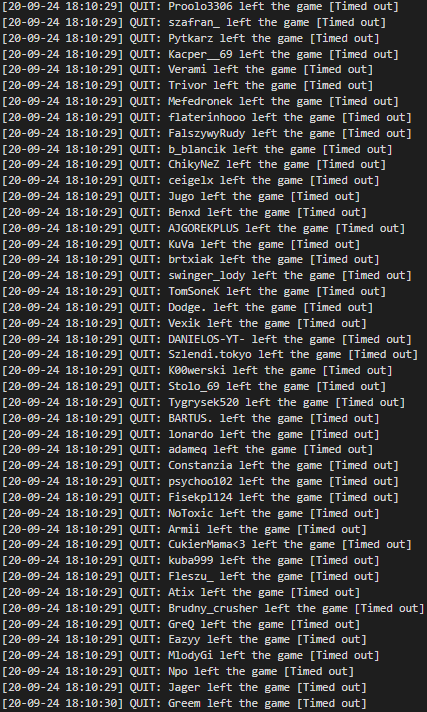
(all players with Timed Out have 20653! No problem for players with 20632.)
Version
Multi Theft Auto v1.5.7-release-20653
Additional context
Would like to help with something more, but what I can do without dumps?
Unfortunately my server has too much resources to debug something by myself.
 brzys
brzys
All 20 comments
Can confirm this. It's also happening in the server I admin.
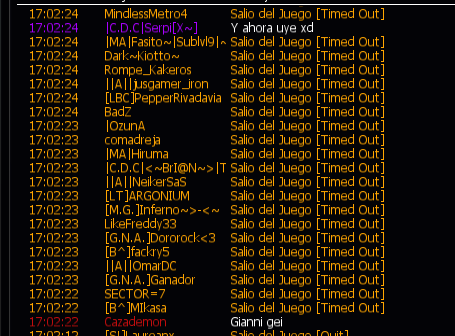
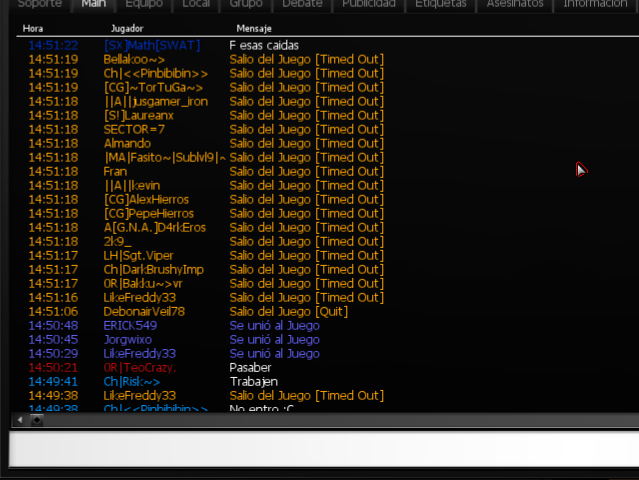
The images are from today but this issue started days ago.
 ecastro98
on 28 Sep 2020
ecastro98
on 28 Sep 2020
https://buildinfo.mtasa.com/?Revision=20649&Branch=
One of these is the culprit: 97dbfc6be01120fb635463c5f60601ecbe5aa195 e30f2ec6121c71408ab5efba3d1a1239ea75253e 27c6cc404a28f2af8b47271f6044486857510742
 qaisjp
on 29 Sep 2020
qaisjp
on 29 Sep 2020
@qaisjp How does the revert work? Do we have to wait for the next RC?
ecastro98
on 30 Sep 2020
How does the revert work? Do we have to wait for the next RC?
Just use the latest nightly, either from http://nightly.mtasa.com/ or by using the "nightly" updater channel in MTA advanced settings.
But since this is a random, non-reproducible issue it's more complex to tell if it will be fixed just by that. So, we will do something to bring this build to more users (e.g with a bugged build) and then you should be able to find out by watching the trends.
For this bug report, the request (@brzys / @ecastro98) is thus: to wait for a next "Time out" spree, and check if any player with the supposed fix (r20654 or higher) was included in the time out spree as well. Even if it's a lower number of them due to lower build circulation, it would still mean it's not fixed if they do appear.
This issue should remain open until it has been confirmed like that a couple of times.
 Dutchman101
on 30 Sep 2020
Dutchman101
on 30 Sep 2020
Sounds cool. I will force the players to update their version and test if the supposed hotfix is actually the correct one. Thanks!
ecastro98
on 30 Sep 2020
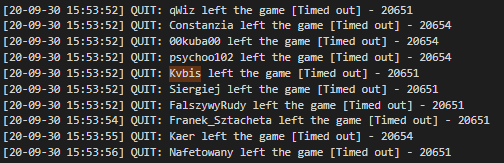
@qaisjp @Dutchman101 same crashes confirmed on r20654 :(
brzys
on 30 Sep 2020
r20657 is ready for re-testing using the same method (some users with the bugged build are getting the update), so @ecastro98 / @brzys you can check your graphs again within the next 24 hours and share the results ; )
UPDATE: scrap that, we'll wait for PR #1693 before getting results. Refer to below comments
Dutchman101
on 1 Oct 2020
@Dutchman101 I forgot to mention that today an user updated to r20654 and reported more frequent crashes. I don't know if it's related with this issue because this time it opened up the crash window and so created dumps. Then he downgraded to r20632 and there hasn't been any crash since that.
Maybe you can take a look at the recent dumps and see if it's related or it was coincidence: https://upload.mtasa.com/u/678125920/dumps-20654.zip_
ecastro98
on 1 Oct 2020
I don't know if it's related with this issue
Nothing changed inbetween r20551 and r20654 that could impact this issue, as we confirmed the latter included no fix. So the difference between dump and no dump that he perceived was a coincidence, yes.
But the crash and dump itself can very well be relevant.. if it's related to this issue, then it would indicate that there's a high chance of getting nothing (MTA closes without dump) and sometimes the crash gets handled with dump, or something that's a side effect of the issue causing the client to go poof gives away some information.
So the devs should look at the trace of your attached dump:
CONTEXT:  (.ecxr)
eax=0028ef38 ebx=51d98370 ecx=00000004 edx=2727af08 esi=00000000 edi=2727af08
eip=66732970 esp=0028f20c ebp=0028f280 iopl=0         nv up ei pl nz na po nc
cs=0023  ss=002b  ds=002b  es=002b  fs=0053  gs=002b             efl=00200202
client!abort+0x39:
66732970 83c40c          add     esp,0Ch
Resetting default scope

EXCEPTION_RECORD:  (.exr -1)
ExceptionAddress: 66732970 (client!abort+0x00000039)
   ExceptionCode: 40000015
  ExceptionFlags: 00000001
NumberParameters: 0

PROCESS_NAME:  gta_sa.exe

ERROR_CODE: (NTSTATUS) 0x40000015 - {Fatal Application Exit}  %hs

EXCEPTION_CODE_STR:  40000015

STACK_TEXT:
0028f208 66732970     00000003 40000015 00000001 client!abort+0x39
0028f210 40000015     00000001 66715c8b 51d98370 client!abort+0x39
WARNING: Frame IP not in any known module. Following frames may be wrong.
0028f280 664c9eae     51d98370 0028f2b4 6657eb9c 0x40000015
0028f28c 6657eb9c     0028f2a8 00000000 0f434158 client!CClientColManager::DoHitDetection+0x1e
0028f2b4 664cd687     51d98370 51d98370 0028f2f0 client!CStaticFunctionDefinitions::RefreshColShapeColliders+0x4c
0028f2c4 664cd591     0028f2d8 3518e970 51d97630 client!CClientColShape::SetPosition+0x77
0028f2f0 664f139e     51d97630 274efab8 0028f354 client!CClientColShape::AttachTo+0x81
0028f300 664d27f0     00000000 708872ad 3518e970 client!CClientMarker::AttachTo+0x1e
0028f354 665210fe     70887289 3518eb04 0028f3a8 client!CClientEntity::~CClientEntity+0x150
0028f370 664fac17     7088724d 00000000 3518e970 client!CClientStreamElement::~CClientStreamElement+0x3e
0028f3b4 66514621     7088722d 3518e970 0f8d4d30 client!CClientPed::~CClientPed+0x937
0028f3d4 664e4eb6     00000001 708875dd 76503605 client!CClientPlayer::`scalar deleting destructor'+0x151
0028f424 6655b0d1     3518e970 00000004 7088793d client!CClientGame::QuitPlayer+0x186
0028f8c4 664e85e0     76503605 0028f95c 0028f8f8 client!CPacketHandler::ProcessPacket+0x141
0028f8d4 6893838f     76503605 0028f95c 00000105 client!CClientGame::StaticProcessPacket+0x50
0028f8f8 6893707d     00000005 0028f95c 58ab8788 netc+0x2838f
0028f998 664de7bc     0f801600 00000000 0028fb01 netc+0x2707d
0028f9b4 664df296     00000001 70887af5 0f8d4d30 client!CClientGame::DoPulses2+0x8c
0028fb0c 664de3bb     70887a71 019627b8 01a15e30 client!CClientGame::DoPulses+0x9f6
0028fb88 6803bc73     019627b8 05852d00 67ff4102 client!CClientGame::DoPulsePostFrame+0x6eb
0028fb94 67ff4102     581677ea 06584ba0 05852d00 core!CModManager::DoPulsePostFrame+0x53
0028fc84 6809df04     581677a6 06584ba0 00000000 core!CCore::DoPostFramePulse+0x8b2
0028fcc8 680a50f0     05852d00 015de470 007f99b0 core!CDirect3DEvents9::OnPresent+0x164
0028fd2c 007f9b12     06584ba0 00000000 00000000 core!CProxyDirect3DDevice9::Present+0x30
0028fd44 015de470     007f99b0 00000000 007fb1c3 gta_sa+0x3f9b12
00000000 00000000     00000000 00000000 00000000 0x15de470

FAULTING_SOURCE_FILE:  minkernel\crts\ucrt\src\appcrt\startup\abort.cpp @ 79

SYMBOL_NAME:  client!abort+39

IMAGE_NAME:  client.dll

FAILURE_BUCKET_ID:  FATAL_APP_EXIT_40000015_client.dll!abort

IMAGE_VERSION:  1.5.7.20654
The other of your 2 dumps contain nothing in the stack trace except for twice the line "client!abort+0x39", which means it was probably close to also crashing without dump at all - so the one above with stack is kinda lucky.
Also, the fatal exit (abort) makes me feel like it's related, as similar codes usually pop up in other "poof client" cases.. these codes are usually written to this log file, even when there is no dump or crash window:
C:\ProgramData\MTA San Andreas All\1.5 > report.log
So it can also be useful if you send us the contents of that file, right after someone's game suddenly closed (before restarting it, as it would overwrite it) and then what matters is a line that looks like this: * End (0x0)* pid:10704 (if client goes poof, 0x0 would be an error exit code).. if it matches the exit code from that dump, it would be intriguing.
Note that if it's related, or rather is the crash from this issue, then it was first seen in r20642 and somehow climbed in popularity as you can see here (accounting for offset shift):
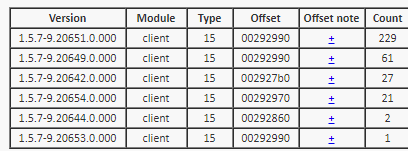
.. and that would kill some of our assumptions.
Dutchman101
on 1 Oct 2020
The crash is probably caused by a94fcb64202d1f43f633bfb83ef24ce347502b81. It's related to the marker code. I'll write a fix for it. The call stack from the crash dump confirms it.
 saml1er
on 1 Oct 2020
saml1er
on 1 Oct 2020
Update: i just tried to confirm if the shifted offset from the above graph, on r20642, is the same crash.. just like dump 2 from ecastro98, it contains only 2 lines "client!abort+0x39" in the stack trace. So it likely is - then I wonder about @saml1er's comment, because his change appeared in r20646, not r20642.
But it might still make sense, because of the expotential growth in crash popularity on later builds - that one (on r20646) might have existed for different reasons, which would trigger this "client.dll!abort" in a similar fashion. Then the raise was caused by the marker fix, as the stack trace seems to indicate.
Dutchman101
on 1 Oct 2020
Update: i just tried to confirm if the shifted offset from the above graph, on r20642, is the same crash.. just like dump 2 from ecastro98, it contains only 2 lines "client!abort+0x39" in the stack trace. So it likely is - then I wonder about @saml1er's comment, because his change appeared in r20646, not r20642.
In the commit, I modified code from PR #1327 . It fixed #1659, but it seems there's more than one crash. Yesterday, I figured out that the pickup colshapes are never attached to the pickups, yet they work flawlessly. With markers, we're attaching their colshapes to the marker itself, and this resulted in instability. We should just update the hit point rather than attaching the colshape to anything at all, just like pickups.
saml1er
on 1 Oct 2020
great job, thanks for research, waiting for build and will test with staff.
@Dutchman101 so do you still need those report.log files?
brzys
on 1 Oct 2020
so do you still need those report.log files?
If you can get a bunch of them, yes.. because if we have difficulty confirming the marker changes are really the culprit, a match between that exit code and the dump exit code can be helpful.
Requiring confirmation of drawing the right conclusions, is why PR #1694 is waiting until this stage is completed.
Dutchman101
on 1 Oct 2020
7104: 2020-10-01 12:02:47 [9.20655.0.000 6.2(10.0)] [20296] - Loader - Finishing
6405: 2020-10-01 12:02:48 [] [16784] - [app64] Stopping
8070: 2020-10-01 12:02:48 [9.20655.0.000 6.2(10.0)] [20296] - CheckService 5 result: 1
1044: 2020-10-01 12:02:48 [9.20655.0.000 6.2(10.0)] [20296] - * End (0xC0000409)* pid:20296
r20655
7104: 2020-10-01 12:02:58 [9.20655.0.000 6.2(10.0)] [12016] - Loader - Finishing
6404: 2020-10-01 12:02:58 [] [11492] - [app64] Client gone
6405: 2020-10-01 12:02:58 [] [11492] - [app64] Stopping
8070: 2020-10-01 12:02:58 [9.20655.0.000 6.2(10.0)] [12016] - CheckService 5 result: 1
1044: 2020-10-01 12:02:58 [9.20655.0.000 6.2(10.0)] [12016] - * End (0xC0000409)* pid:12016
another r20655
brzys
on 1 Oct 2020
0xc0000409 means STATUS_STACK_BUFFER_OVERRUN which apparently can't be captured for making dump files
 ccw808
on 1 Oct 2020
ccw808
on 1 Oct 2020
@brzys @ecastro98
Everything is set up for a new test again, some bugged build users will get the update to r20658 and thus you should be able to collect stats within the next 24 hours. Hopefully, this will be the final run.
Dutchman101
on 2 Oct 2020
fixed in my case
brzys
on 3 Oct 2020
fixed in my case
@brzys now after these 2 days, please check again to make sure.. and also confirm that mass time-outs did actually happen for a bunch of players with older builds.. in which case you just couldn't find anyone with the test fix build timed out.
It's important that you look in as many "time out sprees" as you can, because obviously not many players have the test fix build.
also, results from @ecastro98 would be good to have
Dutchman101
on 5 Oct 2020
I upgraded to the latest revision and it hasn't crashed since that. I'm only talking about myself though. I didn't force our players this time because the last one I realized the minclientversion doesn't work with latest revisions as I thought, and so it throws an error in the client.
ecastro98
on 5 Oct 2020
Related issues
 PlatinMTA
·
3Comments
PlatinMTA
·
3Comments
 ALw7sH
·
3Comments
ALw7sH
·
3Comments
 patrikjuvonen
·
3Comments
qaisjp
·
4Comments
patrikjuvonen
·
3Comments
qaisjp
·
4Comments
 StifflersMom
·
4Comments
StifflersMom
·
4Comments
Most helpful comment
Nothing changed inbetween r20551 and r20654 that could impact this issue, as we confirmed the latter included no fix. So the difference between dump and no dump that he perceived was a coincidence, yes.
But the crash and dump itself can very well be relevant.. if it's related to this issue, then it would indicate that there's a high chance of getting nothing (MTA closes without dump) and sometimes the crash gets handled with dump, or something that's a side effect of the issue causing the client to go poof gives away some information.
So the devs should look at the trace of your attached dump:
The other of your 2 dumps contain nothing in the stack trace except for twice the line "client!abort+0x39", which means it was probably close to also crashing without dump at all - so the one above with stack is kinda lucky.
Also, the fatal exit (abort) makes me feel like it's related, as similar codes usually pop up in other "poof client" cases.. these codes are usually written to this log file, even when there is no dump or crash window:
C:\ProgramData\MTA San Andreas All\1.5 > report.log
So it can also be useful if you send us the contents of that file, right after someone's game suddenly closed (before restarting it, as it would overwrite it) and then what matters is a line that looks like this: * End (0x0)* pid:10704 (if client goes poof, 0x0 would be an error exit code).. if it matches the exit code from that dump, it would be intriguing.
Note that if it's related, or rather is the crash from this issue, then it was first seen in r20642 and somehow climbed in popularity as you can see here (accounting for offset shift):
.. and that would kill some of our assumptions.