Mtasa-blue: Outline dxDrawText with colorcode now doesn't match since r18738
Describe the bug
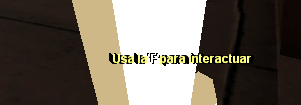
Since r18738 (c9e2e2a) my dxDrawText which had an outline and also had activated the color-code option now match incorrectly.
To reproduce
This is one of the many code where I use this trick:
dxDrawText("#000000Usa la #000000'F' #000000para interactuar", px+1, py+1, px+1, py+1, tocolor(0, 0, 0, 255), 1, 'default-bold', 'center', 'center', false, false, false, true )
dxDrawText("#000000Usa la #000000'F' #000000para interactuar", px+1, py+1, px-1, py-1, tocolor(0, 0, 0, 255), 1, 'default-bold', 'center', 'center', false, false, false, true )
dxDrawText("#000000Usa la #000000'F' #000000para interactuar", px-1, py-1, px+1, py+1, tocolor(0, 0, 0, 255), 1, 'default-bold', 'center', 'center', false, false, false, true )
dxDrawText("#000000Usa la #000000'F' #000000para interactuar", px-1, py-1, px-1, py-1, tocolor(0, 0, 0, 255), 1, 'default-bold', 'center', 'center', false, false, false, true )
dxDrawText("#FFFF7DUsa la #FFFFFF'F' #FFFF7Dpara interactuar", px, py, px, py, tocolor(255, 255, 255, 255), 1, 'default-bold', 'center', 'center', false, false, false, true )
Expected behaviour
The text should have a nice outline to it. Check screenshots.
Screenshots
Expected behaviour (r-18706)

Behaviour on r-18738
Version
r-18738 - Windows 10 version
Additional Context
This only happens when you try to make an outline or shadow to a colorcoded dxDrawText, this does not happend if the dxDrawText isn't colorcoded.
 PlatinMTA
All 3 comments
Was already fixed in 6a39d447a11333030b1d50b9bb5fbc9b6d66a88b (MTA revision 18740 and newer)
Latest nightly: https://nightly.mtasa.com/mtasa-1.5.6-rc-18742-20190801.exe
 botder
on 1 Aug 2019
botder
on 1 Aug 2019
My bad then. MTA didn't warned me out about a new nightly being released. Thanks.
PlatinMTA
on 2 Aug 2019
It works well on r18742 👍
PlatinMTA
on 2 Aug 2019
Related issues
 CrosRoad95
·
4Comments
PlatinMTA
·
3Comments
CrosRoad95
·
4Comments
PlatinMTA
·
3Comments
 ALw7sH
·
3Comments
ALw7sH
·
3Comments
 patrikjuvonen
·
3Comments
CrosRoad95
·
3Comments
patrikjuvonen
·
3Comments
CrosRoad95
·
3Comments
Most helpful comment
It works well on r18742 👍