Mremoteng: Connection names not fully displayed when filtering
Sometimes when filtering connection names get cut off like seen in the picture (sbeesx...). It looks like the connection names column loses its width property.
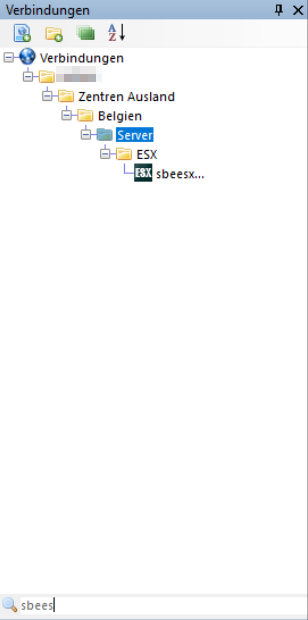
Steps to Reproduce (for bugs)
Unfortunately I have not been able to find a way to reproduce this issue.
Environment
Version used: 1.76.4.16229
Operating System and version (e.g. Windows 10 1709 x64): Windows 10 1803 Build 17134.82
 farosch
All 6 comments
Good find. I'll look into this one. There was some special logic we had to add to get the column width updating properly to avoid the connection name truncation (...). It's likely this was an edge case that got missed
 sparerd
on 19 Jun 2018
sparerd
on 19 Jun 2018
1.76.4.16229 - reproduced even without filtering: the problem is in _Expand all folders_ button
 PetbkA
on 22 Jun 2018
PetbkA
on 22 Jun 2018
Thanks @PetbkA, I can get that one fixed pretty easily.
@farosch Had you used the "Expand all folders" button at any point when you noticed this bug?
sparerd
on 22 Jun 2018
@sparerd No, I have not. But I think I found out how to reproduce the bug:
- Filter for a connaction that is in a nested folder
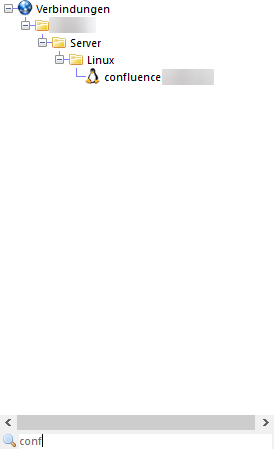
- Collapse a folder obove the connection
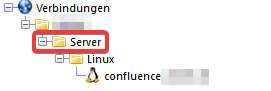
- After emptying the search filter string the connection panel looks like this:
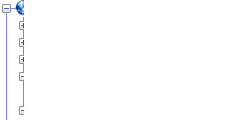
farosch
on 22 Jun 2018
I've fixed the issue with the Expand All button. I'm able to reproduce the issue your issue now as well, @farosch. Those steps were very helpful. I should be able to get a fix for that shortly.
sparerd
on 22 Jun 2018
@farosch I've committed a fix for your issue. I will be available in the next v1.76 build
sparerd
on 22 Jun 2018
Related issues
 luke-weller
·
4Comments
luke-weller
·
4Comments
 mmcnay
·
4Comments
mmcnay
·
4Comments
 PCNerd2001
·
3Comments
PCNerd2001
·
3Comments
 agiz10
·
4Comments
sparerd
·
3Comments
agiz10
·
4Comments
sparerd
·
3Comments