Moveit: MoveIt planner not avoiding Octomap
Description
I implemented a kinect sensor in gazebo and visualize the point cloud in RViz. So far so good, when I now plan a movement with the interaction marker move_group doesn't recognize the Octomap and plans right through it. When executing the planned path the robot arm then crashes in the simulated obstacles.
How can I connect the point cloud with the planning scene? so that it avoids the obstacles?
Cheers Marco
Your environment
- ROS Kinect
- Ubuntu 16.04
Expected behaviour
The robot arm avoids the point cloud / octomap when planning the path and executing the movement.
Actual behaviour
The path is planned through the point cloud / octomap
When launching:
ROS_MASTER_URI=http://localhost:11311
process[joint_state_publisher-1]: started with pid [4390]
process[move_group-2]: started with pid [4391]
process[rviz_frdc51035_3834_9019541648462265413-3]: started with pid [4393]
Starting context monitors...
Context monitors started.
Loading 'move_group/ApplyPlanningSceneService'...
Loading 'move_group/ClearOctomapService'...
Loading 'move_group/MoveGroupCartesianPathService'...
Loading 'move_group/MoveGroupExecuteTrajectoryAction'...
Loading 'move_group/MoveGroupGetPlanningSceneService'...
Loading 'move_group/MoveGroupKinematicsService'...
Loading 'move_group/MoveGroupMoveAction'...
Loading 'move_group/MoveGroupPickPlaceAction'...
Loading 'move_group/MoveGroupPlanService'...
Loading 'move_group/MoveGroupQueryPlannersService'...
Loading 'move_group/MoveGroupStateValidationService'...
MoveGroup using:
- ApplyPlanningSceneService
- ClearOctomapService
- CartesianPathService
- ExecuteTrajectoryAction
- GetPlanningSceneService
- KinematicsService
- MoveAction
- PickPlaceAction
- MotionPlanService
- QueryPlannersService
- StateValidationService
You can start planning now!
0x1039a20 void QWindowPrivate::setTopLevelScreen(QScreen, bool) ( QScreen(0x85dd80) ): Attempt to set a screen on a child window.
0x1016f50 void QWindowPrivate::setTopLevelScreen(QScreen, bool) ( QScreen(0x85dd80) ): Attempt to set a screen on a child window.
0x1041cd0 void QWindowPrivate::setTopLevelScreen(QScreen, bool) ( QScreen(0x85dd80) ): Attempt to set a screen on a child window.
0x1794bb0 void QWindowPrivate::setTopLevelScreen(QScreen, bool) ( QScreen(0x85dd80) ): Attempt to set a screen on a child window.
0x1937580 void QWindowPrivate::setTopLevelScreen(QScreen, bool) ( QScreen(0x85dd80) ): Attempt to set a screen on a child window.
0x17c2d50 void QWindowPrivate::setTopLevelScreen(QScreen, bool) ( QScreen(0x85dd80) ): Attempt to set a screen on a child window.
0x1937750 void QWindowPrivate::setTopLevelScreen(QScreen, bool) ( QScreen(0x85dd80) ): Attempt to set a screen on a child window.
0x19a8ff0 void QWindowPrivate::setTopLevelScreen(QScreen, bool) ( QScreen(0x85dd80) ): Attempt to set a screen on a child window.
 MarcoT11
All 10 comments
Thanks for reporting an issue. We will have a look asap. If you can think of a fix, please consider providing it as a pull request.
![welcome[bot] picture](https://avatars0.githubusercontent.com/in/4141?v=4&s=40) welcome[bot]
on 12 Mar 2019
welcome[bot]
on 12 Mar 2019
What do you mean by "visualize the point cloud in rviz"? Is it just rviz' point cloud display?
Or is the point cloud part of the planning scene?
Did you follow the tutorial?
 rhaschke
on 12 Mar 2019
rhaschke
on 12 Mar 2019
I added a PointCloud2 in RViz which uses the Topic /kinect/depth/points.
This idea came from this https://www.youtube.com/watch?v=kjgEdRJ72Tw tutorial, which also refers to the original tutorial from the MoveIt website.
MarcoT11
on 13 Mar 2019
Same happens when I do the tutorial from the MoveIt website

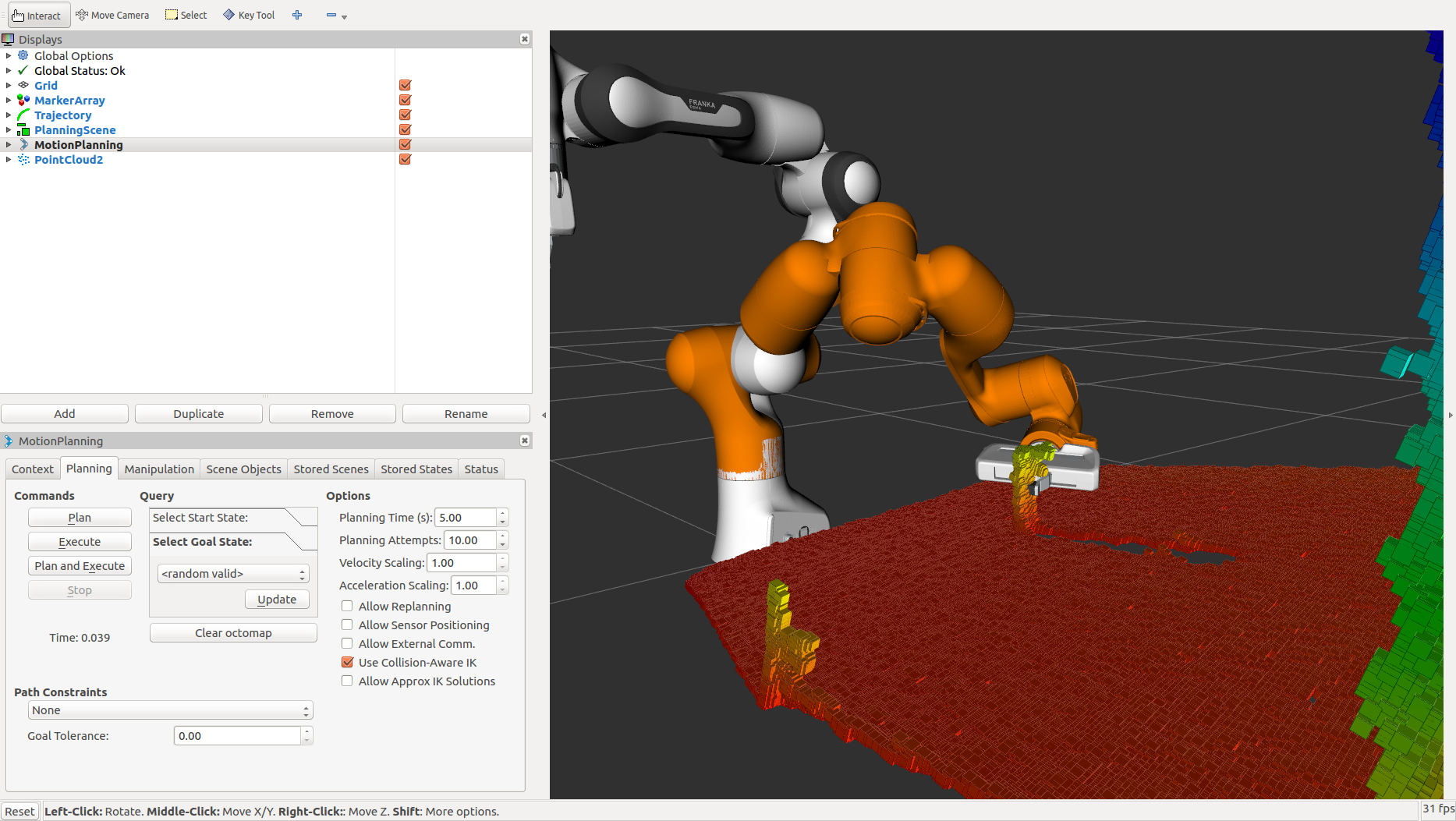
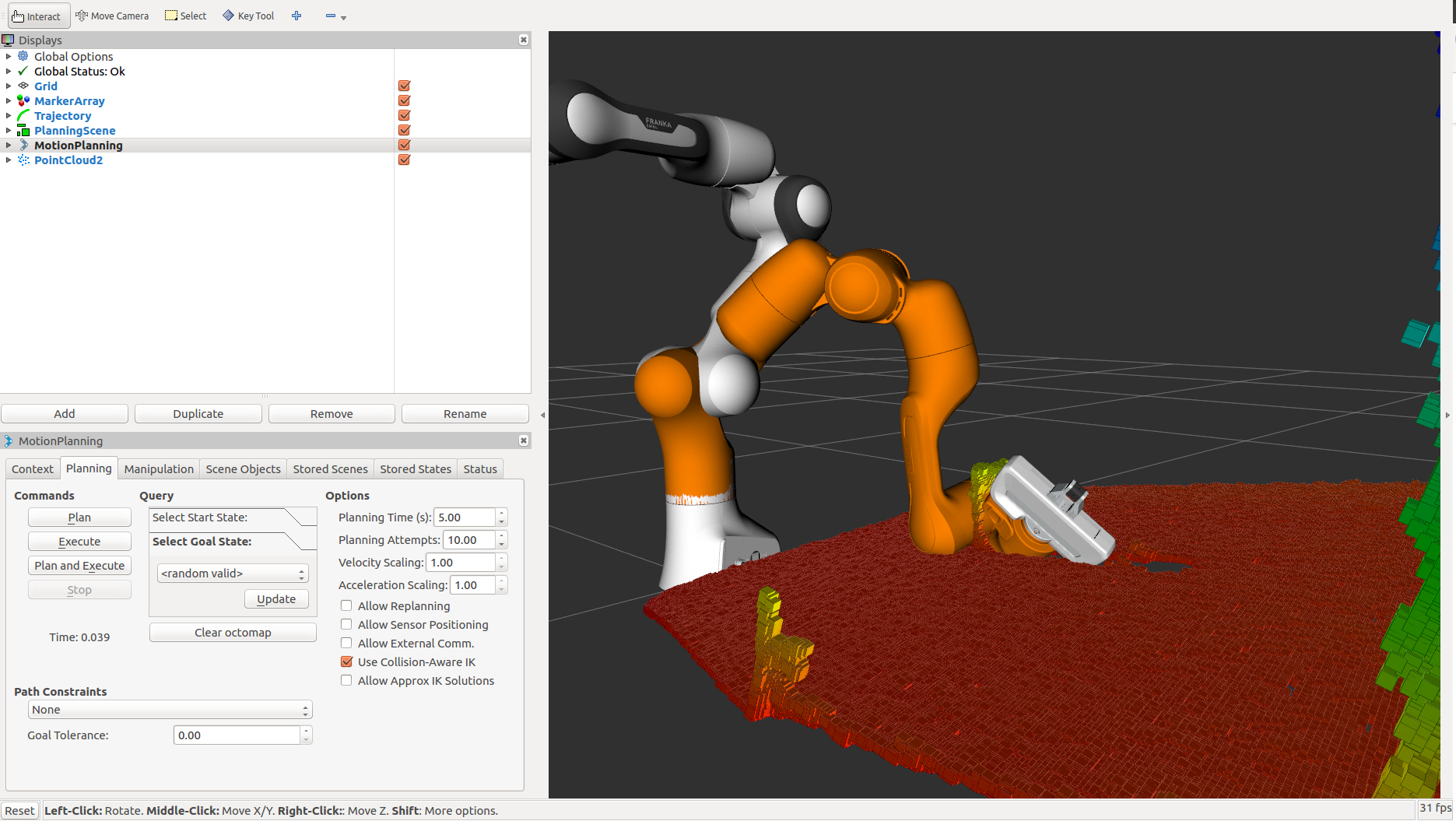
If you set the initial and the final location of the robot in a way that there is no straight path between them, then the planner will automatically avoid the octomap and plan around it
MarcoT11
on 13 Mar 2019
The octomap in your picture does not look like the one from the tutorial. Are you sure everything is configured the same way? If you expand the PlanningScene module in Rviz, can you find the octomap there? If not, and it disappears from view if you uncheck the PointCloud2 Rviz module, then the PlanningScene inside MoveIt does not know about it, and it needs to be registered there.
 felixvd
on 13 Mar 2019
felixvd
on 13 Mar 2019
Hey Felix, when I do the Perception Pipeline Tutorial of the MoveIt website after the Getting Started guide and launch
roslaunch moveit_tutorials obstacle_avoidance_demo.launch
this is the output
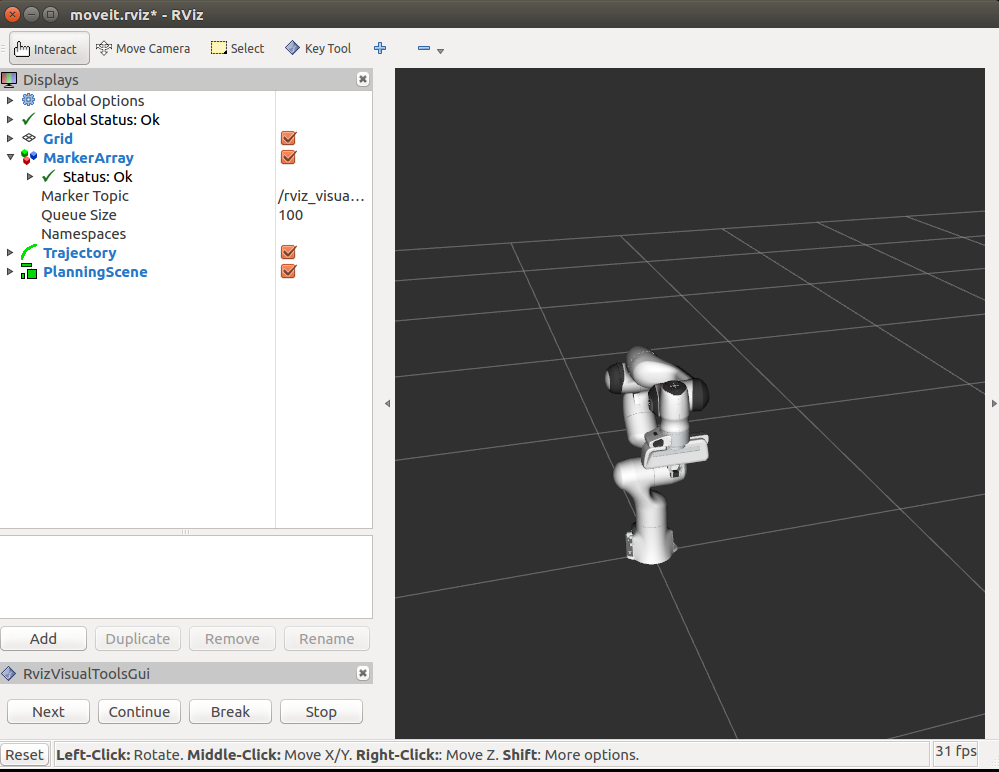
the tutorial says when launching that I should get a image like this
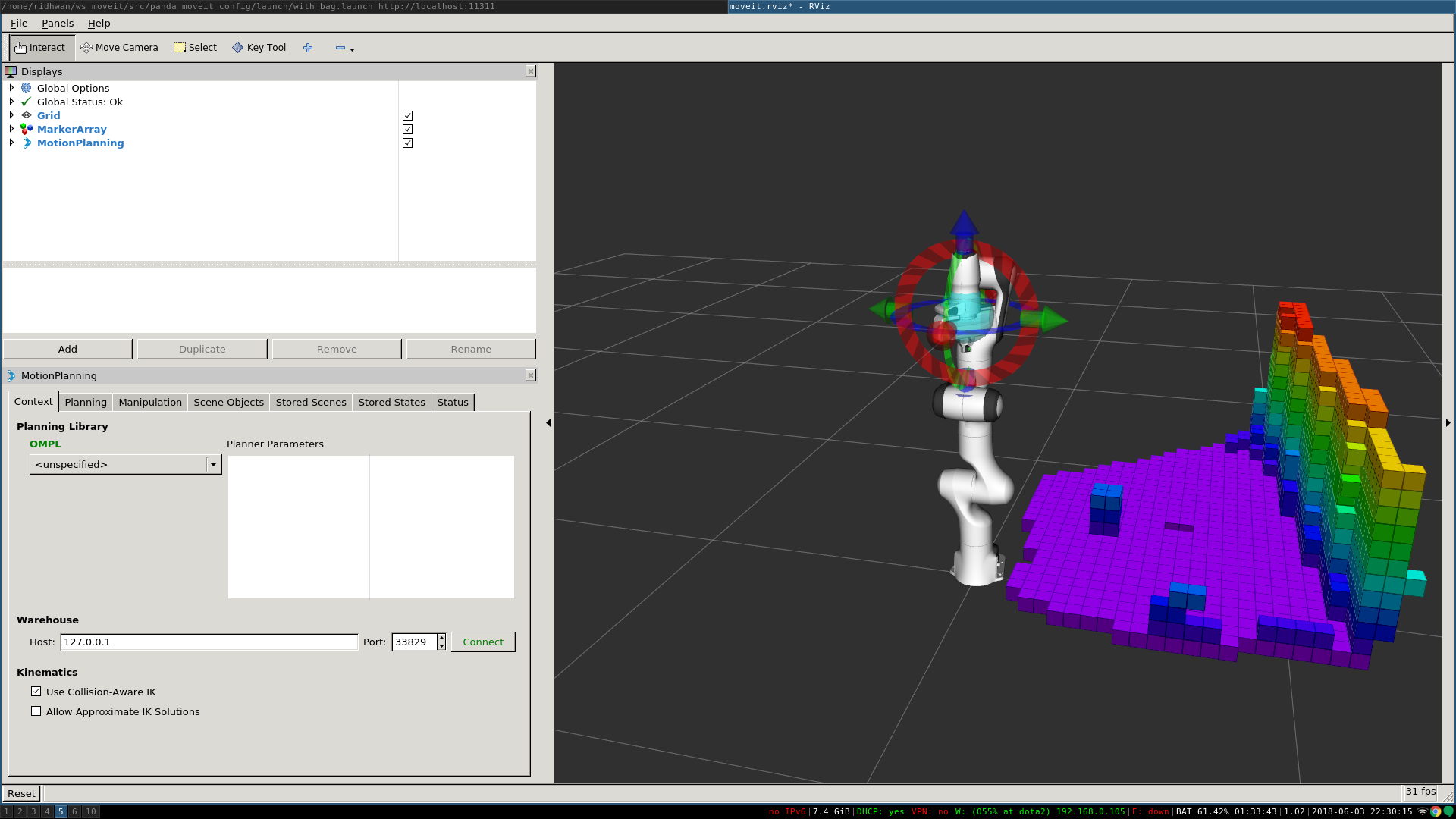
So I added PointCloud2 by myself.
When I expand the PlanningScene module I can't find the octomap, neither in the MoveIt tutorial nor in my robot arm application.
Yes when I uncheck PointCloud2 RViz module it dissapears.
How can I register the octomap in the PlanningScene?
MarcoT11
on 13 Mar 2019
For my example I first launch Gazebo.
With _rostopic list | grep kinect_ I get
/kinect/depth/camera_info
/kinect/depth/image_raw
/kinect/depth/points
/kinect/parameter_descriptions
/kinect/parameter_updates
...
then I created the _kinect_config.yaml_
 sensor:
    - sensor_plugin: occupancy_map_monitor/PointCloudOctomapUpdater
      point_cloud_topic: /kinect/depth/points
      max_range: 5.0
      point_subsample: 1
      padding_offset: 0.1
      padding_scale: 1.0
      filtered_cloud_topic: filtered_cloud
then I updated the _sensor_manager.launch_ file:
<launch>

 <!-- Param for kinect config -->
 <rosparam command="load" file="$(find widowx_arm_moveit_new)/config/kinect_config.yaml" />


  <!-- Params for the octomap monitor -->
  <param name="octomap_frame" type="string" value="arm_base_joint" />
  <param name="octomap_resolution" type="double" value="0.05" />
  <param name="max_range" type="double" value="5.0" />

</launch>
in the end I launch MoveIt with the controllers. The _sensor_manager.launch_ file is included in move_group
<launch>

  <!-- By default, we do not start a database (it can be large) -->
  <arg name="db" default="false" />
  <!-- Allow user to specify database location -->
  <arg name="db_path" default="$(find widowx_arm_moveit_new)/default_warehouse_mongo_db" />

  <!-- By default, we are not in debug mode -->
  <arg name="debug" default="false" />

  <arg name="use_gui" default="false" />

 <rosparam file="$(find widowx_arm_moveit_new)/config/joint_names.yaml" command="load"/>

  <include file="$(find widowx_arm_moveit_new)/launch/planning_context_k.launch">
    <arg name="load_robot_description" value="true"/>
  </include>

  <node name="joint_state_publisher" pkg="joint_state_publisher" type="joint_state_publisher">
    <param name="/use_gui" value="false"/>
    <rosparam param="/source_list">[/joint_states]</rosparam>
  </node>

  <include file="$(find widowx_arm_moveit_new)/launch/move_group_k.launch">
    <arg name="publish_monitored_planning_scene" value="true"/>
  </include>

  <include file="$(find widowx_arm_moveit_new)/launch/moveit_rviz.launch">
    <arg name="config" value="true"/>
  </include>

  <!-- If database loading was enabled, start mongodb as well -->
  <include file="$(find widowx_arm_moveit_new)/launch/default_warehouse_db.launch" if="$(arg db)">
    <arg name="moveit_warehouse_database_path" value="$(arg db_path)"/>
  </include>

</launch>
@MarcoT11: It would be easier if you could link to the git repository and branch where you're keeping the launch files, but check if the include of sensor_manager is being guarded by an if arg :
in the end I launch MoveIt with the controllers. The _sensor_manager.launch_ file is included in move_group
<launch>

  ....

</launch>
I don't see the _sensor_manager.launch_ file in that snippet you've included, I assume it's being included in:
  <include file="$(find widowx_arm_moveit_new)/launch/move_group_k.launch">
    <arg name="publish_monitored_planning_scene" value="true"/>
  </include>
It's sometimes guarded by a argument, for example if="$(arg allow_trajectory_execution)".
And this argument may have a default value, the panda sets the default value to true on L23:
https://github.com/ros-planning/panda_moveit_config/blob/melodic-devel/launch/move_group.launch#L42-L45
<!-- Sensors Functionality -->
<include ns="move_group" file="$(find panda_moveit_config)/launch/sensor_manager.launch.xml" if="$(arg allow_trajectory_execution)">
  <arg name="moveit_sensor_manager" value="panda" />
</include>
When launching the panda demo.launch this argument is set to true
https://github.com/ros-planning/panda_moveit_config/blob/kinetic-devel/launch/demo.launch#L40-L46
  <!-- Run the main MoveIt executable without trajectory execution (we do not have controllers configured by default) -->
  <include file="$(find panda_moveit_config)/launch/move_group.launch">
    <arg name="allow_trajectory_execution" value="true"/>
    <arg name="fake_execution" value="true"/>
    <arg name="info" value="true"/>
    <arg name="debug" value="$(arg debug)"/>
</include>
Also, just wanted to warn that this argument could be named differently. For example when using the Fetch it is allow_active_sensing which we default to false.
https://github.com/fetchrobotics/fetch_ros/blob/melodic-devel/fetch_moveit_config/launch/move_group.launch#L39
please post a link to (find widowx_arm_moveit_new)/launch/move_group_k.launch
 moriarty
on 15 Mar 2019
moriarty
on 15 Mar 2019
@MarcoT11 I encountered a similar problem few days ago. The octomap wasn't showing in my rviz as well. I did two things to make the octomap visualized.
In your
obstacle_avoidance_demo.launch
add<node pkg="tf2_ros" type="static_transform_publisher" name="kinect_broadcaster" args="0 0 0 0 0 0 1 world panda_link0" />
right before the line<node pkg="tf2_ros" type="static_transform_publisher" name="to_temp_link" args="0 0.4 -0.6 0 0 0 temp_link world" />Install octomap plugin by executing
sudo apt-get install ros-kinetic-octomapin your terminal. You could follow this page to make sure the octomap is installed or being referenced by the cmake file.
Launch the obstacle_avoidance_demo, wait for a few seconds and it should be showing in the planning scene plugin now. Not sure if these stpes will help though.
 ejichen
on 15 Mar 2019
ejichen
on 15 Mar 2019
Hello all and thanks for the help. After all I tried I finally found the mistake.
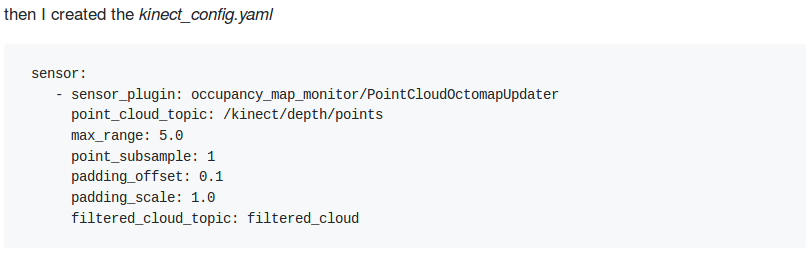
I simply forgot the s in sensors
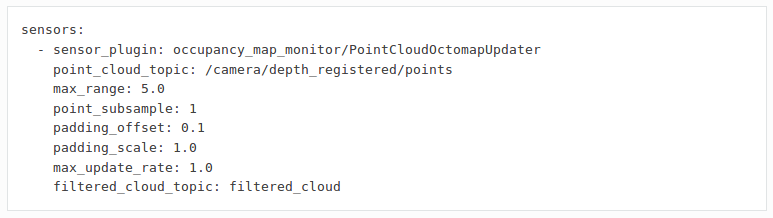
Sometimes you are closer to the goal then you think.
MarcoT11
on 15 Mar 2019
Related issues
 ThanasisTs
·
7Comments
ThanasisTs
·
7Comments
 yinhaoz
·
5Comments
yinhaoz
·
5Comments
 Deastan
·
7Comments
Deastan
·
7Comments
 rkeatin3
·
4Comments
felixvd
·
3Comments
rkeatin3
·
4Comments
felixvd
·
3Comments
Most helpful comment
@MarcoT11 I encountered a similar problem few days ago. The octomap wasn't showing in my rviz as well. I did two things to make the octomap visualized.
In your
obstacle_avoidance_demo.launchadd
<node pkg="tf2_ros" type="static_transform_publisher" name="kinect_broadcaster" args="0 0 0 0 0 0 1 world panda_link0" />right before the line
<node pkg="tf2_ros" type="static_transform_publisher" name="to_temp_link" args="0 0.4 -0.6 0 0 0 temp_link world" />Install octomap plugin by executing
sudo apt-get install ros-kinetic-octomapin your terminal. You could follow this page to make sure the octomap is installed or being referenced by the cmake file.Launch the obstacle_avoidance_demo, wait for a few seconds and it should be showing in the planning scene plugin now. Not sure if these stpes will help though.