Monaco-editor: Monaco's context menu should not get clipped at container or browser boundaries
monaco-editor version: 0.8.3
Browser: Any
OS: Windows 10
During Accessibility testing, one of the tests performed for the visually impaired is to check that a site is still functional (though not necessarily pretty) at 200% browser zoom on a typical/low-end monitor with no other OS scaling. An issue found was that Monaco's context menu can become clipped either by the edge of the browser window, or by the container hosting Monaco if it is styled with overflow:hidden.
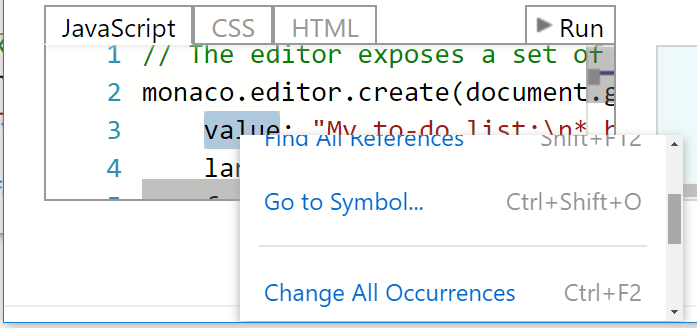
A common pattern to avoid this is to append the context menu container to the BODY element rather than within the Monaco container, and use absolute positioning relative to the window. This gets it out of the Monaco container, so overflow styles do not affect it. Also, it should get a vertical scrollbar if needed (overflow-y auto) if it does not fit within the bounds of the browser window. Shown below is the Monaco playground, zoomed at 200%, with the menu getting clipped at the bottom of the browser window (figure 1). Following that is the same but with a height put on the menu at the boundary and a scrollbar, slightly scrolled down, so that all menu items can still be accessed (figure 2).
Figure 1: Monaco at 200% with clipped menu and inaccessible menu items.

Figure 2: Menu with a set height and vertical scrollbar.
 jayspadie
All 9 comments
@alexandrudima , here is another issue to be considered that affects accessibility according to our testing for VSTS. I appreciate all your work on these.
jayspadie
on 27 Jun 2017
Version 0.9.0
Browser: any
OS: Windows 8.1
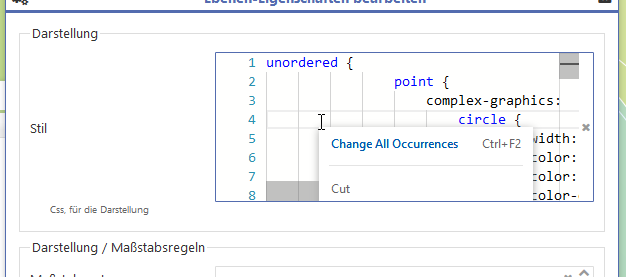
Here's another image showing the clipped menu.
The blue lined container has an overflow:hidden style applied.
That is, if any container at any level has an overflow:hidden style, the context menu/suggesstion/widgets/... is clipped at the containers boundaries.
Possible fix besides the one mentioned by @jayspadie:
Use fixed positioning instead of absolute one on any of those widgets and calculate the position related to the document boundaries.
Thanks for your effort!
 makana
on 1 Aug 2017
makana
on 1 Aug 2017
@alexandrudima Is there any option to bring those autocomplete dropdowns out of the normal flow so that they work inside overflow: hidden element also?
 chinchang
on 24 Mar 2018
chinchang
on 24 Mar 2018
an alternative approach might be to used position: fixed and trick the context-menu that way to leave it's parent boundaries
const subscription = this.editor.onContextMenu((e) => {
  const contextMenuElement = this.editor.getDomNode().querySelector(".monaco-menu-container") as HTMLElement;

  if (contextMenuElement) {
    const posY = (e.event.posy + contextMenuElement.clientHeight) > window.outerHeight
      ? e.event.posy - contextMenuElement.clientHeight
      : e.event.posy;

    const posX = (e.event.posx + contextMenuElement.clientWidth) > window.outerWidth
      ? e.event.posx - contextMenuElement.clientWidth
      : e.event.posx;

    contextMenuElement.style.position = "fixed";
    contextMenuElement.style.top =  Math.max(0, Math.floor(posY)) + "px";
    contextMenuElement.style.left = Math.max(0, Math.floor(posX)) + "px";
  }
});

// somewhere later
subscription.dispose();
depending on your use-case you might have to fiddle around with the checked boundary, in my case it is an electron app, where the border is the windows outer height/width
 zewa666
on 23 May 2018
zewa666
on 23 May 2018
I have, I believe, a similar issue with Hover Provider popups. If the monaco editor instance is inside of an element with something like "overflow: auto", then when I hover over something that has a registered HoverProvider, the "monaco-editor-hover" popup is clipped, or in some cases, completely hidden.
Edit: Holy moly, I just discovered "fixedOverflowWidgets" and it fixed my problem!
 JeremyGrieshop
on 17 Dec 2019
JeremyGrieshop
on 17 Dec 2019
I don't believe this is an issue any more for the browser edges. The context menu repositions and adds a scroll bar as necessary now. (The scroll bar does not work currently, there is a PR for it though.)
It is still an issue when the container has overflow: hidden.
 nrayburn-tech
on 28 Mar 2020
nrayburn-tech
on 28 Mar 2020
How is this still not an issue? I have an overflow: auto parent that clip context menu. And looks like fixedOverflowWidgets have no effect on context menu.
 pckhoi
on 27 Aug 2020
pckhoi
on 27 Aug 2020
Then latest release shipped with fixes here and seems to have resolved the issue.
 sbatten
on 17 Oct 2020
sbatten
on 17 Oct 2020
Just wanted to chime in to give a big thanks to the Monaco team for keeping this repo up to date! This was a problem for our software running on smaller screens, and the upgrade to 0.21.2 seemed to fix the issue, as @sbatten mentioned.
 brendanbates89
on 27 Oct 2020
brendanbates89
on 27 Oct 2020
Related issues
 chengtie
·
3Comments
chengtie
·
3Comments
 brandalorian
·
3Comments
brandalorian
·
3Comments
 robclive
·
3Comments
robclive
·
3Comments
 PinkyJie
·
3Comments
PinkyJie
·
3Comments
 inf9144
·
3Comments
inf9144
·
3Comments
Most helpful comment
an alternative approach might be to used
position: fixedand trick the context-menu that way to leave it's parent boundariesdepending on your use-case you might have to fiddle around with the checked boundary, in my case it is an electron app, where the border is the windows outer height/width